






If Memory Load is near your plan’s memory, lower the AI limit and the network view distance, remove mods you do not use, and restart. If it stays high, move to a bigger size.
Bohemia gives no memory figure for an Arma Reforger server. The honest answer is to read your own: the Memory Load reading in the panel shows what the server uses right now. Compare it with your plan’s memory, and with the Mem: value in the log, as players join.
Read the memory
In the ArthOS panel. Open the Console tab. Memory Load sits beside CPU Load at the top and shows the memory the server is using now against your plan’s memory, in decimal units (MB, GB). The chart below the console starts when you open the page.
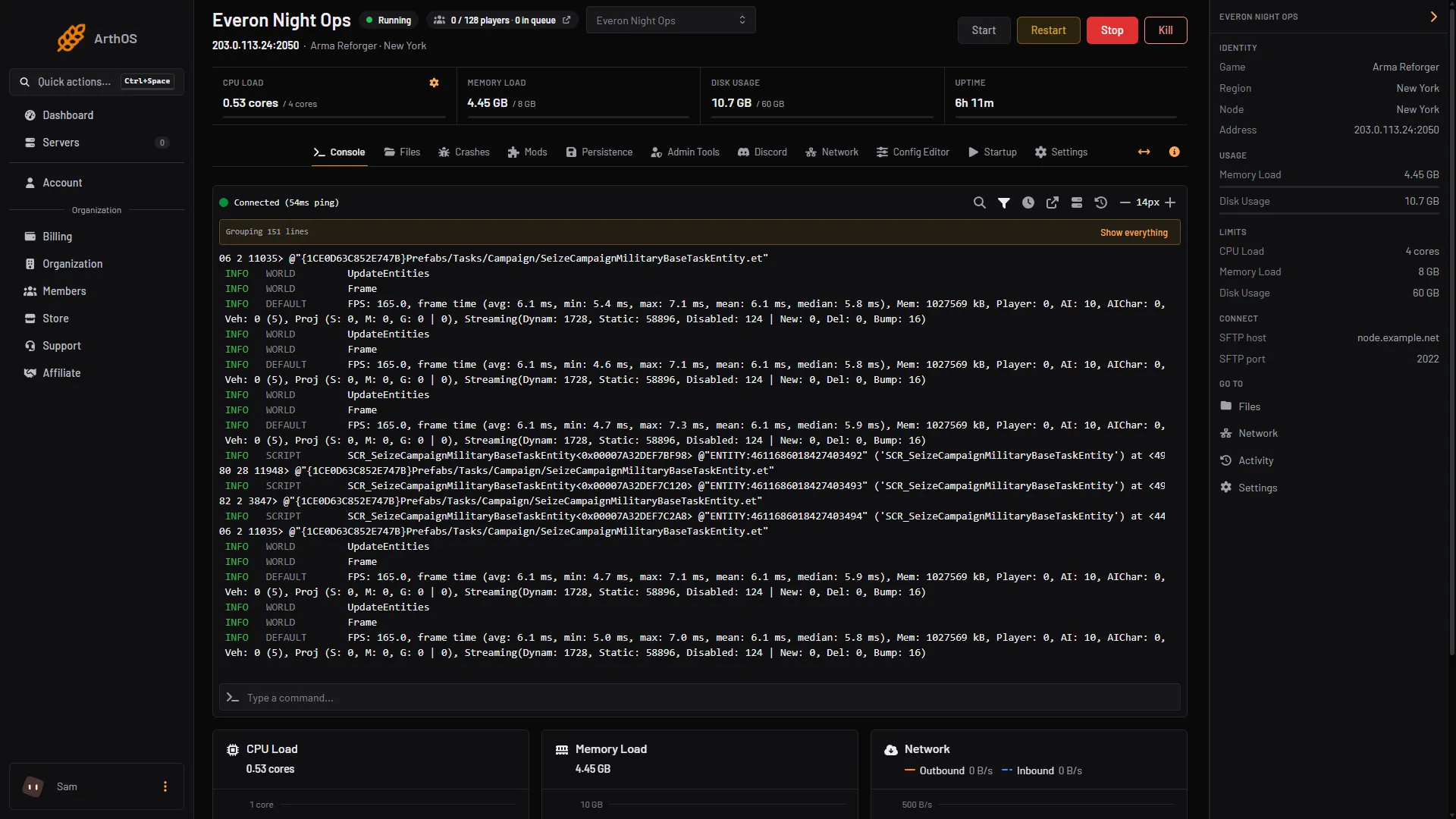
- CPU, memory, disk and uptime
In the log. Loafhosts servers start with -logStats, which prints a line like this one, from Bohemia’s documentation:
FPS: 60.0, frame time (avg: 16.7 ms, min: 9.3 ms, max: 23.7 ms), Mem: 3291106 kB, Player: 2, AI: 104
Mem is in kilobytes. In that example it is about 3.3 GB, with 2 players and 104 AI. Bohemia notes the figure is an approximation and does not match the system’s number exactly. How often the line prints is Performance log interval in Startup. See server stats.
What raises it
Bohemia gives no figure for each of these, so measure them on your server. Read Mem on a quiet server, then again with players and AI on.
- AI. The same log line prints the AI count beside the memory. Lowering the AI limit in Config Editor, Performance, is the first thing to try.
- Navmesh. Do not set
disableNavmeshStreaming: it loads the whole navmesh into memory (Bohemia). The panel does not set it. - Mods. Bohemia gives no per-mod cost. Remove mods you do not use in Mods, On this server, and read
Memagain. - Network view distance. Bohemia describes it as the maximum streaming range of replicated entities, from 500 to 5000 with a default of 1500. A new Loafhosts server starts at 500. Keep it as low as your scenario allows.
- The game version. The 1.8.0.10 changelog lists fixes for memory leaks in pathfinding and vehicle sounds. An older version can climb over a long uptime.
What it looks like when it runs out
The Crashes tab has no out of memory check for Reforger. A crash shows as “The game crashed while running”, with the game’s own crash report reason and the ID it sent to Bohemia. The log line behind it is Application crashed!.
If the server stopped with no crash lines, look at Memory Load just before it stopped. The Crashes tab has nothing to explain in that case. Not checked on 1.8 as of 12 October 2026: whether a server that hits its plan’s memory leaves such a log. Compare Memory Load with your plan’s memory before the stop.
Cut the load
- Open Config Editor, Performance. Read your current Network view distance (m) first. If it is above 1500, lower it. At 500 leave it.
- Lower the AI limit in steps. Some scenarios rely on their AI, so check the scenario still plays.
- Remove unused mods in Mods.
- Choose Save, then restart. Changes apply after a restart. Read Memory Load again with players on.
For FPS and bandwidth as well, see tuning server performance.
Move to a plan with more memory
Bohemia’s own Docker example gives the container 4 CPU cores and 6 GB. The Customize page shows each size’s memory.
- Open your server list and use the server’s menu, or open Billing, then Services. Choose Customize.
- Choose a new size. The page shows the cores, memory and storage of each size.
- A bigger size is charged for the rest of the current period and applies once it is paid. A smaller size waits until the next renewal.
- Restart the server after the change.
By hand
On your own host, give the server enough memory for the game plus the system. Bohemia’s Docker example uses 6 GB and 4 cores. Start -logStats so you can read Mem, and size by what you measure.
If it does not work
- Memory keeps climbing over days. Check the game version. Update if you are behind. Restart on a schedule while you do.
- It still stops after you cut the load. Move to the next size up.
- You cannot see Customize. It needs permission to order and pay for the organization. Ask the owner.
More about the game: Arma Reforger servers.
Sources: Bohemia wiki: Startup Parameters, Bohemia wiki: Server Config, Bohemia wiki: Server Hosting, reforger.armaplatform.com: Changelog august 13 2026