






How to, step by step.
One task per guide: how to do it in the ArthOS panel, and by hand where there is a way. Pick a game, or search all 344.
Minecraft
All 92 Minecraft guides-
 Server basics
 Change your Minecraft server version or software
Switch a server to another Minecraft version or to Paper, Purpur, Fabric, Forge, NeoForge or Vanilla. The panel backs up first and warns about older worlds. -
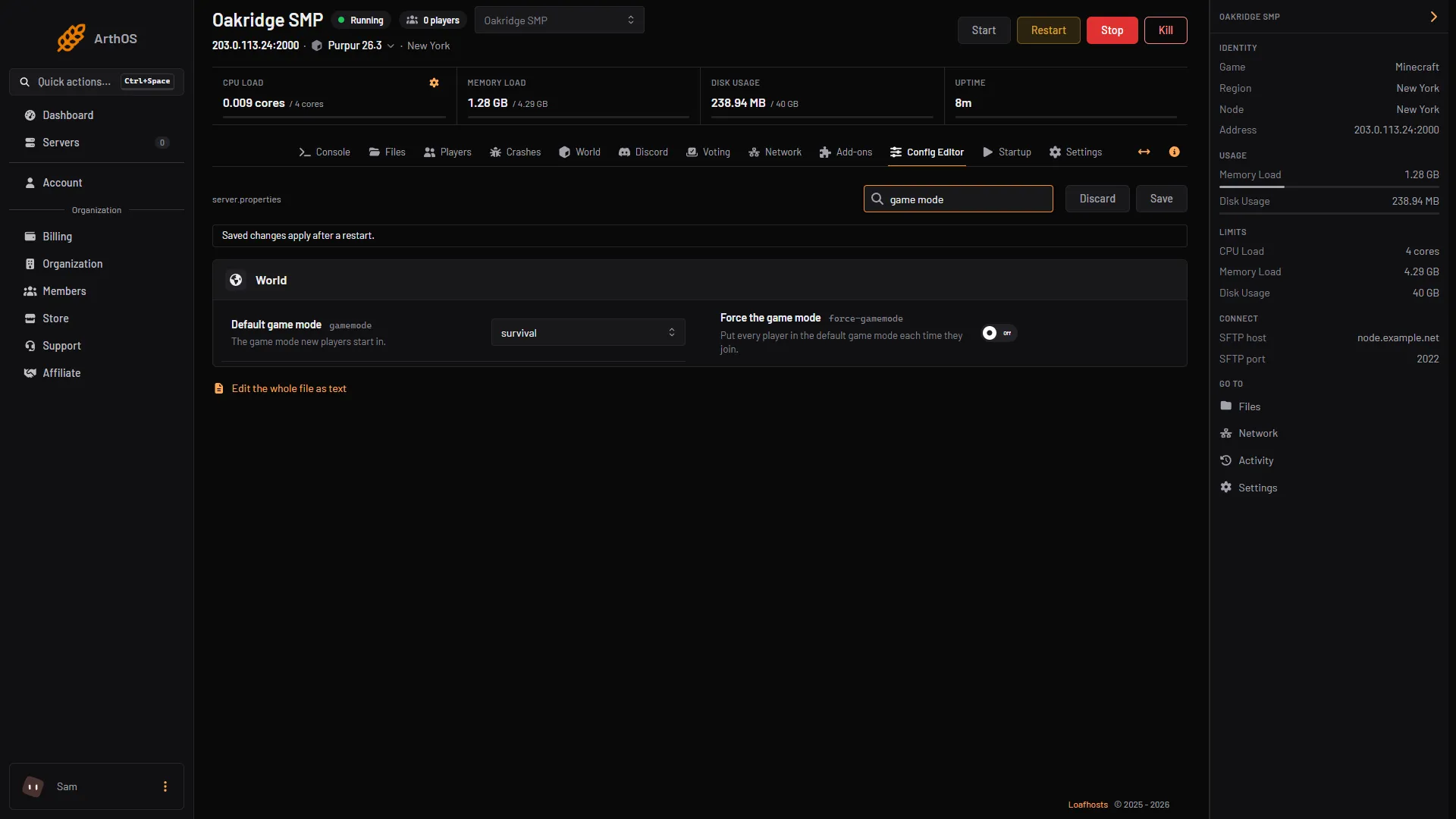
Change the default game mode on a Minecraft server
Set the default game mode in the Config Editor, turn on Force the game mode, or switch one player with /gamemode. Hardcore is a separate setting. - Players and permissions
Give or remove operator (op) on a Minecraft server
Type op and a player's name in the console to make them an operator, deop to remove it. Levels 1 to 4 decide what they can do. Includes ArthOS panel steps. - Worlds
Add datapacks to your Minecraft server
Install a datapack from Add-ons, or drop it in your world's datapacks folder. Restart the server, then check it with /datapack list. Java servers only. - Plugins
Fix and set up Geyser and Floodgate
Why Bedrock names have a dot, the Geyser and Floodgate settings that matter, how to link accounts, slow skins, and fixes when Bedrock players cannot join. - Mods and modpacks
Install a mod on your Minecraft server
Mods need a Fabric, Forge or NeoForge server on the same Minecraft version. Install one from the Add-ons page or upload the jar, then restart.
Arma Reforger
All 71 Arma Reforger guides-
 Basics
 Set up an Arma Reforger dedicated server from scratch
Set up an Arma Reforger dedicated server: order one on Loafhosts or install it by hand, set the name, passwords and scenario, start it, and get players in. - Maps and scenarios
Arma Reforger scenario IDs: full list and how to set one
Every official Arma Reforger scenario ID from Bohemia, copied exactly, and how to set game.scenarioId in the Config Editor or in config.json by hand. - Mods
How to install Arma Reforger mods on your server
Add Workshop mods to an Arma Reforger server from the panel's Mods page, or by editing the mods array in config.json. Restart to apply the change. - config.json
Arma Reforger config.json explained, block by block
What every block of the Arma Reforger server config.json does: ports, game, gameProperties, operating, a2s and rcon, and which keys the panel handles for you. - Admin and moderation
Add admins to your Arma Reforger server with config.json
Put a player's identity ID in the admins list of config.json, set the admin password, then log in with #login. A server takes up to 30 admin IDs. - Persistence, logs and performance
Arma Reforger persistence: save games, wipe and restore
Keep your Arma Reforger world between restarts: turn persistence on, set how often it saves, roll back with a backup, wipe a world, fix saves that stop.
Rust
All 56 Rust guides-
 Basics
 Choose your Rust map size and seed
Pick a Rust world size from 1000 to 6000 and a seed, preview the map first, or load a custom map by URL. A new size or seed makes a new world. -
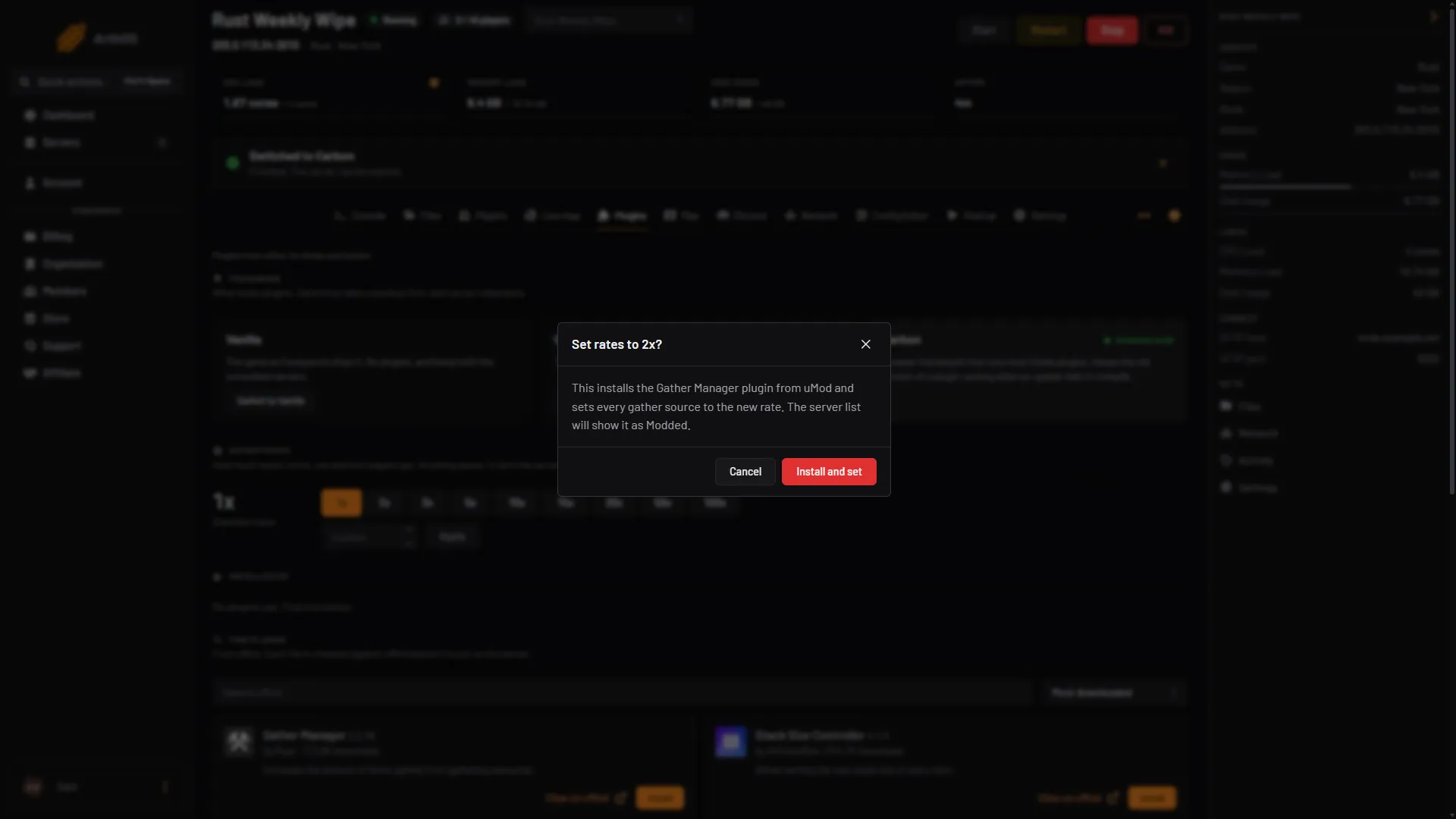
Change gather rates on your Rust server
Vanilla Rust cannot change gather rates, so a plugin does it. Use the panel's Gather rates buttons, or install Gather Manager and run gather.rate. - Plugins
Add /home and /tpr to your Rust server
Install NTeleportation so players can set homes and send teleport requests. Grant the permissions, then change cooldowns, daily limits and VIP limits. - Admin
Ban and kick players on a Rust server
Kick with kick, ban with banid and a Steam ID, lift it with unban, then run server.writecfg. The panel Players page does the same with a click. - Fixes
Rust plugins not loading after an update
After a monthly Rust update, plugins fail when the framework or the plugin is for the old game build. Restart, update plugins, and read the compiler message. - Gameplay
Where to get a red keycard in Rust
You earn a red keycard by finishing the blue puzzle at six monuments, then spend it at five more. The monuments, getting a blue card, and what changed lately.
DayZ
All 55 DayZ guides-
 Basics
 Change DayZ day length, night speed and start time
Set how fast the DayZ day passes on Startup with Time Multiplier and Night Multiplier, pick the start time in Config Editor, and keep time over restarts. - Mods
DayZ mod keys and signatures (.bikey) explained
A DayZ server needs each mod's .bikey in its keys folder while Verify Signatures is on. Workshop mods add theirs for you, uploaded mods do not. - Config
DayZ cfggameplay.json: what it controls and how to use it
cfggameplay.json changes stamina, base building, night light, the map and the hit indicator without mods. Turn it on in the Config Editor, then edit the file. - Admin and fixes
Back up and restore a DayZ server
Make a backup of your DayZ server in the panel, keep some on a timer, and restore one. A restore stops the server and puts the files back as they were. - Basics
Change the map on your DayZ server
Pick Chernarus, Livonia or Sakhal in the Config Editor's Map (mission) row, save and restart. Each map keeps its own world, so switching back is safe. - Mods
Fix the DayZ mod mismatch and signature kick
Kicked from a modded DayZ server for a mod mismatch or missing signature? Match the mod versions, keep each mod's .bikey in keys, then restart.
Squad
All 40 Squad guides-
 Basics
 Change your Squad server name
Change the Squad server name in the Config Editor. The name is what players search for in the server browser. Restart to apply it. - Layers and rotation
Change the layer on your Squad server
Pick a layer on the Players page, then choose Set as next or Change now. Change now ends the match at once. RCON commands can also set factions. - Admin and moderation
Ban and kick players on a Squad server
Open the Players page, choose Kick or Ban from the player's menu, add a reason and a ban length. Lift a ban with Unban, or edit Bans.cfg by hand. - Mods and fixes
Squad server not showing in the server browser
An unlicensed Squad server is under Custom, not the main tab. Also check Show in the server browser, a missing update, the server name quotes and tag filters. - Basics
Connect to a Squad server
Find a Squad server in the in-game Server Browser: use the Custom tab for unlicensed servers, search by name, and enter the password if it has one. - Layers and rotation
Set a layer rotation on your Squad server
Choose In order or Shuffled on the Layers page, build the Rotation list, and press Save. The mode change applies at the next restart.
Enshrouded
All 30 Enshrouded guides-
 Basics
 Back up and restore an Enshrouded world
The world lives in the savegame folder. Take a panel backup of it, restore one, or copy the world files out with Files or SFTP. - Players and groups
Enshrouded admin password: what it does and how to set it
Players who join an Enshrouded server with the Admin password can kick and ban from the Social tab. Find, change and protect that password here. - Settings
Enshrouded server difficulty presets
An Enshrouded server has five difficulty choices: Default, Relaxed, Hard, Survival and Custom. Set it in the Config Editor, then restart. - Fixes
Cannot join an Enshrouded server
Cannot join your Enshrouded server? Check the group password, a full server or reserved slots, a game newer than the server, and a ban. - Basics
Change Enshrouded server player slots
Set how many players can join your Enshrouded server, from 1 to 16, with Player slots on the Startup page. Restart to apply it. - Players and groups
Enshrouded user groups and permissions
An Enshrouded server has four groups: Admin, Friend, Guest and Visitor. The password a player types picks their group. Here is how to set what each may do.
- Add admins to your Arma Reforger server with config.json Put a player's identity ID in the admins list of config.json, set the admin password, then log in with #login. A server takes up to 30 admin IDs.
- Arma Reforger config.json explained, block by block What every block of the Arma Reforger server config.json does: ports, game, gameProperties, operating, a2s and rcon, and which keys the panel handles for you.
- Arma Reforger persistence: save games, wipe and restore Keep your Arma Reforger world between restarts: turn persistence on, set how often it saves, roll back with a backup, wipe a world, fix saves that stop.
- Arma Reforger scenario IDs: full list and how to set one Every official Arma Reforger scenario ID from Bohemia, copied exactly, and how to set game.scenarioId in the Config Editor or in config.json by hand.
- How to install Arma Reforger mods on your server Add Workshop mods to an Arma Reforger server from the panel's Mods page, or by editing the mods array in config.json. Restart to apply the change.
- Set up an Arma Reforger dedicated server from scratch Set up an Arma Reforger dedicated server: order one on Loafhosts or install it by hand, set the name, passwords and scenario, start it, and get players in.
- Arma Reforger Conflict server settings you can change The Conflict settings Bohemia documents for dedicated servers: control points, supplies, vehicle ranks, XP, time and faction limits, set in config.json.
- Connect to an Arma Reforger server: browser and IP Join an Arma Reforger server by searching its name in the server browser, or by IP and port on PC. What a server needs for Xbox and PlayStation players to join.
- Find an Arma Reforger mod ID (GUID) for your server A Reforger mod ID is a 16-character code. Read it from the ID line on the mod's Workshop page or the ArthOS Mods page, then use it in config.json.
- Find an Arma Reforger player's ID (Bohemia ID, UID) The Reforger ID is the identity ID that admin and ban lists use. Find yours in the game, and read other players' IDs from the server log.
- How to back up your Arma Reforger server and its saves Back up an Arma Reforger server: which files matter (config.json and the save folder), how to make and restore a backup in the panel, and by hand.
- Arma Reforger mod load order, presets and folders Reorder your Arma Reforger server's mods, group them in folders, and save the list as a collection to reuse on another server from the ArthOS Mods page.
- Arma Reforger server admin commands and how to use them Log in as admin with #login, then use #kick, #ban, #restart and #shutdown. What each command does, who may use it, and what the panel adds.
- Change your Arma Reforger server name in the panel Change the name players see in the Arma Reforger server browser: edit game.name in the Config Editor or in config.json, up to 100 characters, then restart.
- Find your Arma Reforger server logs and how to read them Reforger writes one log folder per start inside the profile folder. Open console.log, error.log and script.log in Files, or read each start in Crashes.
- Ban and kick players on an Arma Reforger server (#ban) Log in as admin, run #players, then #kick with the player number or #ban create with their identity ID. Lift a ban with #ban remove.
- Set a join password on your Arma Reforger game server Set a join password so only people you tell can join your Arma Reforger server, and know how it differs from the admin password. Panel and config.json.
- Where Arma Reforger stores mods and how to move them Arma Reforger saves Workshop mods in an addons folder under Documents. Add -addonDownloadDir in Steam to move it to another drive. Servers keep their own.
- Why your Arma Reforger server crashed and how to fix it Open the Crashes tab to see how each start ended and why. If no mod is named, the Troubleshoot tab searches your mod list for the one to blame.
- Arma Reforger RCON: enable it and send admin commands Set an RCON password and permission, restart, then connect any BattlEye RCon tool over UDP to run #kick, #ban and #players. The panel has no console for it.
- Change the max players on your Arma Reforger server Set game.maxPlayers on your Arma Reforger server, 1 to 128, in the Config Editor or config.json, and see what holds a busy server back before the cap.
- Find the mod that stops your Arma Reforger server Read the last start, see which mod the log points at, and let the troubleshooter search your mod list for the mod, or pair of mods, to blame.
- See your Arma Reforger server stats, kills and FPS Players, CPU and memory show in the panel. Server FPS, kills and deaths by side come from the Server Admin Tools mod. Here is where each one lives.
- Arma Reforger Discord killfeed and alerts: what works The ArthOS panel has no Discord killfeed. It does post a live player count and start, stop, crash and backup alerts. Here is how to set both up.
- Restart your Arma Reforger server, now or on a schedule Restart an Arma Reforger server from the panel in one click, or set a daily restart with a schedule. What a restart does to players, saves and mods.
- Tune Arma Reforger server FPS, view distance and AI Cap server FPS, lower the network view distance and limit AI in the ArthOS panel, with the ranges Bohemia documents and what each setting costs.
- Fix Arma Reforger thermal profile log spam on a server Reforger 1.8 filled modded server logs with thermal profile errors. Bohemia fixed it in 1.8.0.13. If you still see it, use the workaround mod.
- Add /home and /tpr to your Rust server Install NTeleportation so players can set homes and send teleport requests. Grant the permissions, then change cooldowns, daily limits and VIP limits.
- Add datapacks to your Minecraft server Install a datapack from Add-ons, or drop it in your world's datapacks folder. Restart the server, then check it with /datapack list. Java servers only.
- Add kits to your Rust server with the Kits plugin Install Rust Kits by k1lly0u, give yourself the admin permission, make a kit in game with a cooldown and permission, and set kits players get on respawn.
- Arma Reforger mod failed to load: causes and fixes A mod that fails to load can stop the server. Read the Crashes and Mods tabs, then fix an outdated, missing, undownloadable or delisted mod.
- Arma Reforger scenario rotation: a playlist of missions Build a playlist of Arma Reforger scenarios in the Rotation tab, pick how it moves on (match end, timer or by hand), and see what a crash does.
- Arma Reforger server not showing in the server browser Find why your Arma Reforger server is missing from the browser: visibility off, still starting, wrong version, a crash, or the query port blocked.
- Back up and restore a DayZ server Make a backup of your DayZ server in the panel, keep some on a timer, and restore one. A restore stops the server and puts the files back as they were.
- Back up and restore a Minecraft server Make a backup in Settings, run one every day with a schedule, lock the one you must keep, and restore it. By hand, use save-off, save-all flush, then save-on.
- Back up and restore an Enshrouded world The world lives in the savegame folder. Take a panel backup of it, restore one, or copy the world files out with Files or SFTP.
- Ban and kick players on a DayZ server Open the Players page to kick or ban a player, or ban a BattlEye GUID or IPv4 address. Remove a ban from the same page. By hand: BattlEye RCon.
- Ban and kick players on a Rust server Kick with kick, ban with banid and a Steam ID, lift it with unban, then run server.writecfg. The panel Players page does the same with a click.
- Ban and kick players on a Squad server Open the Players page, choose Kick or Ban from the player's menu, add a reason and a ban length. Lift a ban with Unban, or edit Bans.cfg by hand.
- Cannot join an Enshrouded server Cannot join your Enshrouded server? Check the group password, a full server or reserved slots, a game newer than the server, and a ban.
- Change DayZ day length, night speed and start time Set how fast the DayZ day passes on Startup with Time Multiplier and Night Multiplier, pick the start time in Config Editor, and keep time over restarts.
- Change Enshrouded server player slots Set how many players can join your Enshrouded server, from 1 to 16, with Player slots on the Startup page. Restart to apply it.
- Change gather rates on your Rust server Vanilla Rust cannot change gather rates, so a plugin does it. Use the panel's Gather rates buttons, or install Gather Manager and run gather.rate.
- Change item stack sizes on a Rust server Install Stack Size Controller from the Plugins page and set stack multipliers in its config. Checked in October 2026: version 4.1.3 did not load on Carbon.
- Change the default game mode on a Minecraft server Set the default game mode in the Config Editor, turn on Force the game mode, or switch one player with /gamemode. Hardcore is a separate setting.
- Change the difficulty on a Minecraft server The four difficulties and what each one changes, how to set one in the Config Editor or with /difficulty, and why a command alone is lost at restart.
- Change the layer on your Squad server Pick a layer on the Players page, then choose Set as next or Change now. Change now ends the match at once. RCON commands can also set factions.
- Change the map on your DayZ server Pick Chernarus, Livonia or Sakhal in the Config Editor's Map (mission) row, save and restart. Each map keeps its own world, so switching back is safe.
- Change the max players on a Minecraft server Open the Config Editor, change Maximum players in the Players group, save and restart. The default is 20. Here is what the number counts and what it costs.
- Change the max players on your DayZ server Set Max Players on the Startup page, save and restart. It is a cap, not extra power: more players need more memory and a faster processor.
- Change the scenario on an Arma Reforger server Pick a new mission in the Config Editor Scenario row, restart, and know what happens to your save. Covers modded scenarios and playing several in turn.
- Change your DayZ server name Change the DayZ server name on the Startup page, save, and restart. The name is rewritten from Startup at every start, so editing serverDZ.cfg does not stick.
- Change your Enshrouded server name Change the name players see in the Enshrouded server list: set Server name on the Startup page, save, and restart the server.
- Change your Minecraft server version or software Switch a server to another Minecraft version or to Paper, Purpur, Fabric, Forge, NeoForge or Vanilla. The panel backs up first and warns about older worlds.
- Change your Squad server name Change the Squad server name in the Config Editor. The name is what players search for in the server browser. Restart to apply it.
- Choose your Rust map size and seed Pick a Rust world size from 1000 to 6000 and a seed, preview the map first, or load a custom map by URL. A new size or seed makes a new world.
- Connect to a DayZ server Join a DayZ server from the DayZ Launcher by searching its name, or by Direct Connect with the IP and game port. Also the -connect and -port launch options.
- Connect to a Minecraft server on Java and Bedrock Copy the address and port from the server header, then add it in Multiplayer on Java or in Play, Servers on Bedrock. Use the same version as the server.
- Connect to a Rust server Join a Rust server by searching the in-game server browser, or press F1 and type client.connect with the server's address and game port.
- Connect to a Squad server Find a Squad server in the in-game Server Browser: use the Custom tab for unlicensed servers, search by name, and enter the password if it has one.
- Connect to an Enshrouded server Open Join, turn on Show dedicated server, pick the server by name and type a group password. If it is not listed, add the address in Steam.
- DayZ admin password, #login and what admins can do Set the Admin Password on Startup, then type #login in chat. Bohemia lists no chat commands, so kick, ban and lock from the Players page.
- DayZ cfggameplay.json: what it controls and how to use it cfggameplay.json changes stamina, base building, night light, the map and the hit indicator without mods. Turn it on in the Config Editor, then edit the file.
- DayZ Config Editor: change serverDZ.cfg in the panel The Config Editor shows serverDZ.cfg as a form. Rows set from Startup are locked. Change a row, choose Save, then restart the server.
- DayZ mod keys and signatures (.bikey) explained A DayZ server needs each mod's .bikey in its keys folder while Verify Signatures is on. Workshop mods add theirs for you, uploaded mods do not.
- DayZ server not showing in the server list: fixes A DayZ server missing from the list may still be starting, answering on the wrong query port, or hidden by a filter. Check these, and join by address.
- DayZ serverDZ.cfg explained, key by key What each main serverDZ.cfg key does, its allowed values, how the file is written, and which keys the panel rewrites from Startup at every start.
- Edit DayZ loot with types.xml types.xml sets how much of each item spawns in DayZ. Find the file, learn what nominal, min and lifetime mean, and edit it safely with the server stopped.
- Edit server.properties on your Minecraft server The Config Editor shows every server.properties setting as a labelled field. Change one, save, restart. Here are the settings people change most.
- Enshrouded admin password: what it does and how to set it Players who join an Enshrouded server with the Admin password can kick and ban from the Social tab. Find, change and protect that password here.
- Enshrouded server difficulty presets An Enshrouded server has five difficulty choices: Default, Relaxed, Hard, Survival and Custom. Set it in the Config Editor, then restart.
- Enshrouded server not showing in the server list If your Enshrouded server is missing from Join, turn on Show dedicated server, wait for it to finish starting, or add its address to Steam Favorites.
- Enshrouded user groups and permissions An Enshrouded server has four groups: Admin, Friend, Guest and Visitor. The password a player types picks their group. Here is how to set what each may do.
- Find and read your DayZ server logs DayZ writes its logs to the profiles folder, one set per start: the RPT server log, the ADM admin log, script and error logs. Open them in Files.
- Find out why your Minecraft server crashed Open the Crashes tab, pick the newest crash report or log and read the detected cause. Then fix the plugin, the memory, the Java version or the world.
- Fix and set up Geyser and Floodgate Why Bedrock names have a dot, the Geyser and Floodgate settings that matter, how to link accounts, slow skins, and fixes when Bedrock players cannot join.
- Fix DayZ server lag Lag on a DayZ server is a low server FPS. Measure it first, then check the plan's CPU, the performance settings, infected and loot counts, and your mods.
- Fix Minecraft server lag and check TPS Check TPS and MSPT with spark, then lower view and simulation distance, tame entities and farms, pregenerate chunks and watch memory.
- Fix the DayZ mod mismatch and signature kick Kicked from a modded DayZ server for a mod mismatch or missing signature? Match the mod versions, keep each mod's .bikey in keys, then restart.
- Give or remove operator (op) on a Minecraft server Type op and a player's name in the console to make them an operator, deop to remove it. Levels 1 to 4 decide what they can do. Includes ArthOS panel steps.
- Grant plugin permissions on a Rust server Give a player or a group a plugin permission with oxide.grant, add players to groups, revoke or check them. Includes the Carbon commands.
- How to add admins to your Squad server Add a Squad admin from the Players page with their Steam or EOS ID and a group. The running server reloads Admins.cfg at once.
- Install a mod on your Minecraft server Mods need a Fabric, Forge or NeoForge server on the same Minecraft version. Install one from the Add-ons page or upload the jar, then restart.
- Install a modpack on your Minecraft server Pick a modpack when you order, or later from Add-ons. The panel installs the loader, Minecraft version and Java it needs, and checks every file.
- Install and set up EssentialsX on Minecraft EssentialsX had no 26.3 build in October 2026. Its 26.1.2 build may still work but can cause bugs or lag. How to install it safely and set up homes.
- Install DayZ Workshop mods on your server Upload your DayZ Launcher mod list, or type mod IDs in Additional Mods, then restart. The server downloads the mods when it starts.
- Install LuckPerms and set up ranks on Minecraft Install LuckPerms from Add-ons, make groups with lp creategroup, give them permissions and add players. Includes the web editor and ArthOS panel steps.
- Install Oxide or Carbon on your Rust server Pick a plugin framework for Rust, Oxide or Carbon, install it from the Plugins page, and switch between them later without losing your plugins.
- Install plugins on your Minecraft server Plugins need Paper or Purpur. Install one from the Add-ons page in a few clicks, or upload the jar by hand, then restart the server to load it.
- Install the DayZ Expansion mod on your server DayZ Expansion needs CF, Dabs Framework, the Expansion Bundle and Expansion Licensed together. Here are the Workshop IDs and the steps to add them.
- Install uMod plugins on your Rust server Add, update, configure and remove uMod plugins on a Rust server with Oxide or Carbon. Drop the .cs file in the plugins folder, or use the Plugins page.
- Install WorldEdit on a Minecraft server Install the Bukkit build of WorldEdit on Paper or Purpur, become an operator, then pick two corners with the wand and use //set, //copy, //paste and //undo.
- Kick and ban players on an Enshrouded server Join with the Admin password, open the Social tab and kick or ban a player. The panel lists bans and lets you lift one while the server is stopped.
- Kick or ban a player on a Minecraft server Kick and ban from the Players tab or the console: kick, ban with a reason, ban-ip and banlist. A kick lets them rejoin; a ban does not until you pardon.
- Let Bedrock players join your Java Minecraft server Add Geyser and Floodgate so players on phones, tablets and Windows Bedrock can join your Java server on the same address. One switch in the panel.
- Let Xbox and PlayStation players join your Reforger server Check Crossplay with consoles is on in the Config Editor, restart, and Xbox and PlayStation players can find your Arma Reforger server by name.
- Link Minecraft chat to Discord with DiscordSRV Install DiscordSRV, make a Discord bot, paste its token and a channel ID into plugins/DiscordSRV/config.yml and restart. Chat then flows both ways.
- Make a Rust server PvE Switch on PvE in the Rust Config Editor so players cannot hurt each other. What the built-in mode stops, what it leaves, and when to add the TruePVE plugin.
- Make someone owner or moderator on Rust Give a Steam account admin rights on your Rust server with ownerid or moderatorid. Use the panel Players page, or run the command in the console.
- Minecraft difficulty resets after every restart A server loads its difficulty from server.properties at each start, so the /difficulty command is lost on restart. Set it in the file, then check plugins.
- Minecraft server will not connect: fix every message Connection timed out, Connection refused, invalid session, not whitelisted, Outdated client. What each message means and how to fix it.
- Move a Minecraft server from another host Copy your whole server from your old host with the Import from another host card in Settings, over SFTP or FTP. Or download a zip and upload it.
- Protect spawn on Minecraft with WorldGuard WorldGuard needs WorldEdit. Select spawn, run /rg define spawn, then set the pvp and mob-spawning flags and add the players who may build there.
- Put a singleplayer world on your Minecraft server Zip your singleplayer world, upload it in Files, extract it and set World folder to its name. The server must run the same Minecraft version or newer.
- Restart your DayZ server on a schedule Set a daily or every-few-hours restart for your DayZ server in Settings, Schedules. A schedule cannot warn players first, so use the Players page.
- Roll back griefing with CoreProtect (no 26.3 build yet) CoreProtect has no 26.3 build yet. Its 26.2 build may still work but can cause bugs or lag. How to install it safely, then look up and roll back griefing.
- Rust admin commands for the F1 console Become a Rust admin with ownerid, then use noclip, god, teleport, kick, ban, spawnitem and the other F1 console commands every server owner needs.
- Rust forced wipe day: what it wipes and what to do Rust forces a map wipe on the first Thursday of each month, when Facepunch ships its update. What it wipes, what happens to blueprints, and what owners do.
- Rust plugins not loading after an update After a monthly Rust update, plugins fail when the framework or the plugin is for the old game build. Restart, update plugins, and read the compiler message.
- Rust server not showing in the server list: fixes Your Rust server runs but players cannot find it. Check that it finished starting, the query port, browser tags, the Modded list, region and the list filters.
- Rust server.cfg explained and the Config Editor server.cfg holds your Rust gameplay settings and is read when the server starts. Edit it in the panel Config Editor or by hand, then restart to apply.
- See who is online on your Minecraft server Type list in the server console, or /list in game chat, to see who is online. In the ArthOS panel the header and the Players page show the count and names.
- Set a layer rotation on your Squad server Choose In order or Shuffled on the Layers page, build the Rotation list, and press Save. The mode change applies at the next restart.
- Set a Minecraft server MOTD with colours and two lines The MOTD is the text under your server name in the multiplayer list. Set it in the Config Editor with colour buttons and a preview, or in server.properties.
- Set a password on your DayZ server Put a join password on a DayZ server with Server Password on the Startup page. Leave it empty for a public server. The admin password is a different setting.
- Set a password on your Squad server Set or remove the Squad server join password in the Config Editor. A licensed server may not have one. Restart the server to apply it.
- Set an Enshrouded server password Every Enshrouded group has its own password, and the password a player types decides their group. Change them on the Players page or Startup.
- Set the seed and world type on a Minecraft server World seed and World type only apply when a world is created. Set them in the Config Editor, then start a new world. Find your current seed with /seed.
- Set the team size limit on your Rust server Set relationshipmanager.maxteamsize to cap team size. Change it in the panel Config Editor or in server.cfg, then restart the server.
- Set up a DayZ dedicated server from scratch Order, first start, name, passwords, map and how players join: set up a DayZ server on Loafhosts from the first start to the first player in the game.
- Set up a Minecraft server from scratch Order a Minecraft server, pick Java, Bedrock or both, accept the EULA, start it and give players the address. Panel steps first, the file edits by hand after.
- Set up a Rust server from scratch Set up a Rust dedicated server: order one on Loafhosts or install it with SteamCMD, set the name, map and player limit, start it, and get players in.
- Set up a Squad dedicated server from scratch Start a Squad server, wait for Engine is initialized, name it, set a password, add admins, and learn how players find it with or without a licence.
- Set up a whitelist on your DayZ server Turn on Whitelist only in Config Editor and list the allowed players in whitelist.txt. Get each player's 44-character ID from the admin log.
- Set up an Enshrouded server Start your Enshrouded server, wait for the first start to finish, then set its name, player slots and passwords and send players the address.
- Set up BattlEye RCon on your DayZ server The RCON Port is game port +3 and the RCON Password is set on Startup. Use both in any BattlEye RCon tool. The panel's Players page uses the same link.
- Set up Conflict on Everon on your Arma Reforger server Run Conflict on Everon: what the mode is, the scenario ID, how to set it in the Config Editor or config.json, and how players, saves and tuning fit in.
- Set up layer voting on your Squad server Choose Players vote on the Layers page, fill the Vote pool, and tune the vote in the Config Editor: layers to vote on, lengths and Low population.
- Set up seeding on your Squad server Seeding is the quiet time while a Squad server fills up. Turn on seeding messages, put seed layers in the low-population vote, and set the seed rules.
- Set up the whitelist on your Minecraft server Open the Players tab, keep the Whitelist switch on, type a name and choose Add to whitelist. Commands for the console are under By hand.
- Set up VPPAdminTools on your DayZ server Add VPPAdminTools (Workshop ID 1828439124) with CF, put your Steam64 ID in SuperAdmins.txt, set its password, and open it from your keybinds.
- Set your Rust server name and description Change the name, description, website, header image, logo and tags players see in the Rust server browser. Set them on the Startup tab and press Save.
- Squad Config Editor: Server.cfg, votes and seeding The Config Editor edits Server.cfg, VoteConfig.cfg and CustomOptions.cfg as a form. See what each group holds, what is locked, and what other pages edit.
- Squad max players and queue size Set the player limit and queue on a Squad server. Startup Maximum players caps the Config Editor limit. Queue size 0 is off, -1 is no limit.
- Squad RCON port and password Find your Squad RCON port, set the RCON password on the Startup page, and learn why you should not edit Rcon.cfg by hand on the panel.
- Squad reserved slots: keep seats for chosen players Set Reserved slots in the Config Editor, then give players the reserve access level in Admins.cfg so they can join a full Squad server.
- Squad server license: what it is and how to add it A Squad licence from Offworld lists your server in the main browser tab. Learn the rules, how to apply, and where to paste the key in the panel.
- Squad server not showing in the server browser An unlicensed Squad server is under Custom, not the main tab. Also check Show in the server browser, a missing update, the server name quotes and tag filters.
- Turn on text and voice chat on an Enshrouded server Text chat and voice chat are off on a new Enshrouded server. Turn them on in the Config Editor, pick voice range, then restart the server.
- Unban a player or IP address in Minecraft Type pardon and the player's name in the server console, or pardon-ip and the address. In the ArthOS panel, open the Banned chip on the Players page.
- Update an Enshrouded server Players on a newer Enshrouded version cannot join until the server updates. Restart the server to update it, or let it update itself when it is empty.
- Update your DayZ server after a game patch After Bohemia patches DayZ, restart the server. With Automatic Updates on, it downloads the new server files and updates Workshop mods at start.
- Upload a single player world to an Enshrouded server Copy your world files from Saved Games to the server's savegame folder with Files or SFTP, with the server stopped. Keen's guides do not cover it.
- Upload or download a Minecraft world Zip your world, upload it in Files, extract it and point World folder at it. To download, select the world folder and choose Download as .zip.
- Use the Enshrouded Config Editor Change Enshrouded difficulty, enemies, day length and more in the Config Editor. Edit, save, and the change applies at the next start.
- Use the Rust live map to watch and manage players The Live map tab draws your Rust server in 3D with players, events, vehicles and bases, and lets you act on a player from the map. What it can and cannot do.
- Where to get a red keycard in Rust You earn a red keycard by finishing the blue puzzle at six monuments, then spend it at five more. The monuments, getting a blue card, and what changed lately.
- Wipe your DayZ server and understand its save files DayZ saves the world in the storage_1 folder of your mission. Stop the server, back it up, delete that folder, and start for a fresh world.
- Wipe your Rust server and schedule the next wipe Which files to delete for a map, blueprint or full wipe of a Rust server, how to pick a new seed, and how to set the wipe timer for a regular schedule.
- Accept the Minecraft EULA on your server A new Minecraft server stops until eula.txt says eula=true. Press Accept EULA in the Console, or change the line yourself in Files. Both steps here.
- Add a resource pack to your Minecraft server Put a direct download link in Resource pack link, add the checksum, and choose whether players must accept it. Config Editor steps and server.properties keys.
- Add ACE Medical to an Arma Reforger server ACE Medical, by the ACE team, changes how injuries work in Arma Reforger. Find the right mod and ID, add it with ACE Core, and see what players notice.
- Add backpacks to a Rust server with Backpacks Install Backpacks for Rust, let players open an extra inventory with /backpack or a key, set its size by permission, and choose what happens on death and wipe.
- Add Bacon Loadout Editor to an Arma Reforger server Bacon Loadout Editor is a Workshop mod for customising the Bacon M4 Block II and URG-I. It has no dependencies. Here is how to add it to your server.
- Add BaseBuildingPlus to your DayZ server BaseBuildingPlus needs the CF mod, its key in keys, and its types.xml entries merged so building parts do not despawn. Here is the full setup.
- Add Game Master Enhanced to an Arma Reforger server Game Master Enhanced adds tools to the Arma Reforger Game Master editor, such as saving scenarios and AI waypoint options. Here is how to add it.
- Add more worlds with Multiverse-Core Multiverse-Core adds extra worlds to a Paper or Purpur server. Create or import a world, teleport between worlds, and what it means for backups.
- Add NPCs to your Minecraft server with Citizens Citizens adds NPCs: characters you place, name, dress and send walking. The core commands to create, select, skin, aim and path one, and how to get Citizens.
- Add RHS: Status Quo to an Arma Reforger server Add the RHS: Status Quo mod to your Arma Reforger server: its ID, the two Content Packs it needs, its scenarios and how big the download is for players.
- Add server list tags to your Enshrouded server Tags tell players your server's languages, whether new players are welcome and what it is about. Pick them in the Config Editor and restart.
- Add the Code Lock mod to your DayZ server Code Lock adds an electronic code lock for gates and doors. Add its Workshop ID to Additional Mods, restart, and edit its config in the profiles folder.
- Add the Create mod to your Minecraft server Create is a mod, not a modpack. It runs on Forge or NeoForge, and players need it too. Install it from Add-ons, then Mods, or pick a pack built on Create.
- Add the Trader mod to your DayZ server Add the Trader mod, Workshop ID 1590841260, for AI traders, trader cities and safe zones. Copy its Trader config folder to profiles and restart.
- Arma Reforger AI limit and turning AI off Cap the number of AI soldiers on an Arma Reforger server, or turn AI off, in the Config Editor. What each setting does and how to see AI in the stats.
- Arma Reforger Arland scenarios: IDs and how to set one The four official Arma Reforger scenarios on Arland, with their IDs, what each is for, and how to set one in the Config Editor or config.json.
- Arma Reforger Capture and Hold scenario IDs and setup Capture and Hold is a team versus team mode with 8 official scenarios. Copy the ID you want and set it in the Config Editor or in config.json.
- Arma Reforger Combat Ops scenario IDs and how to set one Combat Ops is Arma Reforger's small-team co-op mode. Copy the scenario ID for Arland, Everon or Kolguyev and set it in the panel or in config.json.
- Arma Reforger fast validation: leave it on Fast validation is a server setting that is on by default and must stay on for a public Arma Reforger server. The panel switches it on every start.
- Arma Reforger join queue and slot hold, explained Set how many players can wait in line when your Arma Reforger server is full, and how long a dropped player's slot is held for them.
- Arma Reforger Kolguyev scenarios: IDs and how to set one Run Kolguyev on your Arma Reforger server: the three official multiplayer scenarios there, their IDs, and how to set one in the panel or config.json.
- Arma Reforger mods on console: what to know Console players download your Arma Reforger server's mods, with a storage limit and a slow download. Keep the list small, and learn what Mods are required does.
- Arma Reforger server view distance settings Set the view distance, network view distance and grass distance on an Arma Reforger server. Bohemia's ranges, the panel limits and the cost of each.
- Arma Reforger voice chat settings for a server Three server settings control voice chat displays and radios in Arma Reforger. See each key, what it does and how to change it in the ArthOS panel.
- Arma Reforger whitelist: what the game offers Arma Reforger has no whitelist setting in config.json. To control who joins, use a join password or the Admin Tools ban list. Both steps are here.
- Become invisible as a Rust admin with the Vanish plugin Install Vanish by Whispers88 on your Rust server, give staff vanish.allow, and type /vanish to hide from players. Covers the other permissions and settings.
- Best Minecraft plugins for your server The plugins most Minecraft servers run, grouped by job: permissions, protection, world editing, logging, chat, crossplay, maps and economy.
- BlueMap or Dynmap: a live web map of your world BlueMap and Dynmap show your Minecraft world in a web browser. Which one fits Minecraft 26.3, the extra web port they need, and how to set it up.
- Change day and night length on a Rust server Rust has env.daylength for how long a full day lasts, but no night setting and no Config Editor row. How to set it, and when a plugin is the better way.
- Change decay and upkeep on a Rust server Set Decay speed and Upkeep in the Rust Config Editor: what 1, 0 and 2 mean, how tool cupboard upkeep works, and the console settings for a gentler server.
- Change Enshrouded day and night length Set how long day and night last on your Enshrouded server. Defaults are 30 and 12 minutes. Pick new values in the Config Editor.
- Change Enshrouded enemy settings Set how many enemies, how hard they hit and how tough bosses are on your Enshrouded server. All in the Enemies group of the Config Editor.
- Change how many vehicles spawn on your DayZ server Vehicle spawns are set in events.xml, and their positions in cfgeventspawns.xml. Edit the Vehicle events with the server stopped, then restart.
- Change or turn off spawn protection in Minecraft Set Spawn protection radius to 0 in the Config Editor to turn it off, or raise it to protect more ground. Operators are not affected. Restart to apply.
- Change the maximum players on a Rust server Set Maximum players on the Rust Startup page (1 to 500), restart to apply it, and see why a bigger number needs more memory and a faster processor.
- Change view distance on a Minecraft server View distance is how far the server sends the world to players, in chunks. Simulation distance is how far it runs mobs and crops. Both default to 10.
- Check that a Minecraft plugin is safe The ArthOS panel checks every plugin it installs for hidden code and can scan all your plugin files. How to read the result and put back a clean copy.
- Connect an RCON tool to a Rust server Find your Rust server's RCON address, port and password in the panel and connect a web RCON tool. Plus how to change the password and what never to share.
- Connect your Rust server to Discord Three ways to link Rust and Discord: a live status channel, event posts through a webhook, and a chat relay plugin. What each does and how to set it up.
- DayZ base building settings: damage and placement rules Turn off base and container damage in the Config Editor, or relax placement rules in cfggameplay.json. Both need a restart to apply.
- DayZ connection errors and kick codes, explained What DayZ error codes such as 0x00040031, 0x00020013 and 0x0004007E mean, from Bohemia's own list, and what to change on your server for each one.
- DayZ events.xml explained: helicrashes, vehicles, animals events.xml tells DayZ what spawns outside normal loot: vehicles, animals, infected and helicopter crashes. It is in the db folder of your mission.
- DayZ globals.xml: zombie, animal and cleanup values globals.xml holds DayZ's economy limits: ZombieMaxCount, AnimalMaxCount, cleanup timers, login and logout times, flag refresh. The main values explained.
- DayZ loot respawn and cleanup settings explained Loot respawn and cleanup are set in globals.xml and types.xml. See what each value does, what a restart changes, and how to edit them safely.
- DayZ mod load order: what order the server uses The server sorts your DayZ mod list as text before it starts, so the order you type is not kept. The start log shows the order it used.
- DayZ player spawn points: change where players start cfgplayerspawnpoints.xml sets where new DayZ characters appear. It has fresh, hop and travel sections with lists of positions you can edit.
- DayZ server-side mods (-serverMod) and how to add them Server-side mods run only on the server, so players never download them. Add them in Server-Side Only Mods, as @ID; entries, and restart.
- DayZ stable or experimental: which your server runs Loafhosts DayZ servers run the stable game, Steam app 223350. Players on the Experimental branch cannot join them. Here is how the two differ.
- DayZ stamina settings: change sprint and stamina limits Change how fast DayZ players run out of stamina with the StaminaData values in cfggameplay.json. Turn the file on, edit the numbers, restart.
- Disable the crosshair on your DayZ server Switch on Disable Crosshair on the Startup page and restart. The crosshair is then hidden for players on your DayZ server at every start.
- Enshrouded custom game settings The Enshrouded server settings under Custom: what each group holds. They only count with Custom, and the panel switches Custom on for you.
- Enshrouded reserved slots Keep room for admins and friends on a full Enshrouded server. Set reserved slots per group, and see why the total cannot pass your player slots.
- Enshrouded resource and experience rates Change mining, plant growth, loot, workshop time, weapon upgrade cost, runes back and experience on your Enshrouded server. Each row takes a number.
- Enshrouded server hunger and weapon wear settings Turn hunger and starving on, set how long players stay hungry, make food last longer, or stop weapons breaking. All four are rows in the Config Editor.
- Enshrouded server lag: what to check Keen Games say an Enshrouded server needs about 4.4 GB of RAM idle, plus 100 MB a player. Check your plan size and player slots first.
- Enshrouded server logs: where they are and how to read The Enshrouded server writes logs/enshrouded_server.log. Read it in the Console or in Files; only the current run is kept.
- Enshrouded server requirements Keen Games say an Enshrouded server idles near 4.4 GB of memory, adds up to 100 MB per player, and needs 6 to 8 cores. Full figures here.
- Enshrouded world settings: weather, Shroud, fishing Change weather, the Shroud curse, Shroud time, fishing, taming and glider turbulence on your Enshrouded server in the Config Editor.
- Find a DayZ player's BattlEye GUID A BattlEye GUID is the 32-character ID DayZ bans work on. Find it on the Players page, click it to copy it, and paste it into the ban form.
- Find a player's UUID on a Minecraft server A UUID is the long ID that Minecraft uses for a player. Find it in the ArthOS panel's player window, in usercache.json, or by looking up the name.
- Find Squad layer IDs for your server A Squad layer ID like AlBasrah_AAS_v1 is not its display name. Find IDs in the Layers browser, add by ID, or list them with ListLayers.
- Fix 'Flying is not enabled on this server' in Minecraft Players kicked for flying? Turn on Allow flight in the Config Editor. When to turn it on, when to leave it off, and what the setting does not cover.
- Fix "Failed to bind to port" on a Minecraft server The error "FAILED TO BIND TO PORT" means something else holds the server's port. What the ArthOS panel sets for you, how to find the clash, and how to fix it.
- Fix a corrupted chunk on a Minecraft server A damaged chunk can crash a server or fail to load. Find it in the Crashes tab, delete it in the World tab with the server stopped, or restore a backup.
- Fix a Minecraft plugin that will not load A plugin red or missing in the list? Check the loader, the Minecraft version, missing dependencies, duplicate jars and a broken plugin.yml, one by one.
- Fix a Minecraft server that runs out of memory Fix java.lang.OutOfMemoryError and "Java heap space" on a Minecraft server. Find the cause on the Crashes tab, cut the load, or move to a plan with more memory.
- Fix a Rust custom map that will not load A Rust custom map needs a direct .map download link that is always online. Fix download errors, world mismatch, a freeze while loading, and map size limits.
- Fix a Rust server running out of memory A Rust server's memory use grows with map size and entities. Read Memory Load, check serverinfo, and cut it with a smaller map, a wipe or a bigger plan.
- Fix a Rust wipe that went wrong After a Rust wipe the old map still loads, blueprints are still there, plugin data was not reset, or the server will not start. Causes and fixes.
- Fix Arma Reforger high ping and desync on a server Players rubber-banding or seeing things pop in on your Arma Reforger server? Check server FPS first, then lower network view distance and AI.
- Fix Arma Reforger mod dependency errors A mod that needs another mod can stop an Arma Reforger server. See what dependencies are, how the panel adds them, and fix a missing or conflicting one.
- Fix EAC disconnects and kicks on a Rust server Easy Anti-Cheat disconnects and kicks in Rust are fixed on the player's PC: start from Steam, repair EAC, verify files. What a server owner can and cannot do.
- Fix lag and low server FPS on a Rust server Read your Rust server's FPS and entity count, then find the cause: old bases, plugins, map size or memory. Safe settings to change in the Config Editor.
- Fix Outdated client and Outdated server in Minecraft Outdated client means the server is newer than your game. Outdated server means your game is newer. Match the versions, or add ViaVersion for newer clients.
- Fix Steam Auth Timeout on a Rust server Steam Auth Timeout means Rust could not finish its Steam login while joining. Player fixes that work most often, and what a server owner can check.
- Fix the DayZ Client not responding kick BattlEye kicks a DayZ player with Client not responding when their connection stalls. What it means, how Loafhosts servers avoid it, and what players check.
- Force first person only on an Arma Reforger server Set disableThirdPerson to true in your Arma Reforger server config to force first person for every player. Use the Config Editor or edit config.json by hand.
- Give items to a player on a Minecraft server Give a player items with /give, including item components on 26.x. In the ArthOS panel, use Give in the player's window, or move items in their inventory.
- Give items to a player on a Rust server Give a player an item on your Rust server from the Players tab, or with inventory.giveto in the console. How to find short names and fix the usual errors.
- Hide an Arma Reforger server from the server browser Turn off Show in the server browser to make your Arma Reforger server private, then add a join password so only people you tell can get in.
- Hide layers and factions on your Squad server Use the Hidden from admins list for layers, edit ExcludedFactions.cfg and ExcludedLevels.cfg by hand, and leave factions out of a single vote entry.
- How much memory an Arma Reforger server uses Read your Arma Reforger server's memory in the panel and the log, see what pushes it up, cut the load and move to a plan with more memory when you need it.
- How to read your Minecraft server console Read the Console tab and logs/latest.log. What INFO, WARN and ERROR mean, how to filter and search, and how to find where an error starts.
- Install Community Framework (CF) on a DayZ server Community Framework, CF, is a Workshop mod many DayZ mods need. Add it to Additional Mods, keep its key, and restart. Workshop ID 1559212036.
- Install Steam Workshop mods on a Squad server The Squad server has no mod setting on its Startup page. Copy the mod's folder from your PC into SquadGame/Plugins/Mods, named by its Workshop ID.
- Jobs Reborn: let players earn money from jobs Jobs Reborn pays players money for mining, farming, fishing and more. What it needs (Vault, an economy plugin, CMILib), how to join a job, first settings.
- Kick idle players from a Minecraft server Set Idle kick after (minutes) in the Config Editor to kick players who do nothing for that long. 0 never kicks. What counts as being idle, and the message.
- Kick Squad players who are not in a squad Turn on Automation, Kick players without a squad to warn players outside a squad and kick them after a set time. Admins.cfg players are never kicked.
- Let players remove their own buildings with Remover Tool Install Remover Tool on your Rust server, give players removertool.normal, set the /remove command, refund and cooldown, and use the admin remove modes.
- Let players vote to skip the night in Rust Install the Skip Night Vote plugin by k1lly0u on your Rust server. Players type /voteday during the night, and enough votes move the clock to morning.
- Lock Arma Reforger mod versions on your server Stop a mod update from breaking your save or server: pick a version on each mod, lock all versions on disk at once, or set version in config.json.
- Make DayZ nights darker or brighter Darker Nights picks dark or bright nights, and Disable Personal Light removes the light around players. Both are on Startup and apply at each start.
- Make furnaces smelt faster with the Quick Smelt plugin Install Quick Smelt by misticos on your Rust server, set its speed multiplier and the quicksmelt.use permission, and see how it differs from gather rates.
- mcMMO on your Minecraft server: skills and commands mcMMO adds RPG skills such as mining and swords that level up as players use them. Its price and versions, the main commands, and the XP settings to change.
- Message players and lock your DayZ server On the Players page, send a message to everyone or to one player, and Lock the server so nobody new can join. Unlock it, or restart, to open it again.
- Minecraft colour codes and formatting codes Every Minecraft section sign colour and formatting code with its hex value, where they work in Java and Bedrock, and how to use them in a server MOTD.
- Minecraft Java or Bedrock server: which to order Order Java for plugins, mods and PC players, Bedrock for phones, tablets and Windows Bedrock, or Java + Bedrock to let both join one world.
- Minecraft mods vs plugins vs data packs A plugin runs only on the server, a mod usually needs players to install it too, and a data pack is a third kind. How to tell which a file is.
- Minecraft online-mode: keep it on, and when to turn it off Online mode checks every player against Minecraft accounts. Keep it on, unless a proxy such as Velocity does the check. Why, and how to find the setting.
- Minecraft server commands owners use most The Java server commands owners use most, the op level each needs, and how to run them from the Console tab or in game chat, with links to how-tos.
- Moderate chat on an Arma Reforger server Bohemia's admin commands have no mute. To stop a player who abuses chat on an Arma Reforger server, kick them, or ban them by identity ID.
- Mute a player in Rust chat Rust has a built-in mute for admins. Mute a player from the panel's Players tab or with the mute command, and see what the Better Chat Mute plugin adds.
- Mute a player on a Minecraft server Vanilla Minecraft and the panel have no mute. Install a moderation plugin to mute players, or let players hide a chatty player for themselves.
- Pregenerate chunks on a Minecraft server with Chunky Install the Chunky plugin, then run chunky radius, chunky start and chunky pause in the console to build your map before players explore it.
- Protect builds with GriefPrevention claims GriefPrevention lets players claim land with a golden shovel. How claim blocks work, how to share a claim with trust commands, and how admins manage claims.
- Record demos on your Squad server Turn on Record demos in the Config Editor, let chosen players record with clientdemos, and know what the demos access levels do and cost in disk space.
- Remove an Arma Reforger mod from your server Take a mod off an Arma Reforger server from the Mods page or game.mods in config.json. What happens to its files, other mods that need it, and saves.
- Reset a player's data on a Minecraft server Reset one player's inventory, position, stats and advancements. In the ArthOS panel, stop the server and use Reset player data. By hand, rename their files.
- Reset the world on your Minecraft server Stop the server, back it up, then give World folder a new name or delete the world folder. The next start builds a fresh world from your seed.
- Restart a hung Arma Reforger server automatically The Hang recovery card restarts an Arma Reforger server that is running but hung: what counts as a hang, how often it acts, and how to switch it off.
- Restart an Enshrouded server Restart from the Console power buttons, or on a schedule. Everyone on the server is dropped and can rejoin once it is back up.
- Restart your Minecraft server on a schedule Set up a daily Minecraft restart with chat warnings at 5 minutes, 1 minute and 10 seconds, from the Schedules tab in Settings. Or build your own.
- Restart your Rust server with a warning Give players 1, 5 or 10 minutes of warning in chat before the server restarts, straight from the players page.
- Restart your Squad server, or just the match Restarting the Squad server drops everyone and reloads its files. Restart match and End match keep it running. Which to use, and how to schedule restarts.
- Restore an older Arma Reforger save Go back to an earlier Arma Reforger save point. The panel lists saves but cannot pick one, so restore a backup or move the newer save points aside.
- Run a Chernarus server on DayZ Chernarus is DayZ's original map, mission dayzOffline.chernarusplus. Choose it in the Config Editor's Map (mission) row and restart.
- Run a Livonia server on DayZ Livonia is a 168 km² forest map in the DayZ base game, mission dayzOffline.enoch. Choose it in the Config Editor's Map (mission) row and restart.
- Run a modded scenario on an Arma Reforger server Run a scenario from a Workshop mod: add the mod first, then pick its scenario on the Mods page or paste its ID. Fixes Unable to read the mission header.
- Run a Pixelmon server on Minecraft 1.21.1 Pixelmon adds Pokémon to Minecraft. The newest build is for 1.21.1 on NeoForge. Install the official modpack from Add-ons, Modpacks, and match your players.
- Run a Sakhal (Frostline) server on DayZ Sakhal is the winter map from the Frostline DLC, mission dayzOffline.sakhal. Pick it in the Config Editor, and read how its lighting works first.
- Run a Vault Hunters server (1.18.2, Forge) Vault Hunters Third Edition is a Forge modpack for Minecraft 1.18.2. Install it from Add-ons, then Modpacks, and make sure players use the same version.
- Run All the Mods 10 on your Minecraft server All the Mods 10 runs on NeoForge for Minecraft 1.21.1. Install it from Add-ons, Modpacks, start a new world, and have players install the same version.
- Run an Arma Reforger Game Master server Set up Game Master on your Arma Reforger server: the scenario ID for Everon, Arland and Kolguyev, what a Game Master can do, and who gets the role.
- Run an Arma Reforger server on the experimental branch Bohemia ships test builds of Arma Reforger as an experimental version. What it is, why the ArthOS panel cannot put a server on it, and what players would need.
- Run an RLCraft server on Minecraft 1.12.2 RLCraft is a Forge modpack for Minecraft 1.12.2. Install it from Add-ons, then Modpacks, give it plenty of memory, and have players use the same version.
- Run Better MC (BMC) on your Minecraft server Better MC comes in editions for different Minecraft versions and loaders. Pick one, install it from Add-ons, Modpacks, and have players use the same edition.
- See Squad match history and the killfeed The Matches page lists each match with its winner, most players, deaths and teamkills, and shows the current match's killfeed, all read from the server log.
- Seed and Skirmish layers for a Squad server Put Seed and Skirmish layers in the low population vote pool so a quiet Squad server offers small layers, then switches back to full layers as it fills.
- Send broadcast messages on a Squad server Send one message to everyone now, show a list of messages in turn with Timed messages, or rotate lines from ServerMessages.cfg on a set interval.
- Server Admin Tools mod and the Admin Tools tab Add the Server Admin Tools mod to your Arma Reforger server, then use the Admin Tools tab for admins, bans, a join message and chat messages.
- Set a DayZ server description and messages of the day Add a description to the DayZ server browser and welcome messages in chat. Use Description, Messages of the day and Seconds between messages in Config Editor.
- Set a Minecraft server icon (64 by 64 PNG) The server icon is a 64 by 64 PNG called server-icon.png in the server's main folder. Upload any picture in the Config Editor and the panel sizes it for you.
- Set a Squad server message of the day (MOTD.cfg) Edit MOTD.cfg in SquadGame/ServerConfig to show players a text box when they join, and use Rules tags to show your rules in the server browser.
- Set a world border on your Minecraft server Type worldborder set 4000 in the server console to keep players within 2,000 blocks of the centre. Plus centre, damage, warning and the size cap.
- Set the DayZ login queue and priority list Set the login queue size and how many players log in at once in the Config Editor, and move chosen players to the front with priority.txt.
- Set the first layer on a Squad server Choose which layer a Squad server loads after it starts: set First layer in VoteConfig when players vote, or shuffle the rotation on start.
- Set the idle kick on your Rust server Kick players who stand idle on your Rust server. What Idle kick (minutes), Idle kick mode (0, 1, 2) and Idle kick admins too do, and how to set them.
- Set the maximum server FPS on an Arma Reforger server Limit server FPS on Arma Reforger with the -maxFPS startup parameter. Why Bohemia says to cap it, the 165 limit in the ArthOS panel and the CPU cost.
- Set up a Minecraft Bedrock server Order a Bedrock Dedicated Server, add players to the allow list, find the port and join from a phone, tablet or Windows. Console limits explained.
- Set up Better Chat on your Rust server Install Better Chat by LaserHydra, make chat groups with titles and colours, add players to them, and pair it with Better Chat Mute on a Rust server.
- Set up ChestShop player shops on Minecraft ChestShop turns a sign on a chest into a shop. Install it from SpigotMC, write the sign, make admin shops and add Vault and an economy plugin.
- Set up clans on your Rust server with Clans Install the Clans plugin by k1lly0u: how players create, invite, join and leave a clan, how alliances work, the config limits, and team size versus clan size.
- Set up Raidable Bases on a Rust server Raidable Bases spawns NPC bases players can raid. Install it with Copy Paste, add base files, set how many spawn, and learn the free and paid versions.
- Set up server list voting with VotifierPlus Use the Voting tab to install VotifierPlus, copy the address and token vote sites ask for, send a test vote, and add VotingPlugin for rewards.
- Set up Server Rewards on a Rust server Install Server Rewards for Rust, open the point store with /s, add products, give points by hand, and pay points for playtime with Playtime Tracker.
- Set up TAB: tab list header, footer and prefixes TAB changes the player list that opens with the Tab key: a header and footer, rank prefixes from LuckPerms, and the config files. Install it and set it up.
- Set up the Economics plugin on a Rust server Install Economics for Rust, set the starting balance, give admins the money commands, and wipe balances. It is the money other uMod plugins spend.
- Share one ban list across Arma Reforger servers Arma Reforger has no shared ban list. Each server keeps its own, so copy the bans between servers by hand. Here is the file, the steps and the limits.
- Show your Squad server's player count in Discord Link a Discord channel to your Squad server to show its status and player count, and post start, stop, crash and backup events with a webhook.
- Split ore across furnace slots with Furnace Splitter Install Furnace Splitter by FastBurst on your Rust server, give players furnacesplitter.use, and ore you load into a furnace spreads across its slots by itself.
- Squad admin permissions and access levels explained What each Squad access level does in Admins.cfg, from kick and ban to changemap and reserve, with example groups you can copy.
- Squad chat commands like !rules and !discord Add chat commands to your Squad server. A player types ! and a word, such as !rules, and gets your reply, privately or shown to everyone.
- Squad licence key not working: causes and fixes Licence key added but the Squad server still sits under Custom? Restart the server, check License.cfg, and meet Offworld's rules.
- Squad map rotation or layer rotation: which to use Layer modes play the exact layers you list. Map modes play your map list and let the game pick each layer. Here is how to choose and set each.
- Squad server browser tags and rules Pick the Tags and Rules for your Squad server in the Config Editor. Tags set which filters list you; Rules show on your server's card. Includes the limits.
- Squad server crashes or won't start after an update After an Offworld update, restart so Update on start can download it. Then check mods built for the old version, new config keys, and the crash logs.
- Squad server lag and low tick rate: causes and checks Read your Squad server's tick rate on the Matches page. Above 35 is healthy. Then check player count, mods, restarts and the plan's CPU and memory.
- Squad server tick rate: what it is and how to check it Tick rate is how many times a second your Squad server updates the game. Set the cap on Startup, read the live number on Matches, and know what lowers it.
- Squad team balance and team changes Control who can change team on your Squad server: allow or block changes, keep teams even, set the player gap, and shuffle or move players by hand.
- Squad teamkill settings: kicks, bans and warnings Choose how many teamkills get a player banned, for how long, and send teamkillers a private warning. Teamkill counts show on the Matches page.
- Stop your Minecraft server without losing progress Use Stop, not Kill, so the server saves the world first. What each button and the stop and save-all commands do, and when Kill is the right choice.
- Switch between worlds on a Minecraft server Keep several worlds on one server and load one at a time. Change World folder in the Config Editor and restart. A new name makes a new world.
- Switch to Fabric, Forge or NeoForge for mods Mods need a mod loader. Open Add-ons, then Versions, pick Fabric, Forge or NeoForge and a version, press Switch now, then install mods that match.
- Switch your Minecraft server to Paper or Purpur Plugins need Paper or Purpur. Open Add-ons, then Versions, pick Paper or Purpur and a version, and press Switch now. Your world stays.
- Teleport a player on a Minecraft server Teleport a player with /tp to another player, to coordinates or to another dimension. In the ArthOS panel, use the Teleport boxes in the player's window.
- Teleport a player on a Rust server Move a Rust player to another player from the panel's player window, or use teleport, teleport2me and teleportpos from the F1 console as an admin.
- The Arma Reforger A2S query port explained The a2s block in Arma Reforger's config.json sets the Steam query port. What it is for, what the ArthOS panel does with it and why you leave it alone.
- Turn BattlEye on or off on an Arma Reforger server Bohemia's default for BattlEye is on; a new Loafhosts Reforger server starts with it off. Switch it in the ArthOS panel or config.json.
- Turn building stability off on a Rust server Switch off Building stability in the Rust Config Editor so anything can be built in the air. What stability is, who turns it off, and how to restart.
- Turn off or tune voice chat on your DayZ server Switch Disable VoN on to turn off voice chat, or set VoN Quality from 0 to 20 on the Startup page. Both apply when the server restarts.
- Turn off third person on your DayZ server Switch on Disable Third Person on the Startup page and restart. Players then use first person only, and the setting is applied again at every start.
- Turn on hardcore mode on a Minecraft server Hardcore means one life: a player who dies becomes a spectator. Switch Hardcore on in the Config Editor before the world is made, or reset the world.
- Turn on instant crafting on a Rust server Switch on Instant crafting in the Rust Config Editor so every item crafts at once, then restart. Or use the Crafting Controller plugin for faster crafting.
- Turn PvP on or off on a Minecraft server PvP is no longer a server.properties setting. Turn it off with the pvp game rule: the World tab, Rules, or the console command gamerule pvp false.
- Turn radiation off on a Rust server Switch off the Radiation row in the Rust Config Editor so monuments stop poisoning players. What changes for rad suits and pills, and how to restart.
- Turn Rust server events on or off Switch Rust world events such as the cargo ship, patrol helicopter and airdrops on or off in the Config Editor, and what Facepunch documents for one event only.
- Turn the Nether or the End back on, or reset it On Minecraft 26.3 the Nether is switched by a game rule, not allow-nether. Turn it on, or reset only the Nether or End by deleting its folder.
- Update a modpack on your Minecraft server Update an installed modpack from Add-ons, Modpacks. The panel backs up first, keeps your world and settings, and players must install the same pack version.
- Update an Arma Reforger server to the latest game version When Bohemia ships an Arma Reforger update, how to bring your server to the same version in the ArthOS panel, check it, and handle mods built for the old one.
- Update Arma Reforger mods on your server How Arma Reforger mods update on a server: they download when it starts. See what changed, restart to update, or lock a version, and back up first.
- Update DayZ mods on your server Restart the server and it downloads every Workshop mod that has a newer version. Players update in the DayZ Launcher, then they can join again.
- Use Admin Radar on your Rust server Install Admin Radar by nivex to see players, sleepers, stashes and more as an admin. Its /radar command, filters, permissions and why only admins can use it.
- Use command blocks on a Minecraft server Get a command block with /give and place it as an operator in Creative mode. On 26.3 the on and off switch is a game rule, not a server.properties line.
- Use the admin camera on your Squad server Give an admin the cameraman access level, press Shift and P in game to use the free spectator camera, and see camera use in the panel's Players feed.
- Use the Enshrouded live map The Players page can show where each player is on Embervale, with paths and places. Turn it on, follow a player, and choose who may see it.
- Use your own domain for your Minecraft server Add a domain in Network, then Domains, create the A and SRV records the panel lists at your DNS provider, and players join without a port.
- ViaVersion: let newer Minecraft clients join your server ViaVersion lets players on a newer Minecraft version join an older server. What ViaBackwards and ViaRewind add, what none of them can do, and how to install.
- View and edit your Minecraft world in the World tab Open the World tab for a region map, a 3D chunk view, live players and block editing. Back up first, and stop the server for file edits.
- Warn players on a Squad server Warn one Squad player privately from the Players page, send AdminWarn over RCON, or turn on the Teamkill warning to do it for you.
- WCS mods for an Arma Reforger server: what to add WCS means Worst Case Scenario, a family of Arma Reforger Workshop mods. See which parts exist, what each one needs, and how to add them to your server.
- What players lose when they die on an Enshrouded server Choose what a player leaves behind when they die: materials only, the whole backpack, or nothing. Set On death in the Config Editor and restart.
- What the Vault plugin is and when you need it Vault is a bridge that lets economy, permission and chat plugins work together. It does nothing on its own. Which plugins ask for it, and how to install it.
- What was workbench tax in Rust? Removed in 2025 Workbench tax was a scrap surcharge on tech tree unlocks, added in May 2024. Facepunch removed it on 6 November 2025, so no Rust server charges it now.
- Who can use Game Master on an Arma Reforger server Admins always get Game Master. If nobody has it, the first player to join does. Give it to chosen players in the Admin Tools tab by identity ID.
- Wipe an Arma Reforger server and start a fresh world Start your Arma Reforger world from nothing: stop the server, back up, delete the scenario's save folder in Files, then start. The panel cannot delete saves.