









Guides / Arma Reforger
Arma Reforger server guides.
One task per guide: how to do it in the ArthOS panel, and by hand where there is a way.
Basics
11 guides-
 Basics
 Set up an Arma Reforger dedicated server from scratch
Set up an Arma Reforger dedicated server: order one on Loafhosts or install it by hand, set the name, passwords and scenario, start it, and get players in. - Basics
Connect to an Arma Reforger server: browser and IP
Join an Arma Reforger server by searching its name in the server browser, or by IP and port on PC. What a server needs for Xbox and PlayStation players to join. - Basics
Change your Arma Reforger server name in the panel
Change the name players see in the Arma Reforger server browser: edit game.name in the Config Editor or in config.json, up to 100 characters, then restart. - Basics
Set a join password on your Arma Reforger game server
Set a join password so only people you tell can join your Arma Reforger server, and know how it differs from the admin password. Panel and config.json. - Basics
Change the max players on your Arma Reforger server
Set game.maxPlayers on your Arma Reforger server, 1 to 128, in the Config Editor or config.json, and see what holds a busy server back before the cap. - Basics
Restart your Arma Reforger server, now or on a schedule
Restart an Arma Reforger server from the panel in one click, or set a daily restart with a schedule. What a restart does to players, saves and mods. - Basics
Arma Reforger server not showing in the server browser
Find why your Arma Reforger server is missing from the browser: visibility off, still starting, wrong version, a crash, or the query port blocked. - Basics
Change the scenario on an Arma Reforger server
Pick a new mission in the Config Editor Scenario row, restart, and know what happens to your save. Covers modded scenarios and playing several in turn. - Basics
Let Xbox and PlayStation players join your Reforger server
Check Crossplay with consoles is on in the Config Editor, restart, and Xbox and PlayStation players can find your Arma Reforger server by name. - Basics
Arma Reforger join queue and slot hold, explained
Set how many players can wait in line when your Arma Reforger server is full, and how long a dropped player's slot is held for them. - Basics
Hide an Arma Reforger server from the server browser
Turn off Show in the server browser to make your Arma Reforger server private, then add a join password so only people you tell can get in.
Maps and scenarios
10 guides- Maps and scenarios
Arma Reforger scenario IDs: full list and how to set one
Every official Arma Reforger scenario ID from Bohemia, copied exactly, and how to set game.scenarioId in the Config Editor or in config.json by hand. - Maps and scenarios
Arma Reforger Conflict server settings you can change
The Conflict settings Bohemia documents for dedicated servers: control points, supplies, vehicle ranks, XP, time and faction limits, set in config.json. - Maps and scenarios
Arma Reforger scenario rotation: a playlist of missions
Build a playlist of Arma Reforger scenarios in the Rotation tab, pick how it moves on (match end, timer or by hand), and see what a crash does. - Maps and scenarios
Set up Conflict on Everon on your Arma Reforger server
Run Conflict on Everon: what the mode is, the scenario ID, how to set it in the Config Editor or config.json, and how players, saves and tuning fit in. - Maps and scenarios
Arma Reforger Arland scenarios: IDs and how to set one
The four official Arma Reforger scenarios on Arland, with their IDs, what each is for, and how to set one in the Config Editor or config.json. - Maps and scenarios
Arma Reforger Capture and Hold scenario IDs and setup
Capture and Hold is a team versus team mode with 8 official scenarios. Copy the ID you want and set it in the Config Editor or in config.json. - Maps and scenarios
Arma Reforger Combat Ops scenario IDs and how to set one
Combat Ops is Arma Reforger's small-team co-op mode. Copy the scenario ID for Arland, Everon or Kolguyev and set it in the panel or in config.json. - Maps and scenarios
Arma Reforger Kolguyev scenarios: IDs and how to set one
Run Kolguyev on your Arma Reforger server: the three official multiplayer scenarios there, their IDs, and how to set one in the panel or config.json. - Maps and scenarios
Run a modded scenario on an Arma Reforger server
Run a scenario from a Workshop mod: add the mod first, then pick its scenario on the Mods page or paste its ID. Fixes Unable to read the mission header. - Maps and scenarios
Run an Arma Reforger Game Master server
Set up Game Master on your Arma Reforger server: the scenario ID for Everon, Arland and Kolguyev, what a Game Master can do, and who gets the role.
Mods
16 guides- Mods
How to install Arma Reforger mods on your server
Add Workshop mods to an Arma Reforger server from the panel's Mods page, or by editing the mods array in config.json. Restart to apply the change. - Mods
Find an Arma Reforger mod ID (GUID) for your server
A Reforger mod ID is a 16-character code. Read it from the ID line on the mod's Workshop page or the ArthOS Mods page, then use it in config.json. - Mods
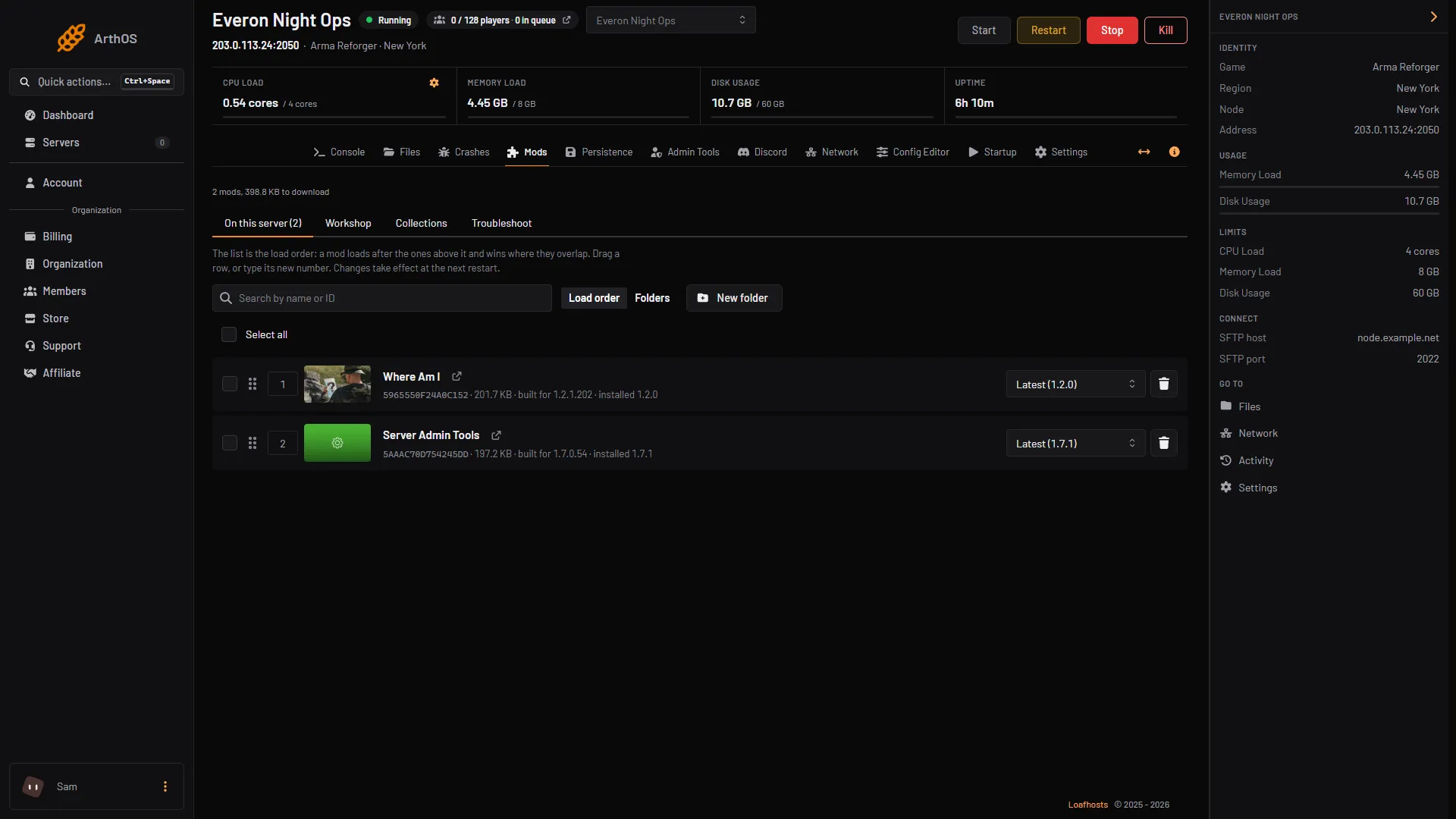
Arma Reforger mod load order, presets and folders
Reorder your Arma Reforger server's mods, group them in folders, and save the list as a collection to reuse on another server from the ArthOS Mods page. -
Where Arma Reforger stores mods and how to move them
Arma Reforger saves Workshop mods in an addons folder under Documents. Add -addonDownloadDir in Steam to move it to another drive. Servers keep their own. - Mods
Find the mod that stops your Arma Reforger server
Read the last start, see which mod the log points at, and let the troubleshooter search your mod list for the mod, or pair of mods, to blame. - Mods
Arma Reforger mod failed to load: causes and fixes
A mod that fails to load can stop the server. Read the Crashes and Mods tabs, then fix an outdated, missing, undownloadable or delisted mod. - Mods
Add ACE Medical to an Arma Reforger server
ACE Medical, by the ACE team, changes how injuries work in Arma Reforger. Find the right mod and ID, add it with ACE Core, and see what players notice. - Mods
Add Bacon Loadout Editor to an Arma Reforger server
Bacon Loadout Editor is a Workshop mod for customising the Bacon M4 Block II and URG-I. It has no dependencies. Here is how to add it to your server. - Mods
Add Game Master Enhanced to an Arma Reforger server
Game Master Enhanced adds tools to the Arma Reforger Game Master editor, such as saving scenarios and AI waypoint options. Here is how to add it. - Mods
Add RHS: Status Quo to an Arma Reforger server
Add the RHS: Status Quo mod to your Arma Reforger server: its ID, the two Content Packs it needs, its scenarios and how big the download is for players. - Mods
Arma Reforger mods on console: what to know
Console players download your Arma Reforger server's mods, with a storage limit and a slow download. Keep the list small, and learn what Mods are required does. - Mods
Fix Arma Reforger mod dependency errors
A mod that needs another mod can stop an Arma Reforger server. See what dependencies are, how the panel adds them, and fix a missing or conflicting one. - Mods
Lock Arma Reforger mod versions on your server
Stop a mod update from breaking your save or server: pick a version on each mod, lock all versions on disk at once, or set version in config.json. - Mods
Remove an Arma Reforger mod from your server
Take a mod off an Arma Reforger server from the Mods page or game.mods in config.json. What happens to its files, other mods that need it, and saves. - Mods
Update Arma Reforger mods on your server
How Arma Reforger mods update on a server: they download when it starts. See what changed, restart to update, or lock a version, and back up first. - Mods
WCS mods for an Arma Reforger server: what to add
WCS means Worst Case Scenario, a family of Arma Reforger Workshop mods. See which parts exist, what each one needs, and how to add them to your server.
config.json
8 guides- config.json
Arma Reforger config.json explained, block by block
What every block of the Arma Reforger server config.json does: ports, game, gameProperties, operating, a2s and rcon, and which keys the panel handles for you. - config.json
Arma Reforger fast validation: leave it on
Fast validation is a server setting that is on by default and must stay on for a public Arma Reforger server. The panel switches it on every start. - config.json
Arma Reforger server view distance settings
Set the view distance, network view distance and grass distance on an Arma Reforger server. Bohemia's ranges, the panel limits and the cost of each. - config.json
Arma Reforger voice chat settings for a server
Three server settings control voice chat displays and radios in Arma Reforger. See each key, what it does and how to change it in the ArthOS panel. - config.json
Force first person only on an Arma Reforger server
Set disableThirdPerson to true in your Arma Reforger server config to force first person for every player. Use the Config Editor or edit config.json by hand. - config.json
Set the maximum server FPS on an Arma Reforger server
Limit server FPS on Arma Reforger with the -maxFPS startup parameter. Why Bohemia says to cap it, the 165 limit in the ArthOS panel and the CPU cost. - config.json
The Arma Reforger A2S query port explained
The a2s block in Arma Reforger's config.json sets the Steam query port. What it is for, what the ArthOS panel does with it and why you leave it alone. - config.json
Turn BattlEye on or off on an Arma Reforger server
Bohemia's default for BattlEye is on; a new Loafhosts Reforger server starts with it off. Switch it in the ArthOS panel or config.json.
Admin and moderation
11 guides- Admin and moderation
Add admins to your Arma Reforger server with config.json
Put a player's identity ID in the admins list of config.json, set the admin password, then log in with #login. A server takes up to 30 admin IDs. - Admin and moderation
Find an Arma Reforger player's ID (Bohemia ID, UID)
The Reforger ID is the identity ID that admin and ban lists use. Find yours in the game, and read other players' IDs from the server log. - Admin and moderation
Arma Reforger server admin commands and how to use them
Log in as admin with #login, then use #kick, #ban, #restart and #shutdown. What each command does, who may use it, and what the panel adds. - Admin and moderation
Ban and kick players on an Arma Reforger server (#ban)
Log in as admin, run #players, then #kick with the player number or #ban create with their identity ID. Lift a ban with #ban remove. - Admin and moderation
Arma Reforger RCON: enable it and send admin commands
Set an RCON password and permission, restart, then connect any BattlEye RCon tool over UDP to run #kick, #ban and #players. The panel has no console for it. - Admin and moderation
Arma Reforger Discord killfeed and alerts: what works
The ArthOS panel has no Discord killfeed. It does post a live player count and start, stop, crash and backup alerts. Here is how to set both up. - Admin and moderation
Arma Reforger whitelist: what the game offers
Arma Reforger has no whitelist setting in config.json. To control who joins, use a join password or the Admin Tools ban list. Both steps are here. - Admin and moderation
Moderate chat on an Arma Reforger server
Bohemia's admin commands have no mute. To stop a player who abuses chat on an Arma Reforger server, kick them, or ban them by identity ID. - Admin and moderation
Server Admin Tools mod and the Admin Tools tab
Add the Server Admin Tools mod to your Arma Reforger server, then use the Admin Tools tab for admins, bans, a join message and chat messages. - Admin and moderation
Share one ban list across Arma Reforger servers
Arma Reforger has no shared ban list. Each server keeps its own, so copy the bans between servers by hand. Here is the file, the steps and the limits. - Admin and moderation
Who can use Game Master on an Arma Reforger server
Admins always get Game Master. If nobody has it, the first player to join does. Give it to chosen players in the Admin Tools tab by identity ID.
Persistence, logs and performance
15 guides- Persistence, logs and performance
Arma Reforger persistence: save games, wipe and restore
Keep your Arma Reforger world between restarts: turn persistence on, set how often it saves, roll back with a backup, wipe a world, fix saves that stop. - Persistence, logs and performance
How to back up your Arma Reforger server and its saves
Back up an Arma Reforger server: which files matter (config.json and the save folder), how to make and restore a backup in the panel, and by hand. -
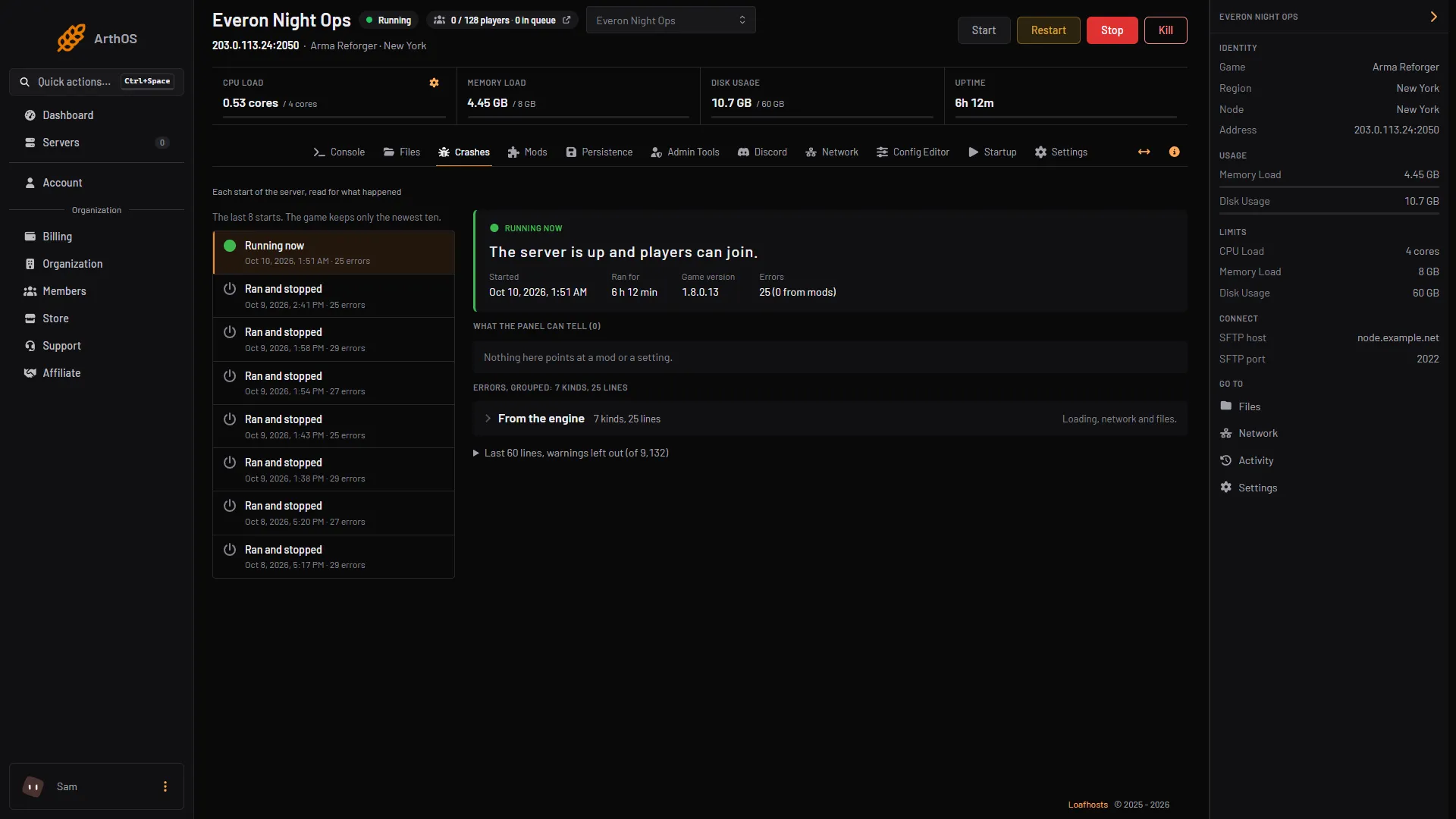
Find your Arma Reforger server logs and how to read them
Reforger writes one log folder per start inside the profile folder. Open console.log, error.log and script.log in Files, or read each start in Crashes. - Persistence, logs and performance
Why your Arma Reforger server crashed and how to fix it
Open the Crashes tab to see how each start ended and why. If no mod is named, the Troubleshoot tab searches your mod list for the one to blame. -
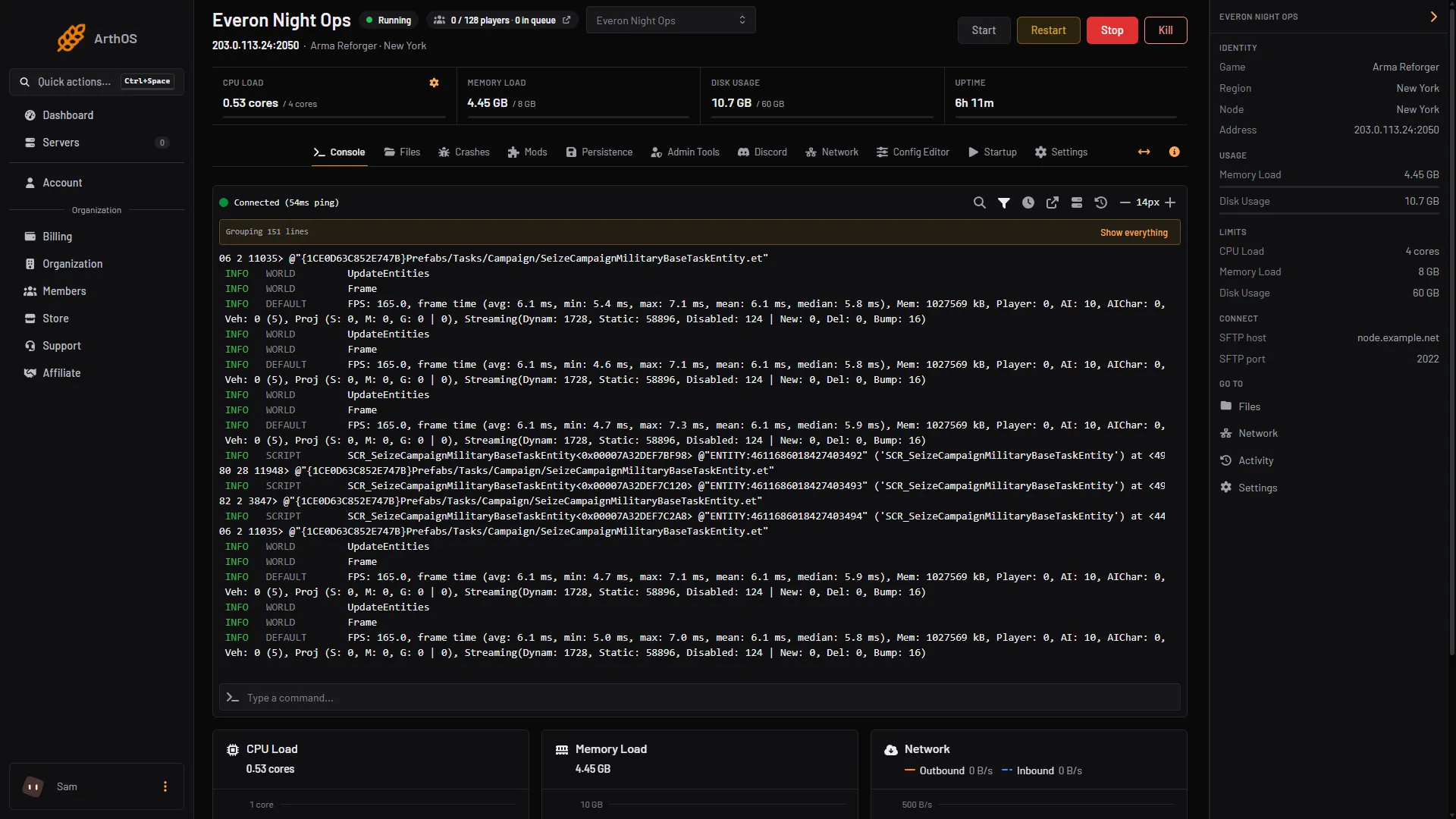
See your Arma Reforger server stats, kills and FPS
Players, CPU and memory show in the panel. Server FPS, kills and deaths by side come from the Server Admin Tools mod. Here is where each one lives. - Persistence, logs and performance
Tune Arma Reforger server FPS, view distance and AI
Cap server FPS, lower the network view distance and limit AI in the ArthOS panel, with the ranges Bohemia documents and what each setting costs. - Persistence, logs and performance
Fix Arma Reforger thermal profile log spam on a server
Reforger 1.8 filled modded server logs with thermal profile errors. Bohemia fixed it in 1.8.0.13. If you still see it, use the workaround mod. - Persistence, logs and performance
Arma Reforger AI limit and turning AI off
Cap the number of AI soldiers on an Arma Reforger server, or turn AI off, in the Config Editor. What each setting does and how to see AI in the stats. - Persistence, logs and performance
Fix Arma Reforger high ping and desync on a server
Players rubber-banding or seeing things pop in on your Arma Reforger server? Check server FPS first, then lower network view distance and AI. - Persistence, logs and performance
How much memory an Arma Reforger server uses
Read your Arma Reforger server's memory in the panel and the log, see what pushes it up, cut the load and move to a plan with more memory when you need it. - Persistence, logs and performance
Restart a hung Arma Reforger server automatically
The Hang recovery card restarts an Arma Reforger server that is running but hung: what counts as a hang, how often it acts, and how to switch it off. - Persistence, logs and performance
Restore an older Arma Reforger save
Go back to an earlier Arma Reforger save point. The panel lists saves but cannot pick one, so restore a backup or move the newer save points aside. - Persistence, logs and performance
Run an Arma Reforger server on the experimental branch
Bohemia ships test builds of Arma Reforger as an experimental version. What it is, why the ArthOS panel cannot put a server on it, and what players would need. - Persistence, logs and performance
Update an Arma Reforger server to the latest game version
When Bohemia ships an Arma Reforger update, how to bring your server to the same version in the ArthOS panel, check it, and handle mods built for the old one. - Persistence, logs and performance
Wipe an Arma Reforger server and start a fresh world
Start your Arma Reforger world from nothing: stop the server, back up, delete the scenario's save folder in Files, then start. The panel cannot delete saves.
- Add admins to your Arma Reforger server with config.json Put a player's identity ID in the admins list of config.json, set the admin password, then log in with #login. A server takes up to 30 admin IDs.
- Arma Reforger config.json explained, block by block What every block of the Arma Reforger server config.json does: ports, game, gameProperties, operating, a2s and rcon, and which keys the panel handles for you.
- Arma Reforger persistence: save games, wipe and restore Keep your Arma Reforger world between restarts: turn persistence on, set how often it saves, roll back with a backup, wipe a world, fix saves that stop.
- Arma Reforger scenario IDs: full list and how to set one Every official Arma Reforger scenario ID from Bohemia, copied exactly, and how to set game.scenarioId in the Config Editor or in config.json by hand.
- How to install Arma Reforger mods on your server Add Workshop mods to an Arma Reforger server from the panel's Mods page, or by editing the mods array in config.json. Restart to apply the change.
- Set up an Arma Reforger dedicated server from scratch Set up an Arma Reforger dedicated server: order one on Loafhosts or install it by hand, set the name, passwords and scenario, start it, and get players in.
- Arma Reforger Conflict server settings you can change The Conflict settings Bohemia documents for dedicated servers: control points, supplies, vehicle ranks, XP, time and faction limits, set in config.json.
- Connect to an Arma Reforger server: browser and IP Join an Arma Reforger server by searching its name in the server browser, or by IP and port on PC. What a server needs for Xbox and PlayStation players to join.
- Find an Arma Reforger mod ID (GUID) for your server A Reforger mod ID is a 16-character code. Read it from the ID line on the mod's Workshop page or the ArthOS Mods page, then use it in config.json.
- Find an Arma Reforger player's ID (Bohemia ID, UID) The Reforger ID is the identity ID that admin and ban lists use. Find yours in the game, and read other players' IDs from the server log.
- How to back up your Arma Reforger server and its saves Back up an Arma Reforger server: which files matter (config.json and the save folder), how to make and restore a backup in the panel, and by hand.
- Arma Reforger mod load order, presets and folders Reorder your Arma Reforger server's mods, group them in folders, and save the list as a collection to reuse on another server from the ArthOS Mods page.
- Arma Reforger server admin commands and how to use them Log in as admin with #login, then use #kick, #ban, #restart and #shutdown. What each command does, who may use it, and what the panel adds.
- Change your Arma Reforger server name in the panel Change the name players see in the Arma Reforger server browser: edit game.name in the Config Editor or in config.json, up to 100 characters, then restart.
- Find your Arma Reforger server logs and how to read them Reforger writes one log folder per start inside the profile folder. Open console.log, error.log and script.log in Files, or read each start in Crashes.
- Ban and kick players on an Arma Reforger server (#ban) Log in as admin, run #players, then #kick with the player number or #ban create with their identity ID. Lift a ban with #ban remove.
- Set a join password on your Arma Reforger game server Set a join password so only people you tell can join your Arma Reforger server, and know how it differs from the admin password. Panel and config.json.
- Where Arma Reforger stores mods and how to move them Arma Reforger saves Workshop mods in an addons folder under Documents. Add -addonDownloadDir in Steam to move it to another drive. Servers keep their own.
- Why your Arma Reforger server crashed and how to fix it Open the Crashes tab to see how each start ended and why. If no mod is named, the Troubleshoot tab searches your mod list for the one to blame.
- Arma Reforger RCON: enable it and send admin commands Set an RCON password and permission, restart, then connect any BattlEye RCon tool over UDP to run #kick, #ban and #players. The panel has no console for it.
- Change the max players on your Arma Reforger server Set game.maxPlayers on your Arma Reforger server, 1 to 128, in the Config Editor or config.json, and see what holds a busy server back before the cap.
- Find the mod that stops your Arma Reforger server Read the last start, see which mod the log points at, and let the troubleshooter search your mod list for the mod, or pair of mods, to blame.
- See your Arma Reforger server stats, kills and FPS Players, CPU and memory show in the panel. Server FPS, kills and deaths by side come from the Server Admin Tools mod. Here is where each one lives.
- Arma Reforger Discord killfeed and alerts: what works The ArthOS panel has no Discord killfeed. It does post a live player count and start, stop, crash and backup alerts. Here is how to set both up.
- Restart your Arma Reforger server, now or on a schedule Restart an Arma Reforger server from the panel in one click, or set a daily restart with a schedule. What a restart does to players, saves and mods.
- Tune Arma Reforger server FPS, view distance and AI Cap server FPS, lower the network view distance and limit AI in the ArthOS panel, with the ranges Bohemia documents and what each setting costs.
- Fix Arma Reforger thermal profile log spam on a server Reforger 1.8 filled modded server logs with thermal profile errors. Bohemia fixed it in 1.8.0.13. If you still see it, use the workaround mod.
- Arma Reforger mod failed to load: causes and fixes A mod that fails to load can stop the server. Read the Crashes and Mods tabs, then fix an outdated, missing, undownloadable or delisted mod.
- Arma Reforger scenario rotation: a playlist of missions Build a playlist of Arma Reforger scenarios in the Rotation tab, pick how it moves on (match end, timer or by hand), and see what a crash does.
- Arma Reforger server not showing in the server browser Find why your Arma Reforger server is missing from the browser: visibility off, still starting, wrong version, a crash, or the query port blocked.
- Change the scenario on an Arma Reforger server Pick a new mission in the Config Editor Scenario row, restart, and know what happens to your save. Covers modded scenarios and playing several in turn.
- Let Xbox and PlayStation players join your Reforger server Check Crossplay with consoles is on in the Config Editor, restart, and Xbox and PlayStation players can find your Arma Reforger server by name.
- Set up Conflict on Everon on your Arma Reforger server Run Conflict on Everon: what the mode is, the scenario ID, how to set it in the Config Editor or config.json, and how players, saves and tuning fit in.
- Add ACE Medical to an Arma Reforger server ACE Medical, by the ACE team, changes how injuries work in Arma Reforger. Find the right mod and ID, add it with ACE Core, and see what players notice.
- Add Bacon Loadout Editor to an Arma Reforger server Bacon Loadout Editor is a Workshop mod for customising the Bacon M4 Block II and URG-I. It has no dependencies. Here is how to add it to your server.
- Add Game Master Enhanced to an Arma Reforger server Game Master Enhanced adds tools to the Arma Reforger Game Master editor, such as saving scenarios and AI waypoint options. Here is how to add it.
- Add RHS: Status Quo to an Arma Reforger server Add the RHS: Status Quo mod to your Arma Reforger server: its ID, the two Content Packs it needs, its scenarios and how big the download is for players.
- Arma Reforger AI limit and turning AI off Cap the number of AI soldiers on an Arma Reforger server, or turn AI off, in the Config Editor. What each setting does and how to see AI in the stats.
- Arma Reforger Arland scenarios: IDs and how to set one The four official Arma Reforger scenarios on Arland, with their IDs, what each is for, and how to set one in the Config Editor or config.json.
- Arma Reforger Capture and Hold scenario IDs and setup Capture and Hold is a team versus team mode with 8 official scenarios. Copy the ID you want and set it in the Config Editor or in config.json.
- Arma Reforger Combat Ops scenario IDs and how to set one Combat Ops is Arma Reforger's small-team co-op mode. Copy the scenario ID for Arland, Everon or Kolguyev and set it in the panel or in config.json.
- Arma Reforger fast validation: leave it on Fast validation is a server setting that is on by default and must stay on for a public Arma Reforger server. The panel switches it on every start.
- Arma Reforger join queue and slot hold, explained Set how many players can wait in line when your Arma Reforger server is full, and how long a dropped player's slot is held for them.
- Arma Reforger Kolguyev scenarios: IDs and how to set one Run Kolguyev on your Arma Reforger server: the three official multiplayer scenarios there, their IDs, and how to set one in the panel or config.json.
- Arma Reforger mods on console: what to know Console players download your Arma Reforger server's mods, with a storage limit and a slow download. Keep the list small, and learn what Mods are required does.
- Arma Reforger server view distance settings Set the view distance, network view distance and grass distance on an Arma Reforger server. Bohemia's ranges, the panel limits and the cost of each.
- Arma Reforger voice chat settings for a server Three server settings control voice chat displays and radios in Arma Reforger. See each key, what it does and how to change it in the ArthOS panel.
- Arma Reforger whitelist: what the game offers Arma Reforger has no whitelist setting in config.json. To control who joins, use a join password or the Admin Tools ban list. Both steps are here.
- Fix Arma Reforger high ping and desync on a server Players rubber-banding or seeing things pop in on your Arma Reforger server? Check server FPS first, then lower network view distance and AI.
- Fix Arma Reforger mod dependency errors A mod that needs another mod can stop an Arma Reforger server. See what dependencies are, how the panel adds them, and fix a missing or conflicting one.
- Force first person only on an Arma Reforger server Set disableThirdPerson to true in your Arma Reforger server config to force first person for every player. Use the Config Editor or edit config.json by hand.
- Hide an Arma Reforger server from the server browser Turn off Show in the server browser to make your Arma Reforger server private, then add a join password so only people you tell can get in.
- How much memory an Arma Reforger server uses Read your Arma Reforger server's memory in the panel and the log, see what pushes it up, cut the load and move to a plan with more memory when you need it.
- Lock Arma Reforger mod versions on your server Stop a mod update from breaking your save or server: pick a version on each mod, lock all versions on disk at once, or set version in config.json.
- Moderate chat on an Arma Reforger server Bohemia's admin commands have no mute. To stop a player who abuses chat on an Arma Reforger server, kick them, or ban them by identity ID.
- Remove an Arma Reforger mod from your server Take a mod off an Arma Reforger server from the Mods page or game.mods in config.json. What happens to its files, other mods that need it, and saves.
- Restart a hung Arma Reforger server automatically The Hang recovery card restarts an Arma Reforger server that is running but hung: what counts as a hang, how often it acts, and how to switch it off.
- Restore an older Arma Reforger save Go back to an earlier Arma Reforger save point. The panel lists saves but cannot pick one, so restore a backup or move the newer save points aside.
- Run a modded scenario on an Arma Reforger server Run a scenario from a Workshop mod: add the mod first, then pick its scenario on the Mods page or paste its ID. Fixes Unable to read the mission header.
- Run an Arma Reforger Game Master server Set up Game Master on your Arma Reforger server: the scenario ID for Everon, Arland and Kolguyev, what a Game Master can do, and who gets the role.
- Run an Arma Reforger server on the experimental branch Bohemia ships test builds of Arma Reforger as an experimental version. What it is, why the ArthOS panel cannot put a server on it, and what players would need.
- Server Admin Tools mod and the Admin Tools tab Add the Server Admin Tools mod to your Arma Reforger server, then use the Admin Tools tab for admins, bans, a join message and chat messages.
- Set the maximum server FPS on an Arma Reforger server Limit server FPS on Arma Reforger with the -maxFPS startup parameter. Why Bohemia says to cap it, the 165 limit in the ArthOS panel and the CPU cost.
- Share one ban list across Arma Reforger servers Arma Reforger has no shared ban list. Each server keeps its own, so copy the bans between servers by hand. Here is the file, the steps and the limits.
- The Arma Reforger A2S query port explained The a2s block in Arma Reforger's config.json sets the Steam query port. What it is for, what the ArthOS panel does with it and why you leave it alone.
- Turn BattlEye on or off on an Arma Reforger server Bohemia's default for BattlEye is on; a new Loafhosts Reforger server starts with it off. Switch it in the ArthOS panel or config.json.
- Update an Arma Reforger server to the latest game version When Bohemia ships an Arma Reforger update, how to bring your server to the same version in the ArthOS panel, check it, and handle mods built for the old one.
- Update Arma Reforger mods on your server How Arma Reforger mods update on a server: they download when it starts. See what changed, restart to update, or lock a version, and back up first.
- WCS mods for an Arma Reforger server: what to add WCS means Worst Case Scenario, a family of Arma Reforger Workshop mods. See which parts exist, what each one needs, and how to add them to your server.
- Who can use Game Master on an Arma Reforger server Admins always get Game Master. If nobody has it, the first player to join does. Give it to chosen players in the Admin Tools tab by identity ID.
- Wipe an Arma Reforger server and start a fresh world Start your Arma Reforger world from nothing: stop the server, back up, delete the scenario's save folder in Files, then start. The panel cannot delete saves.