






Three settings control distance on an Arma Reforger server: view distance, network view distance and minimum grass distance. The one that costs your server the most is the network view distance. The ArthOS panel keeps it at 3000 metres at most, and 1500 suits most servers.
The three settings
| Panel row (in Performance) | Key | Bohemia’s range | Bohemia’s default |
|---|---|---|---|
| View distance (m) | serverMaxViewDistance | 500 to 10000 | 1600 |
| Network view distance (m) | networkViewDistance | 500 to 5000 | 1500 |
| Minimum grass distance (m) | serverMinGrassDistance | 0, or 50 to 150 | 0 |
The ArthOS panel narrows two of these. Network view distance (m) accepts 500 to 3000. Minimum grass distance (m) accepts 0 to 150, but Bohemia’s valid values are 0 or 50 to 150, so 1 to 49 is not valid. If you set the network view distance above 3000 by hand, the start command lowers it to 3000 at every start. The panel’s own help text follows.
View distance (m): “The furthest players can see. Higher costs the server and players more.”
Network view distance (m): “How far away the server sends players what other players and vehicles are doing. The biggest bandwidth and CPU cost there is, so it is kept at 3000 at most; 1500 suits most servers.” Bohemia describes it as the maximum network streaming range of replicated entities. In plain words, it is how far from a player the server keeps telling them about other players, vehicles and AI. A larger number means more data to send and more work for the server, and the work grows with more players.
Minimum grass distance (m): “Force grass to draw at least this far, so nobody hides by turning grass down. 0 lets players choose; otherwise 50 to 150.” Bohemia says that with 0, no distance is forced on clients.
In the ArthOS panel
- Open the Config Editor tab.
- Find the Performance group.
- Change View distance (m) (1), Network view distance (m) (2) or Minimum grass distance (m) (3). Change one at a time.
- Choose Save. The editor says “Saved changes apply after a restart.”
- Restart the server. See restart an Arma Reforger server. A restart drops every player.
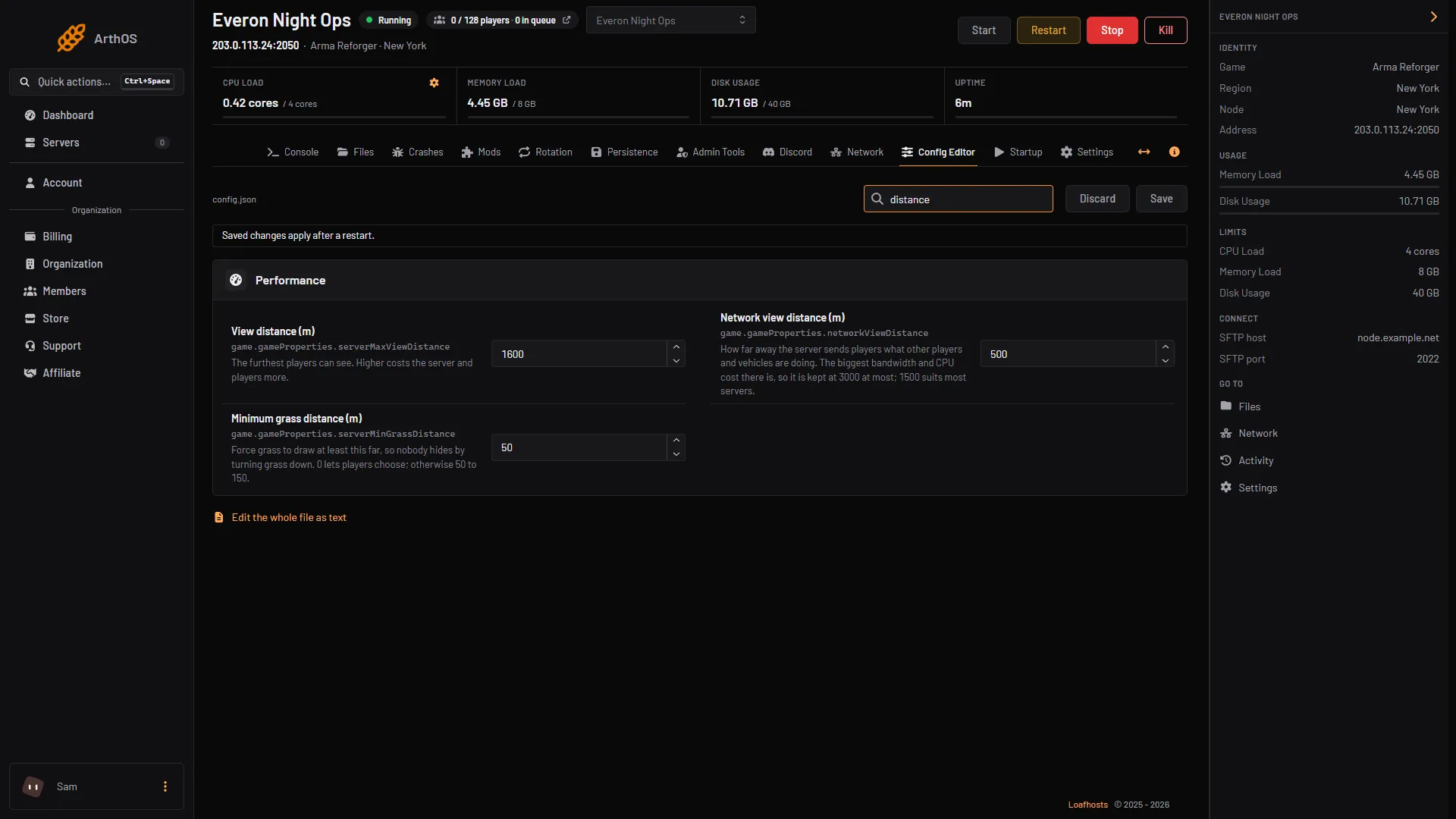
- View distance (m)
- Network view distance (m)
- Minimum grass distance (m)
Then watch the server FPS. The guide on tuning FPS, view distance and AI shows how to read it and in what order to lower things.
By hand
Open config.json in Files and edit game.gameProperties:
{
  "game": {
    "gameProperties": {
      "serverMaxViewDistance": 1600,
      "networkViewDistance": 1500,
      "serverMinGrassDistance": 0
    }
  }
}
Only these three keys are shown. Leave the others, and check commas before you save. See the config.json guide.
If it does not work
- The value went back down to 3000. The server start-up on the ArthOS panel lowers a network view distance above 3000 to 3000 each time it starts. Use 3000 or less.
- The panel will not take my number. Stay inside the panel’s range: 500 to 3000 for network view distance, 0 to 150 for grass distance. Grass distance of 1 to 49 is outside Bohemia’s range too.
- FPS is still low. View distance is not the only cause. Check player count, AI and mods, and follow the tuning guide.
- Nothing changed. Save, then restart. The server reads the file at start.
See Arma Reforger servers for the rest.
Sources: Bohemia wiki: Server Config