






An Arma Reforger server has three voice chat settings, all in game.gameProperties. Two hide parts of the voice display on every player’s screen. One lets a faction talk on the other side’s radio. Each one applies after a restart.
Bohemia calls voice chat VON, short for Voice Over Network. Direct speech is talking to players near you. Radio is talking over a channel to players far away.
The three settings
| Panel row (in Gameplay) | Key | Bohemia’s default |
|---|---|---|
| Hide the voice chat display | VONDisableUI | false |
| Hide the nearby talker display | VONDisableDirectSpeechUI | false |
| Radio across factions | VONCanTransmitCrossFaction | false |
Hide the voice chat display (VONDisableUI). The panel help says: “Hide the on-screen list of who is talking on the radio.” Bohemia says it forces clients to not have the VON user interface. Players can still hear radio. They just do not see the list.
Hide the nearby talker display (VONDisableDirectSpeechUI). The panel help says: “Hide the marker over players talking nearby.” Bohemia says it forces clients to not have the VON direct speech interface. This is useful for realism servers, where you do not want a player to see who is speaking.
Radio across factions (VONCanTransmitCrossFaction). The panel help says: “Let a faction tune into and talk on the other side’s radio channels.” Bohemia says: “true is allow to communicate, false is listen-only”. So with Bohemia’s default false, a faction can listen on the other side’s channels but cannot transmit on them. A new Loafhosts server starts with it on (true), so factions can talk on each other’s radio. Bohemia lists this option as new in game version 1.0.0.
In the ArthOS panel
- Open the Config Editor tab.
- In the Gameplay group, find the three rows: Hide the voice chat display (1), Hide the nearby talker display (2) and Radio across factions (3).
- Switch each one the way you want it.
- Choose Save. The editor says “Saved changes apply after a restart.”
- Restart the server. See restart an Arma Reforger server. A restart drops every player.
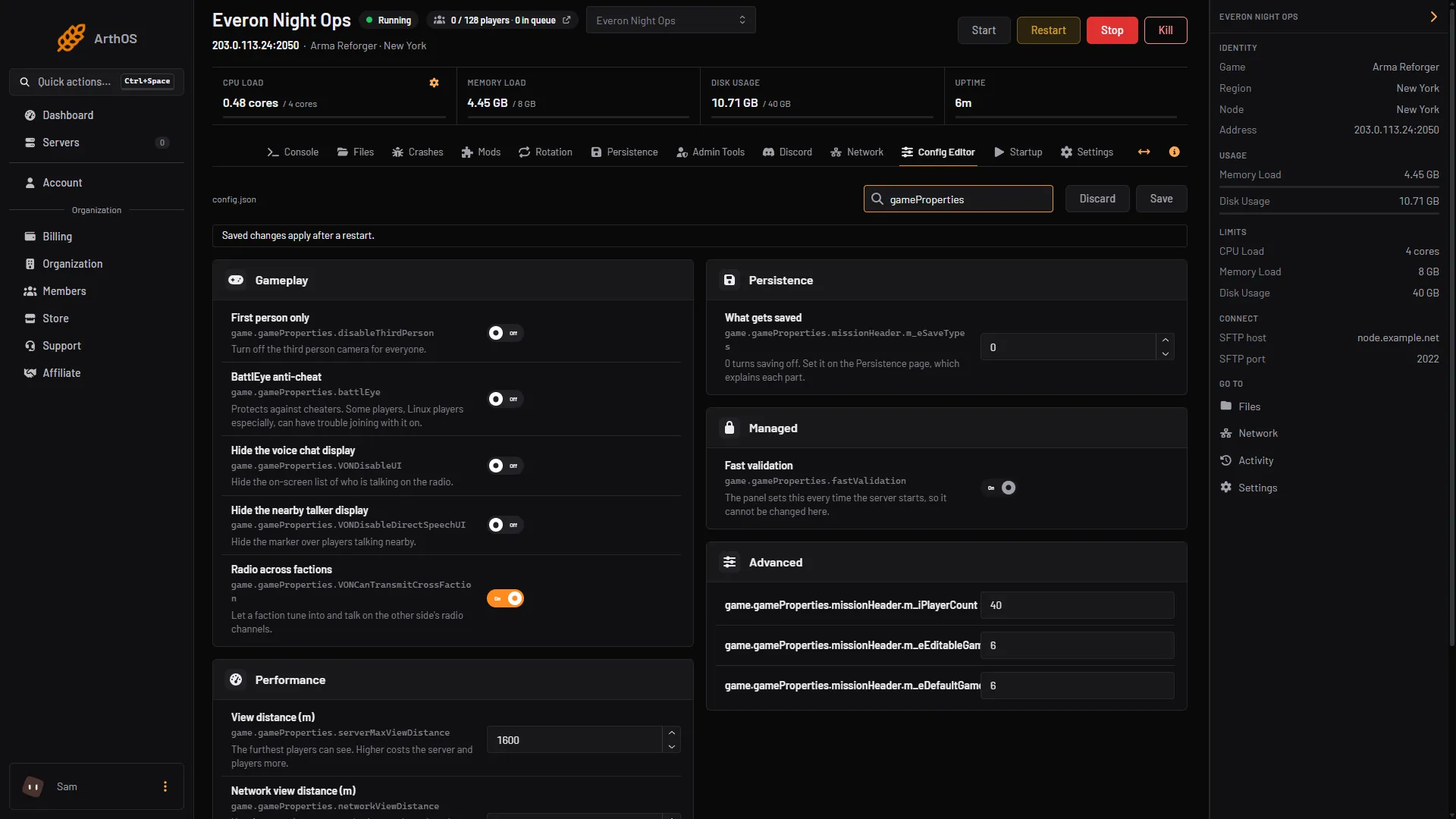
- Hide the voice chat display
- Hide the nearby talker display
- Radio across factions
By hand
Open config.json in Files and edit game.gameProperties. This shows a server that hides both displays and keeps radio listen-only for the other side:
{
  "game": {
    "gameProperties": {
      "VONDisableUI": true,
      "VONDisableDirectSpeechUI": true,
      "VONCanTransmitCrossFaction": false
    }
  }
}
Only these three keys are shown. Leave the other keys in gameProperties alone, and check the commas before you save. The whole file is explained in the config.json guide. Then restart.
If it does not work
- Nothing changed for players. The server only reads
config.jsonwhen it starts. Save, then restart. Players may also need to rejoin. - The server will not start after a by-hand edit. A comma or quote is wrong. Fix it or restore a backup.
- Players cannot talk to the other side. Check that Radio across factions is on. If it is off, a faction can only listen on the other side’s channels. Think about whether your scenario expects cross-faction talk.
- The rows are missing. Look under Gameplay in the Config Editor. If a key is not set in the file, the game uses its default.
Not checked on 1.8 as of 12 October 2026: how a scenario or a mod that adds its own voice features reacts to these three settings.
See also Arma Reforger servers.
Sources: Bohemia wiki: Server Config