






The world size (server.worldsize, 1000 to 6000) and the seed (server.seed, any number from 0 to 2147483647) decide the map. The same size and seed always make the same map. Change either and the next start builds a new world, so everything players built on the old one is gone.
In the ArthOS panel
You can preview a seed before you commit to it.
- Open your server and the Map tab. The top shows the Size and Seed the server runs now.
- Under Try another seed, choose a Size (1).
- Type a Seed (2), or press Random (3) until the picture suits you. Then press Preview (4).
- You see the picture, the biomes and the monuments, with Open on RustMaps to look closer. Land is the share of the map that is land. Islands is the number of islands.
- Happy with it? Preview changes nothing on the server. Set the same size and seed on the Startup tab, below.
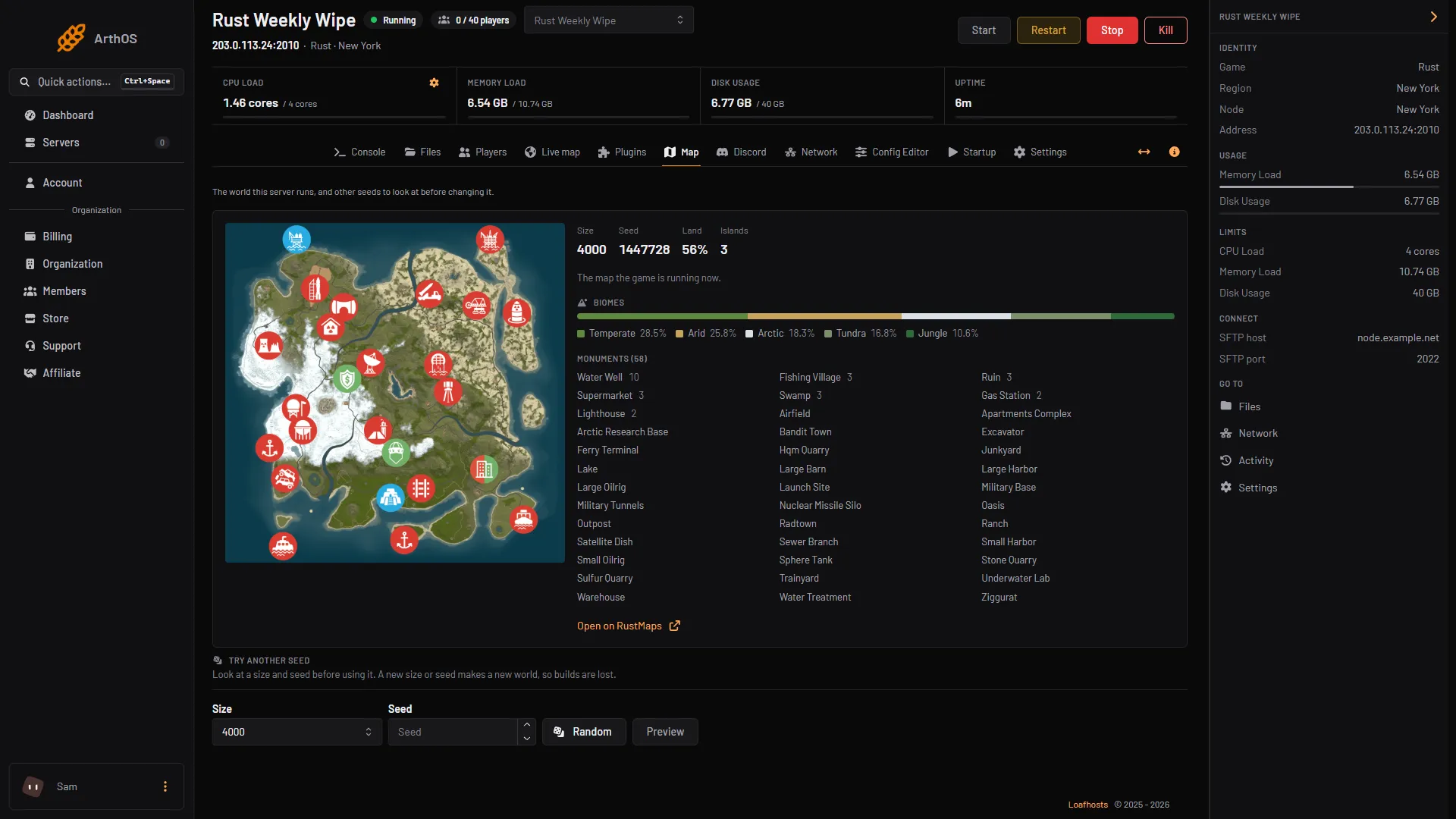
- Choose the size
- Type the seed
- Or press Random
- Press Preview
If you do not see Try another seed, set the size and seed on the Startup tab instead.
On the Startup tab
Open Startup, and under Variables set Map size (1000 to 6000, default 4000) and Map seed (0 to 2147483647). Press Save. They apply at the next start.
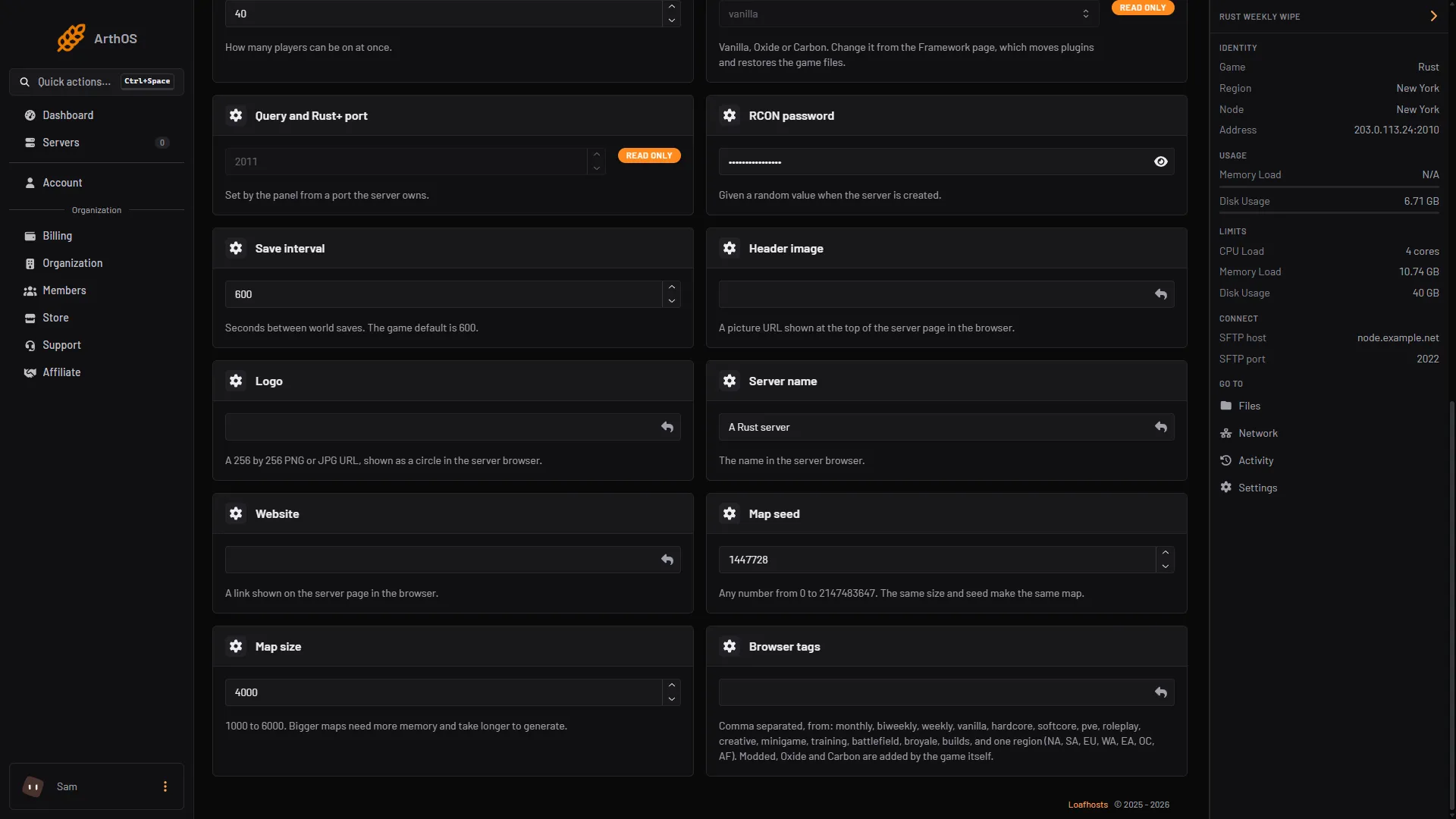
- Type the map seed
- Set the map size
How big?
Bigger maps need more memory, more disk and more time to generate. Facepunch, the maker of Rust, lists 12 GB of free RAM for a server and says a 6000 map uses more. Your plan’s memory is under Limits on the right of the server page. A 4000 map with nobody online used about 6.5 GB in our test. Start at 4000, the default, and go bigger only if your plan has the room.
Fixed maps and Barren
Map type on the Startup tab is Procedural Map by default, which builds the map from your size and seed. The other choices are fixed maps made by Facepunch, such as SavasIsland, the official pre-made map. Facepunch retired the Barren map in the December 2023 update, so use Procedural Map unless you have a reason not to.
A custom map
- Host the map file on a site that is always up, and get a direct link. If a download starts when you open the link, it is direct. A page that asks you to click something first does not work.
- On the Startup tab, paste the link into Custom map URL. Press Save.
- Restart the server and watch the console while it loads the map.
New players download the map from that link, not from your server. If the link goes down, new players cannot join. The Map tab shows no preview for a custom map.
By hand
Keep the level on the start command, and set the size and seed in server.cfg:
+server.level "Procedural Map"server.worldsize 4000
server.seed 1234For a custom map, give the server the link instead, and remove the size and seed, as Facepunch advises:
+server.levelurl "https://example.com/mymap.map"The map file for a generated world is named proceduralmap.<size>.<seed>.<protocol>.map, for example proceduralmap.4000.1234.289.map (289 is the game’s protocol number in October 2026), and the save file carries the same name. A different size or seed is a different file, which is why the old world does not come back.
Starting a fresh map
A change to the size or seed starts a new world. To keep the current world, do not change them. To wipe on a schedule, see the Rust wipe scheduler and forced wipe day.
If it does not work
- The preview has no picture yet. Wait a few minutes and press Preview again.
- There is no Try another seed section. It is hidden when the server loads a custom map, or when previews are not set up. Use the Startup tab.
- The map did not change. The size and seed apply at the next start. Restart the server.
- A custom map will not load. The link must be a direct download that works all the time. Open it in a browser to check that the file downloads by itself.
More on the game: Rust servers.
Sources: wiki.facepunch.com: Creating a server, wiki.facepunch.com: Getting Started w Server, wiki.facepunch.com: Hosting a custom map, wiki.facepunch.com: Procedural generation customization, wiki.facepunch.com: Map