









Open World rules and look in the group World and blood moons. Three rows control air drops: Air Drops, Mark Air Drops and Air Drop Random Time. The change applies the next time the server starts.
What an air drop is
An air drop is a supply crate. A plane flies over, and the crate falls to the ground on a parachute with an orange smoke trail. It takes about 20 seconds to land. Players can then find it and open it. Crates can land in odd places, such as the top of a tree.
The three rules
This is the World rule for each row below. It is stored in the SandboxCode line of the server’s settings file.
| Row | Key | Choices | Default |
|---|---|---|---|
| Air Drops | AirDropFrequency | Disabled, Every Day, 1-3 Days, 3 Days, 3-7 Days, 7 Days, 1-7 Days | 3 Days |
| Mark Air Drops | AirDropMarker | No, Yes | Yes |
| Air Drop Random Time | AirDropRandomTime | None, Morning, Mid Day, Evening, Night, All Day, Any | None |
Air Drops is how often a drop comes. Choose Disabled for no air drops at all. Mark Air Drops shows each drop on the map and compass, so players can find it. Air Drop Random Time is a time-of-day choice for when a drop can arrive.
In the panel
- Open the World rules page of your server.
- Find the group World and blood moons.
- Change Air Drops, Mark Air Drops or Air Drop Random Time.
- Choose Save.
- The page says “Saved. The game reads its rules when it starts, so restart the server to use them.” Choose Restart now, or choose Restart at the top of the server page later.
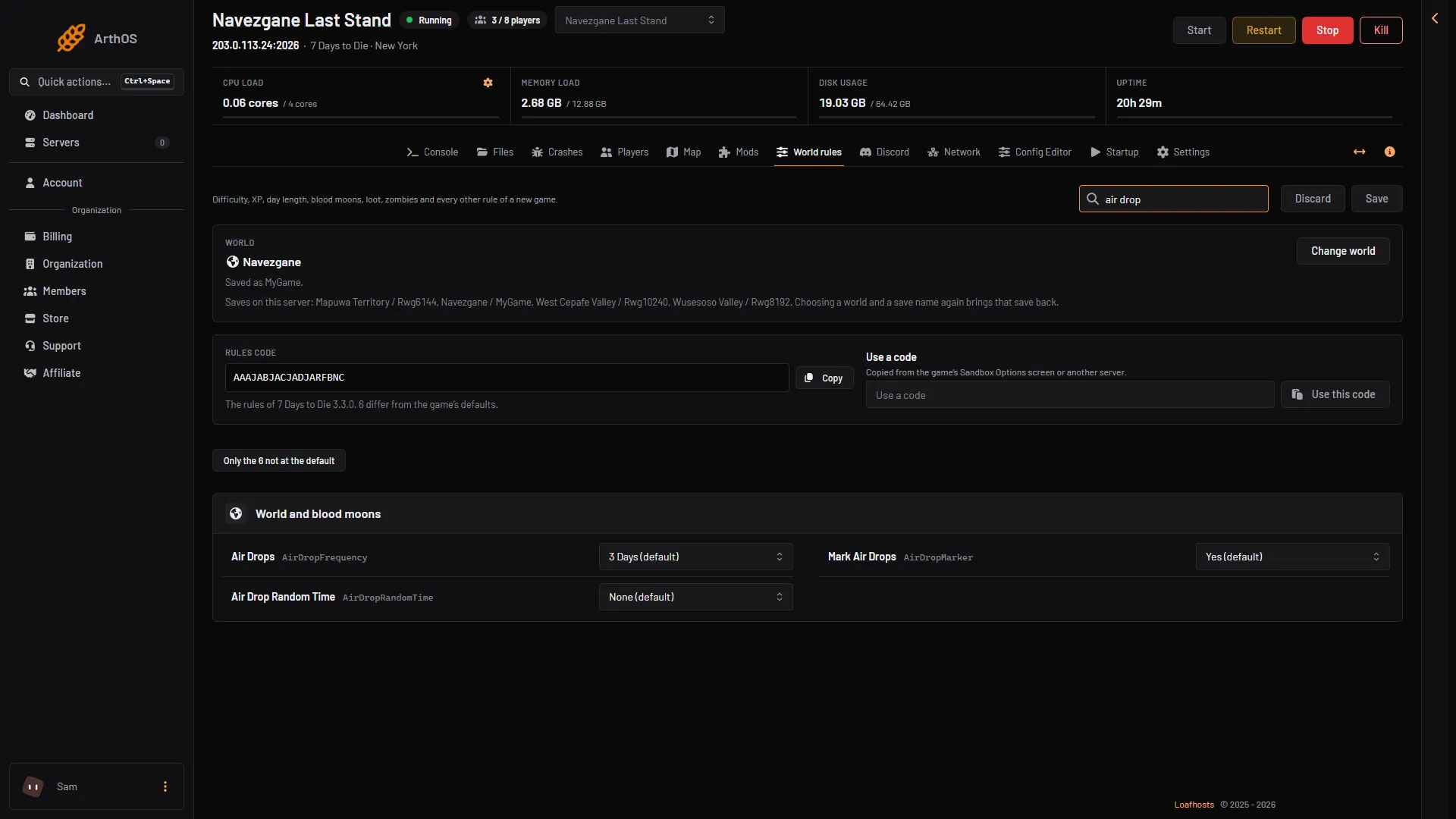
- How often
- Show the marker
- Time of day
To see only what you changed, turn on the filter Only the N not at the default. Every rule is stored in one Rules code. Rules left at their default are not part of it.
By hand
The Console page can call a drop at once. Type this while the server is running:
spawnairdropThe game describes it as “Spawns an air drop”. It does not change the rules above. Those are read only at the start.
If it does not work
- The rows did not change in the game. The server has not restarted since you saved. Restart it.
- Players cannot find a drop. Mark Air Drops is set to No. Set it to Yes.
- No drops come. Air Drops is set to Disabled.
- You cannot save. Your role may not allow changing the server’s settings.
Not checked on V3.3.0 as of 19 October 2026: what each Air Drop Random Time choice does in play.
More about the game: 7 Days to Die servers.
Sources: 7daystodie.wiki.gg: Air Drop