









A buff is an effect on a player, such as a boost, a wound or an illness. Open the Players page, open the menu of an online player, choose Buffs, type the buff name and choose Apply. For god mode, the buff is god. The player must be online.
Give a buff
- Open the Players page.
- Find the player under Online (N) and open the menu on their row.
- Choose Buffs (box 1). A box titled “Buffs for (name)” opens.
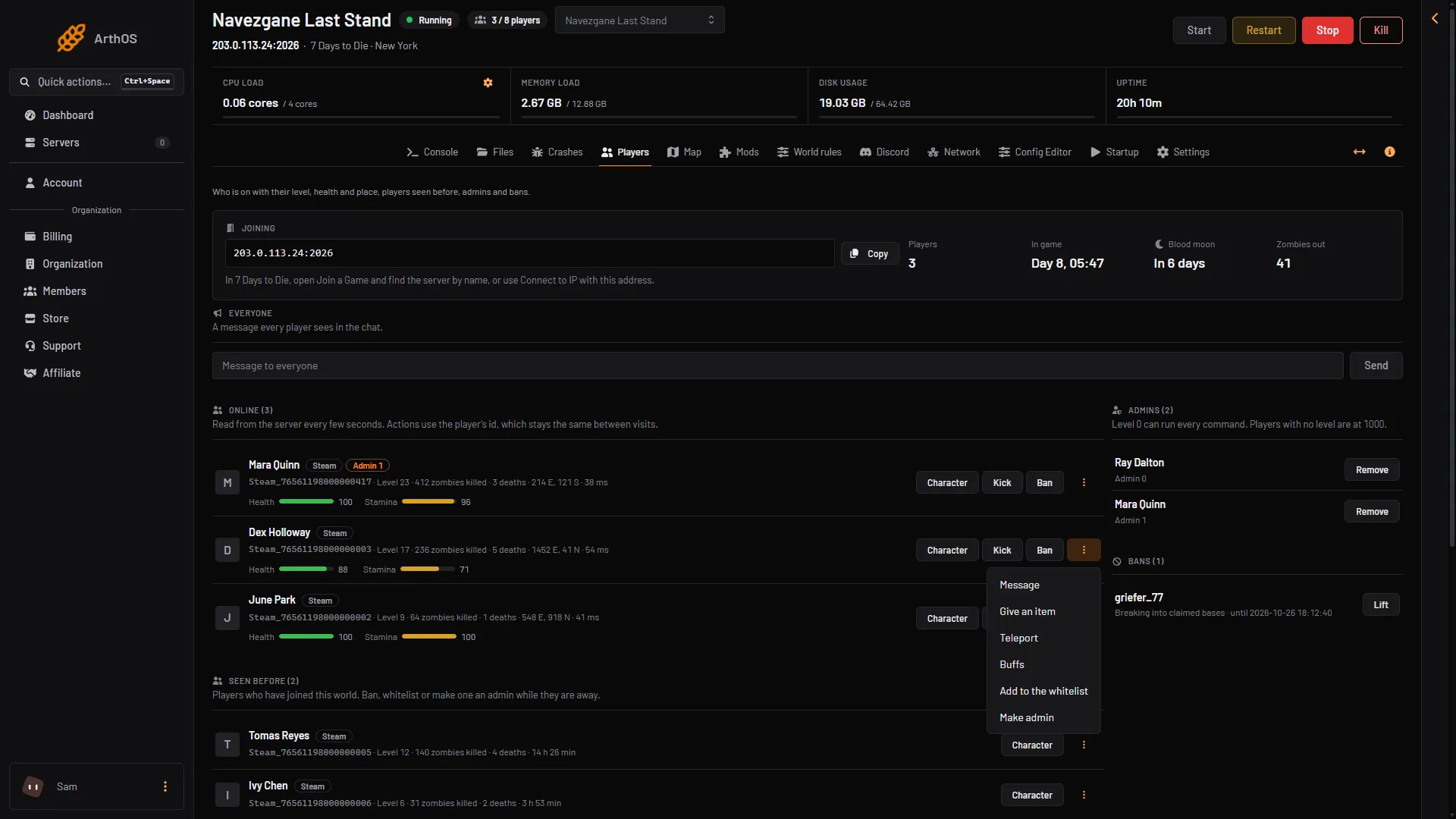
- Buffs
- Under What to do, keep Give a buff (box 1).
- In Buff, pick a name from the list or type one (box 2).
- Choose Apply (box 3).
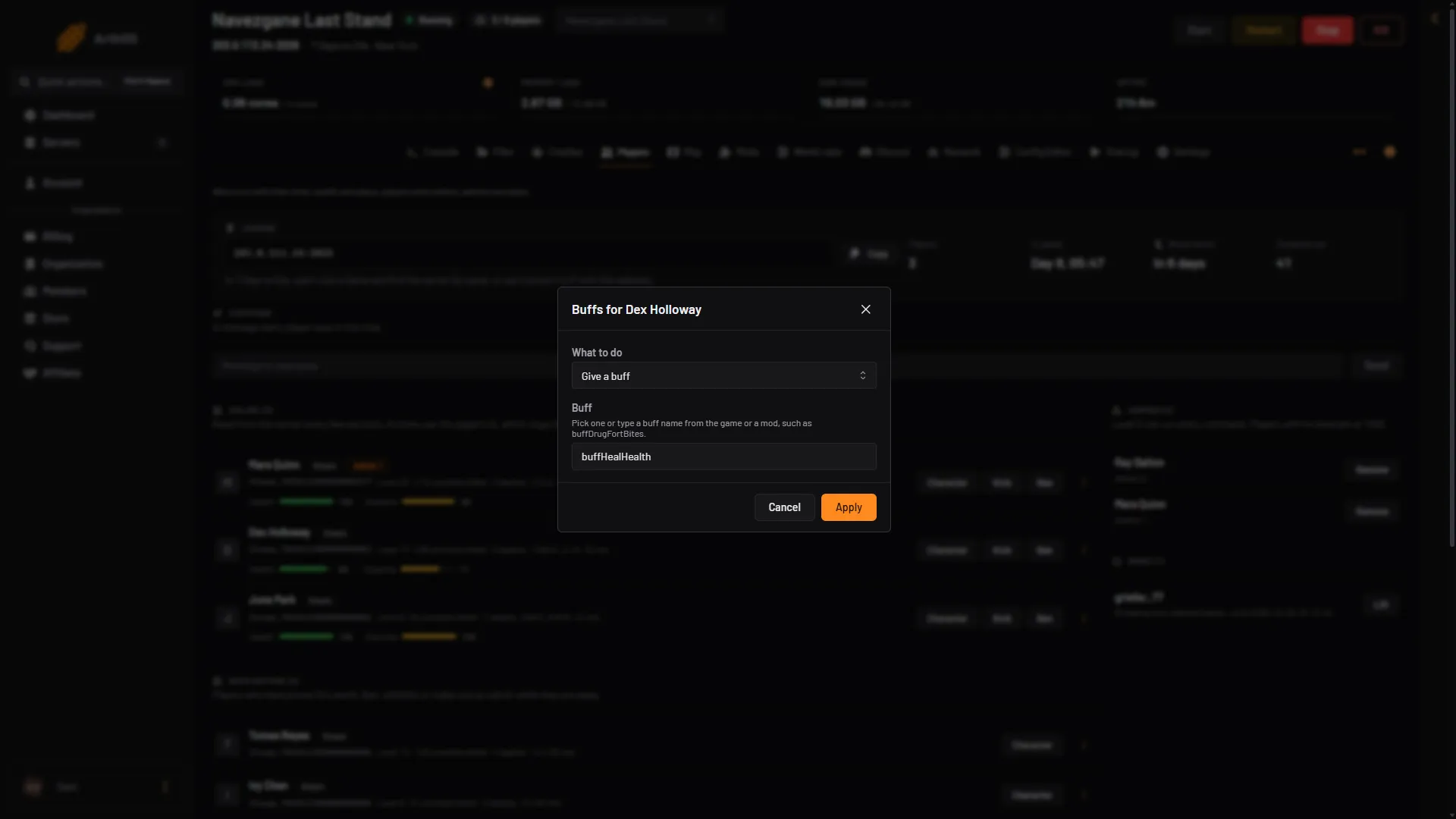
- What to do
- Buff
- Apply
The effect starts at once. It follows the game’s own rules for that buff, so a timed buff ends by itself.
The list offers these names:
- Helpful:
buffHealHealth,buffDrugFortBites,buffDrugSteroids,buffDrugRecog,buffDrugPainkillers,buffMegaCrush. - Harmful:
buffInjuryBleeding,buffLegBroken,buffArmBroken,buffInfectionMain,buffInjuryStunned01,buffElementCold.
The list is only a few examples. The box accepts any buff name the game or a mod defines.
God mode
Type god in Buff and choose Apply. The player gets the game’s god buff. To end it, choose Take a buff away under What to do, type god and choose Apply. Not checked on V3.3.0 as of 19 October 2026: taking god away again.
Take a buff away
- Open Buffs for the player.
- Under What to do, choose Take a buff away.
- Type or pick the buff, for example
buffLegBrokenorbuffInjuryBleeding. - Choose Apply.
This removes the buff from the player. Use it to clear a wound or an illness you gave by mistake.
Find more buff names
The game keeps its buffs in a file called buffs.xml. To read it on your server, type exportcurrentconfigs in the Console. The game copies every config file as it is now used, including changes from mods, into a folder called Configs inside the save’s folder. Open Files and look in data/Saves/<world>/<save name>/Configs/. Buff names are the name values in buffs.xml.
By hand
Type these on the Console page, without a slash:
buffplayer <player> <buff name>: gives the buff.debuffplayer <player> <buff name>: takes it away.
<player> is a player name, an entity id or a platform id. Type lpi to list them. Example: buffplayer Alex god.
The commands buff and debuff without player act on the player who types them. On the Console they have no player, so use the player forms.
What you cannot do from the panel
Flying and walking through walls are part of the player’s own debug menu in the game. The server cannot switch them on for someone else. A remote cvar command does not work on a server either. See the debug menu and creative mode.
If it does not work
- There is no Buffs on the row. The player is not online, or your role does not allow in-game actions on the server.
- Nothing seems to happen. A buff name that the game does not know does nothing useful. Check the spelling against
buffs.xml. - The server is stopped. Start it first. Buffs only work on a running server.
More about the game: 7 Days to Die servers.
Sources: 7daystodie.wiki.gg: Command Console