









A 7 Days to Die server lags when it has more to do than its processor and memory can finish in time. The settings that cost the most are the zombie limit and the view distance. Lower those first, then watch the log to see if it helped.
What makes a server lag
The game’s own settings file marks four settings as costly:
- Zombies at once (
MaxSpawnedZombies, default 64). The game says changing it “can have a huge impact on performance”. It counts zombies for the whole world, and the game raises it for blood moons and sleepers. - Most view distance (
ServerMaxAllowedViewDistance, 6 to 12, default 12). The game says it has a high impact on memory and performance. - Distant buildings (
DynamicMeshEnabled, on by default). It shows bases from far away. Distant buildings at once says that higher values use more memory. - Queued mesh layers (
MaxQueuedMeshLayers, default 1000). Lower uses less memory but may slow how fast chunks appear.
Other causes, as the panel and the game describe them:
- World size. In the Config Editor, Generated world size says larger worlds take longer to generate and need more memory.
- Mods. The Crashes page advises removing mods that add many items or zombies when a server runs out of memory.
- Blood moons. The next guide, blood moon performance, covers the heaviest nights.
- Animals cost less than zombies, so Animals at once is a poor first change.
Read the log first
With a player on, the game prints one line like this every 30 seconds:
INF Time: ... FPS: ... Heap: ... Ply: 1 Zom: ... RSS: ...MB
Ply is the players on, Zom the zombies out, Heap and RSS the memory in use. The line has more fields; these are the ones this guide uses. The game documents no target FPS, so compare with your own quiet reading: lines from a quiet moment against lines from a lag spike. If FPS falls as Zom or Ply rises, that load is the cause. If RSS keeps growing, memory is the problem. To print the game’s memory report, type mem on the Console.
On the Console, lines like Executing command 'admin list' by WebCommandResult_for_admin_by_Unauth-PermLevel-0 (and the same with 'ban list') are the panel reading its lists, not a person. The Console shows the log’s INF, WRN and ERR as INFO, WARN and ERROR.
When a start ends because the server used all its memory, the Crashes page shows these same lines under Last lines, where the log stopped.
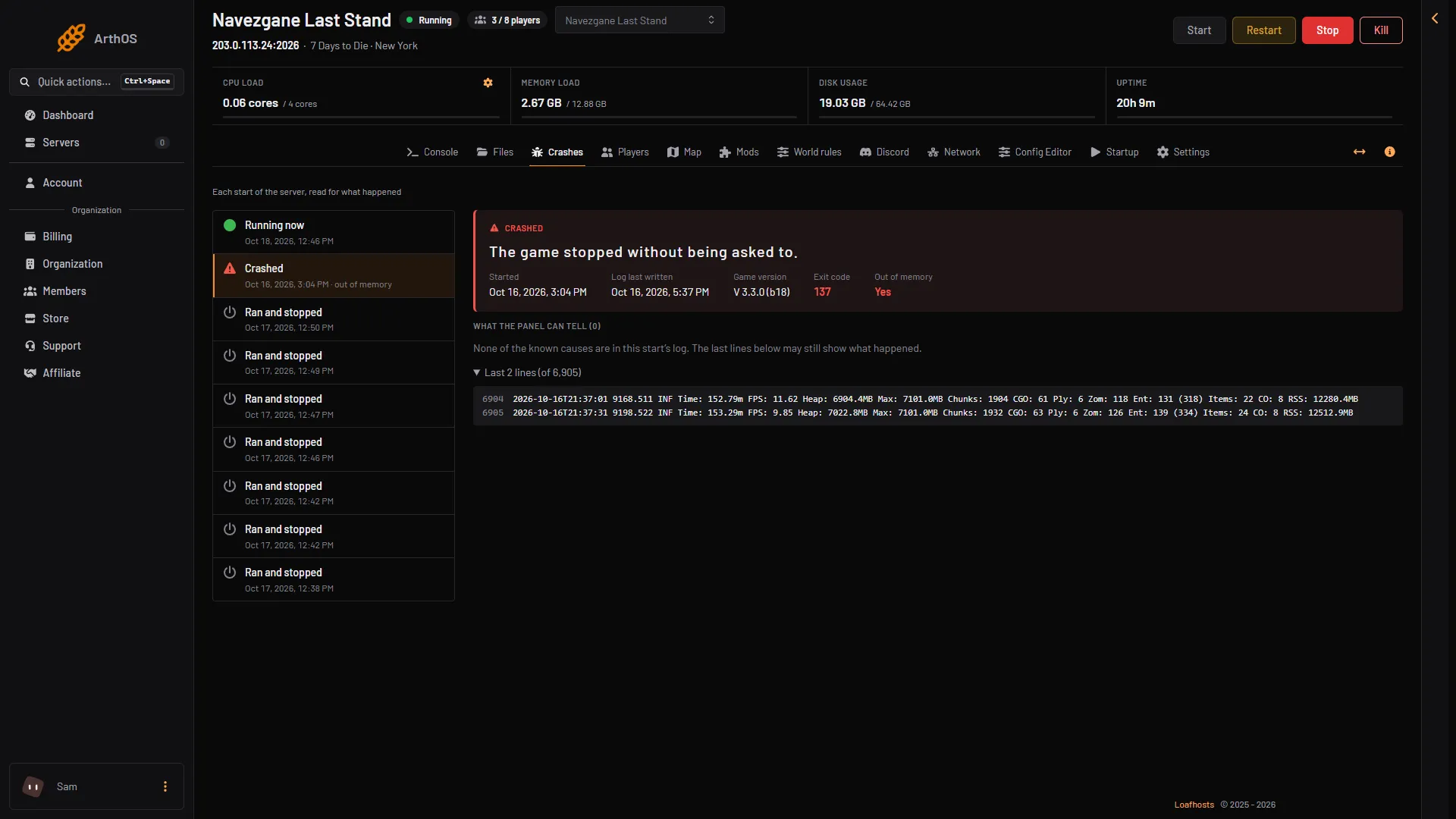
- Exit code 137
- Out of memory: Yes
- Last lines
Ease the load
- Open the Config Editor.
- In the group Performance, lower Zombies at once (1) (for example from 64 to 48) and Most view distance (2) (for example from 12 to 8).
- Turn off Distant buildings (3), or leave it on and keep Distant buildings only in claims on.
- Choose Save. The page says “Saved. Restart the server to apply the changes.” Choose Restart now.
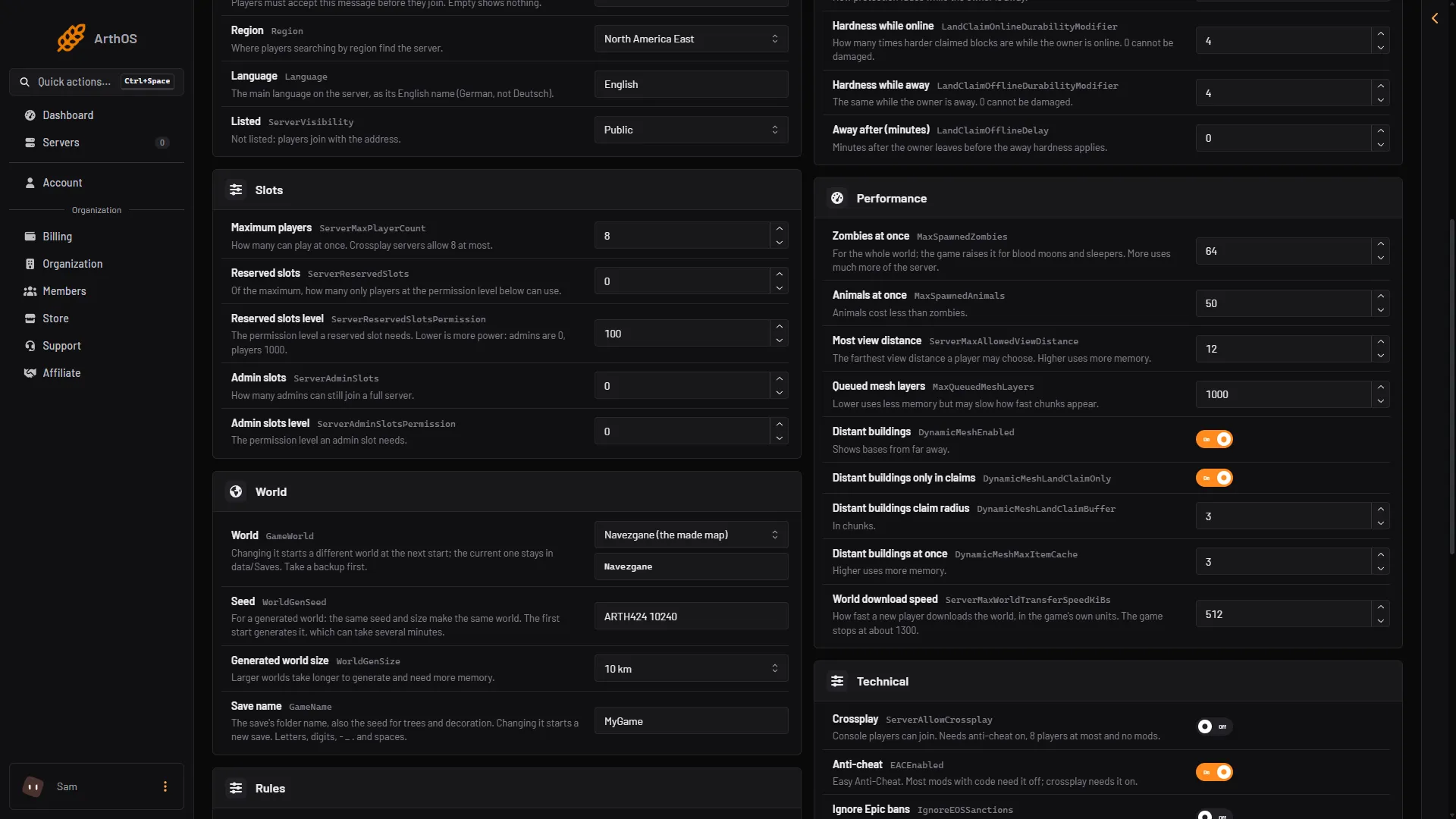
- Zombies at once
- Most view distance
- Distant buildings
The example numbers are a starting point, not game advice. Change one setting at a time and read the log again.
Rules that change how many enemies the game makes are on the World rules page. Blood Moon Count is in the group World and blood moons. Enemy Spawn, Day Enemy Density and Night Enemy Density are in the group Zombies and animals. They apply after a restart too.
More memory or cores
If the log shows memory growing and the settings are already low, the server needs more memory. See 7 Days to Die server requirements.
If it does not work
- Lag only during blood moons. See the blood moon guide.
- Lag since a mod was added. Open the Mods page, use the switch beside the newest mod to turn it off, and restart.
- The server is slow to join or load. A new generated world is built at its first start and takes minutes.
- The log shows
ERROR: Shader ... not supported on this GPU. The headless server prints this at every start. It is not a fault.
More: 7 Days to Die servers.
Sources: 7daystodie.wiki.gg: Blood Moon Horde, 7daystodie.wiki.gg: Server