









The Fun Pimps (TFP), who make 7 Days to Die, publish no memory or CPU figure for a dedicated server as of 19 October 2026. So this guide does not invent one. It lists what makes a server need more, so you can pick a size and know what to turn down if it struggles.
Disk space
The server installs from Steam without an account when the server is created, and takes about 17.7 GB. The disk usage in the server page header then shows about 19 GB. Saves, generated worlds and backups come on top of that.
- Each save lives in its own folder. A new save name or a new world adds another one.
- A player can uncover a limited part of the map. The game’s default lets one player’s map file grow to about 67 MB. That is the setting Map a player can uncover.
- Save size limit (MB) caps the disk space of one saved game. The default is -1, which means no limit. The game’s own warning: when a limit is reached, saved chunks may be reset to free space.
What decides memory and CPU
These are the things the game’s own settings file names as costly.
Players. Every player on is one more person the server must keep up with. Read Change the max players for the setting. A new Loafhosts server starts at 8.
World size. A generated world has one of three sizes: 6144, 8192 or 10240 blocks. The Config Editor calls them 6 km, 8 km and 10 km. The Change world box on the World rules page calls them 6.1 km, 8.2 km and 10.2 km. The panel says: “Larger worlds take longer to generate and need more memory.” A world is generated once, at the first start, and that takes minutes.
Zombies at once. The default is 64 for the whole world. The game’s comment says it scales up for blood moons (about 1.9 times) and for sleeper zombies (about 2.1 times). It also says that changing this setting can have a huge impact on performance. In the Config Editor it is Zombies at once. Animals cost less than zombies. See Animals at once.
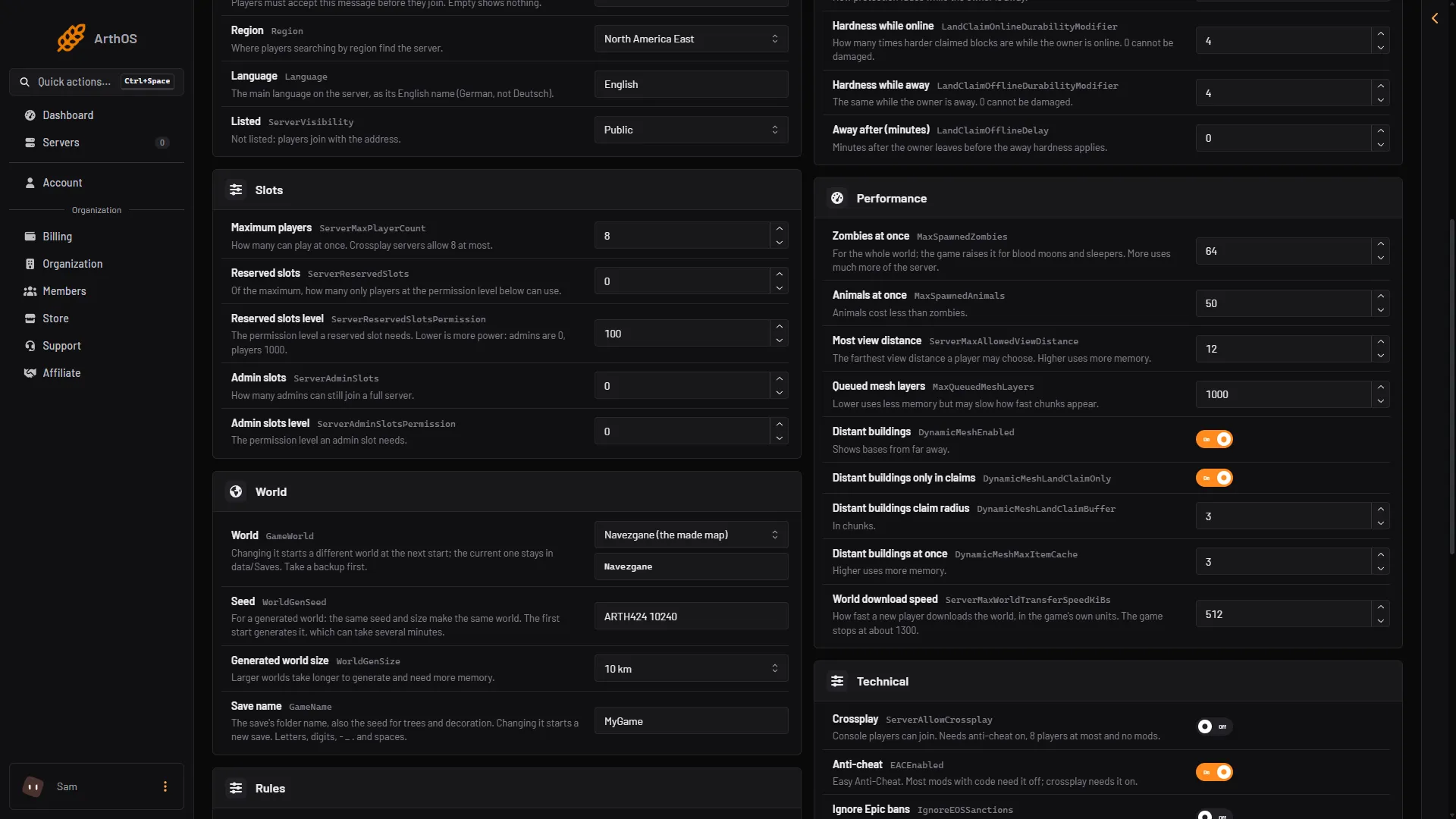
- Zombies at once
- Most view distance
- Distant buildings
All three settings are in the Performance group: Zombies at once (1), Most view distance (2) and Distant buildings (3).
View distance. The game says Most view distance has a high impact on memory and performance. It is the farthest distance a player may choose, from 6 to 12. The default is 12. Lowering it to 8 or 10 is the first thing to try on a server that struggles.
Chunk and building settings. Queued mesh layers (default 1000): lower uses less memory but chunks can appear more slowly. Distant buildings at once (default 3): higher uses more memory.
Mods and overhauls. A mod adds to what the server loads. A large overhaul changes a great deal of the game. No fixed figure exists, because every mod is different. Add mods a few at a time and watch the server after each.
Players’ computers are a separate matter
The game’s own store page recommends 12 GB of RAM and a four-core processor for playing. The official wiki says 16 GB or more is suggested, and that six cores suit multiplayer. Those numbers are for the game on a player’s computer, which also draws the graphics. A dedicated server has no screen to draw.
Watch the server instead of guessing
While players are on, the server writes a line to the Console every 30 seconds. It starts with Time: and holds the fields FPS, Heap, Ply, Zom and RSS.
Plyis the players on,Zomthe zombies,RSSthe memory the game uses in MB.- Watch
RSSduring a blood moon and with all your players on. If it keeps rising over several days, restart the server on a schedule. See Restart a 7 Days to Die server.
Exit code 137 means the process was killed. With Out of memory Yes, it was killed for using all its memory, and the Crashes page shows the start as Crashed. With Out of memory No, someone chose Kill or something else stopped it: check Activity, a tab in Settings.
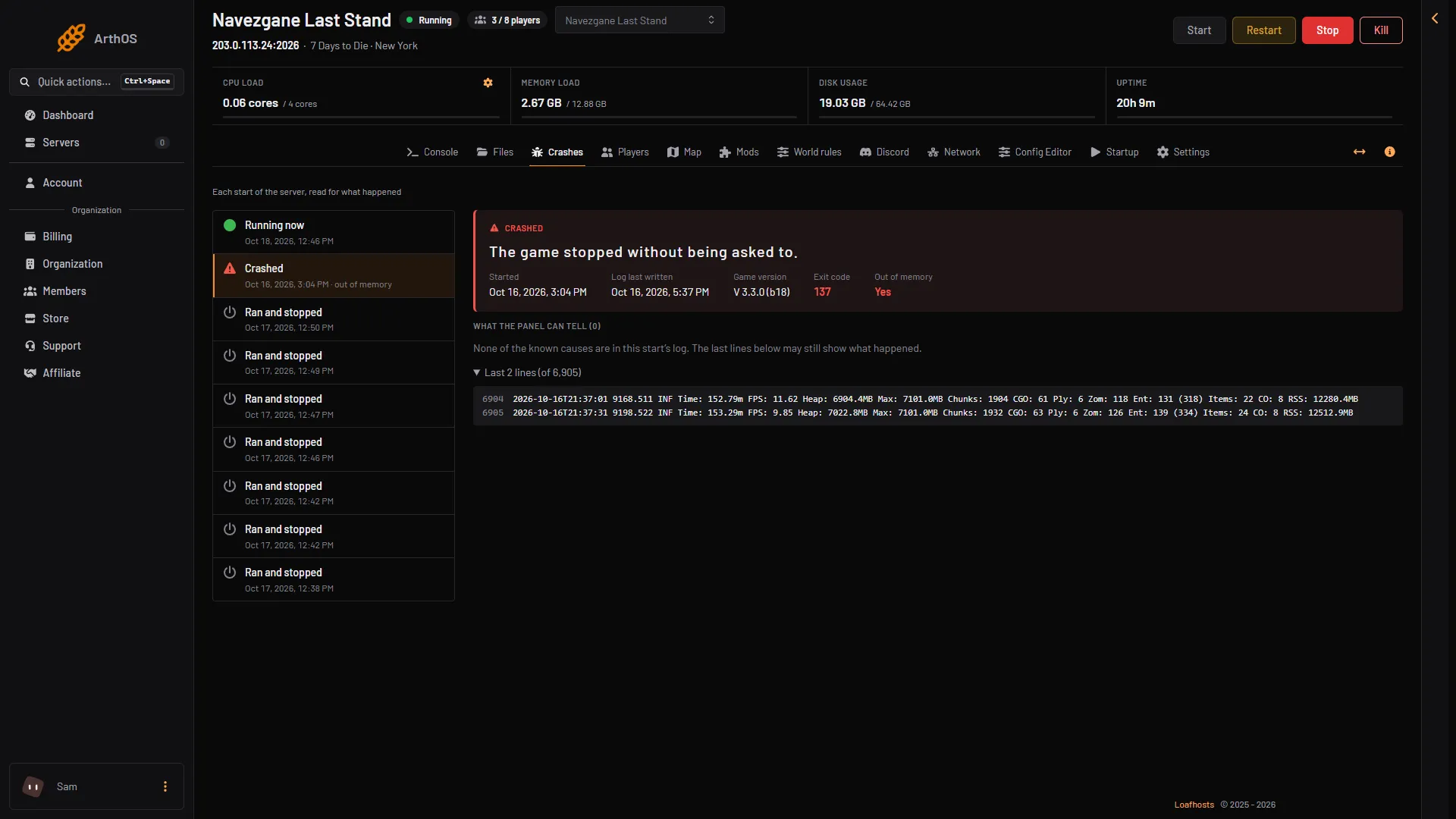
- Crashed
- Exit code 137
- Out of memory: Yes
The picture is demo data. Box 1 is the stopped start, box 2 its exit code and box 3 the memory answer.
If it does not work
- The server stopped and the Crashes page shows “Out of memory: Yes”. The start shows Crashed with Exit code 137. The finding “The server ran out of memory” appears only when the game’s own log says so. Lower Most view distance and Zombies at once, remove the newest mod, or use a bigger size.
- Everything lags during a blood moon. The zombie limit goes up for the horde. Lower Zombies at once.
- A new world takes a long time to start. That is the one-time world generation. Wait for it. A larger world takes longer.
- Not checked on V3.3.0 as of 19 October 2026: a safe memory figure per player, and the cost of any single mod.
More about the game: 7 Days to Die servers.
Sources: 7daystodie.wiki.gg: Serverconfig.xml, 7daystodie.wiki.gg: Multiplayer