






The game loads the latest save point when it starts. To go back to an older one, either restore a backup that holds it, or take the newer save points out of the way so the older one becomes the latest. The ArthOS panel shows your saves but has no button to choose one. If the newest save will not load, open Persistence and read Before the next start first.
See what you have
Open the Persistence tab. Saves on disk lists the newest save points, each as playthroughNNN / savepointNNN with the time it was written. It is a list only.
Before the next start also shows the Newest save: when it was saved, its scenario, the time played, the game version and the mods in it. If a game or mod update came after the save you want, read save games first. A save can be refused after an update.
The tab has no button to choose or load an older save.
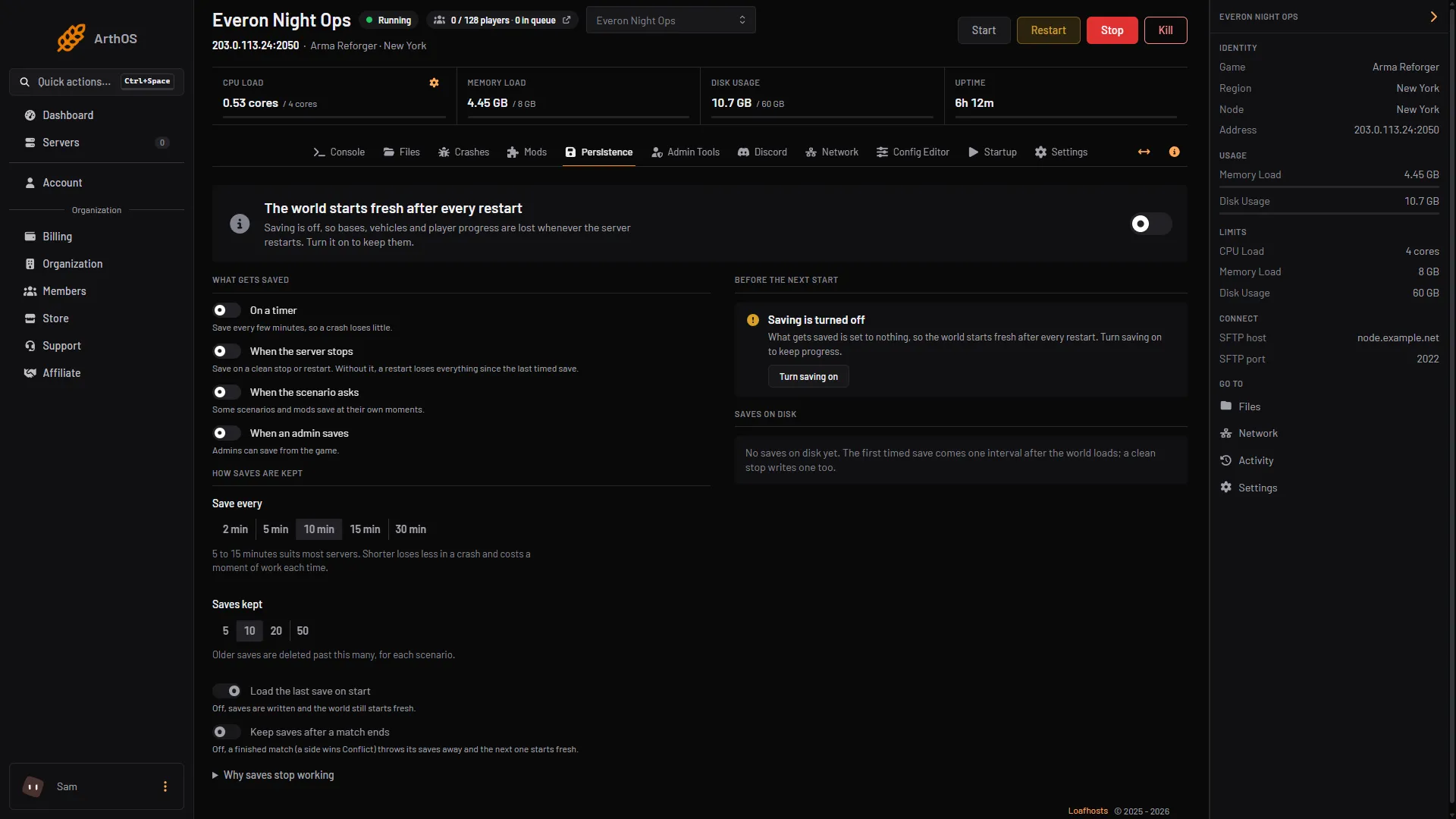
- Saves kept
- Load the last save on start
Way 1: restore a backup
This is the safest way if you made a backup before the change you want to undo.
- Choose Stop and wait until the server is offline.
- Open Settings, then Backups. Open the menu of the backup and choose restore. The steps and the two switches are in backing up the server.
- Leave Do you want to delete all files of this server before performing this action? off unless you are sure. On, it removes everything that is not in the backup first and cannot be undone.
- Choose Restore, then start the server when it finishes.
A restore puts the backup’s files back over what is there. It does not remove save points made after the backup. The game may still pick the newest one. If the world is not the old one, use Way 2 to move the newer save points aside.
Way 2: move the newer save points aside
- On Persistence, check Load the last save on start is on. Choose Stop and wait until the server is offline.
- Open Files and go to
/profile/profile/.save/game, then the folder of your scenario, then theplaythroughNNNfolder. - Each
savepointNNNfolder has ameta-info.jsonfile. Open it.m_iSavedAtUnixis the time of the save in Unix seconds, andm_iPlaytimeSecondsis the time played. Find the save point you want to go back to. - Create a folder outside
.save, for example/profile/saves-moved. Move every save point newer than your choice into it. Use Move or Rename. Do not delete them yet. - Choose Start. The log (in the Console) should say the session was restored:
[PERSISTENCE] Session restored.
If Session restored. does not appear or the world is wrong, move the save points back and try the next older one. If the old world is the one you wanted, you can delete the moved folders later.
Way 3: load one save by its ID (your own host only)
This way is for people who host the server themselves. On a Loafhosts server you cannot add startup arguments, so use Way 1 or Way 2.
Bohemia’s -loadSessionSave startup parameter can take the ID of a save. The ID is in that save point’s meta-info.json.
ArmaReforgerServer -loadSessionSave 0d51b792-2a66-47d2-b71a-09086cffba3aWithout an ID the parameter loads the latest save. The matching key in config.json is game.gameProperties.persistence.loadSessionSave (Bohemia’s default is true). Add the parameter to your own start line. Remove the parameter afterwards so later starts use the latest save. On a Loafhosts server, the Always load the last save variable in Startup only adds the plain parameter, so the newest save always loads. You usually do not need it: set saving on the Persistence tab, where loading the last save is already on.
If it does not work
- The newest world loads, not the old one. A newer save point is still in place. Move it aside as in Way 2.
- The server starts fresh. Loading is off, or the save is for another scenario, game version or mod set. Open Persistence: Before the next start names the cause, and the log shows
[SaveGameManager] Starting new playthrough. - A save is refused after an update. The save stays on disk. It can load again once your mods catch up.
- Saves were deleted past the limit. Only the newest are kept. Raise Saves kept (1 in the picture above), and restore from a backup.
More about the game: Arma Reforger servers.
Sources: Bohemia wiki: Startup Parameters, Bohemia wiki: Server Config, Bohemia wiki: Persistence System