






To start an Arma Reforger world fresh, stop the server and delete the save folder of the scenario in Files. On the next start the game builds a new world. The panel’s Persistence tab only lists saves, so the delete is done by hand. Take a backup first, because a deleted save cannot be brought back.
What a wipe deletes
The game saves the world’s state: bases, vehicles and player progress. Those saves are what a wipe removes. A save belongs to one scenario, so wiping one scenario does not touch the saves of another.
A wipe does not touch your mods, config.json, the Server Admin Tools settings or your logs. They are in other folders.
Wipe from the ArthOS panel
- Back up. Open Settings, then Backups, and create a backup. The steps are in backing up the server. You can leave the mods folder out.
- Choose Stop on the server and wait until it is offline. Stopping first lets the shutdown save finish, so it does not write a new one after your delete.
- Open Files and go to
/profile/profile/.save/game. - Open that folder. It holds one folder per scenario. Delete the folder of the scenario you want to wipe. Delete all of them to wipe every scenario.
- Choose Start. In Console you should see
[SaveGameManager] Starting new playthrough.
Start fresh without deleting anything
If you only want the next start to be fresh, you can keep the saves and tell the server not to load them.
- Open the Persistence tab.
- Under How saves are kept, turn off Load the last save on start (1).
- Open Startup. If Always load the last save is on, turn it off too. Otherwise the start still loads the save.
- Restart the server.
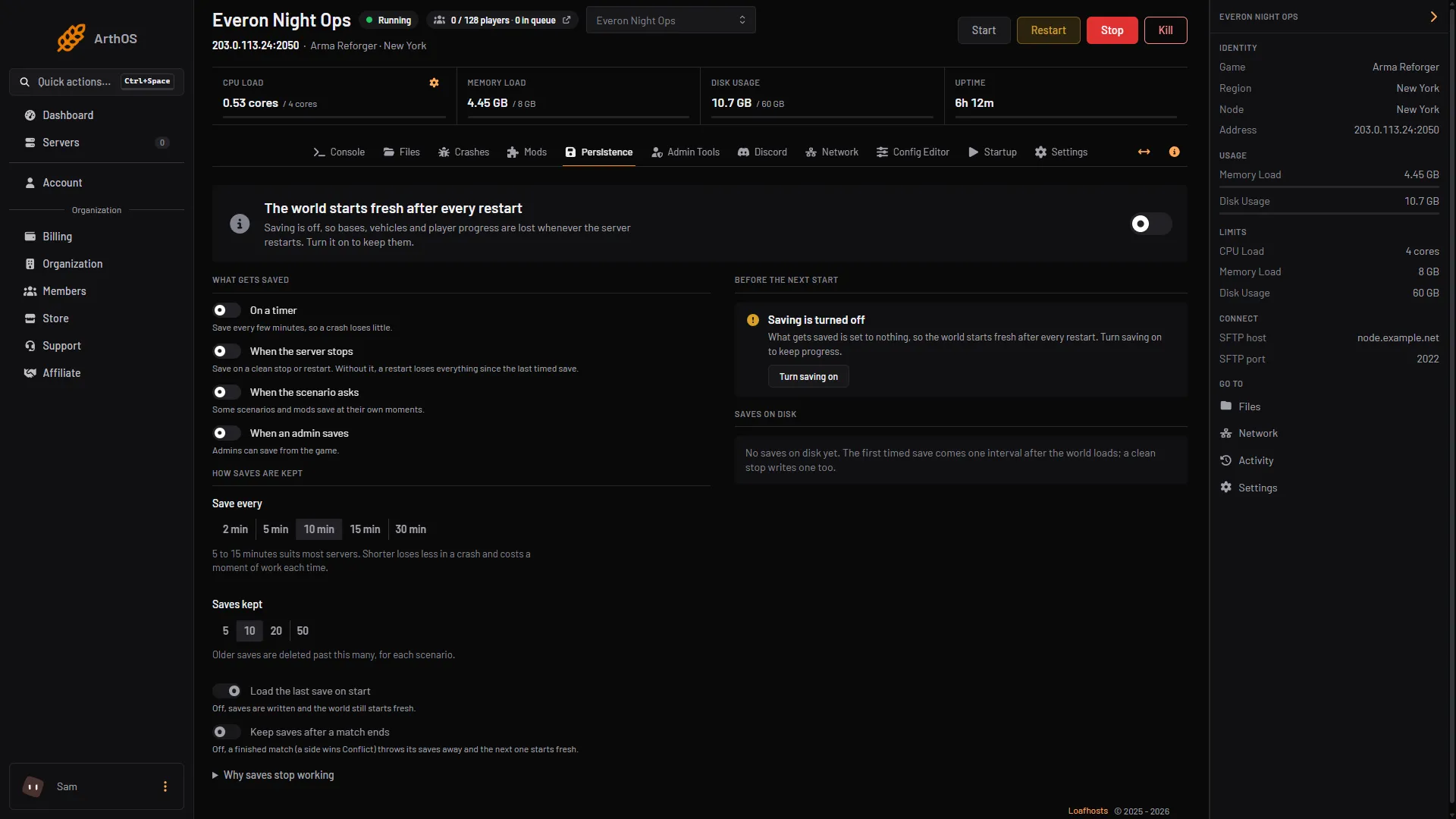
- Load the last save on start
- Keep saves after a match ends
The server writes saves as before, but the world starts fresh. Turn the switches back on once the new world is how you want it, or the next restart will start fresh again. Old saves are removed by themselves past Saves kept, for each scenario.
Let a finished match wipe it
On Conflict, the Persistence tab has Keep saves after a match ends (2 in the picture above). With it off, a finished match (a side wins) throws its saves away and the next match starts fresh.
By hand
On your own host, stop the server and delete the scenario’s folder inside .save/game in your -profile folder. Bohemia’s persistence block also has keepSessionSave, default false, which decides whether the saves survive the end of a mission. See save games.
If it does not work
- The old world is back. The server was still running when you deleted, and its shutdown save wrote a new one. Stop it fully, delete again, then start. Also check you deleted the folder of the scenario you run now.
- The folder is not there. The server may not have saved yet. Open Persistence: Saves on disk lists what exists.
- The log does not say a new playthrough started. A save for this scenario was still on disk and was loaded. Open Persistence: Saves on disk lists what is left.
- You wiped the wrong scenario. Restore your backup. See restore a save.
More about the game: Arma Reforger servers.
Sources: Bohemia wiki: Persistence System, Bohemia wiki: Server Config, Bohemia wiki: Startup Parameters