






If your server is missing from the browser, check these in order: the server is running and has finished starting, Show in the server browser is on, and console players have Crossplay with consoles on. Then check the game version and the query port.
Check in this order
- Is it running? The header of the server page shows its status. If it says Offline, press Start. If it stopped by itself, open the Crashes tab. It lists each start and how it ended. See server crashes.
- Has it finished starting? The server appears in the browser only after its log prints
Entered online game state.Watch the Console tab. A start with many mods can take several minutes. See server logs. - Is it shown? Open the Config Editor tab. In the Server group, Show in the server browser (1) must be on. Its help text says “Off hides the server from the list; players can still join by address.” Bohemia’s setting is
game.visible, which istrueby default. Save and restart if you change it. - Does it accept consoles? Xbox and PlayStation players see a server only when Crossplay with consoles is on. See let consoles join.
- Are you searching right? Search for a distinctive word from the server name. Check the name in the Server name row matches what you type.
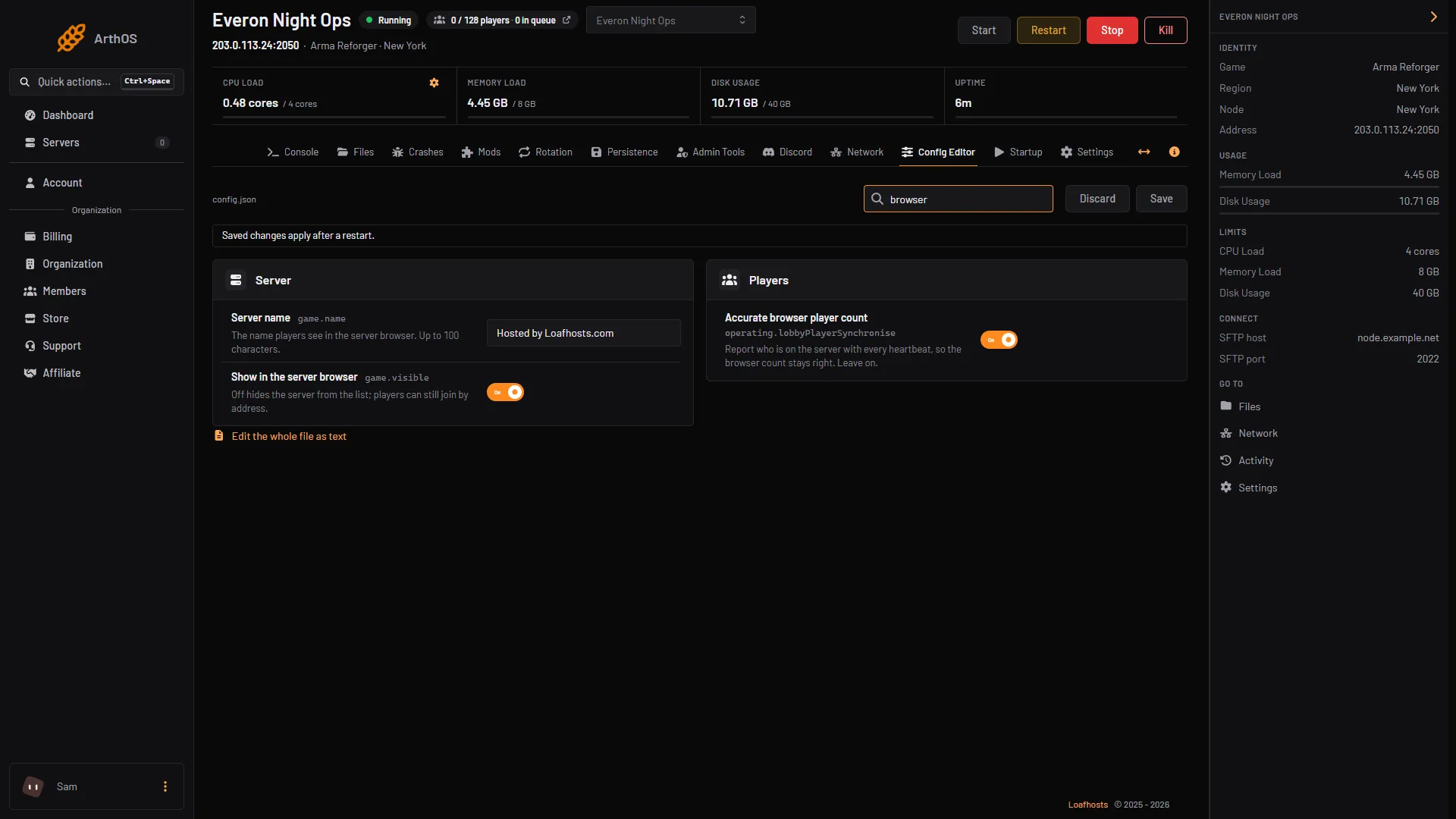
- Show in the server browser
- Accurate browser player count
PC players can still connect by address. Console players cannot, so for them the server must be shown and crossplay must be on.
If PC players see the server and console players do not, check Show in the server browser and Crossplay first, then ask which game version the console runs (not checked how the browser treats a version mismatch).
Also look at Accurate browser player count (2). Its help text reads “Report who is on the server with every heartbeat, so the browser count stays right. Leave on.” If the count in the list looks wrong, make sure it is on.
Game version mismatch
After Bohemia releases an update, update the server too and restart it, so the server runs the current stable version. That is 1.8.0.13 as of 12 October 2026. Not checked on 1.8 as of 12 October 2026: exactly how the browser treats a server on another version.
The query port
The server answers Steam-style queries on a separate UDP port, which Bohemia calls the A2S port. The default is 17777. Not checked on 1.8 as of 12 October 2026: whether the in-game browser depends on it. On a Loafhosts server the panel sets it from the port plan, and it follows the game port. You cannot change it in the Startup tab, where it is marked read only.
If you host at home, forward this UDP port on your router as well as the game port. See the setup guide.
By hand
Open config.json and check these values:
"game": {
    "visible": true,
    "crossPlatform": true
},
"a2s": {
    "address": "0.0.0.0",
    "port": 17777
}
Only a2s needs an address; the port defaults to 17777. Restart after editing.
If it does not work
- It appears, then vanishes. The server may be crashing. Open Crashes.
- Players can join by address but the list is empty. The server is hidden, or the query port is blocked. You can still connect by address.
Sources: Bohemia wiki: Server Config, Bohemia wiki: Server Hosting, Bohemia wiki: Crash Report