






Day lasts 30 minutes and night lasts 12 minutes by default. A full day and night is day length plus night length (60 and 12 make 72 minutes). In the Config Editor, Day length and Night length change that. They only work while Difficulty is Custom.
Checked on the 0.9 server. Enshrouded 1.0 is released on 15 October 2026. The defaults and limits come from the server’s own readme (version 0.9.0.0). See Enshrouded servers.
In the ArthOS panel
- Open Config Editor. In the World group, find Day length and Night length.
- Choose a length for Day length (1) and Night length (2) in the picture below. The panel offers 2, 4, 8, 12, 20, 30, 45 and 60 minutes. A smaller number means a shorter day or night.
- Choose Save. The panel sets Difficulty to Custom for you. Saving while the server runs is fine; restart when it is quiet to apply it.
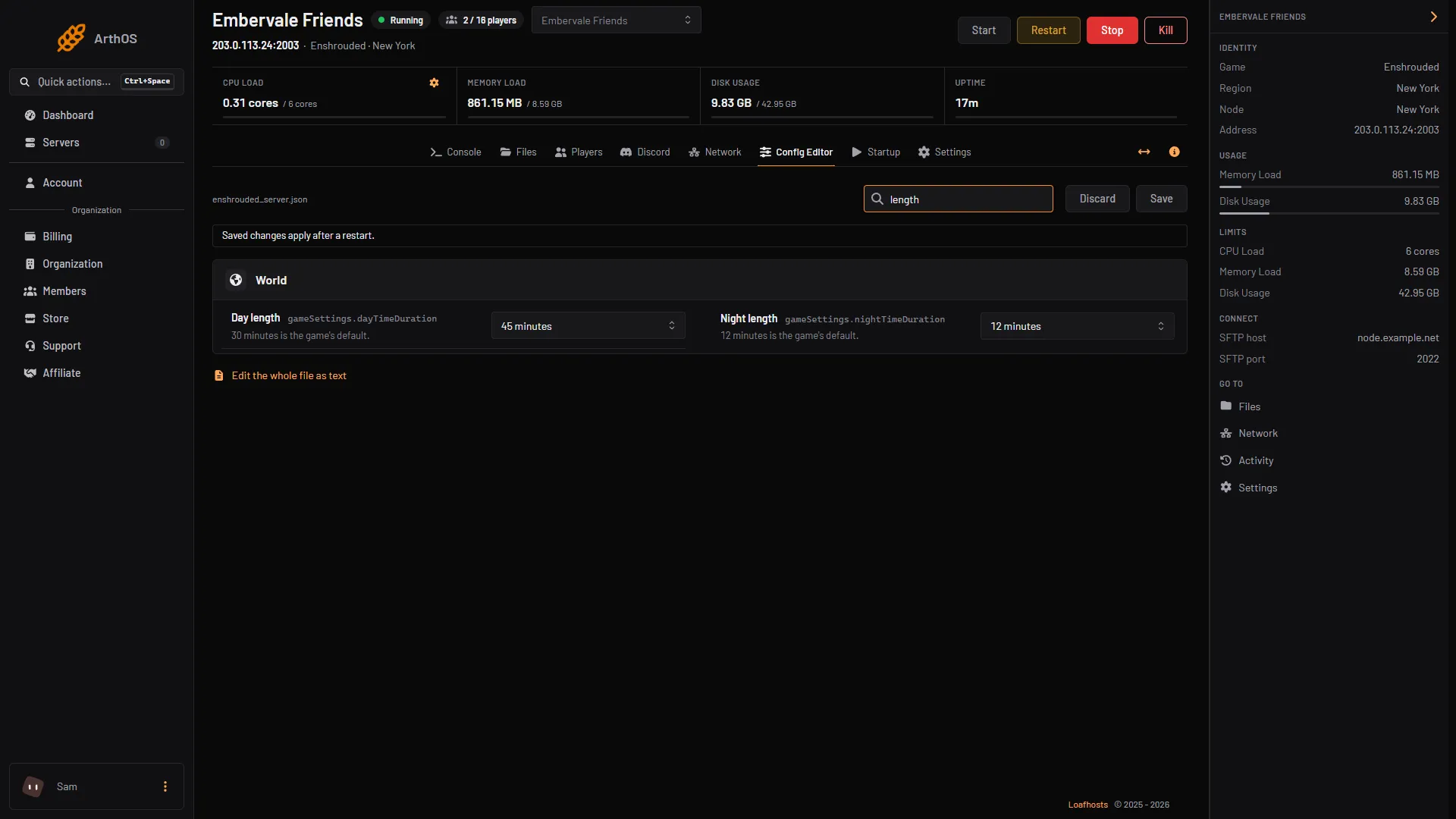
- Day length
- Night length
The help under the rows reads “30 minutes is the game’s default.” and “12 minutes is the game’s default.”
By hand
The file counts in nanoseconds. One minute is 60,000,000,000. The panel’s choices are:
| Minutes | Value in the file |
|---|---|
| 2 | 120000000000 |
| 4 | 240000000000 |
| 8 | 480000000000 |
| 12 | 720000000000 |
| 20 | 1200000000000 |
| 30 | 1800000000000 |
| 45 | 2700000000000 |
| 60 | 3600000000000 |
- Stop the server (needed for hand edits) and open
enshrouded_server.jsonin Files. - Set
"gameSettingsPreset": "Custom". - Under
"gameSettings", set the two lines:
"dayTimeDuration": 1800000000000,
"nightTimeDuration": 720000000000- Save the file and start the server.
The readme allows 2 to 60 minutes for each. In game, the time is shown in minutes.
If it does not work
- Nothing changed. Difficulty is not Custom, or the server has not restarted since you saved.
- A hand edit was lost. The game rewrites the file when it starts. Stop the server before editing the file in Files.
- The number looks wrong in the file. It is nanoseconds, not minutes. Multiply minutes by 60,000,000,000.
Sources: store.steampowered.com: 1203620