






Every Enshrouded server has one Difficulty setting with five choices: Default, Relaxed, Hard, Survival and Custom. Pick one in the Config Editor and restart the server to apply it. Enshrouded servers start on Default.
Checked on the 0.9 server. Enshrouded 1.0 is released on 15 October 2026. The descriptions below come from the server’s own readme (version 0.9.0.0).
What each choice does
- Default: every value at the game’s default. It is the way Enshrouded played before difficulty settings existed, and the readme recommends it for first-time players.
- Relaxed: fewer enemies, and more resources and loot. For players who mostly want to build and wander.
- Hard: more enemies, and they are more aggressive. A tougher fight.
- Survival: more aggressive enemies, plus extra survival mechanics on top. For players who want some punishment.
- Custom: you set the individual values yourself. See custom game settings.
The readme does not list the exact numbers behind Relaxed, Hard or Survival. If you want known numbers, use Custom.
In the ArthOS panel
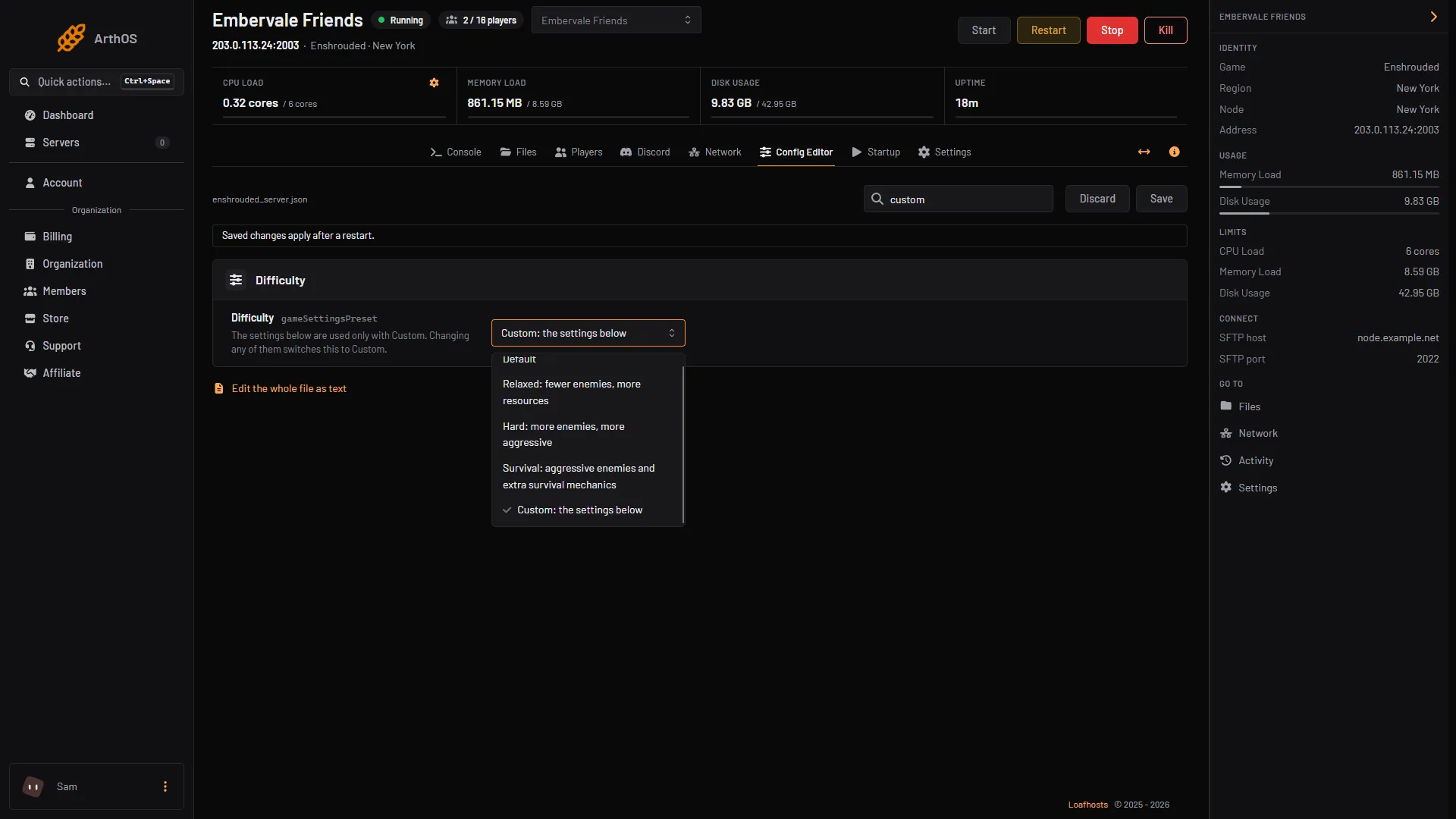
- Open Config Editor. In the Difficulty group, open the Difficulty row.
- Choose one from the list (boxes 1 to 4; Custom is the fifth, below). The panel shows these names:
- Default
- Relaxed: fewer enemies, more resources
- Hard: more enemies, more aggressive
- Survival: aggressive enemies and extra survival mechanics
- Custom: the settings below
- Choose Save. Saving while the server runs is fine; restart when it is quiet.
- Default
- Relaxed
- Hard
- Survival
The change affects the world’s rules, not the world. Bases and progress stay as they are.
By hand
- Stop the server and open
enshrouded_server.jsonin Files. - Set the line to one of
"Default","Relaxed","Hard","Survival"or"Custom":
"gameSettingsPreset": "Relaxed",- Save the file and start the server.
If it does not work
- Your own numbers are ignored. Difficulty is not Custom. Set Custom.
- Difficulty went to Custom by itself. You changed an individual setting. This is on purpose, because those settings do nothing under any other choice.
- A hand edit was lost. The game rewrites the file when it starts. Stop the server before editing the file in Files.
Sources: store.steampowered.com: 1203620