






All enemy settings are in the Enemies group of the Config Editor. They count only while Difficulty is Custom, and the panel switches it for you when you save. A value of 1 means normal. Bosses have their own two rows.
Checked on the 0.9 server. Enshrouded 1.0 is released on 15 October 2026. Ranges come from the server’s own readme (version 0.9.0.0). See Enshrouded servers.
The settings
| Panel row | Choices | What it does |
|---|---|---|
| Enemy numbers | Few, Normal, Many, Extreme | How many enemies are in the world. |
| Enemies attacking at once | Few, Normal, Many, Extreme | How many may attack a player at the same time. |
| Enemy damage | 0.25 to 5 | Damage enemies deal. Not bosses. |
| Enemy health | 0.25 to 4 | Enemy health. Not bosses. |
| Enemy stun resistance | 0.5 to 2 | Higher takes longer to stun. Not bosses. |
| How far enemies notice players | 0.5 to 2 | How far they see and hear you. Lower makes sneaking easier. Not bosses. |
| Enemy attack frequency | 0.25 to 4 | How often enemies attack. Not bosses. |
| Boss damage | 0.2 to 5 | Damage of boss attacks. |
| Boss health | 0.2 to 5 | Boss health. |
| Peaceful enemies | On or off | On, enemies attack only when attacked first. Bosses still fight. |
Because the normal-enemy rows skip bosses, halving Enemy health does not change any boss.
In the ArthOS panel
- Open Config Editor and find the Enemies group.
- Change the rows you want. Type a number inside the range, or pick from the list. In the picture below, the first row is box 1 (Enemy numbers) and the last is box 2 (Peaceful enemies).
- Choose Save. Saving while the server runs is fine; restart when it is quiet to apply it.
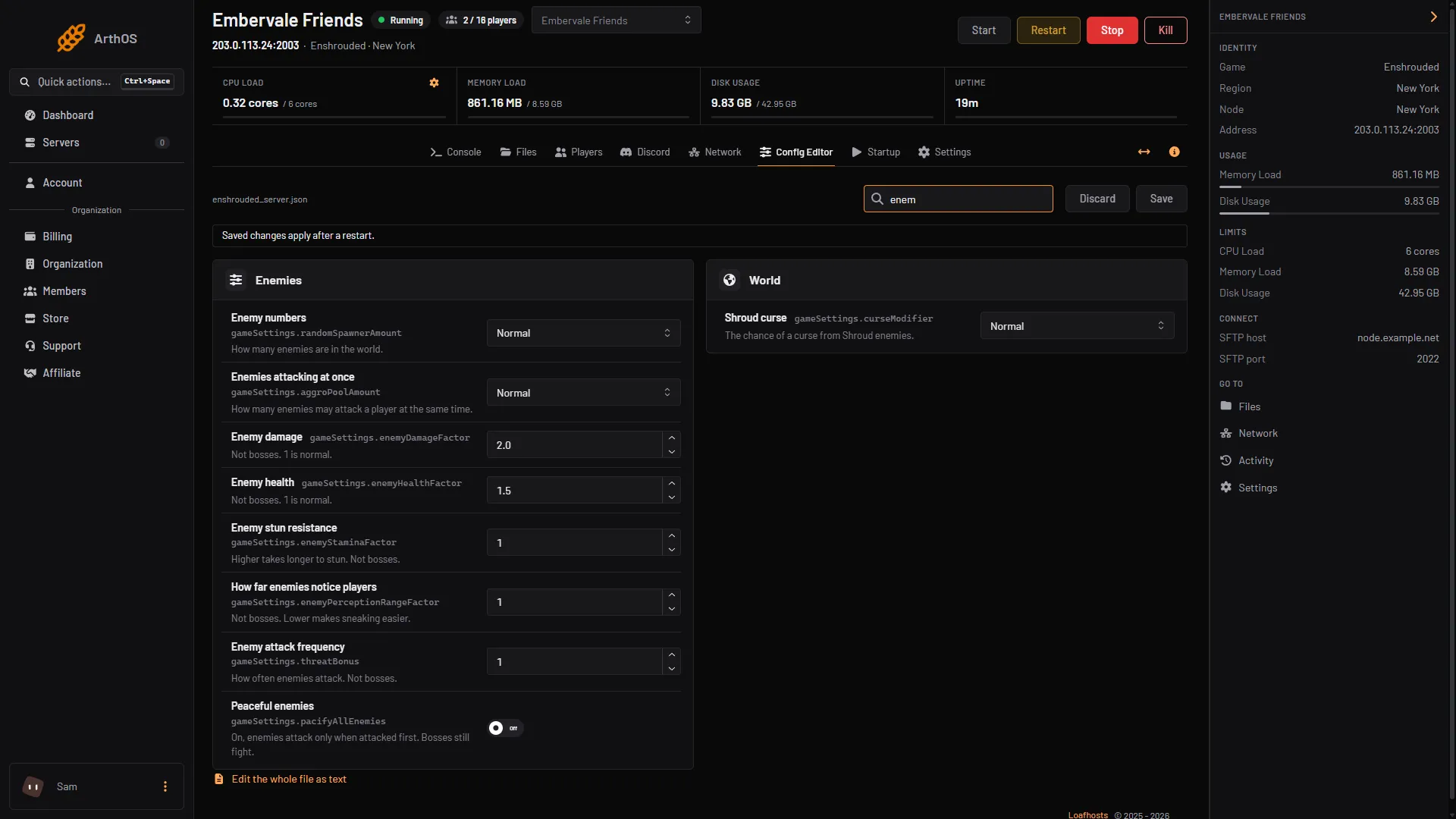
- Enemy numbers
- Peaceful enemies
By hand
- Stop the server (needed for hand edits) and open
enshrouded_server.jsonin Files. - Set
"gameSettingsPreset": "Custom". - Change the lines under
"gameSettings":
"randomSpawnerAmount": "Few",
"aggroPoolAmount": "Normal",
"enemyDamageFactor": 1,
"enemyHealthFactor": 1,
"enemyStaminaFactor": 1,
"enemyPerceptionRangeFactor": 1,
"threatBonus": 1,
"bossDamageFactor": 1,
"bossHealthFactor": 1,
"pacifyAllEnemies": false- Save the file and start the server.
If it does not work
- Enemies did not change. Difficulty is not Custom.
- Bosses did not change. The normal-enemy rows skip bosses. Use Boss damage and Boss health.
- Peaceful enemies still fight. Bosses are not covered. Enemies also fight back when attacked.
- A hand edit was lost. The game rewrites the file when it starts. Stop the server before editing the file in Files.
Sources: store.steampowered.com: 1203620