






A new server has no starving, so nothing to change unless you want it. Four settings control how survival feels on an Enshrouded server: Hunger and starving, Hungry before starving, Food effects last and Weapons wear out. All four are in the Player card of the Config Editor. Weapon wear is on.
Checked on the 0.9 server. Enshrouded 1.0 is released on 15 October 2026. The names and limits below come from the readme that ships with the server (version 0.9.0.0).
What each setting does
- Hunger and starving. Off by default. When it is on, a player who does not eat or drink loses health until they die.
- Hungry before starving. How long a player stays hungry before starving begins. You pick 5, 8, 10, 15 or 20 minutes. The game’s default is 10 minutes. It only matters while Hunger and starving is on.
- Food effects last. A multiplier on how long food bonuses last. It runs from 0.5 to 2. 1 is normal and 2 is twice as long. In game it shows as a percentage.
- Weapons wear out. On by default. Turn it off and weapons never break.
In the ArthOS panel
- Open the Config Editor tab.
- In the Player card, find the setting you want.
- For a switch, use the toggle. For Hungry before starving, pick a time from the list. For Food effects last, type a number from 0.5 to 2.
- Choose Save.
- If the server is running, restart it. Saved changes apply after a restart.
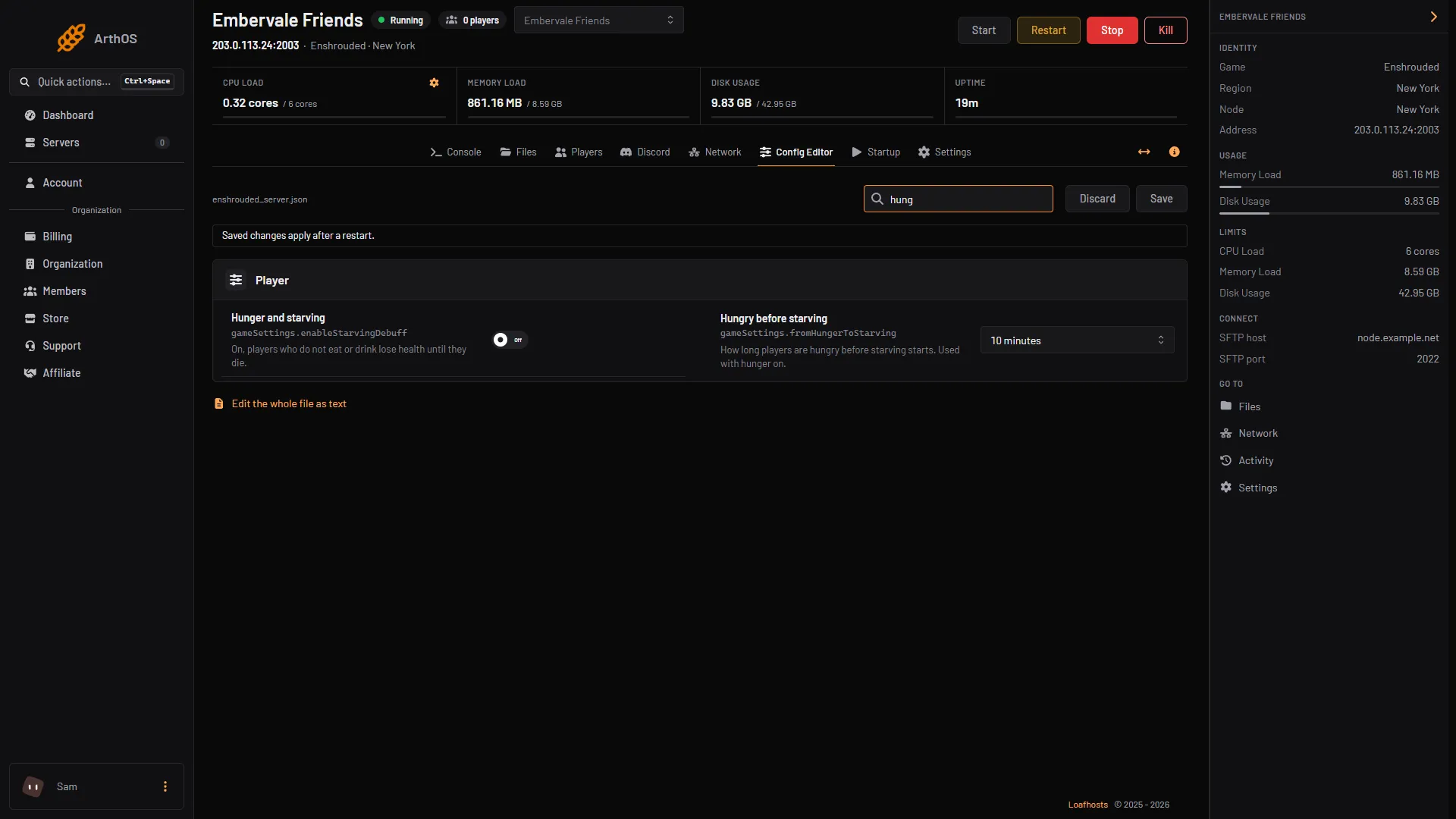
- Hunger and starving
- Hungry before starving
The two hunger rows are marked 1 and 2. Food effects last and Weapons wear out sit in the same card.
By hand
- Stop the server. The game rewrites
enshrouded_server.jsonwhen it starts, so edit it while the server is stopped. - Open
enshrouded_server.jsonin Files. - Set
"gameSettingsPreset": "Custom". - Change the values inside
gameSettings:
"enableStarvingDebuff": true,
"fromHungerToStarving": 600000000000,
"foodBuffDurationFactor": 1,
"enableDurability": true
fromHungerToStarving is in nanoseconds. 600000000000 is 10 minutes. The readme allows 5 to 20 minutes.
- Save the file and start the server.
If it does not work
- Nothing changed in game. Difficulty is not Custom. The game ignores
gameSettingsotherwise. - My hand edit disappeared. It was made while the server ran, and the game wrote the file again at start. Stop the server first.
- The panel will not accept my number. Food effects last takes 0.5 to 2. Anything outside that is refused.
- Players starve at once. Raise Hungry before starving, or turn off Hunger and starving.
More about the game: Enshrouded servers.
Sources: store.steampowered.com: 1203620, enshrouded.wiki.gg: Death