






On an Enshrouded server, what a player may do depends on the password they type when they join. Each password belongs to a group. A new server has four groups: Admin, Friend, Guest and Visitor. Each group has its own permission switches.
Keen Games, who make Enshrouded, describe this in the readme that comes with the dedicated server (version 0.9.0.0). Checked on the 0.9 server. Enshrouded 1.0 is released on 15 October 2026.
The five permissions
Every group has the same five switches. The panel and the settings file name them differently:
| In the panel | In the file | What it allows |
|---|---|---|
| Kick and ban | canKickBan | Kick players and ban them for good. |
| Open storage in bases | canAccessInventories | Open chests, factories and other containers in player bases. Chests in the open world are not affected. |
| Change the world outside bases | canEditWorld | Dig, terraform and destroy outside bases. |
| Build in bases | canEditBase | Build, terraform and remove things inside bases, and add or remove water. |
| Place and upgrade Flame Altars | canExtendBase | Place, remove and upgrade Flame Altars. |
What a new server gives each group
These are the values a new server’s file starts with, from Keen’s readme.
| Group | Kick and ban | Storage | World | Build | Flame Altars |
|---|---|---|---|---|---|
| Admin | yes | yes | yes | yes | yes |
| Friend | no | yes | yes | yes | no |
| Guest | no | no | yes | no | no |
| Visitor | no | no | no | no | no |
Everyone except Visitor can still fight, gather, dig for resources and do quests.
In the ArthOS panel
- Open the Players page of your server.
- Find Groups and passwords. Each group is a row with its password and five switches.
- Turn the switches on or off for each group.
- Choose Save groups.
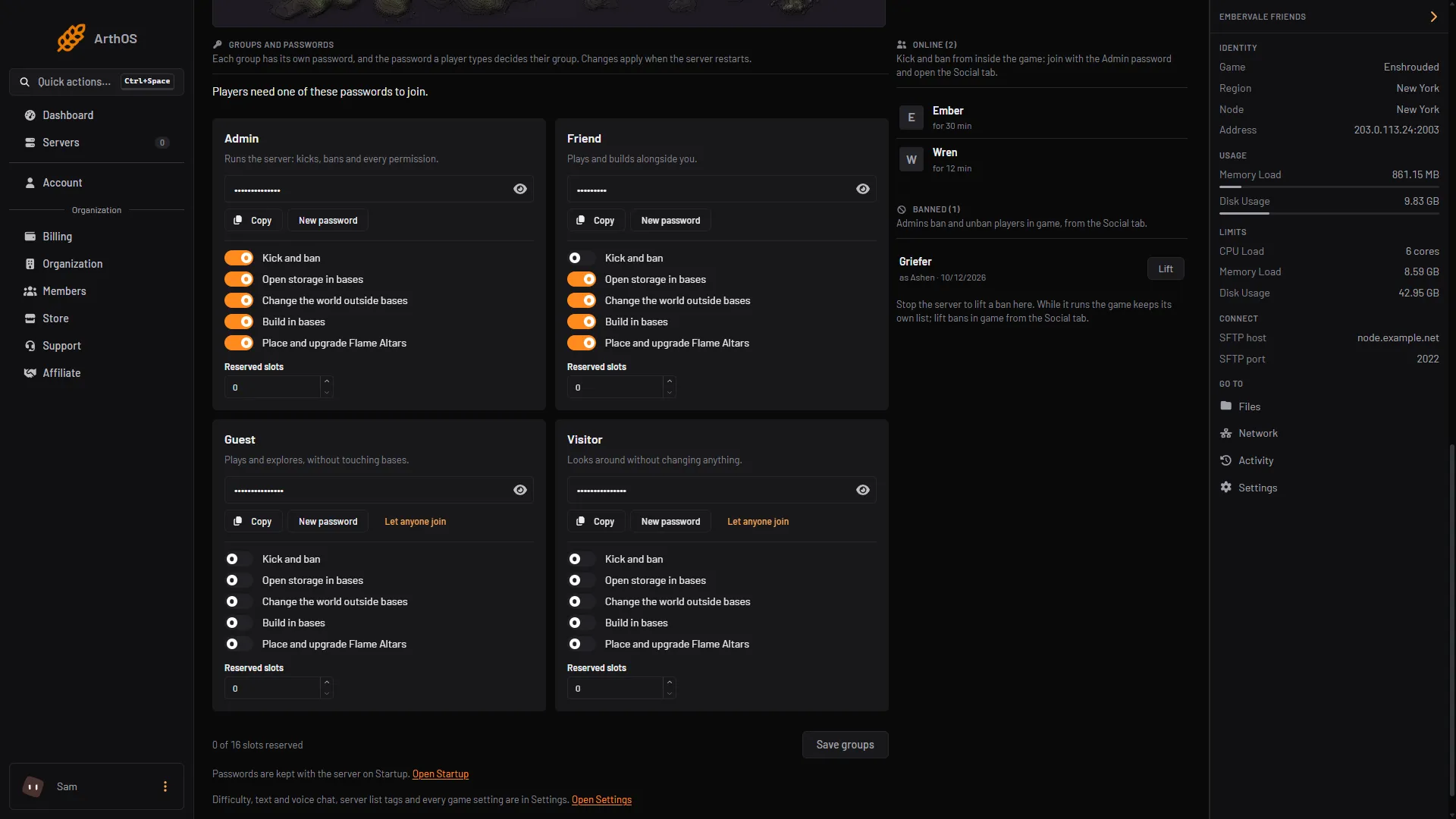
- The five switches of a group
- Save groups
The five switches of each group sit on its card (box 1). Choose Save groups (box 2) when you are done. Save groups saves only the switches and Reserved slots. The switches in the picture are the ones set on the test server, not the values above.
The panel confirms “Groups saved. They apply when the server restarts.” Restart the server to use them. A password you change shows Applies at restart until then.
The page also warns you when two groups share a password (players can only ever join as one of them) or when a group has no password.
Passwords are kept on the Startup page: Admin password, Friend password, Guest password and Visitor password. On Players you can copy a password, make a new one with New password, or let anyone join as Guest or Visitor with Let anyone join. New password saves the password at once; a restart applies it. Let anyone join is offered only for Guest and Visitor. See set a server password.
Groups added in the file
You can add more groups in enshrouded_server.json. The new group then appears on Players after the four standard ones, with its switches and Reserved slots. For these you change the switches and Reserved slots on the page, but the password is set in the file. Pick a password different from the other groups, or players can only ever join as one of them.
The Config Editor’s “Edit the whole file as text” is a second way in. Saving in the Config Editor while the server runs is fine: the change applies at the next start. Stop the server first only for hand edits of the file in Files, and to Lift a ban.
By hand
Stop the server first. The game rewrites enshrouded_server.json when it starts, so an edit made while it runs can be lost. Open the file in Files. Each group sits in userGroups. To add one, add a block after the existing groups:
{
    "name": "Builder",
    "password": "pick-a-long-password",
    "canKickBan": false,
    "canAccessInventories": true,
    "canEditWorld": false,
    "canEditBase": true,
    "canExtendBase": false,
    "reservedSlots": 0
}
Keep the first four groups where they are. On Loafhosts the panel writes their names and passwords from Startup in that order at every start.
Start the server again.
If it does not work
- The switches are greyed out. Your role cannot edit files. Ask the server owner.
- A player joins with the wrong rights. Two groups may share a password. Give each its own.
- Anyone can join as Admin. A group with no password lets everyone in. Admin always needs a password in the panel.
- A change did nothing. Restart the server. Groups are read at start.
More about the game: Enshrouded servers.
Sources: store.steampowered.com: 1203620