






A reserved slot keeps a seat free for one group. When a group has reserved slots, the server counts as full for players of other groups once only those seats are left. That way your Admins and Friends can still join when Guests have filled the server.
Keen Games’ readme for the dedicated server (version 0.9.0.0) describes it. Checked on the 0.9 server. Enshrouded 1.0 is released on 15 October 2026.
An example
The server has 16 player slots. You give Admin 2 reserved slots and Friend 4.
- Guests and Visitors can fill 10 seats. After that the server shows as full to them.
- The other 6 seats wait for Admin and Friend players.
A reserved seat stays empty until someone from that group joins: with 6 reserved on 16, other groups are never more than 10.
The limit
The reserved slots of all groups added together cannot be more than the server’s player slots. The panel shows the sum under the groups, for example “6 of 16 slots reserved”. If the sum is too high, Save groups stays off.
A server has at most 16 slots. Change them in Player slots on the Startup page. See player slots.
In the ArthOS panel
- Open the Players page of your server.
- In Groups and passwords, find Reserved slots on the group’s row. Type a number from 0 to 16.
- Check the total under the list.
- Choose Save groups.
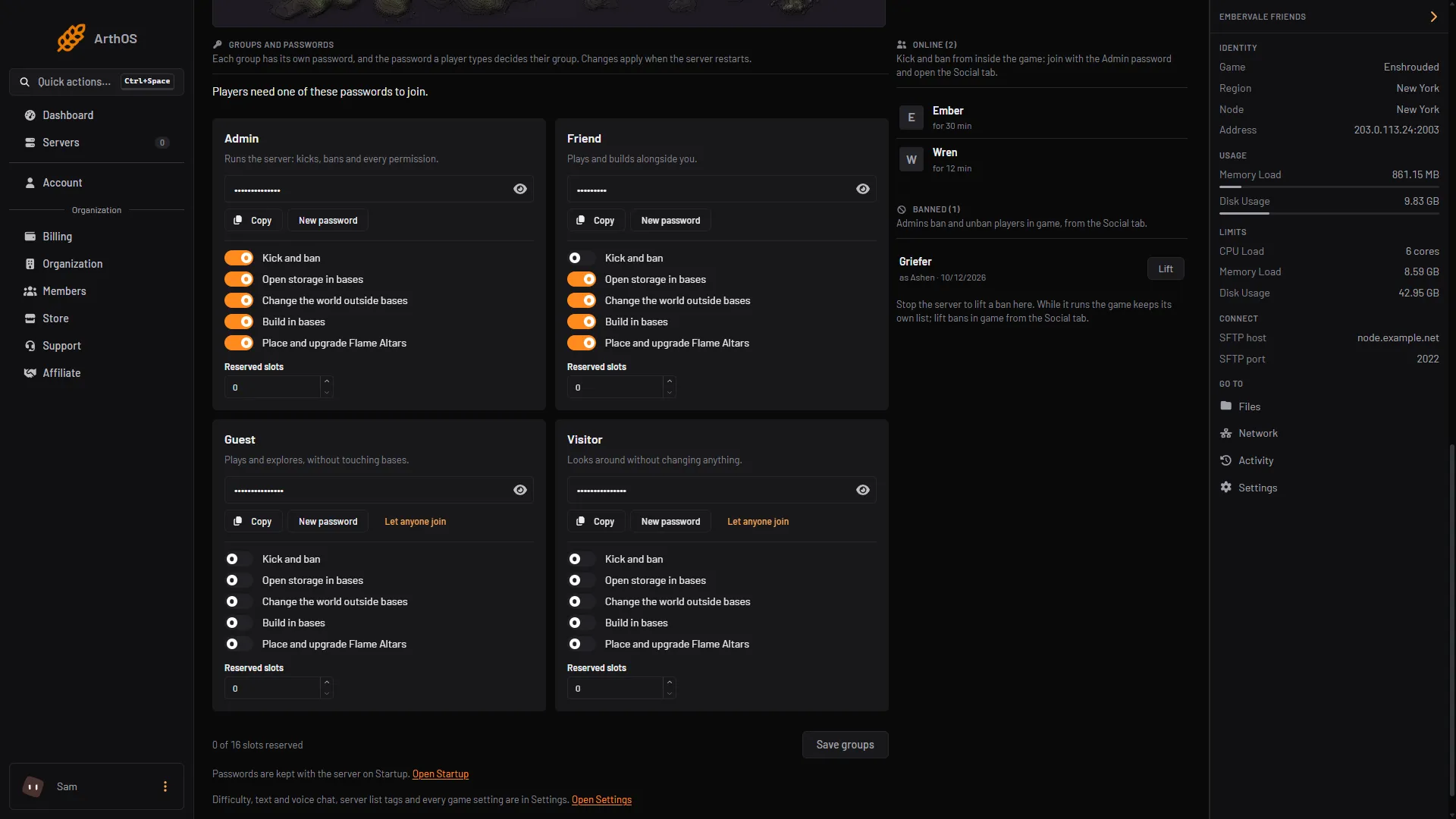
- Reserved slots
- Save groups
Set the number in Reserved slots (box 1), then choose Save groups (box 2). Save groups saves only the switches and Reserved slots.
The panel says “Groups saved. They apply when the server restarts.” Restart the server to use the new numbers.
You need permission to edit files to change them.
By hand
Saving in the Config Editor while the server runs is fine: the change applies at the next start. Stop the server first only for hand edits of the file. Open enshrouded_server.json in Files and add the line to the group in userGroups:
"reservedSlots": 1The default is 0. Start the server again. Keep the total at or below slotCount.
If it does not work
- Save groups is greyed out. The total is more than the player slots. Lower a number, or raise Player slots on Startup.
- Guests are turned away early. That is the idea. Reserved seats are not available to them.
- Admins still cannot join. Check they use a password of the group that holds the slots. A player’s group is the group of the password they type.
- Nothing changed in game. Restart the server.
More about the game: Enshrouded servers.
Sources: store.steampowered.com: 1203620