






The Events row in the Config Editor is all or nothing: it turns Rust’s world events on or off together. Switch it off, choose Save, and restart the server. To stop one event only, Facepunch, the maker of Rust, documents the cargo ship and the endgame events, and nothing else. No event timing plugin was checked for this page.
What the switch covers
The panel describes the row as “Cargo ship, patrol helicopter, airdrops and the other world events.” The setting behind it is server.events. A running server reported it as on, and so it did for cargoship.event_enabled. The row shows a Game default chip until your file sets it.
In the ArthOS panel
- Open your server and choose Config Editor. It opens
server/rust/cfg/server.cfg. - In the Gameplay group, find Events (1) and switch it Off.
- Choose Save (2). The panel says “Saved. Restart the server to apply the changes.”
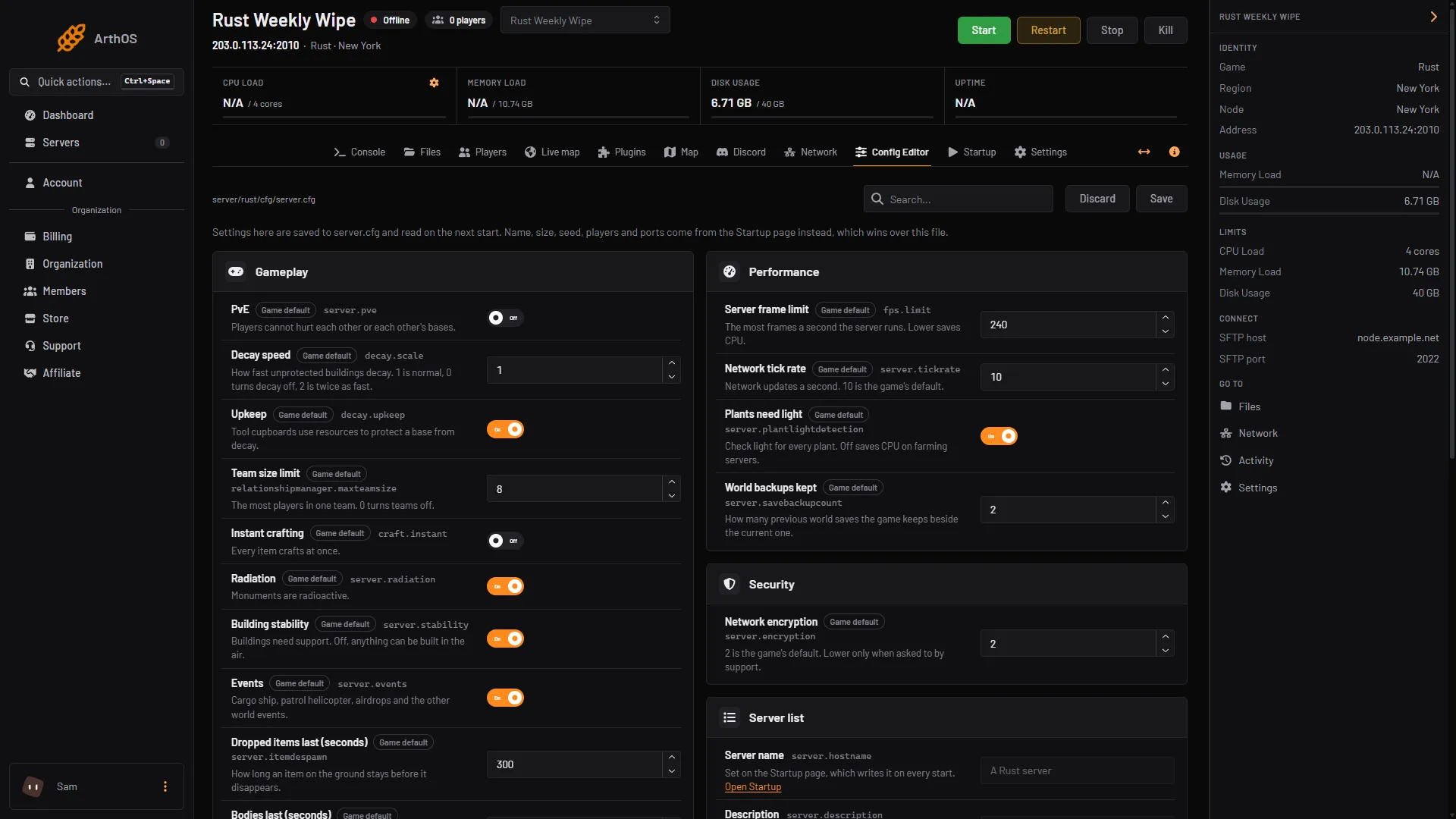
- Switch Events off
- Save
- Restart the server. The file is read when the server starts.
To turn events back on, switch the row On again, save, and restart.
Stop one event only
Facepunch documents these. Each one is set on the start line or in the file, not in a Config Editor row.
| What you want | Setting | Where |
|---|---|---|
| No cargo ship | +cargoship.event_enabled false | Extra startup arguments on the Startup tab |
| No endgame events (the F-15E jets and the road Bradley APCs that start 24 hours before a wipe) | eventschedulewipeoffset.event_hours_before_wipe 0 | server.cfg |
Facepunch gives cargoship.event_enabled false for custom maps with little or no ocean, together with two more options. It says the setting removes the cargo event. Not checked as of 11 October 2026: that this one setting is enough on an ordinary map. The full list is in Rust custom map will not load.
On the Startup tab, Extra startup arguments is added to the end of the start line, so write the +. To add a line to server.cfg that the Config Editor has no row for, choose Edit the whole file as text at the bottom of the Config Editor. A line the editor does not know stays in the file and shows under Advanced.
Start an event by hand
An admin can start some events for a test. Type these in the F1 console in game:
| Command | What it does |
|---|---|
heli.call | Starts the patrol helicopter event |
heli.calltome | Starts it and sends the helicopter to you |
spawn f15e | Starts the F-15E jets event |
spawnroadbradley | Spawns a road Bradley APC on the road you are looking at |
The October 2026 console also lists eventschedule.triggerevent, eventschedule.killallevents and events.set_event_enabled. Not checked as of 11 October 2026: how to use them.
Finer control
Facepunch’s wiki lists no setting for how often the cargo ship or the helicopter comes. For that, use a plugin. Open the Plugins tab, type the event’s name into Search uMod, and read each result’s page before you install it. See install uMod plugins.
By hand
Add this line to server/rust/cfg/server.cfg. On your own machine the file is server/<identity>/cfg/server.cfg. There is no + in the file.
server.events falseSave the file and restart the server. To stop only the cargo ship, put +cargoship.event_enabled false on the start line instead.
If it does not work
- Events still happen after a restart. The row was not saved, or the server was not restarted. Open the Config Editor again and check the row.
- Your line is ignored. Check the spelling, and that there is no
+or-in front of it inserver.cfg. - The cargo ship setting does nothing. It belongs on the start line, with the
+. In the panel that is Extra startup arguments.
More about the game: Rust servers.
Sources: wiki.facepunch.com: FAQ and Troubleshooting, wiki.facepunch.com: Server wipe timer, wiki.facepunch.com: Useful commands, wiki.facepunch.com: Creating a server