






A Rust custom map loads only from a direct download link to the .map file, on a site that is online all the time. New players download the map from that link, not from your server. If the link fails, they cannot join. Open the link in a browser: if the file starts downloading by itself, the link is direct.
Check the link
Facepunch, the maker of Rust, says the link must start the download on its own. A page that asks you to click something first does not work, and the server throws an error.
| Link | Works? |
|---|---|
https://example.com/files/valid.map | Yes, if the file downloads when you open it |
mymap.map | No, it is not a full link |
| A Discord message link | No |
A Dropbox link without dl=1 at the end | No |
A path on your own PC, such as file:///C:/mymap.map | Only on a server running on that PC. Nobody else can join |
Facepunch says uploading the map as a public GitHub release works. It also advises server owners not to use public file hosts, because some players cannot reach them: in some countries such hosts are blocked.
In the ArthOS panel
- Open the server’s Startup tab and find Custom map URL. Its help text reads “A direct link to a .map file that players can download at any time. Leave empty for a generated map.”
- Paste the full link into Custom map URL (1). The field accepts only a valid web address. Choose Save (2).
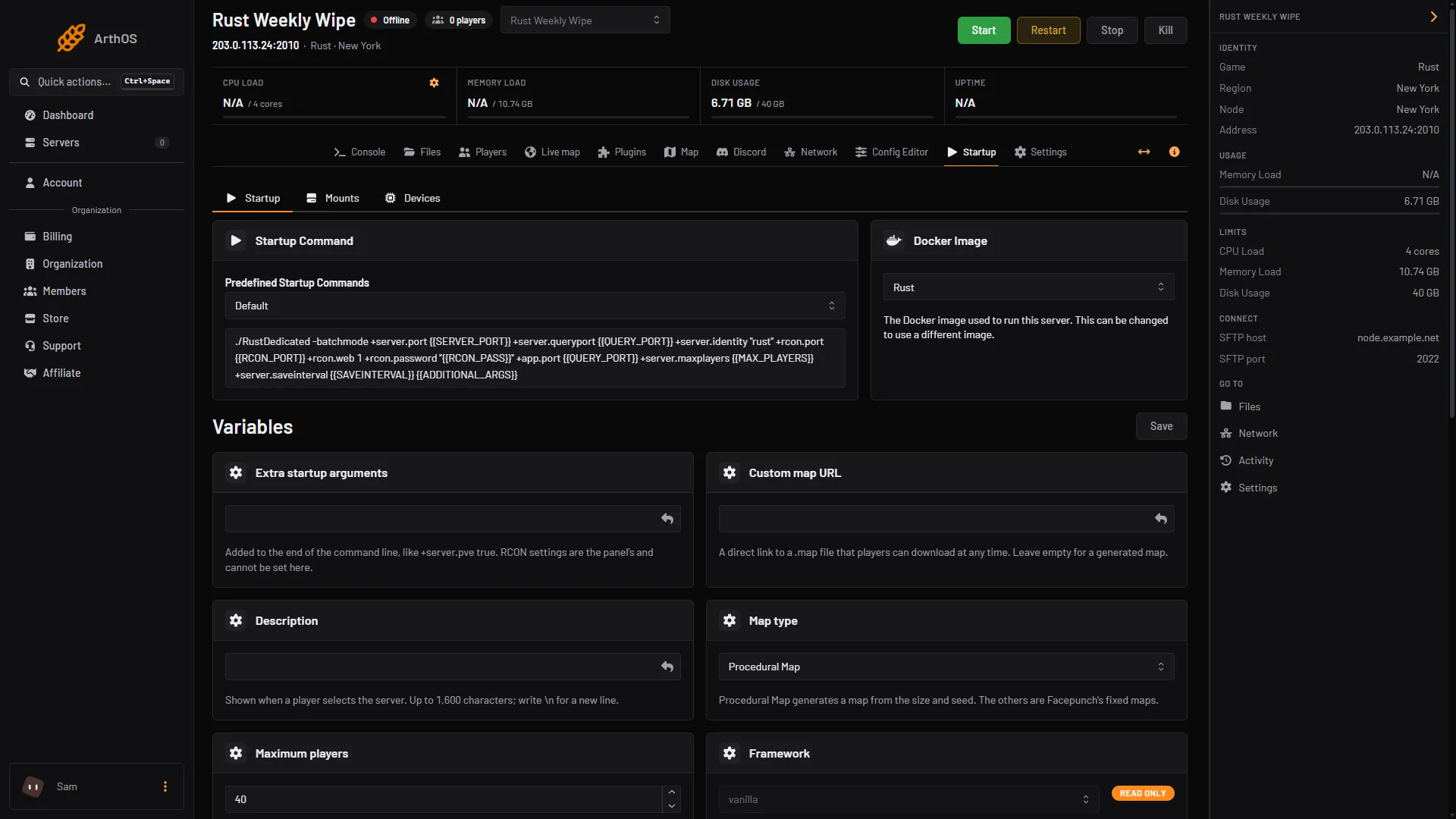
- Paste the direct .map link
- Save
- Restart the server and watch the Console until it shows
Server startup complete.
Facepunch says to remove the procedural settings, +server.worldsize and +server.seed, when you host a custom map. The panel keeps Map size and Map seed on the Startup tab. Not checked whether they matter when Custom map URL is set, as of 11 October 2026.
When players cannot get the map
The server worked, but a player sees “Couldn’t Download Level”. There is no single fix, but this is the order Facepunch suggests.
- The player presses F1 in Rust and finds the line that starts with “Download map file”. They copy the link, paste it in a browser and download the file.
- If the download works, the player tries to join again. If it does not, check what blocks the link:
| Cause | What to do |
|---|---|
| The host is down | You must fix this. Make sure the link works from another network |
| The player uses a VPN | Some hosts refuse a VPN. Turn it off |
| An antivirus blocks it | Check the antivirus network settings |
| Bad DNS settings | Switch the player’s DNS to a public one |
| Windows Firewall | Allow Rust.exe and RustClient.exe |
| The domain is blocked in the player’s country | A VPN may help the player. You should move the map off a public host |
| Bad web server rules | If you run the site, check .htaccess and that the map’s folder is open to downloads |
Other errors
- World cache version mismatch, or World File Outdated. The player still has an older
.mapwith the same name. Give every changed map a new unique name, such asmymap-v2.map. The player can also delete the old.mapfrom their Rust folder. - The server freezes while loading. Facepunch says this happens when a map has little or no ocean, because the server cannot make the ocean path for the cargo ship. Add ocean around the island. Or put these in Extra startup arguments on the Startup tab:
+cargoship.event_enabled false +baseboat.generate_paths false +ai.ocean_patrol_path_iterations 0. If the cargo ship is spawned on that map, it stays still.
Generated maps: size and seed limits
If you do not use a custom map, the server builds one from Map size (1000 to 6000) and Map seed (0 to 2147483647). The panel refuses values outside these ranges.
A new map is generated on the first start and takes minutes, and a bigger map takes longer. Wait for Server startup complete. A very large map also needs more memory: see fix a Rust server running out of memory.
By hand
Give the server the link on the start line, and remove the size and seed:
+server.levelurl "https://example.com/files/valid.map"If the server freezes while loading a map with little ocean, add these to the same start line:
+cargoship.event_enabled false +baseboat.generate_paths false +ai.ocean_patrol_path_iterations 0If it does not work
- An error about the download. The server could not fetch the link. Check it for typing mistakes and that the site is up for everyone.
- Only some players fail. Go through the table above with one of them.
More about Rust hosting on the Rust page.
Sources: wiki.facepunch.com: Hosting a custom map, wiki.facepunch.com: FAQ and Troubleshooting, wiki.facepunch.com: Creating a server, wiki.facepunch.com: Procedural generation customization