









Open the World rules page and change the blood moon rules in the group World and blood moons. Choose Save, then restart the server. The game reads its rules only when it starts.
What a blood moon is
A blood moon is a night when a large horde of zombies hunts every player. The horde starts at 22:00 and ends at 04:00 the next day. The zombies know where the players are, even through walls. Each player has a game stage, which grows with their level and the days they survive, and it decides how big and how hard the horde is.
In 7 Days to Die V3.0 and later these settings are no longer in serverconfig.xml. They are World rules. Older guides that tell you to edit BloodMoonFrequency in that file are out of date.
The rules
Each one is a World rule with the key shown below. The keys are stored in the SandboxCode line of the server’s settings file. All of them are on the World rules page. The first four are in World and blood moons. The last two are in Zombies and animals.
| Rule | Key | What it does | Choices | Default |
|---|---|---|---|---|
| Blood Moon Frequency | BloodMoonFrequency | Days between blood moons. | Disabled, then 1 to 10, 14, 20 or 30 days | 7 Days |
| Blood Moon Range | BloodMoonRange | Lets the blood moon day vary by up to the days you pick. | 0, 1, 2, 3, 4, 7, 10, 14 or 20 days | 0 Days |
| Blood Moon Warning | BloodMoonWarning | When the day number turns red to warn of the night. | Disabled, Morning, Evening | Morning |
| Blood Moon Count | BloodMoonEnemyCount | How many horde zombies can be alive at once for each player. | 4, 6, 8, 10, 12, 16, 24, 32 or 64 Enemies | 8 Enemies |
| Blood Moon Block Damage | BlockDamageAIBM | How much damage zombies do to blocks during a blood moon. | None, then 25% up to 300% | 100% |
| Zombie Blood Moon Speed | ZombieBMMove | How fast blood moon zombies move. | Walk, Jog, Run, Sprint, Nightmare | Sprint |
Frequency 7 means a blood moon on day 7, 14, 21 and so on. Choose Disabled to have no blood moons at all.
Nightmare is faster than a player who is sprinting.
In the panel
- Open the World rules page of your server.
- Find the rule in the group named above.
- Pick a value. A rule that is not at its default is marked Not the default.
- Choose Save.
- Restart the server. The page offers Restart now.
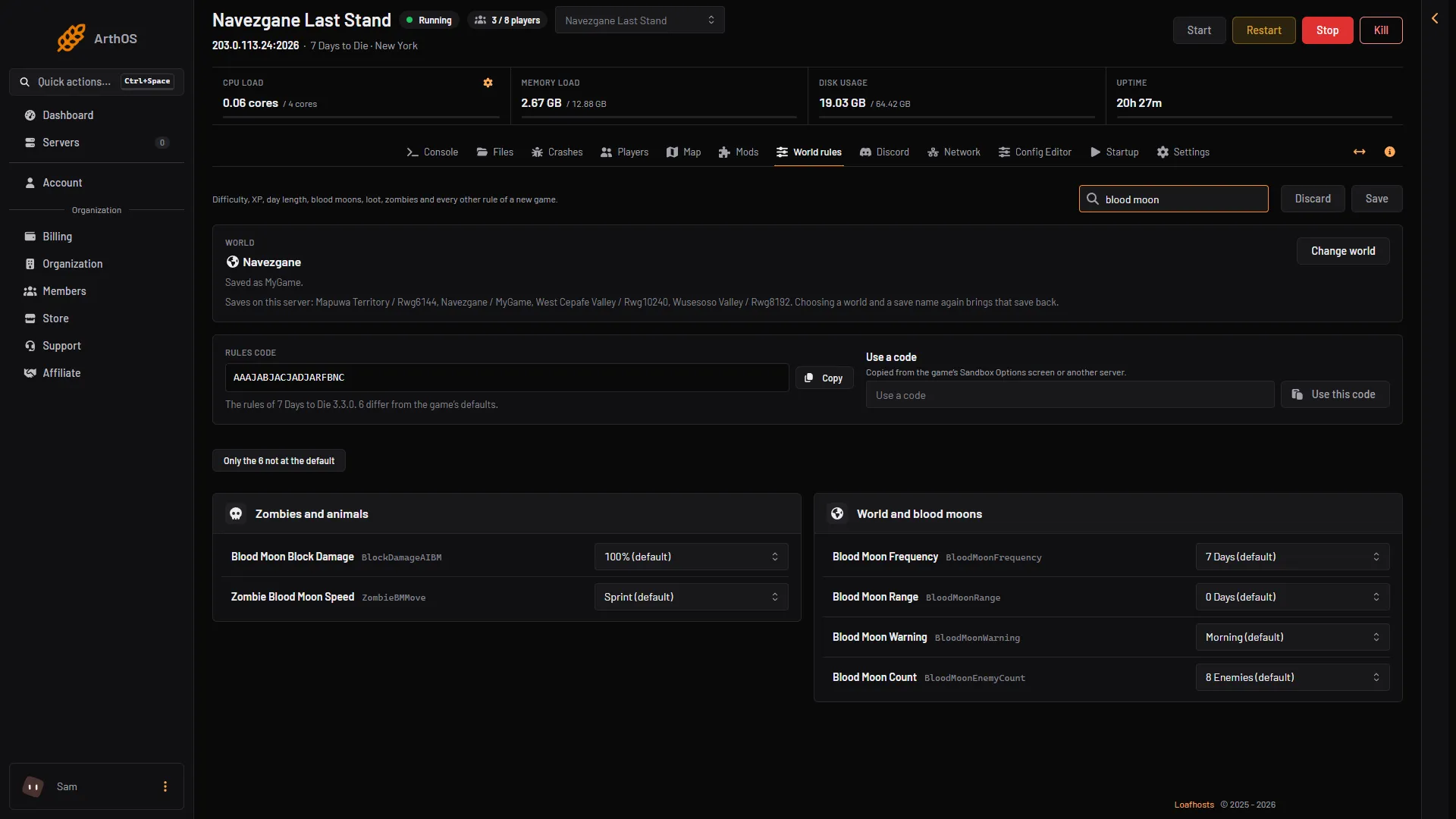
- Blood Moon Frequency
- Blood Moon Range
- Blood Moon Warning
- Blood Moon Count
Type “blood moon” in Search… to list them. Box 1 is the days between blood moons, box 2 the range, box 3 the warning and box 4 the horde size.
A restart drops every player. Tell them first with Message to everyone on the Players page.
A new rules code applies to an existing world at its next start. Not checked on V3.3.0 as of 19 October 2026: how an existing world’s next blood moon day moves after you change the frequency.
See when the next one comes
The Players page has a stat called Blood moon. It says Now while one is on, Tonight at 22:00 on the day of one, and In N days before that.
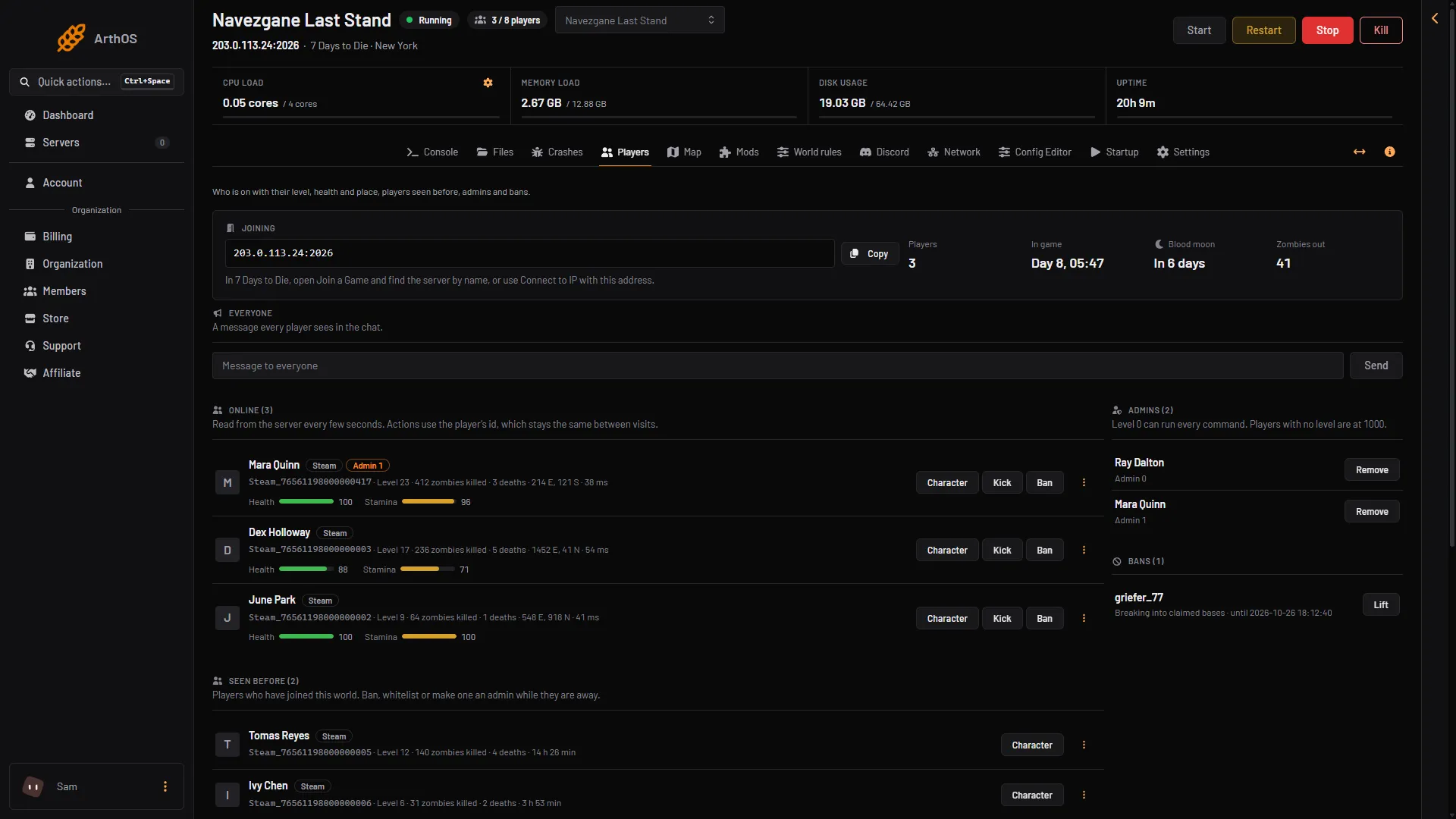
- Blood moon
The lists and stats show only while the server runs. Stopped, the page says “The server is stopped. Players show here once it is running.”
Many players, a slow server
Blood Moon Count applies to each player. With 16 Enemies, each player can have up to 16 horde zombies on them at once. The whole world also has a limit, which the game raises for blood moons. In the Config Editor it is the row Zombies at once. A bigger horde uses much more of the server. See blood moon performance if it lags.
If it does not work
- Nothing changed. The rules are read at the next start. Restart the server.
- The rule is not on the page. Blood Moon Block Damage and Zombie Blood Moon Speed are in Zombies and animals, not in World and blood moons.
- Save is greyed out. You have not changed a value yet, or your role may not allow editing.
- The Blood moon stat is empty. It shows only while the server runs.
More about the game: 7 Days to Die servers.
Sources: 7daystodie.wiki.gg: Blood Moon Horde, 7daystodie.wiki.gg: Game Settings