









Open the Config Editor, turn on Crossplay, save, and restart the server. Crossplay has three rules: anti-cheat stays on, the server holds 8 players at most, and no mods are installed.
The rules
- 8 players at most. Crossplay servers must have the game’s default player count or fewer. The default is 8. A new Loafhosts server starts at 8.
- Anti-cheat on. Easy Anti-Cheat (EAC) must stay on. It is on by default.
- No mods. Console players cannot join a server that has mods. One mod is enough to keep them out. A mod that runs code also needs Anti-cheat off, and crossplay needs it on. With Anti-cheat on, players cannot join a server that has such a mod.
- Epic bans are respected. The game says crossplay servers are only found and joinable if Ignore Epic bans is off. It is off by default.
Players must run exactly the same game version as the server.
Turn it on
- Open the Mods page and check the Installed tab. If you have mods, decide first. With crossplay on, console players cannot join while any of them is on. The mods the game ships with do not count.
- Open the Config Editor.
- In the Technical group, turn on Crossplay (2). Check that Anti-cheat (3) is on.
- In the Slots group, check Maximum players (1). It must be 8 or fewer.
- Choose Save. The panel says “Saved. Restart the server to apply the changes.” while the server runs.
- Choose Restart now, or choose Restart at the top of the server page. A change saved while the server runs applies at the next start.
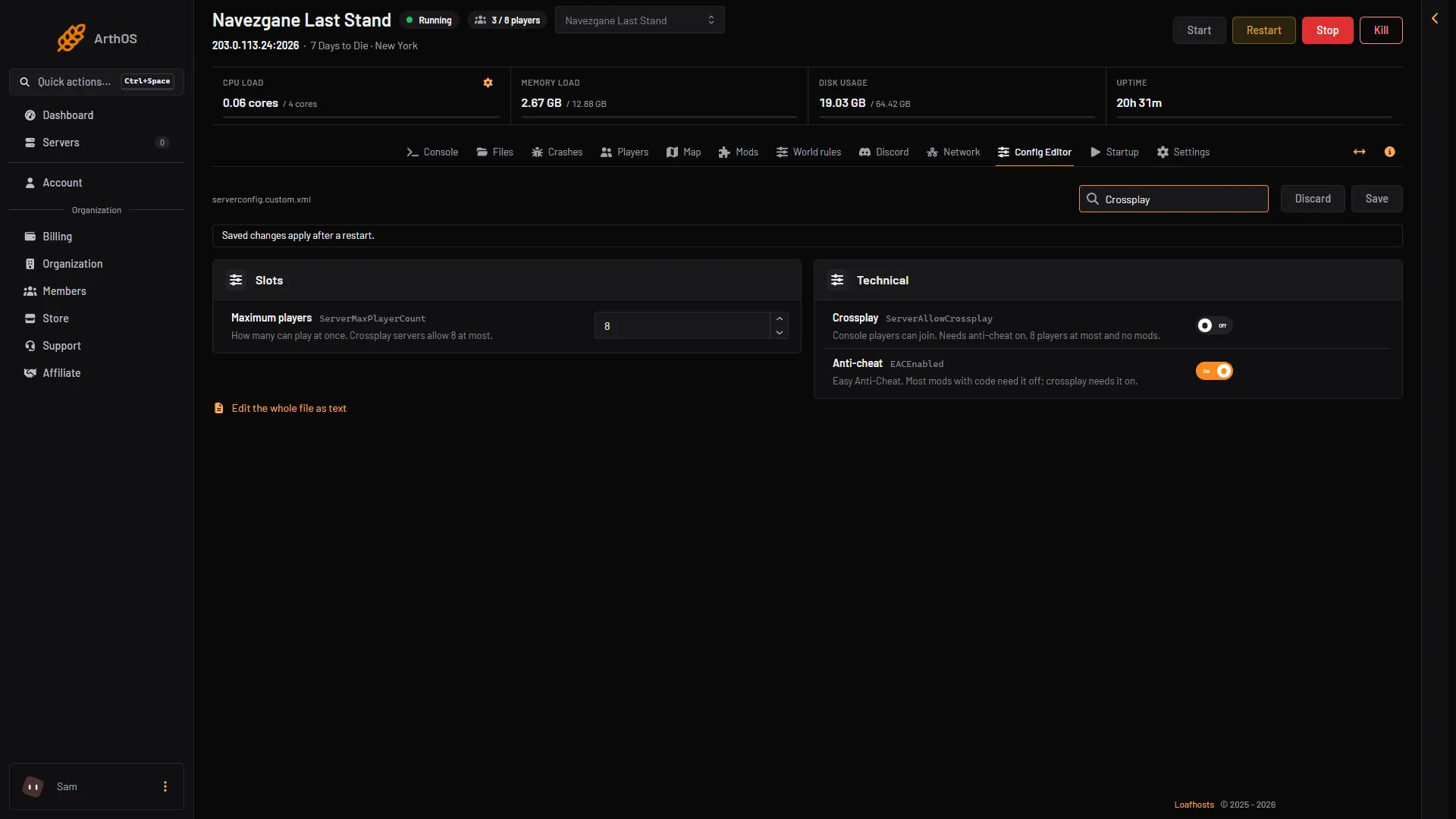
- Maximum players
- Crossplay
- Anti-cheat
If you add a mod later
With crossplay on, the Mods page shows a note above the list saying console players cannot join a server that runs mods. When you install a mod, the box asks you to tick that you understand before Install works. A mod that is turned Off does not count. To bring console players back, remove the mod or turn it off, then restart the server.
By hand
In Files, the server reads serverconfig.custom.xml. Do not edit serverconfig.xml: the game replaces it at every update. The line is:
<property name="ServerAllowCrossplay" value="true"/>Keep EACEnabled at true, and ServerMaxPlayerCount at 8 or less. Restart the server after the change.
If it does not work
- Console players cannot find the server. Check the rules above, one by one: Anti-cheat on, 8 players or fewer, Ignore Epic bans off. Then check that no mod is on.
- The server shows “crossplay on” in Discord but players still cannot join. A mod is installed. See the Mods page.
- Anti-cheat is off. The panel says crossplay needs it on. Turn Anti-cheat back on.
- You need more than 8 players. Then crossplay is not possible. Turn Crossplay off and raise Maximum players.
Not checked on V3.3.0 as of 19 October 2026: what a console player needs on their side to find and join a server.
More about the game: 7 Days to Die servers.