









A land claim block protects the area around it. Other players cannot build or break there, unless they are allies of the owner, and the owner’s blocks are much harder to damage. You change the rules in the Config Editor, in the group Land claims. Saving applies at the next restart.
What a claim block does
Per the official wiki, a land claim block covers a square area, 41 by 41 blocks by default, that reaches the full height of the map. Players other than the owner cannot place or destroy blocks inside it. Allies of the owner can. Party members do not count unless they are also allies. The owner can pick up workstations and electric devices inside the area.
Blocks inside the claim are harder to damage. Zombies from points of interest do not respawn inside it. The wiki describes earlier versions of the game as well, so the settings below, read from the V3.3.0 server’s own file, win.
The settings
All are in the Config Editor, group Land claims.
| Row | Key | What it does | Default |
|---|---|---|---|
| Land claims per player | LandClaimCount | How many claims one player may have | 5 |
| Claim size (blocks) | LandClaimSize | Blocks a claim protects | 41 |
| Distance between claims | LandClaimDeadZone | Claims of players who are not friends must be this far apart | 30 |
| Claim expiry (days) | LandClaimExpiryTime | Real days the owner can be away before the claim stops protecting | 7 |
| Claim decay | LandClaimDecayMode | How protection fades while the owner is away: Slow, Fast, None until expiry | Slow |
| Hardness while online | LandClaimOnlineDurabilityModifier | How many times harder claimed blocks are while the owner is online. 0 means they cannot be damaged | 4 |
| Hardness while away | LandClaimOfflineDurabilityModifier | The same while the owner is away. 0 means they cannot be damaged | 4 |
| Away after (minutes) | LandClaimOfflineDelay | Minutes after the owner leaves before the away hardness applies | 0 |
Bedroll rows
A bedroll also keeps zombies away from a spot. These two rows are in the group Rules:
- Bedroll zone size (
BedrollDeadZoneSize, default 15): no zombies spawn this many blocks around a bedroll. It is measured from the bedroll in every direction, so 15 gives a box of about 31 by 31 blocks. - Bedroll expiry (days) (
BedrollExpiryTime, default 45): real days a bedroll stays active after its owner was last online.
In the panel
- Open your server and choose Config Editor.
- Find the group Land claims and change the rows.
- Choose Save. While the server runs, the panel says “Saved. Restart the server to apply the changes.” Choose Restart now.
Search for claim to show the group on its own. Box 1 is the claim count, box 2 the size and box 3 the distance between claims.
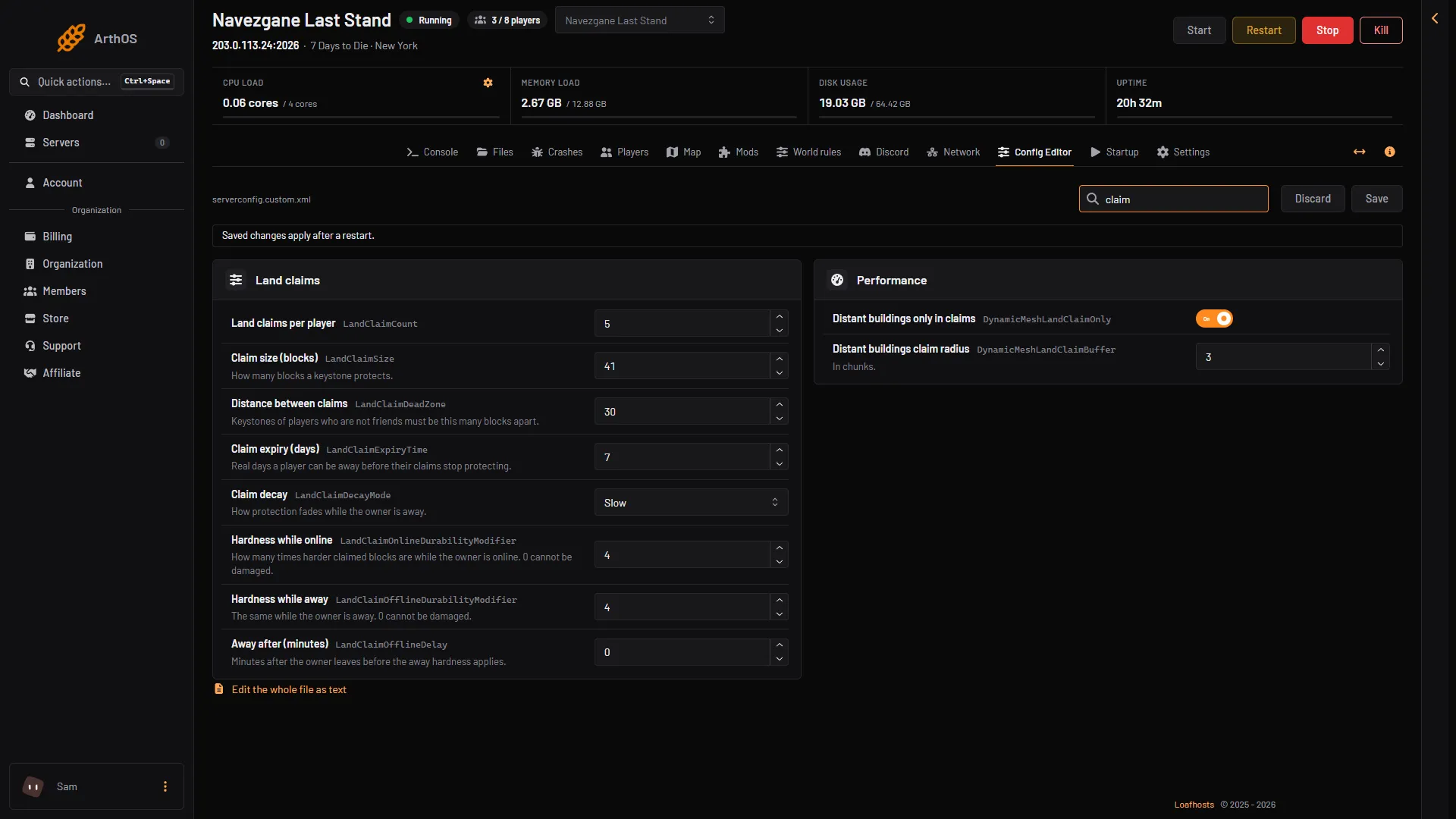
- Land claims per player
- Claim size (blocks)
- Distance between claims
- Claim expiry (days)
- Hardness while online
See claims on the map
Open the Map page. Turn on the Show switch Land claims (N) to see each claim. The switch Expired land claims (N) shows claims whose owner was away longer than Claim expiry (days). The list Land claims (N) on the right shows owners and allies, and marks an expired claim Expired. The switch Bedrolls (N) shows bedrolls.
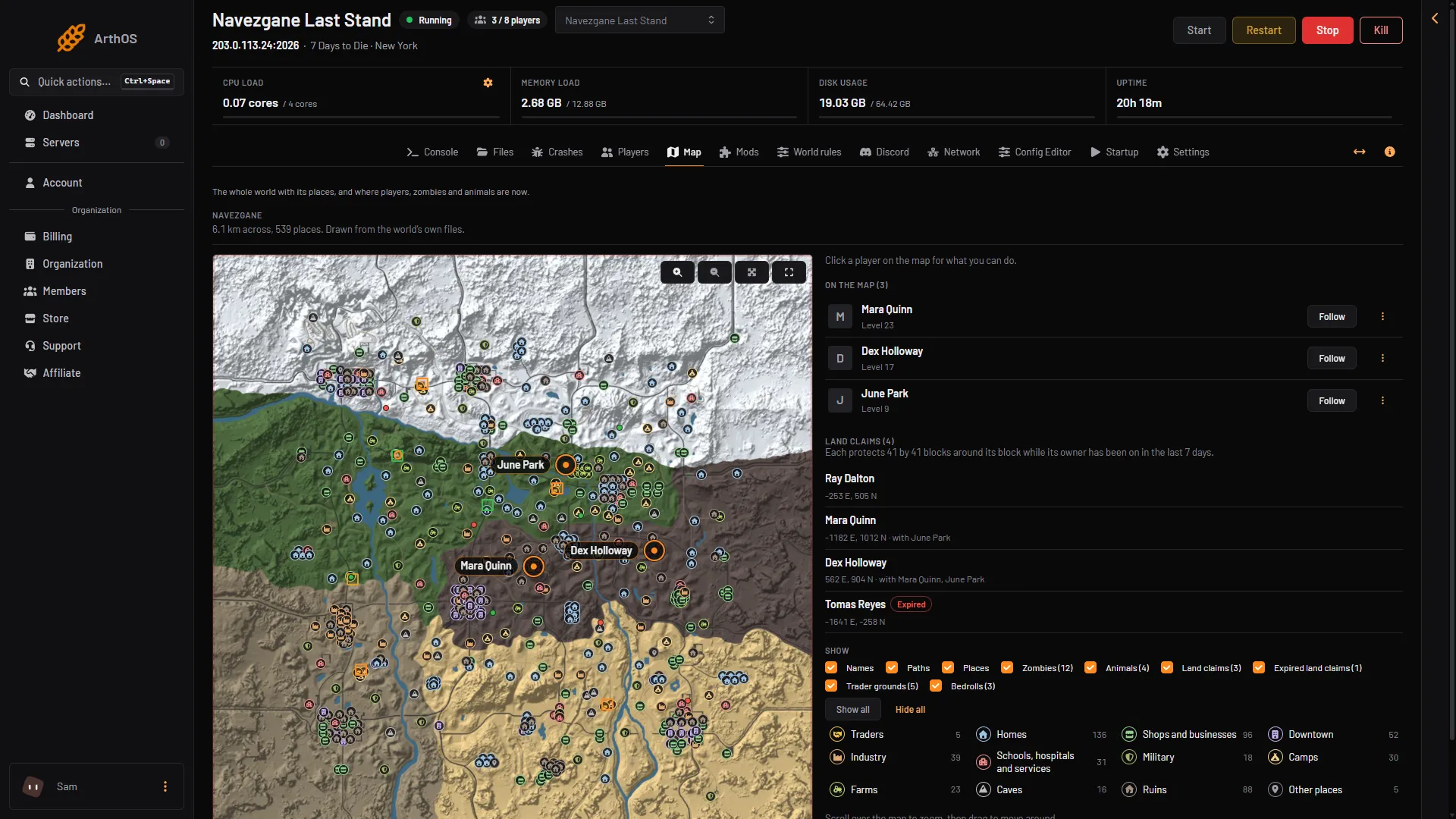
- Land claims list
- Expired claim
- Land claims switch
- Bedrolls switch
The claims, owners and names in the picture are demo data.
If it does not work
- Changes do nothing. Restart the server. The game reads these at start.
- A claim does not protect. The owner was away longer than Claim expiry (days). It shows under Expired land claims on the map.
- Players cannot place a claim near another. Distance between claims is too large for them. Lower it.
- The saved file will not read. If an edit by hand breaks
serverconfig.custom.xml, the panel puts back the newest earlier copy that reads and keeps the broken one asserverconfig.custom.xml.broken.
More about the game: 7 Days to Die servers.
Sources: 7daystodie.wiki.gg: Land Claim Block, 7daystodie.wiki.gg: Bedroll