






Game Master Enhanced (GME) is a Workshop mod that adds more tools to the Game Master editor in Arma Reforger. To use it, add the mod to your server’s mod list and restart. It has no dependencies, so there is nothing else to add. It does nothing until someone runs a Game Master session on the server.
What the Workshop page says
- Name and ID: Game Master Enhanced,
5964E0B3BB7410CE. - Author: GME Mod Team. The mod was formerly called Odin’s Game Master Additions.
- Version: 1.3.8, 2.0 MB, updated 24 August 2026. The Workshop lists it as built for game version 1.8.0.10.
- Licence: Arma Public License (APL).
- Dependencies: none.
The page lists these features:
- Makes saving and loading of scenarios available in multiplayer (PC only).
- A context action to teleport a player to their group leader.
- Toggle damage and visibility of objects.
- Formation, stance and skill attributes for AI.
- Cycle waypoint, to make AI move in repeated patterns.
- Waypoint radius and completion attributes.
The page says GME is built for communities that use Game Master as their main mission making tool. The authors keep their code and issue list at https://github.com/zen-mod/GME_AR.
In the ArthOS panel
- Open the Mods tab, then the Workshop tab (1).
- Search for
Game Master Enhanced(2). Several other mods use the name in their text, so pick the card by GME Mod Team (3). - Choose Add (4) on that card.
- Open On this server and check that it is on the list.
- Restart the server. A change to the mod list takes effect at the next restart. See restart your server.
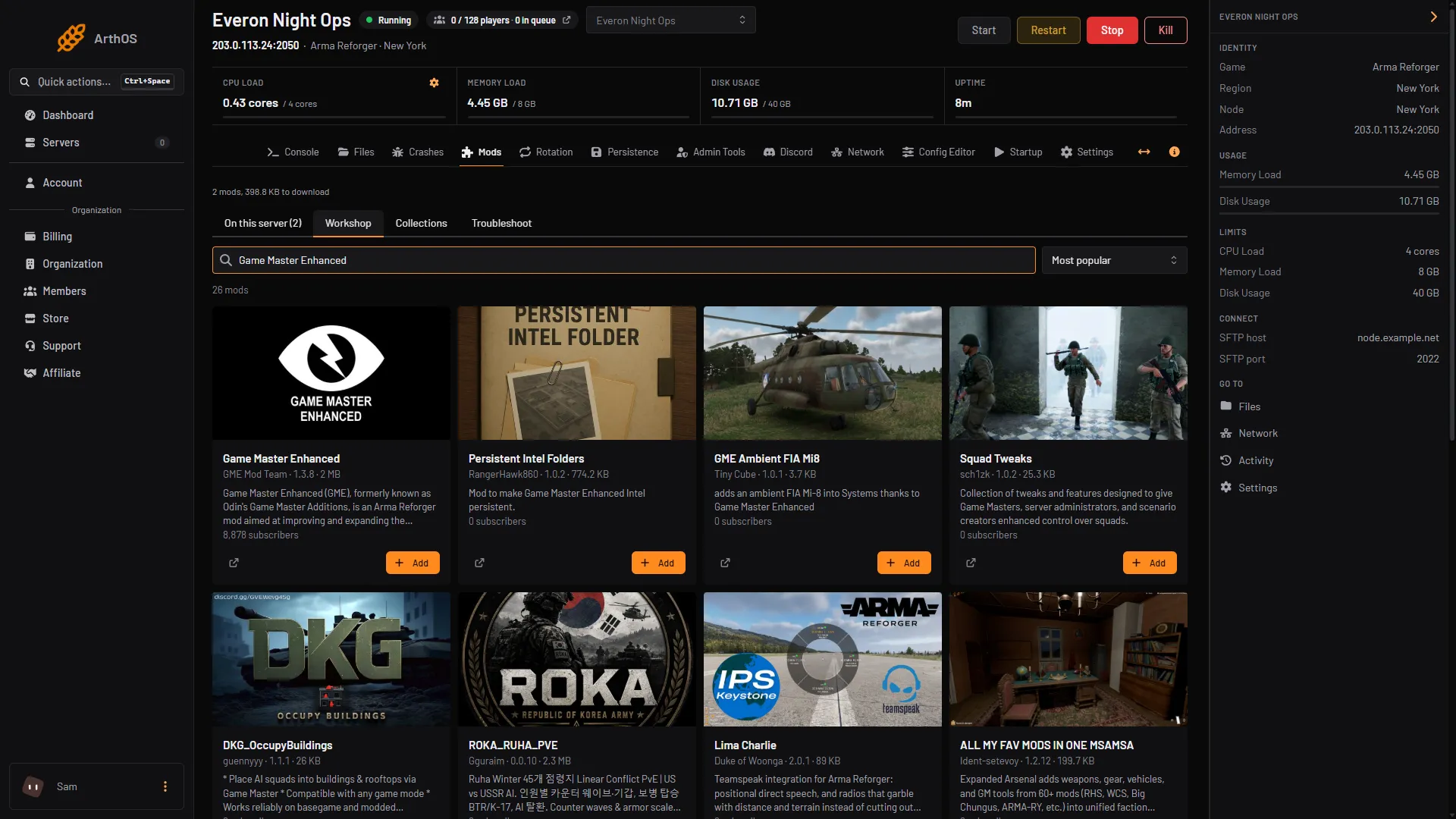
- Workshop tab
- Search the Workshop
- Game Master Enhanced card
- Add
By hand
In config.json, add the mod as an object in game.mods:
{
  "modId": "5964E0B3BB7410CE",
  "name": "Game Master Enhanced",
  "version": "1.3.8"
}
Save the file and restart the server. Bohemia’s server documentation says players download the mods on this list and activate them when they join. Keep the file valid JSON: a missing comma between mods will stop the server starting.
Using it
GME adds to the editor that the game already has, so you still need a Game Master. Bohemia’s page says the server host or a declared server admin always has the Game Master interface. If no Game Master is present, the first player to connect gets the role, and it cannot be handed over unless that player disconnects. See run a Game Master server for the full setup.
Once the server is running, the Game Master opens the editor as usual. The extra attributes are the ones listed above, for example formation and stance on AI.
Not checked on 1.8 as of 12 October 2026: how each feature looks in the editor. The list comes from the Workshop page. The save and load feature is marked PC only on that page.
If it does not work
- The server will not start after you add it. Follow find the mod that stops your server.
- You see no new options. Check that On this server lists the mod, and that the server was restarted after you added it.
- Console players cannot use the save and load feature. The Workshop page says it is for PC only.
More about the game on our Arma Reforger page.
Sources: reforger.armaplatform.com: 5964E0B3BB7410CE GameMasterEnhanced, Bohemia wiki: Game Master, Bohemia wiki: Server Config