






When a mod fails to load, the server either stops at start or runs without that mod’s features. The server log says which. In the ArthOS panel you read it on the Crashes and Mods tabs. Most causes are one of four: the mod is built for an older game version, it needs another mod, it cannot be downloaded, or it has been removed from the Workshop.
To get running now: if the log names a mod, remove it or lock it to its previous version, then Start. If it names nothing, see Troubleshoot below.
Read what failed
- Open the Crashes tab. Each start of the server is read for you. Open the latest start and look at Errors. It reads like “12 (4 from mods)”. Under Errors, grouped, the group From mods is marked “Look here first.”
- Open the Mods tab. If the last start reported mod problems, a box at the top reads “The last start reported problems with mods:” and lists the log lines. The panel picks out lines that say a mod was
not found on workshop, that addonsare not downloadable, thatAddon loading failed, or that a filesystem directory could not be added. - Open Mods, then Troubleshoot. What the log shows names the mod it blames and how sure it is: Certain, Likely or Note.
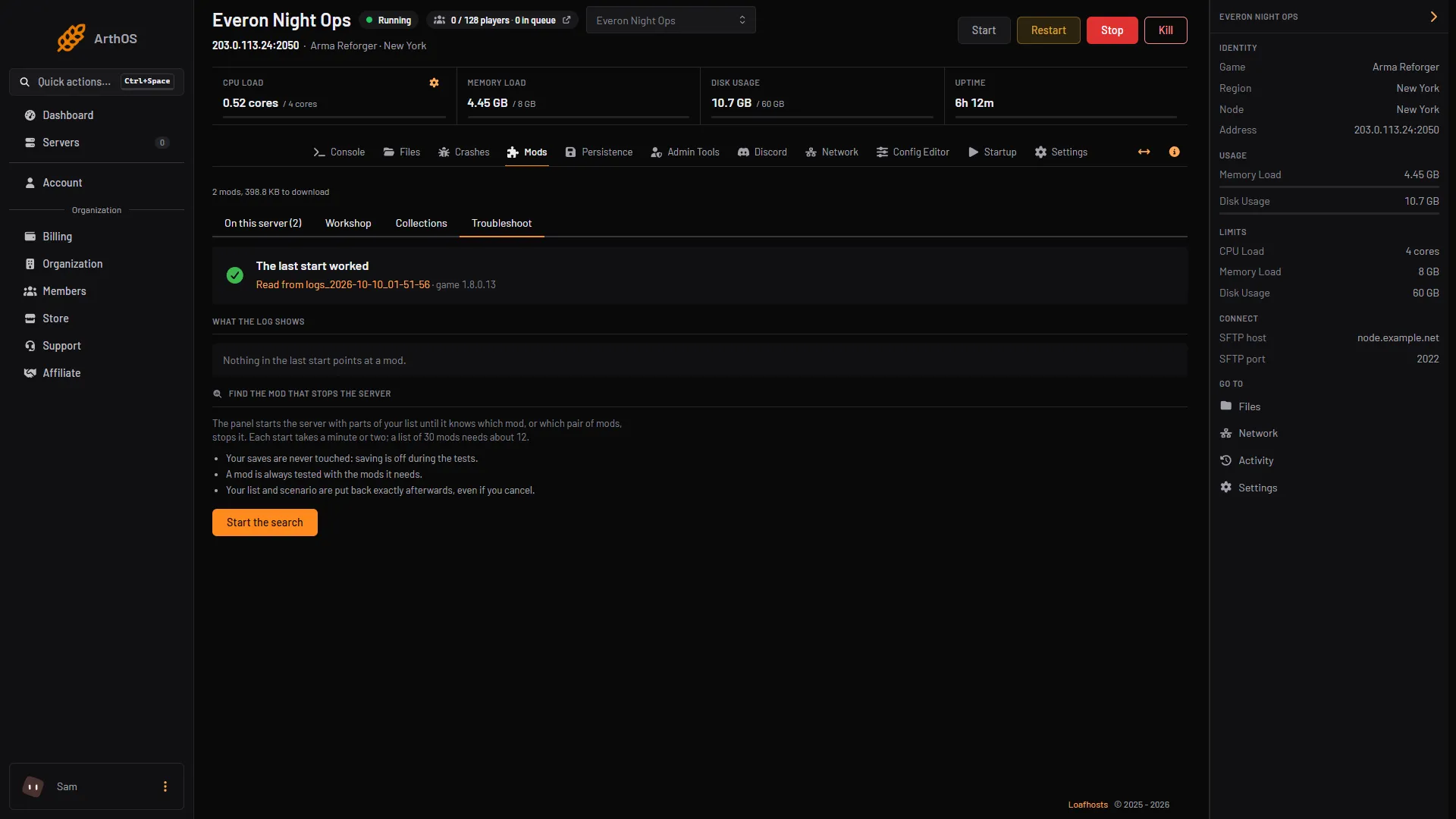
- Troubleshoot tab
- What the log shows
- Start the search
Open Troubleshoot (1) and read What the log shows (2). Start the search (3) restarts the server many times and players cannot join until it ends; your list is put back afterwards.
If the log does not name a mod, or the server fails with a long mod list, run the search in finding the mod that stops your server. This page covers what to do once you know the cause.
The mod is built for an older game version
Each row on Mods shows the game version the mod was built for, for example “built for 1.2.1.202”, and the version installed. The game has moved on since, and an old mod can fail with script errors. The panel treats a mod built for an earlier release (for example 1.6 against a server on 1.8) as the likeliest suspect when a script error does not name its mod.
What to do:
- Open the mod’s Workshop page and look for a newer version. If the row says a newer version “downloads at the next start”, restart.
- If the mod worked before the last game update, open the mod’s version menu on Mods and choose the previous version, then restart.
- If no update exists, remove the mod and see whether the server starts. Troubleshoot says: “It is often built for another game version; look for an update, or remove it and test.”
- A mod that works can be kept on an older version. See locking mod versions.
A mod it needs is missing
A mod can need other mods. The row shows how many (“N needed”) and says “Needs …, which the game downloads with it” when one is not on your list yet. The game fetches what a listed mod needs at each start. But note this: if you remove a mod that another mod needs, the game still loads it, so it comes back at the next start while the mod that needs it stays on the list. Remove them together.
If a mod fails right after you added it, open its detail window and read Needs. Separately, the panel warns of “Two mods load under the same name” when two mods on the list use one package name. The game then refuses every mod. Usually one is an old copy or a fork of the other. Keep one of them.
The download failed
The server fetches every listed mod from the Workshop at start. If it cannot, the log says the addons are not downloadable. Causes:
- The mod is gone. See the next section.
- Your own host cannot write the download. Bohemia notes that downloading large mods in a container can fail with curl error 23, “Failed writing received data to disk”. Setting
-addonTempDirto a folder the server may write to fixes it. This applies to hosting it yourself.
By default a mod that cannot be downloaded stops the server. In Config Editor, the setting Mods are required (game.modsRequiredByDefault) controls it. Its help text says: “A mod that cannot be downloaded stops the server starting. Off, it is skipped with a warning instead.” Bohemia’s required flag does the same for one mod. Use that only if you accept the server running without the mod.
The mod was removed from the Workshop
A mod that its author removed shows Gone from the Workshop on its row. Troubleshoot reports ”… is gone from the Workshop”. A fresh download cannot get it. If the log says not found on workshop for it, the server refuses to start while it is on the list. Remove it. Anything that needed it may need a replacement.
If it does not work
- The server starts but the mod does nothing. The list is the load order (the order mods start in). If two mods change the same thing, the lower mod is used, so a mod meant to override another goes below it. See load order and presets.
- Errors from mods, but the server still starts. Troubleshoot marks these a Note. They did not stop the start, and the mod may not work as intended.
- You fixed the mod and the page still shows the old problem. The panel reads the last start. Restart the server and check again.
- The server fails and Troubleshoot names nothing. Run the search linked above.
Running on Loafhosts? See Arma Reforger servers.
Sources: Bohemia wiki: Server Config, Bohemia wiki: Server Hosting, Bohemia wiki: Workshop