






RHS - Status Quo is a Workshop mod by Red Hammer Studios. Its ID is 595F2BF2F44836FB. It needs two other mods, RHS - Content Pack 01 and RHS - Content Pack 02, and the ArthOS panel adds them for you.
What the Workshop page says
From the mod’s Workshop page and the panel’s Workshop search on 12 October 2026:
- Name and author: RHS - Status Quo, by Red Hammer Studios.
- ID:
595F2BF2F44836FB. - Version: 0.16.5237, built for game version 1.8.0.13. Last modified 5 October 2026.
- Size: 204.3 MB for the mod itself, as the panel’s Workshop search shows it.
- Dependencies: RHS - Content Pack 01 (
1337C0DE5DABBEEF) and RHS - Content Pack 02 (BADC0DEDABBEDA5E). The Workshop lists them at about 6.3 GB and 2.2 GB in total file size. - Tags: characters, effects, props, scenarios (multiplayer and single player), systems, terrains, vehicles and weapons.
The author describes it as the contemporary setting, from 2000 to the present, with the US and Russian forces in the main roles. The mod is still being built toward version 1.0.
There is also a separate mod called RHS - Status Quo Dev. Do not add it to a normal server.
In the ArthOS panel
- Open your server and choose Mods, then the Workshop tab.
- Type
RHSin Search the Workshop by name (1). Find RHS - Status Quo by Red Hammer Studios. Do not pick RHS - Status Quo Dev. - Open the card to check Needs, then choose Add (2) on the card. The panel adds the mod and puts the mods it needs directly above it, and a message says what came with it.
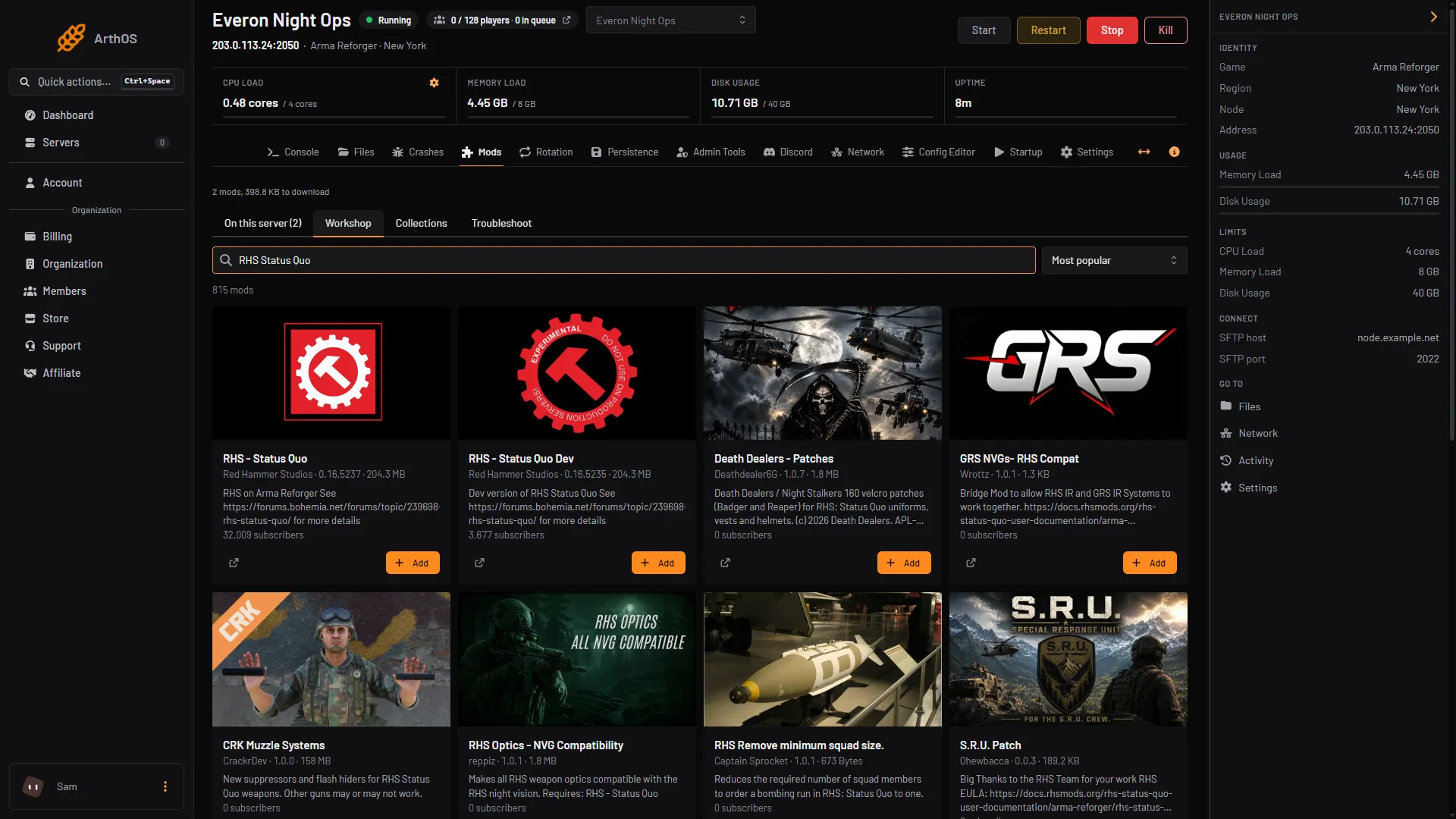
- Search the Workshop
- Add
- Open On this server and check the order. The Content Packs should be above RHS - Status Quo.
- Restart the server. The first start downloads everything, so it takes longer than usual.
Its scenarios
The Workshop page lists these scenarios. Pick one in Config Editor under Scenario, or on the mod’s row in On this server where the panel shows a Play button for scenarios the mod provides. See scenario IDs.
| Scenario | Scenario ID | Players |
|---|---|---|
| Combat Ops - Arland (RHS MSV vs FIA) | {C5EAD55037EB4751}Missions/RHS_CombatOps_MSV.conf | 16 |
| Combat Ops - Arland (RHS USMC vs MSV) | {D10B11A71A36FCF5}Missions/RHS_CombatOps_USMC_vs_MSV.conf | 16 |
| Conflict - Everon (RHS) | {AAD43C10045857C1}Missions/RHS_Conflict.conf | 64 |
| Conflict - Everon No AI (RHS) | {B694A77592CB69E0}Missions/RHS_ConflictWithoutAIs.conf | 64 |
| Conflict - Arland (RHS) | {7577640CD42A00BD}Missions/RHS_Conflict_Arland.conf | 64 |
| Conflict - Everon East (RHS) | {9909DB7ECEA05535}Missions/RHS_Conflict_East.conf | 40 |
| Conflict - Everon North Central (RHS) | {2F5DD5ACC14120A9}Missions/RHS_Conflict_NorthCentral.conf | 64 |
| Conflict - Everon SW Coast (RHS) | {57B154A20B8B283E}Missions/RHS_Conflict_SWCoast.conf | 64 |
| Conflict - Everon West (RHS) | {367A7800D147878A}Missions/RHS_Conflict_West.conf | 40 |
| RHS - Showcase Mission | {68A6FBF43B801FF6}Missions/RHS_ShowcaseBasic.conf | 6 |
| RHS - Showcase Mission (GM) | {217436B52D34E4BD}Missions/RHS_Showcase_GM.conf | 36 |
The player numbers are the ones the Workshop page lists for each scenario. Your server’s own player limit still applies, see change max players.
What players download
A player who joins downloads the mod and the two Content Packs. That is a big download, so tell your community before you switch the server to RHS. Keep the rest of your mod list short. If you have console players, read mods on console first. Not checked on 1.8.0.13 as of 12 October 2026: whether RHS works on console.
By hand
Add the three mods to game.mods in config.json, the Content Packs first:
"mods": [
  { "modId": "1337C0DE5DABBEEF", "name": "RHS - Content Pack 01" },
  { "modId": "BADC0DEDABBEDA5E", "name": "RHS - Content Pack 02" },
  { "modId": "595F2BF2F44836FB", "name": "RHS - Status Quo" }
]
Then set game.scenarioId to one of the IDs above, save the file and restart.
If it does not work
- The server does not start after adding RHS. A Content Pack may be missing or below the main mod. Check the order, then see dependency errors.
- The scenario is not found. The scenario ID has a typo, or the mod is not on the list. Copy the ID from the table.
- Players cannot join. They may still be downloading. The Content Packs are large.
- Another mod breaks after an RHS update. Mods that depend on RHS can stop working when it changes. Lock versions you have tested, see lock mod versions.
Sources: reforger.armaplatform.com: 595F2BF2F44836FB RHS StatusQuo, Bohemia wiki: Server Config