

A scenario ID is the text you put in game.scenarioId in config.json. It tells the server which mission to load: a code in curly braces, then the path of a .conf file. For Conflict on Everon it is {ECC61978EDCC2B5A}Missions/23_Campaign.conf.
A server runs one scenario at a time. Bohemia’s server documentation says only one scenario can be set and the game does not rotate missions, so changing the mission means changing this one value and restarting.
The official scenario IDs
This is Bohemia’s official list of 31 scenarios from the Server Config page, published for game version 1.6.0. Newer versions may add more. Copy the whole ID, braces and .conf included.
| Name | Scenario ID |
|---|---|
| Conflict - Everon | {ECC61978EDCC2B5A}Missions/23_Campaign.conf |
| Conflict - Northern Everon | {C700DB41F0C546E1}Missions/23_Campaign_NorthCentral.conf |
| Conflict - Southern Everon | {28802845ADA64D52}Missions/23_Campaign_SWCoast.conf |
| Conflict - Western Everon | {94992A3D7CE4FF8A}Missions/23_Campaign_Western.conf |
| Conflict - Montignac | {FDE33AFE2ED7875B}Missions/23_Campaign_Montignac.conf |
| Conflict - Arland | {C41618FD18E9D714}Missions/23_Campaign_Arland.conf |
| Conflict: HQ Commander - Everon | {0220741028718E7F}Missions/23_Campaign_HQC_Everon.conf |
| Conflict: HQ Commander - Arland | {68D1240A11492545}Missions/23_Campaign_HQC_Arland.conf |
| Conflict: HQ Commander - Kolguyev | {BB5345C22DD2B655}Missions/23_Campaign_HQC_Cain.conf |
| Game Master - Everon | {59AD59368755F41A}Missions/21_GM_Eden.conf |
| Game Master - Arland | {2BBBE828037C6F4B}Missions/22_GM_Arland.conf |
| Game Master - Kolguyev | {F45C6C15D31252E6}Missions/27_GM_Cain.conf |
| Combat Ops - Arland | {DAA03C6E6099D50F}Missions/24_CombatOps.conf |
| Combat Ops - Everon | {DFAC5FABD11F2390}Missions/26_CombatOpsEveron.conf |
| Combat Ops - Kolguyev | {CB347F2F10065C9C}Missions/CombatOpsCain.conf |
| Capture & Hold - Briars | {3F2E005F43DBD2F8}Missions/CAH_Briars_Coast.conf |
| Capture & Hold - Montfort Castle | {F1A1BEA67132113E}Missions/CAH_Castle.conf |
| Capture & Hold - Concrete Plant | {589945FB9FA7B97D}Missions/CAH_Concrete_Plant.conf |
| Capture & Hold - Almara Factory | {9405201CBD22A30C}Missions/CAH_Factory.conf |
| Capture & Hold - Simon’s Wood | {1CD06B409C6FAE56}Missions/CAH_Forest.conf |
| Capture & Hold - Le Moule | {7C491B1FCC0FF0E1}Missions/CAH_LeMoule.conf |
| Capture & Hold - Camp Blake | {6EA2E454519E5869}Missions/CAH_Military_Base.conf |
| Capture & Hold - Morton | {2B4183DF23E88249}Missions/CAH_Morton.conf |
| Elimination | {C47A1A6245A13B26}Missions/SP01_ReginaV2.conf |
| Air Support | {0648CDB32D6B02B3}Missions/SP02_AirSupport.conf |
| Training | {002AF7323E0129AF}Missions/Tutorial.conf |
| Operation Omega 01: Over The Hills And Far Away | {10B8582BAD9F7040}Missions/Scenario01_Intro.conf |
| Operation Omega 02: Radio Check | {1D76AF6DC4DF0577}Missions/Scenario02_Steal.conf |
| Operation Omega 03: Light In The Dark | {D1647575BCEA5A05}Missions/Scenario03_Villa.conf |
| Operation Omega 04: Red Silence | {6D224A109B973DD8}Missions/Scenario04_Sabotage.conf |
| Operation Omega 05: Cliffhanger | {FA2AB0181129CB16}Missions/Scenario05_Hill.conf |
Bohemia has not updated that page for newer game versions, so it can lag behind the game. To print the list your own server really has, start it with -listScenarios and without -config, then read console.log. Scenarios from mods are listed only when no scenario is loaded, which is why -config must be left out.
In the ArthOS panel
- Open your Arma Reforger server and choose the Config Editor tab.
- Find Scenario (1) in the Server group. Pick one from the list, for example Conflict: Everon or Game Master: Arland.
- For any ID that is not in the list, paste it into the box under the list.
- Choose Save (2). If the server is running, choose Restart now; the new scenario loads when it starts.
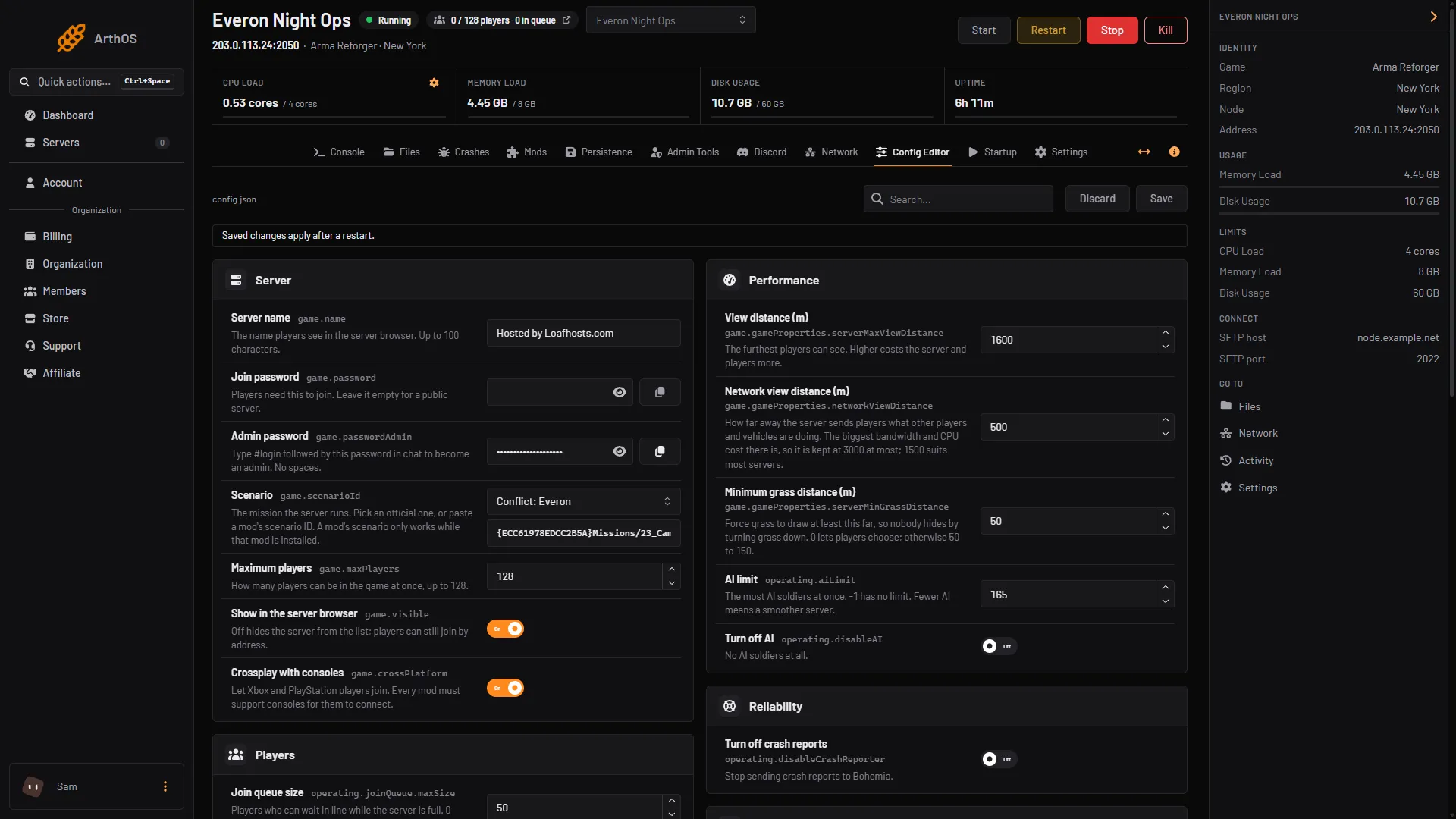
- Pick or paste the scenario
- Discard and Save
The panel’s list has 23 of the 31 IDs above. It does not offer Training, Elimination, Air Support or the five Operation Omega scenarios, and it names a few Capture & Hold maps differently (Castle for Montfort Castle, Military Base for Camp Blake). Paste those IDs into the box if you want them.
By hand
- Open
config.json(in Files, or on your own host in the server folder). - Set
scenarioIdinside thegameblock:
{
    "game": {
        "scenarioId": "{ECC61978EDCC2B5A}Missions/23_Campaign.conf"
    }
}- Save and restart the server.
Scenarios from mods
Add the mod to the server’s mod list first. On the Mods page, a mod that brings its own scenarios shows a Play button for each of them on its row. Choosing one sets game.scenarioId for you, and it takes effect at the next restart. By hand, take the ID from the mod’s author, or start your own server once with -listScenarios and without -config, and read the log.
A mod’s scenario only works while that mod is installed, so removing the mod breaks the server’s scenario. See how to install mods.
If it does not work
- The server does not start after the change. Check the ID character by character: the curly braces, the 16 characters inside them, the
Missions/path and the.confending. Copy it rather than retyping it. - The server starts a fresh world. Saves belong to one scenario. A new scenario starts fresh, and switching back finds the old save while it is still kept. See persistence and save games.
- A mod scenario is missing or fails. The mod is not in the mod list, or it failed to download. Add it back or pick an official scenario.
- You want two missions in turn. The game cannot rotate. Change the ID and restart, or run a second server.
Running your own server? See Arma Reforger server hosting. To go deeper into the file, read config.json explained.
Sources: Bohemia wiki: Server Config, Bohemia wiki: Startup Parameters, reforger.armaplatform.com: News