





Log in as admin in game, type #players to see who is on, then #kick <playerId> to remove someone or #ban create <id> <seconds> to keep them out. A kicked player can rejoin straight away. A banned player cannot until the ban ends or you lift it.
Pick the way that fits where you are:
- In the game: use the commands under In game.
#kickremoves someone at once. - From a phone, or a computer with no game open: ban from the panel’s Admin Tools tab, or over RCON. You need the player’s identity ID first; see find a player’s ID.
In game
You must be a logged-in admin. See add admins if you are not.
- Open chat and type
#login, plus the admin password if your ID is not in the admins list. - Type
#players. It lists each player with theirplayerId, which is a number for this session only. - To kick, type
#kick <playerId>. For example#kick 5. There is no reason field. - To ban, type
#ban create <id> <seconds> [reason]. If you know the player’s name, you can type it as the<id>(since 1.2.0).
For <id> you can use the playerId, the identity ID or the name. A playerId works only while that player is connected. Use the identity ID for someone who has left. For <seconds>, 3600 is one hour, 86400 one day and 0 forever.
Examples, from Bohemia:
#ban create 123456789 3600
#ban create 123456789 0
#ban create 123456789 86400 teamkilling
The first bans for an hour, the second forever (0 seconds), and the third for a day with a reason.
Unban, and see who is banned
#ban remove <identityId>lifts a ban and lets the player rejoin. It takes the identity ID.#ban listprintsBanID ; Player UID ; Duration. Add a page number, such as#ban list 2. The game shows 10 bans a page.
#ban works only on a dedicated server.
In the ArthOS panel
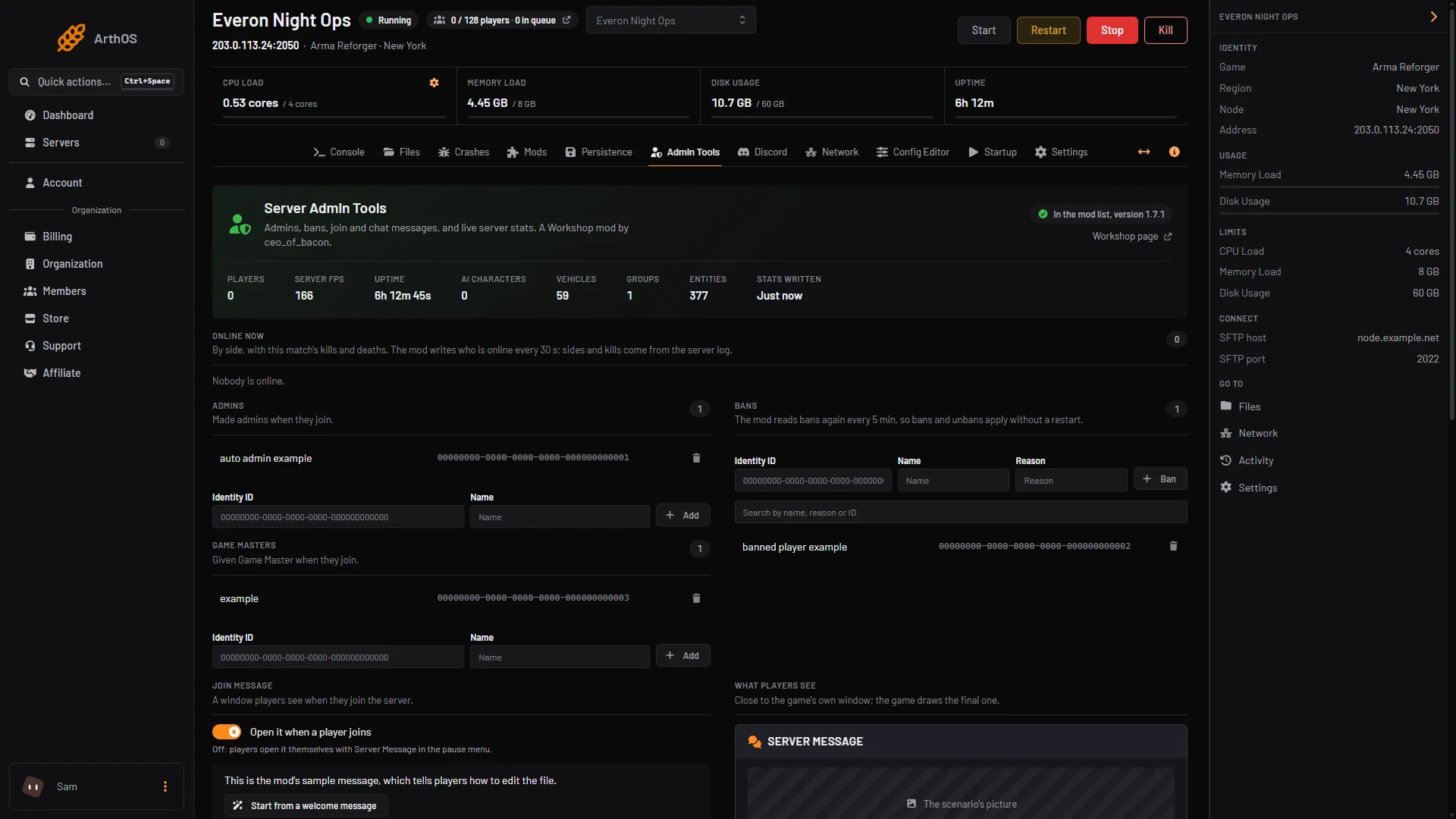
The panel edits the ban list of the Server Admin Tools mod, a Workshop mod, so you can ban without being in game. It has no Kick button for Reforger, and a ban is not instant: the mod reads its ban list again every 5 minutes by default (the page shows the number), and a banned player who is online is removed then. To remove someone right now, use #kick in game.
- Open the Admin Tools tab. If the mod is not in your mod list, choose Add to the mod list and restart the server. The mod writes its settings file at that first start.
- In Bans, fill in Identity ID (1), Name and Reason. The identity ID is what the ban works on; the name is how the list shows who it is.
- Choose Ban (2). A bar shows the number of unsaved changes; choose Save changes. The panel confirms “Saved. Bans apply within 5 min”.
- Identity ID
- Ban
To lift one, use the bin icon on its row, whose label starts with Unban, then choose Save changes. The search box finds a ban by name, reason or ID.
You need permission to edit files to change the list. Without it you can only read it.
This list holds the mod’s bans. Bans made with the game’s own #ban command are separate, and the panel does not list them.
By hand
Everything above is in game. To run the same commands from outside the game, you need RCON. See the RCON guide. RCON must have admin permission for #kick and #ban. A monitor account can only list players.
If it does not work
- Nothing happens when you type the command. You are not logged in. Type
#loginfirst. - Ban by
playerIdfails. The player left. Use their identity ID. - The player was kicked but is back. That is how
#kickworks. Use#ban create. - A banned player is still on the server. Wait for the reload time shown on the page, 5 minutes by default; the player is removed then. Check you chose Save changes, and that the mod is in the mod list and the server was restarted once since it was added.
- You cannot ban anyone from the panel. Your role lacks permission to edit files.
More about the game: Arma Reforger servers.
Sources: Bohemia wiki: Server Management, Bohemia wiki: Server Config, reforger.armaplatform.com: News