






To become an admin in game, type #login <password> in the chat. Bohemia describes the admin password as the “password to become a server admin”. You set it on the Startup page.
A server ordered from the Loafhosts store starts with a random 20-character value in Server Password, Admin Password and RCON Password, so a new DayZ server already has an admin password and a join password. Players need the join password, or empty Server Password for a public server.
Bohemia’s DayZ pages do not list any chat commands for admins, so this guide lists none either. The things most admins want are in the panel and need no login: kicks, bans, messages and locking. See ban and kick DayZ players.
Set the admin password
- Open your server and choose Startup.
- Type a password in Admin Password.
- Choose Save, then restart the server.
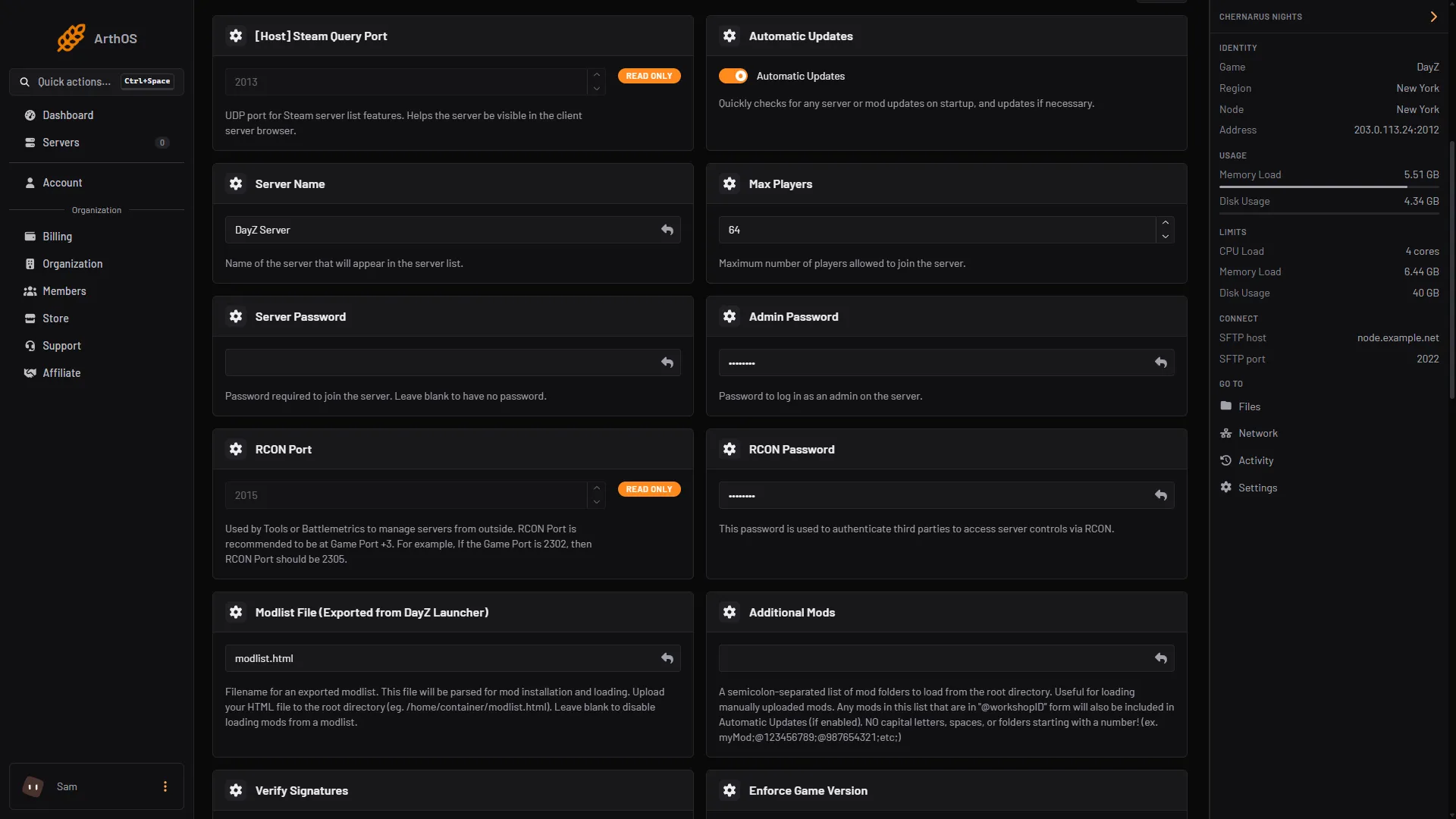
- Type the admin password
Type the password in the Admin Password field (1). It is a plain text field, so what you type stays visible while you type it. The picture hides the passwords.
The password is written into serverDZ.cfg at every start. The Config Editor shows the same setting as Admin password, locked, with a link back to Startup. A change made to that line in the file is undone at the next start, so always change it on Startup.
Log in in game
- Join your server.
- Open the chat and type
#loginand a space, then the admin password.
The Config Editor describes the setting this way: “Type #login followed by this password in chat to become an admin.” Bohemia does not document any extra chat commands for a logged-in admin, so do not rely on commands you have seen on other websites.
Do the admin jobs from the panel
You do not need to be logged in to the game for these. Open Players.
- Kick and Ban are on each player’s row. Ban lengths run from 1 hour to For good.
- Message sends one player a message. Message to everyone sends one to all.
- Lock stops anyone new from joining until you choose Unlock or the server restarts.
- Bans lists every ban and has Remove.
The Players page talks to the game through BattlEye RCon, so it works only while the server is running. If it says the server is not running or BattlEye RCon is not answering yet, wait for the server to finish starting. More in the BattlEye RCon guide and message and lock the server.
Read what players report
A player can type #toadmin and a message in chat. Bohemia says this is written to the administration log as a “PLAYER REPORT”. The log is the .ADM file in profiles/, and it exists only when the server starts with -adminlog. That parameter is on by default in [Advanced] Extra Startup Parameters. Open the file in Files.
By hand
If you host DayZ yourself, set the password in serverDZ.cfg and restart:
passwordAdmin = "a-long-password";If it does not work
- The new password is not accepted. Restart the server after saving. The password is read when the server starts.
- Your edit to
serverDZ.cfgdisappeared. Startup rewrites this line at every start. Change Admin Password on Startup instead. - Nothing happens after
#login. Check you typed the password exactly, with a space after#login. If it still does nothing, use the Players page, which does not depend on the in-game login. - The Players page is empty. The server is not running, or BattlEye RCon is not answering yet.
More about the game: DayZ servers.
Sources: Bohemia wiki: Server Configuration, Bohemia wiki: Administration Logs, Bohemia wiki: Server Messages