






The Config Editor shows your DayZ serverDZ.cfg as a form, so you do not have to edit the file by hand. Change a row, choose Save, and restart the server. Some rows are locked because the panel writes them from Startup every time the server starts.
In the ArthOS panel
- Open your DayZ server and choose Config Editor in the server menu. The page shows
serverDZ.cfgat the top left, and a banner: “Saved changes apply after a restart.” - Settings sit in cards: Server, Access, Gameplay, Voice, Time, Messages, Performance, Logs and Advanced. Type in Search… (1) to see only the rows that match. A locked row, such as Server name (2), says “Set on the Startup page, which writes it on every start. Open Startup”.
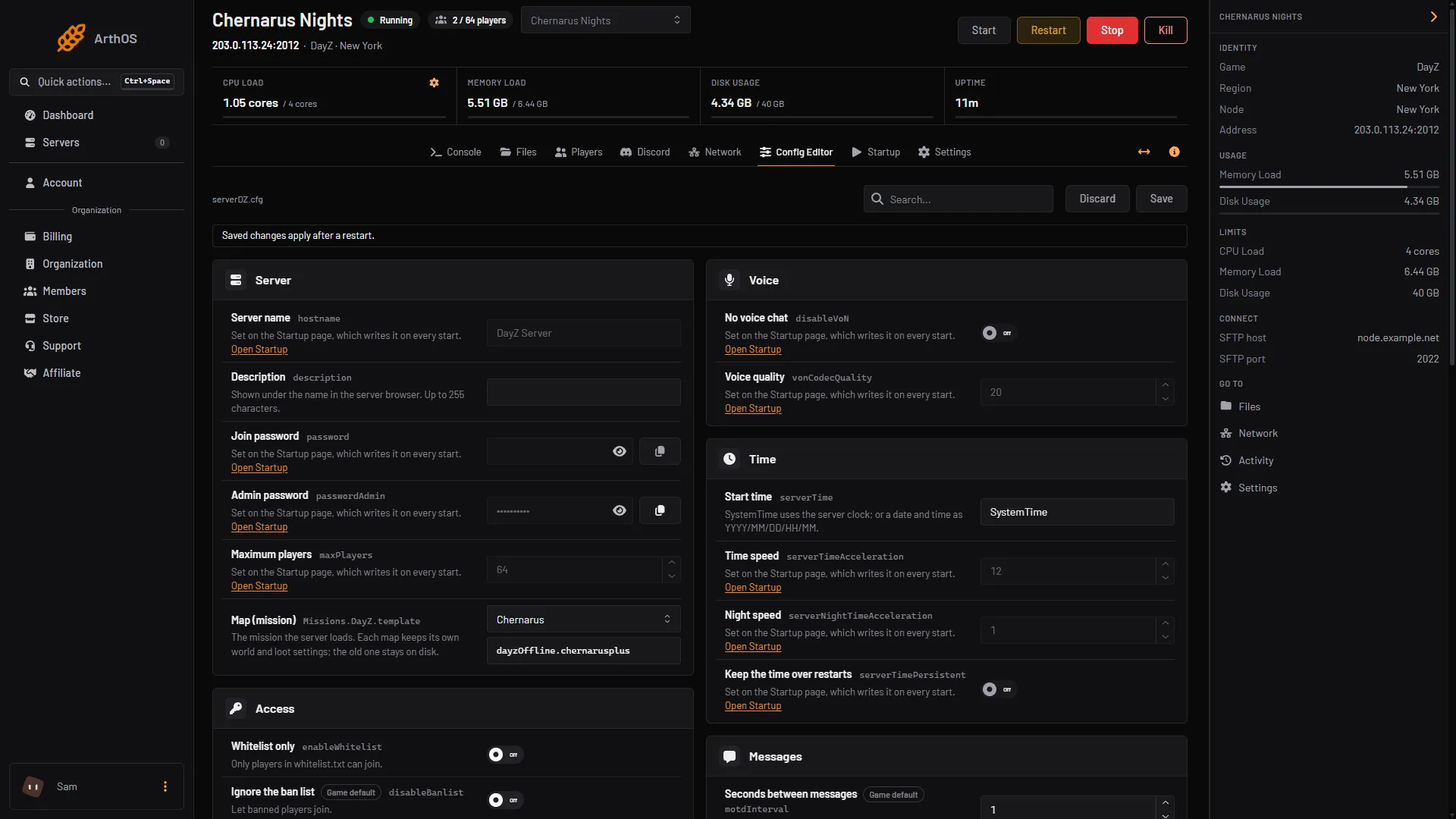
- Search for a row
- Locked: set on Startup
- Map (mission)
- Save
- Change a row, for example Map (mission) (3). The page shows Unsaved changes with a count, and each changed card shows how many rows changed. Discard puts everything back.
- Choose Save (4).
- If the server is running, the page says “Saved. Restart the server to apply the changes.” Choose Restart now. If the server is stopped, the changes apply when it starts.
You cannot save while the server is starting or stopping. If you try to leave with unsaved changes, the panel asks “Leave without saving?”.
A setting the file does not carry yet shows a Game default badge. Save adds it to the end of the file. Everything you did not change stays as it was, including comments and the class Missions block.
Rows that are locked
Some rows are locked with the note “Set on the Startup page, which writes it on every start.” If you changed such a line in the file, the next start would undo it. Change these on Startup instead:
| Config Editor row | Startup field |
|---|---|
| Server name | Server Name |
| Join password | Server Password |
| Admin password | Admin Password |
| Maximum players | Max Players |
| Verify mod signatures | Verify Signatures |
| Same game version only | Enforce Game Version |
| No voice chat | Disable VoN |
| Voice quality | VoN Quality |
| First person only | Disable Third Person |
| No crosshair | Disable Crosshair |
| No personal light | Disable Personal Light |
| Night brightness | Darker Nights |
| Time speed | Time Multiplier |
| Night speed | Night Multiplier |
| Keep the time over restarts | Persistent Time |
Steam query port is locked too, and [Host] Steam Query Port on Startup is read only. It is set for you.
Rows that are not locked, such as Map (mission), Whitelist only, Respawn time (seconds) and the Messages rows, save straight to the file. To pick a map, see change the DayZ map.
What it does not edit
The Config Editor edits serverDZ.cfg only. These files are edited in Files, by hand:
types.xml,events.xmlandglobals.xml, in thedbfolder of the mission. See DayZ types.xml loot.cfggameplay.json, in the mission folder. It is only read when Use cfggameplay.json is on.- The BattlEye RCon settings. Set the RCon password in RCON Password on Startup.
The mission folders are in mpmissions: dayzOffline.chernarusplus, dayzOffline.enoch (Livonia) and dayzOffline.sakhal.
Settings that are in the file but not in the editor’s list wait behind a card with the button Show them. At the bottom of the page, Edit the whole file as text opens serverDZ.cfg in the file editor.
By hand
Open serverDZ.cfg in Files, change a line and save. Keep the semicolon at the end of each line. Edit it with the server stopped. A line for a locked setting will be rewritten from Startup at the next start. Every key is explained in serverDZ.cfg explained.
If it does not work
- The Save button is grey. You have not changed anything yet, or a value is outside its range. A row with a range tells you the range, for example “A whole number from 1 to 100.”
- There is no Save button. Your role can see the settings but not change them. The page says so.
- The page says the file does not exist yet. The game creates
serverDZ.cfgthe first time the server starts. Start it once. - Your change did not apply. Restart the server. A running server reads the file only when it starts.
- A locked row keeps its old value. Change it on Startup.
More about the game: DayZ servers.
Sources: Bohemia wiki: Server Configuration