






The map a DayZ server loads is called its mission. In the panel you change it in the Config Editor, on the Map (mission) row, then restart. Each map keeps its own world, so the world you leave stays on disk.
In the ArthOS panel
- Open your server and choose Config Editor.
- Under Server, find Map (mission).
- Pick Chernarus, Livonia or Sakhal from the list.
- Choose Save, then Restart now.
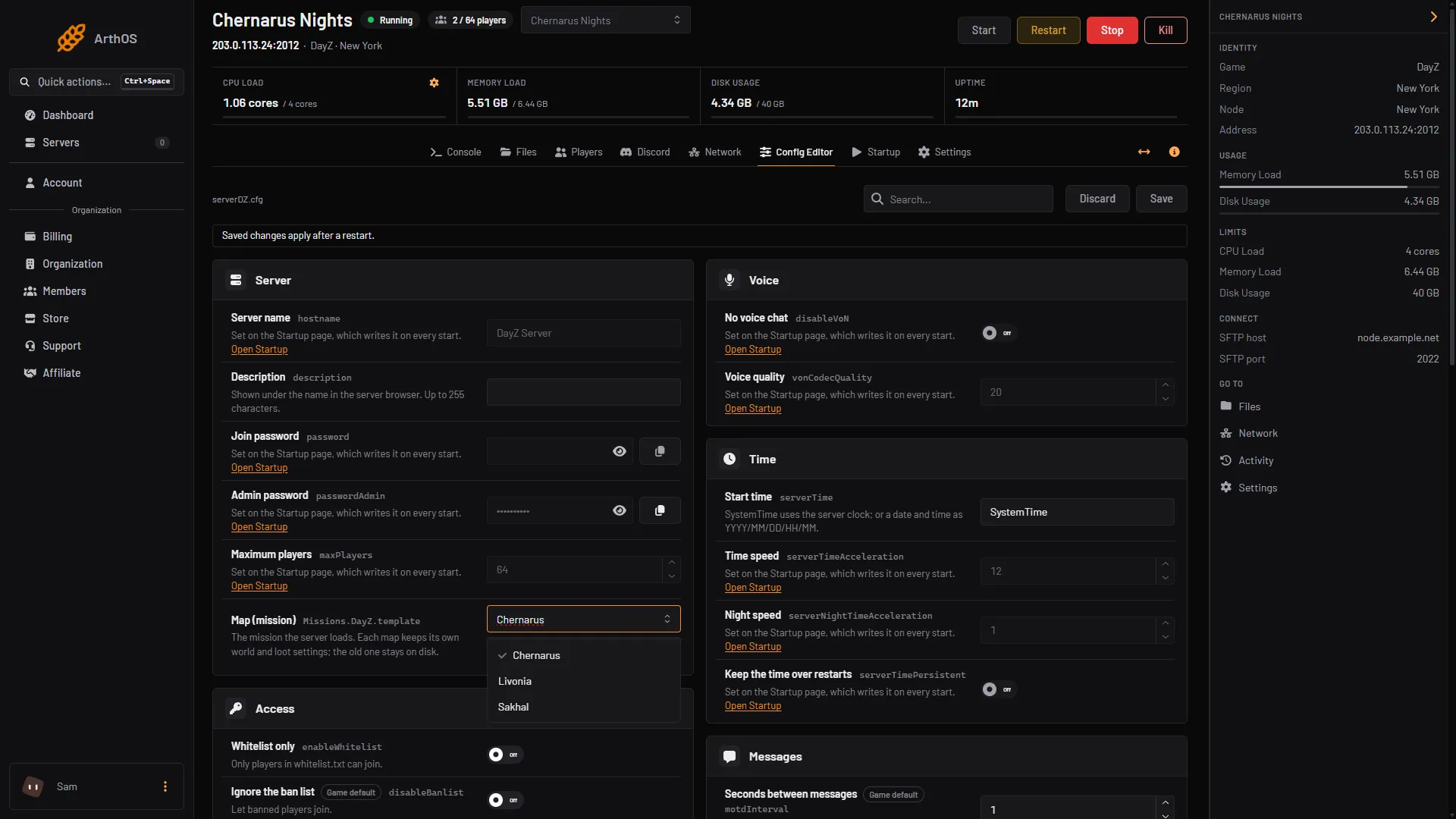
- Pick the map
Open the list (1) and pick the map. The mission folder name shows under the list once you have chosen. A new server already has all three mission folders in mpmissions.
The Map (mission) list also shows any other mission folder it finds in mpmissions, as its folder name followed by “(found on this server)”.
Checked on DayZ 1.29. Update 1.30 is due on 15 October 2026. The DayZ Badlands expansion (a new map, Nasdara) launches the same day. Badlands is a paid expansion whose players need it. Whether its mission ships with the dedicated server is Not checked as of 13 October 2026.
What each choice means
The three choices are Bohemia’s own mission folders:
| Choice | Mission folder |
|---|---|
| Chernarus | dayzOffline.chernarusplus |
| Livonia | dayzOffline.enoch |
| Sakhal | dayzOffline.sakhal |
Bohemia writes the setting as <MissionName>.<TerrainName>. It sits in serverDZ.cfg under class Missions, as template.
Guides for each map: Chernarus, Livonia and Sakhal.
Each map keeps its own world
The loot files, such as db/types.xml, live inside each mission folder. So does the saved world. Bohemia calls the storage_ folder inside a mission the actual state of the Central Economy in that mission. The panel’s help says the same thing: “Each map keeps its own world and loot settings; the old one stays on disk.”
So when you switch to another map, you start in a fresh world on that map. Switch back and the earlier world is still there. Anything you changed in one mission’s loot files does not carry over to the others.
Do players need a DLC?
Steam’s DayZ page says the base game includes two maps: Chernarus and Livonia. Sakhal comes with DayZ Frostline, a separate DLC. Its Steam page says: “This content requires the base game DayZ on Steam in order to play.”
Steam’s pages do not say what happens when a player without Frostline joins a Sakhal server. Tell your players which map you run before they download anything.
By hand
Edit serverDZ.cfg and restart:
class Missions
{
    class DayZ
    {
        template = "dayzOffline.enoch";
    };
};
The mission folder must exist in mpmissions.
If it does not work
- The server did not change map. Restart after saving. The map is read when the server starts.
- The list has no Livonia or Sakhal. The list shows the three standard maps. If the server’s install is missing a folder, check
mpmissionsin Files. - A map of your own does not load. Its folder name must match exactly a folder in
mpmissions, and it must hold a complete mission. - Your world looks empty after a switch. You are in the new map’s own world. Switch back to return to the old one.
More about the game: DayZ servers.
Sources: Bohemia wiki: Server Configuration, Bohemia wiki: Central Economy setup for custom terrains, github.com: DayZ Central Economy, store.steampowered.com: DayZ, store.steampowered.com: DayZ Frostline