






types.xml lists every item the loot system can spawn, and how many of each: nominal is the count the economy tries to keep, min the count below which it spawns more, and lifetime the seconds an untouched item stays. To change loot, edit these numbers with the server stopped, then start the server. Bohemia describes the file as the place that limits each item’s presence in the world, with its min and nominal values, tags, categories and flags.
Where the file is
It is in the db folder of your map’s mission folder, inside mpmissions:
mpmissions/dayzOffline.chernarusplus/db/types.xmlfor Chernarusmpmissions/dayzOffline.enoch/db/types.xmlfor Livoniampmissions/dayzOffline.sakhal/db/types.xmlfor Sakhal
Each map has its own file. Changing one does not change the others. Bohemia publishes the vanilla files for every map on its Central Economy repository. The Config Editor does not edit this file. See DayZ Config Editor.
What one entry looks like
This is the vanilla entry for the AKM:
<type name="AKM">
    <nominal>3</nominal>
    <lifetime>7200</lifetime>
    <restock>3600</restock>
    <min>2</min>
    <quantmin>30</quantmin>
    <quantmax>80</quantmax>
    <cost>100</cost>
    <flags count_in_cargo="0" count_in_hoarder="0" count_in_map="1" count_in_player="0" crafted="0" deloot="0"/>
    <category name="weapons"/>
    <usage name="Military"/>
    <value name="Tier4"/>
</type>
What each part means
| Part | Meaning |
|---|---|
name | The item’s class name. It must match the game exactly. |
nominal | How many of the item the economy tries to keep in the world. 0 stops it spawning. |
min | When the count falls below this, the economy spawns more. |
lifetime | Seconds an untouched item stays before it is removed. |
restock | Seconds to wait before the economy may spawn a replacement. 0 means no wait. |
quantmin, quantmax | How full the item is when it spawns, in percent (ammo, liquid). -1 means the item has no quantity. |
cost | A priority weight. The vanilla file uses 100 for nearly everything. |
flags | What counts toward nominal: count_in_map (on the ground), count_in_cargo (inside other containers), count_in_hoarder (in stashes, barrels and tents), count_in_player (in a player’s inventory). crafted="1" marks an item made only by crafting. deloot="1" marks loot for dynamic events such as helicopter crashes. |
category | The kind of item. |
usage | The kind of building it spawns in. More than one is allowed. |
value | The map tier where it spawns, Tier1 to Tier4, or Unique. More than one is allowed. |
tag | Where in a building it spawns: floor, shelves or ground. |
Allowed names for category, usage, value and tag are in cfglimitsdefinition.xml in the mission folder. A name that is not listed there is rejected. A file called cfglimitsdefinitionuser.xml exists beside cfglimitsdefinition.xml; what mods need there is Not checked. In the vanilla file the categories are tools, containers, clothes, lootdispatch, food, weapons, books and explosives.
The meanings of nominal, min, lifetime, restock, cost and the flags above come from a community reference, not from Bohemia. Bohemia names these fields but does not define each one.
In the ArthOS panel
- Take a backup of the file first. In Files, download
types.xmlto your computer. For a full copy of the server, use Settings, then Backups. - Choose Stop on the server.
- In Files, open
mpmissions, your map’s folder, thendb. - Open
types.xml(1). The file is large, so you may find it easier to edit a copy on your computer and upload it again.
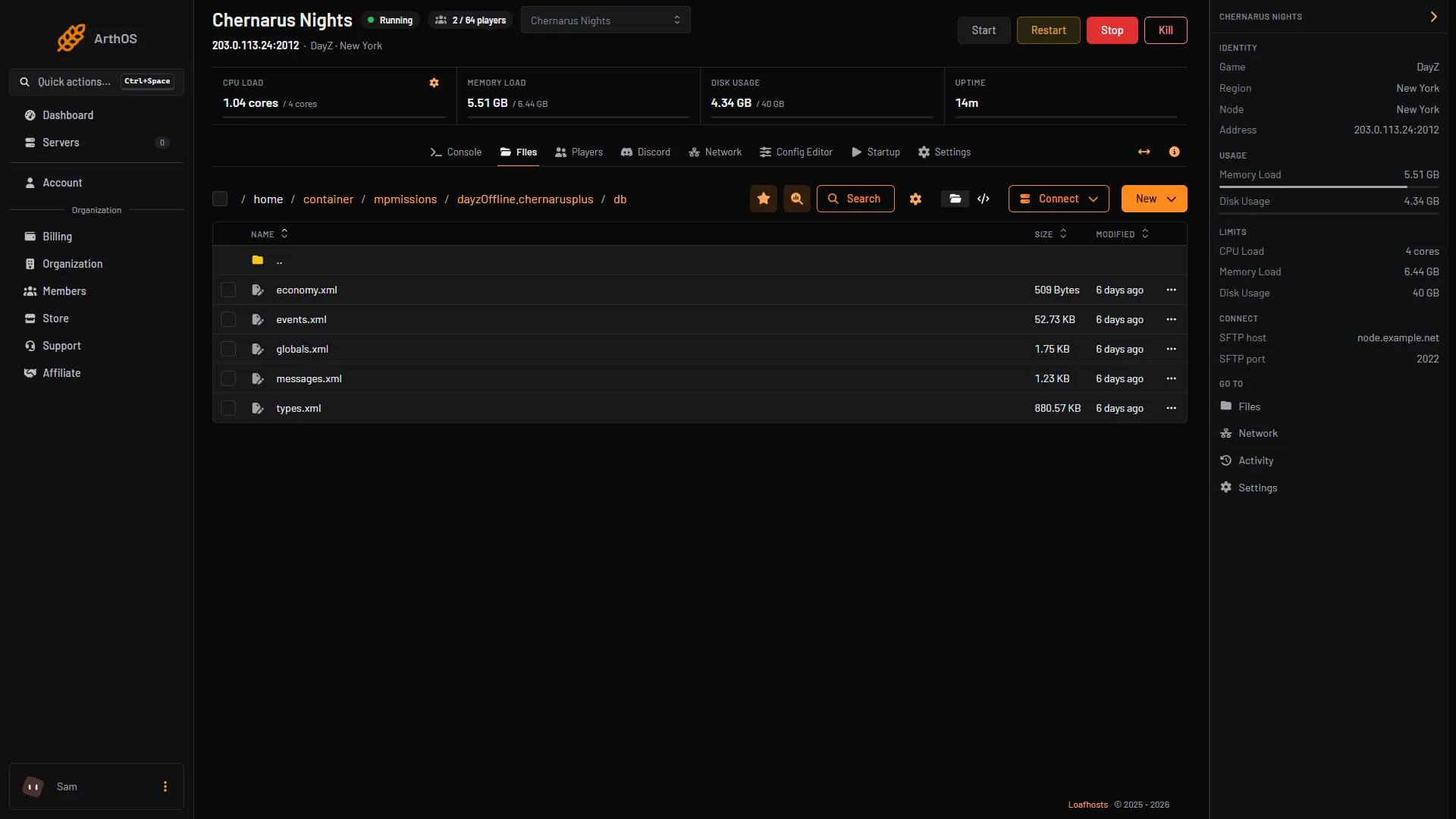
- Open types.xml
- Change the numbers. For example, to double the AKM, set
nominalto6andminto4. Keepminat or belownominal. - Save, then start the server.
Changes take effect when the server restarts. Items already in the world stay until their lifetime runs out, so the new numbers show up gradually (Not checked).
Add modded items without editing the vanilla file
Bohemia’s way to add items from a mod is a separate file. Put it in a new folder inside the mission folder, then list it in cfgeconomycore.xml, before </economycore>:
<ce folder="custom">
    <file name="mod_types.xml" type="types" />
</ce>
In an override file, you only need to write the values you change. If a field has several elements, such as flags, write all of them. If you give any usage, tag or value, they replace all the original ones.
If it does not work
- An item never spawns. Check that
nominalis above0, that the item has at least oneusage, and that everycategory,usage,valueandtagname is incfglimitsdefinition.xml. - Items vanish fast.
lifetimeis too low. The vanilla weapons use 7,200 to 28,800 seconds. - Nothing changed. You edited a different map’s file, or the server was running. Check the mission folder name, then stop, edit and start.
- A mod’s items do not spawn. Add their entries to the economy as above. A mod’s author usually provides the entries, but you have to merge them in.
More about the game: DayZ servers.
Sources: Bohemia wiki: Central Economy setup for custom terrains, Bohemia wiki: Central Economy mission files modding, github.com: DayZ Central Economy, raw.githubusercontent.com: Types.xml, raw.githubusercontent.com: Cfglimitsdefinition.xml, stardz-team.github.io: 04 loot economy