






Open the Players page of your server. Every player who is on shows a long code of letters and digits beside their name. That is their BattlEye GUID. Click it to copy it.
What it is
A BattlEye GUID is 32 letters and digits. BattlEye gives one to every player and uses it to ban them. The panel says the same: “Players are identified by their BattlEye GUID, which stays the same between visits.”
Bohemia’s BattlEye page explains why bans use it. The GUID “cannot be hacked/changed client-side”, so a banned player cannot get back in by changing their name. A community post on the DayZ forums says BattlEye works the GUID out from the player’s Steam ID. You do not need to work it out yourself.
Three different IDs
A player has three IDs, and each list takes only one of them:
- The Steam ID (the Steam64 ID) is 17 digits.
priority.txttakes Steam IDs, separated by semicolons (Bohemia’s page). - The BattlEye GUID is 32 characters. The BattlEye bans in the panel take it, and so does
addBan. - The 44-character log ID is the
id=value of a “Player … is connected (id=…)” line in the admin log (.ADMfile inprofiles).whitelist.txtandban.txttake it. The files’ own instructions say so.
You cannot swap one for another. The ban form in the panel only accepts a 32-character GUID, or an IPv4 address. To use the log ID in whitelist.txt, see whitelist your DayZ server.
In the ArthOS panel
- Open your server and choose Players.
- Find the player under Online. Each row shows the name, the GUID and the ping (1).
- Click the GUID to copy it.
- To ban by GUID, scroll to Bans. Paste it into BattlEye GUID or IPv4 address, pick a Length, and choose Ban.
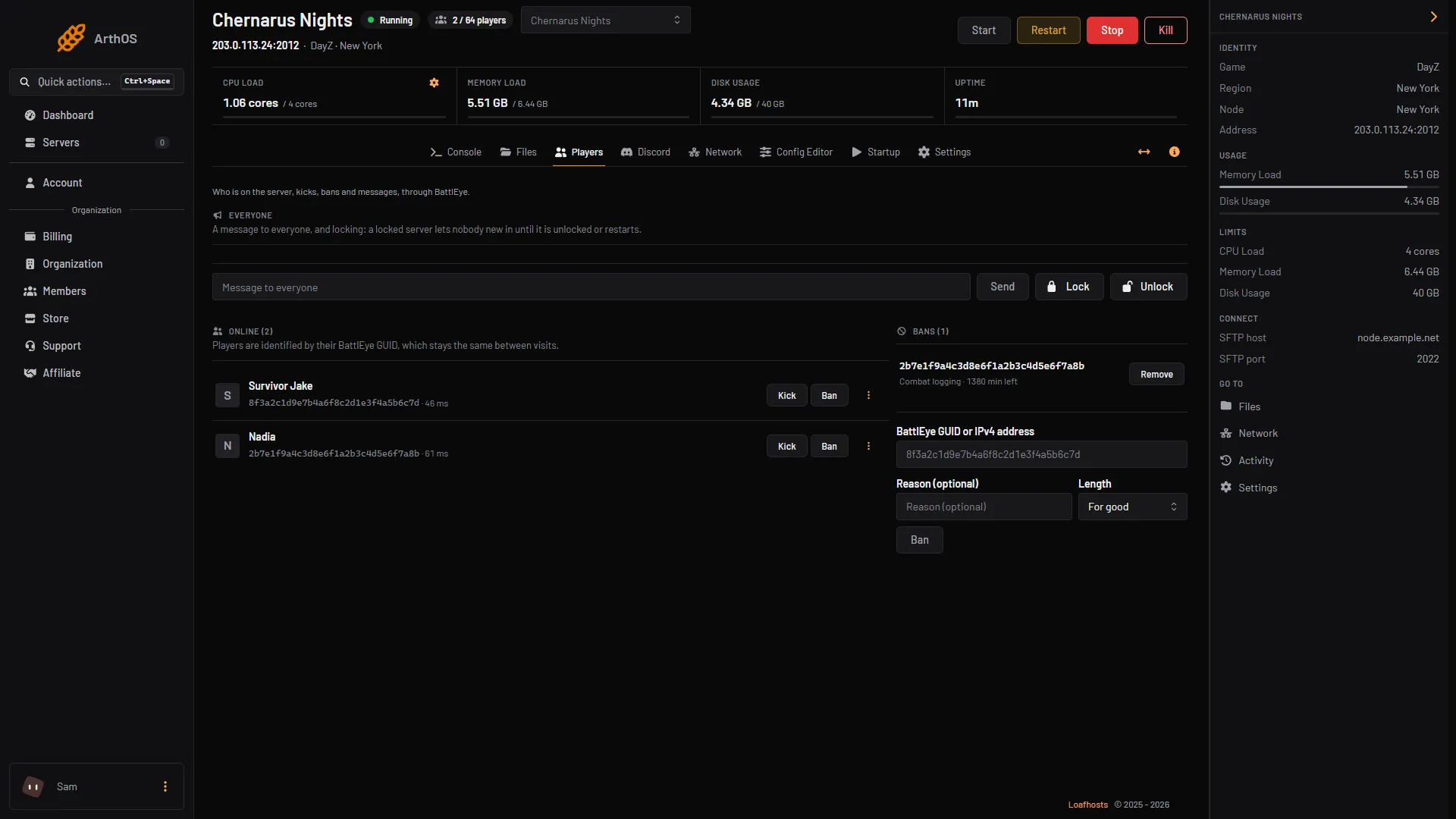
- Player, GUID and ping
If the tag GUID not checked yet shows, BattlEye has not checked that player yet. A player who is still joining shows no GUID, and the panel offers no kick or ban for them until it appears.
The Players page lists only players who are on now.
By hand
BattlEye RCon shows GUIDs too. The players command prints a table with the columns number, IP address and port, ping, GUID and name. To ban a player who is not on the server, use addBan:
addBan <GUID> <minutes> <reason>With no time, or 0, the ban is permanent. Bohemia’s BattlEye page lists this command. See BattlEye RCon for how to connect.
If it does not work
- No GUID next to a name. The player is still joining. Wait a moment.
- The ban form says “A GUID is 32 letters and digits.” You pasted something else, such as a Steam ID or the 44-character log ID. Copy the GUID from the Players page.
- The player is not on the list any more. They left. The page cannot show a GUID for someone who is not on the server, so you need one you copied earlier.
- A banned player is back. Check that the GUID in the Bans list is the one you copied from their row.
More about the game: DayZ servers.
Sources: Bohemia wiki: BattlEye, Bohemia wiki: Server Configuration, Bohemia wiki: Administration Logs, forums.dayz.com: 243396 battleye guid