






Day length is set on the Startup page. Time Multiplier says how many times faster than real life the game clock runs, and Night Multiplier speeds up or slows down the night on top of it. A Time Multiplier of 12 makes a full game day last 2 hours.
What the settings mean
DayZ keeps these settings in serverDZ.cfg:
| Startup label | Setting | What it does |
|---|---|---|
| Time Multiplier | serverTimeAcceleration | How much faster than real time the game day passes. |
| Night Multiplier | serverNightTimeAcceleration | Multiplied with the time speed at night only. |
| Persistent Time | serverTimePersistent | When on, the next start continues from the saved game time. |
A real day is 24 hours, so divide 24 by the Time Multiplier to get the length of a game day in real hours:
- 1: a game day lasts 24 hours, the same as real time.
- 6: a game day lasts 4 hours.
- 12: a game day lasts 2 hours. This is the default.
- 24: a game day lasts 1 hour.
The Night Multiplier is multiplied with the Time Multiplier, and only at night. Bohemia’s example: a night speed of 4 with a time speed of 2 makes the night pass 8 times faster than real time. With Time Multiplier 12 and Night Multiplier 4, the night runs at 48 times real time. Night Multiplier 0.5 makes nights longer than days.
Bohemia allows 0.1 to 64 for both. The Startup page takes a whole number from 0 to 24 for Time Multiplier and 0.1 to 64 for Night Multiplier. Do not use 0 for the Time Multiplier.
In the ArthOS panel
- Open your server and choose Startup.
- Find Time Multiplier (1) and Night Multiplier (2) and type the values. A new server has 12 and 1.
- Turn Persistent Time (3) on if the clock should carry on after a restart, or off to begin at the start time every time. A new server has it off.
- Choose Save. The settings are written into
serverDZ.cfgevery time the server starts, so restart the server to use them.
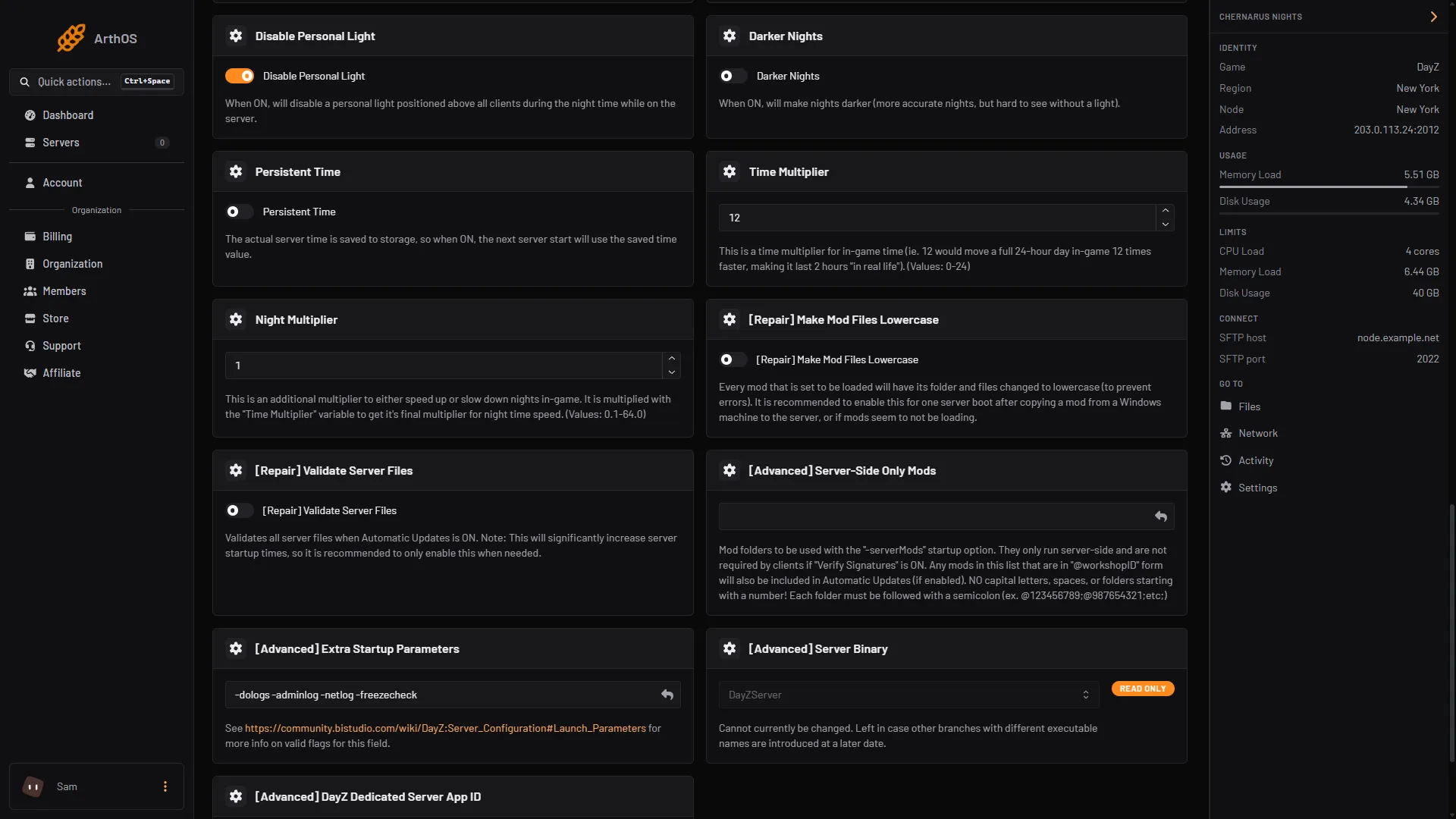
- Time Multiplier
- Night Multiplier
- Persistent Time
The Config Editor shows these as Time speed, Night speed and Keep the time over restarts, locked, with the note “Set on the Startup page, which writes it on every start.” Change them on Startup, not in the file.
Set the start time
The start time is not a Startup variable. It is in the Config Editor.
- Open Config Editor and the
serverDZ.cfgfile. - In the Time group, find Start time (1). It is the only editable row there. Time speed, Night speed and Keep the time over restarts are locked.
- Type
SystemTimeto use the clock of the machine the server runs on. Or type a date and time asYYYY/MM/DD/HH/MM, for example2015/4/8/17/23for 5:23 pm. - Choose Save, then Restart now.
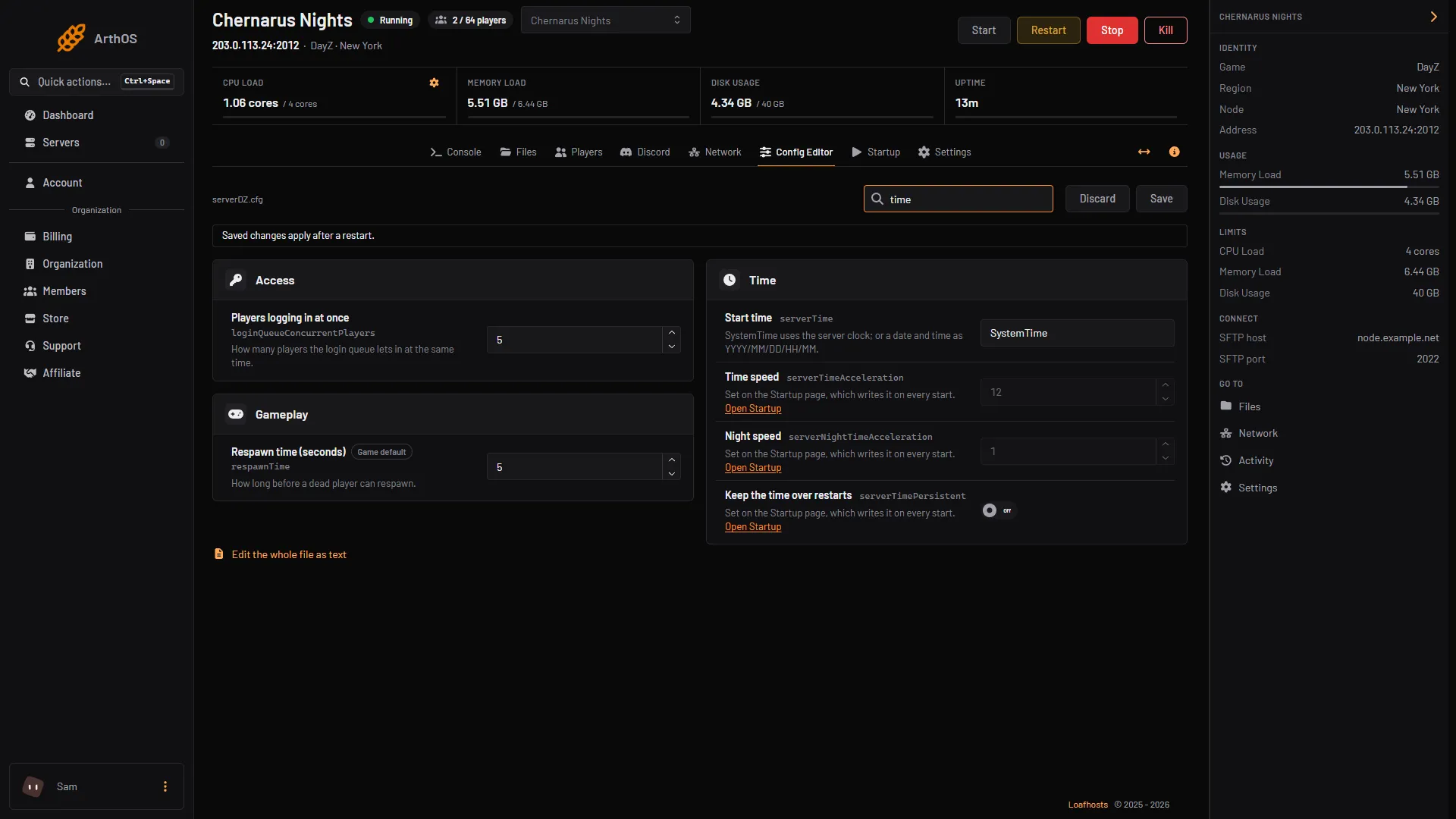
- Start time
- Locked, set on Startup
With Persistent Time on, the server saves the game time, and the next start uses the saved time instead of the start time.
By hand
On a server you run yourself, edit serverDZ.cfg:
serverTime = "SystemTime";
serverTimeAcceleration = 12;
serverNightTimeAcceleration = 4;
serverTimePersistent = 0;
Restart the server after the change. On Loafhosts, the three speed and persistence lines are rewritten from Startup at every start, so a hand edit to them is undone.
If it does not work
- The time did not change. Restart the server. The values are read at start.
- A speed edited in Files went back. The Startup page writes those lines at every start. Change them on Startup.
- The Time Multiplier is refused. Use a whole number from 0 to 24.
- The start time is ignored. Check whether Persistent Time is on. It uses the saved time instead.
For how dark the night looks, see DayZ night brightness. More about the game: DayZ servers.
Sources: Bohemia wiki: Server Configuration