






The Live map on the Players page shows where each player on your Enshrouded server is, on a map of Embervale. It is a Beta feature. Switch it On and make sure the server is running. The map says when it has a reading.
The panel reads positions from the running server. Nothing is added to the game, and players do not need to do anything.
In the ArthOS panel
- Start the server. The map only works while it runs.
- Open the Players page and find Live map.
- Switch it On (1).
- Wait for the first reading. Until then the map (2) says it is waiting. It says when it has a reading.
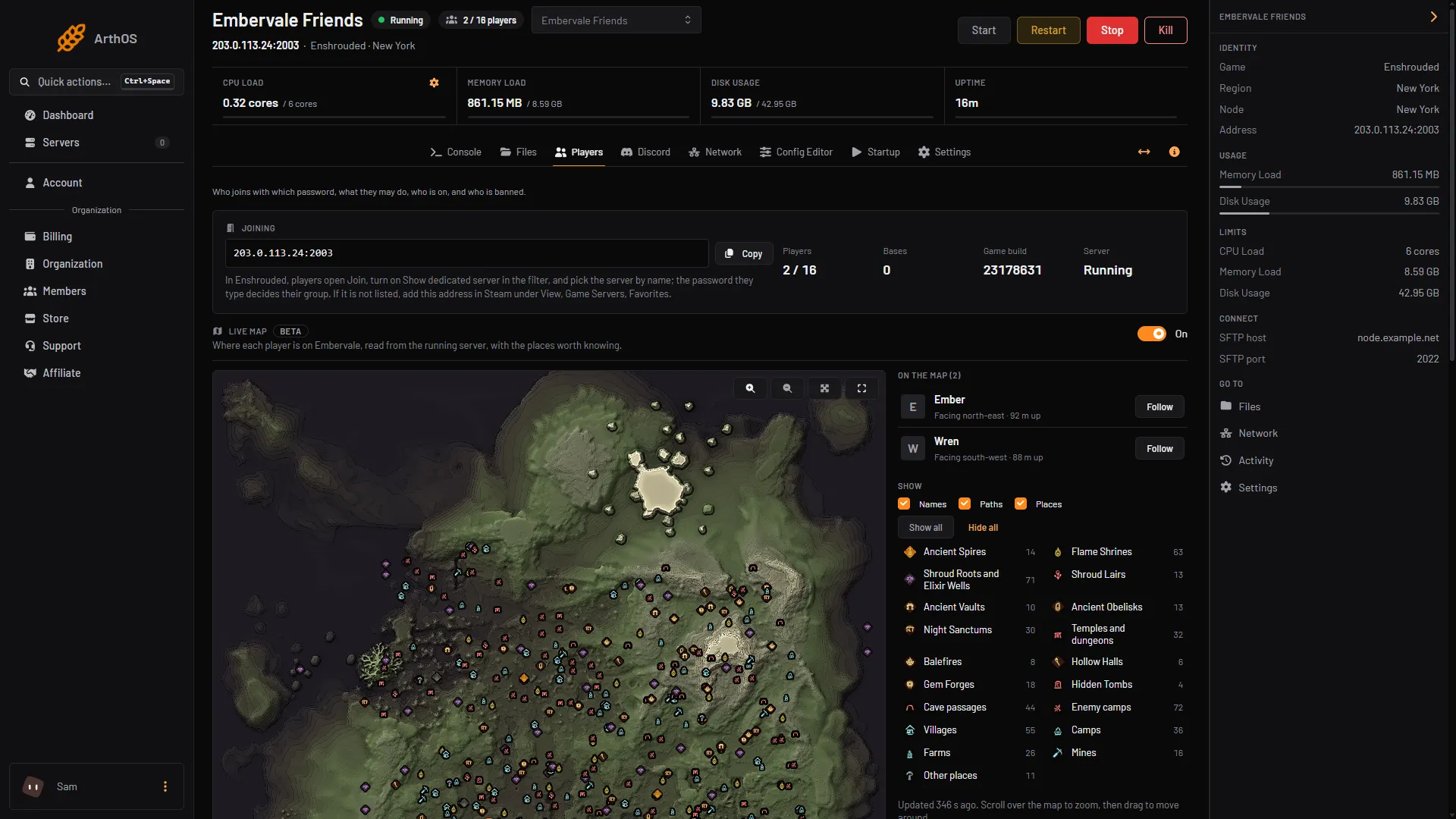
- The On switch
- The map
- Players and Follow
- Show choices
What the map shows
- Players. Each player is an arrow that points the way they face. The list beside the map shows Facing north, east and so on, and how many metres up they are. A player who is online but not yet found appears as “Online but not on the map yet”. A player not seen for a moment is marked “Not seen for a moment”.
- Names. The player’s name beside the arrow.
- Paths. The route each player has taken.
- Places. Ancient Spires, Flame Shrines, Villages, Enemy camps and more, with their own icons. Hover over an icon to see its name.
The choices Names, Paths and Places under Show (4) turn each of these on or off. With Places on, each kind of place has its own button, and Show all and Hide all switch them all.
Move around
- Scroll over the map to zoom, then drag to move.
- The zoom buttons are Zoom in, Zoom out and Whole map.
- Choose Follow beside a player (3). The map stays centred on them as they move, and the button reads Following. Drag the map, or choose Whole map, to stop following.
- Choose Full screen to fill your screen, and Leave full screen to go back. The button only shows if your browser allows full screen.
Who can see it
Two permissions control the live map. You set them on the organization’s roles. They are not the game’s groups (Admin, Friend, Guest, Visitor); see Enshrouded user groups and permissions for those.
- live-map.read lets a member see the map: where each player is and which way they face.
- live-map.manage lets a member turn the map on and off.
A member without live-map.read does not see the section at all. A member with it but without live-map.manage sees the switch greyed out.
If it does not work
- The map says it is off. Switch it On, or ask someone with live-map.manage.
- It says the server is stopped. Start the server.
- It says “Nothing has come from this server’s machine”. The live map is not set up on that machine yet. The panel tells you to contact support.
- It says players are online but cannot be found. The panel says this version of the game keeps them where the map cannot find them yet. Checked on the 0.9 server. Enshrouded 1.0 is released on 15 October 2026, and it may change this. For a slow server, see Enshrouded server lag.
- You cannot see the Live map section. Your role has no live-map.read. Ask the organization owner.
More about the game: Enshrouded servers.
Sources: store.steampowered.com: 1203620