






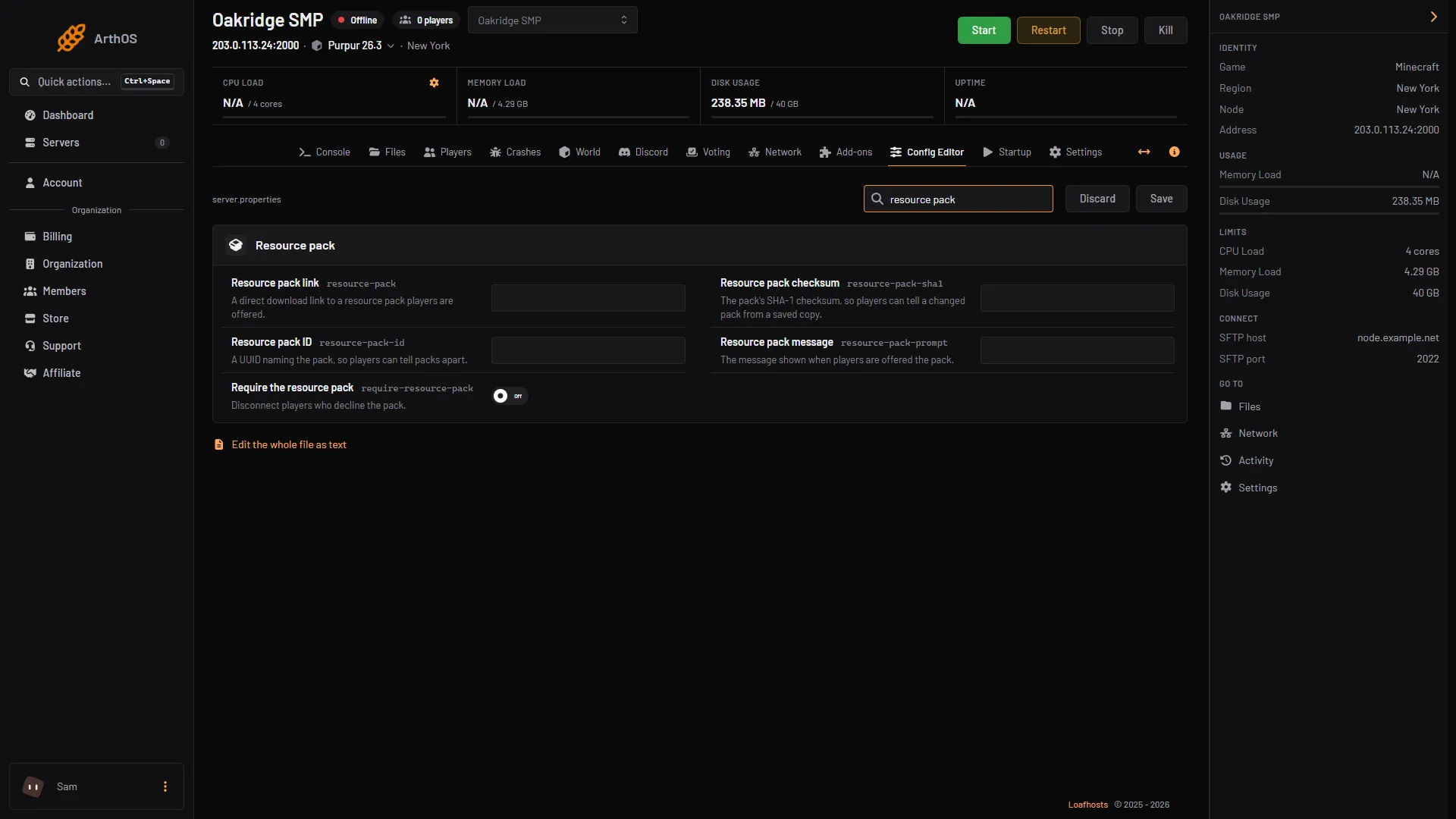
To offer a resource pack, paste a direct download link to the pack’s zip file into Resource pack link in the Config Editor, add the pack’s checksum, save, and restart. Players are asked to download the pack when they join. Switch Require the resource pack on if players who say no should be disconnected.
The pack must be a zip file at a web address (HTTP or HTTPS). It may not be larger than about 262 MB (the wiki gives the limit in binary units).
The settings
The Config Editor groups these rows under Resource pack. The server.properties key is in brackets.
| Config Editor row | Key | What it does |
|---|---|---|
| Resource pack link | resource-pack | “A direct download link to a resource pack players are offered.” |
| Resource pack checksum | resource-pack-sha1 | “The pack’s SHA-1 checksum, so players can tell a changed pack from a saved copy.” |
| Resource pack ID | resource-pack-id | “A UUID naming the pack, so players can tell packs apart.” Optional. |
| Resource pack message | resource-pack-prompt | “The message shown when players are offered the pack.” |
| Require the resource pack | require-resource-pack | “Disconnect players who decline the pack.” Off by default. |
A direct download link is a link that starts the download of the zip file itself when you open it.
In the ArthOS panel
- Upload the pack to a web host that gives a direct link, and test the link in a browser. It should download the zip. A page that shows the file is not a direct link.
- Work out the pack’s SHA-1 checksum. On Windows, type
certutil -hashfile pack.zip SHA1in a terminal. On Linux, typesha1sum pack.zip. The wiki asks for lowercase hexadecimal, so write it in lowercase. - Open your Minecraft server and choose Config Editor. Type “resource” in Search….
- Paste the link into Resource pack link (1).
- Paste the checksum into Resource pack checksum (2).
- If you want a message, type it in Resource pack message. The wiki says it expects chat component syntax and may have several lines. Plain text works as a message, for example: Our server pack. Not checked on 26.3 as of 11 October 2026: how quote marks are saved.
- Switch Require the resource pack on if you want players to be disconnected when they decline.
- Choose Save (3). The banner says “Saved changes apply after a restart.”
- Restart the server.
- Resource pack link
- Resource pack checksum
- Save
What players see
When a player joins, the game says this server recommends the use of a custom resource pack and asks whether to download it. If Require the resource pack is on, the game says the server requires the pack and that rejecting it will disconnect them. These are the game’s own texts.
A message in Resource pack message appears under “Message from server” in the game’s prompt. The wiki says the message is shown when Require the resource pack is on. Not checked on 26.3 as of 11 October 2026: whether it also shows when the pack is only recommended.
By hand
- Stop the server.
- Work out the SHA-1 checksum:
certutil -hashfile pack.zip SHA1on Windows,sha1sum pack.zipon Linux. It is 40 characters, lowercase. - In
server.propertiesset:
resource-pack=https://example.com/pack.zip
resource-pack-sha1=0123456789abcdef0123456789abcdef01234567
require-resource-pack=false- Use your own link and checksum. The values above are examples.
- Start the server. A change to
server.propertiesneeds a restart.
If it does not work
- The pack never downloads. Open the link in a browser. If it does not download the zip, it is not a direct link. The wiki says the client logs a download failure, not the server.
- A yellow message in the Console: “Invalid sha1 for resource-pack-sha1”. The wiki says this appears at start when the checksum does not match the pack. Work out the checksum again from the file you uploaded.
- Players keep getting the old pack. A new version at the same link has a new checksum. Put the new checksum in Resource pack checksum. Not checked on 26.3 as of 11 October 2026: how long players’ games keep a saved copy.
- Players who decline cannot play. That is Require the resource pack. Switch it off to let them in without the pack.
- The pack is too big. Keep it under about 262 MB.
More on the game: Minecraft servers.
Sources: minecraft.wiki: Server.properties, minecraft.wiki: Resource pack, raw.githubusercontent.com: En us.json, learn.microsoft.com: Certutil, gnu.org: Sha1sum invocation.html