






Vanilla Rust has no gather rate setting, so there is no line for it in server.cfg. A plugin called Gather Manager does it. The panel installs it for you and sets a rate with one click. Anything above 1x lists your server as Modded in the server browser.
What a rate changes
A rate is a multiplier on what players receive. 3x means three times as much. Gather Manager splits gathering into sources:
- dispenser: what a player hits, such as trees, ore and animals.
- pickup: what a player picks up, such as hemp, stones and mushrooms.
- quarry: what a mining quarry produces.
- excavator: what the giant excavator produces.
- survey: what survey charges give.
In the ArthOS panel
The panel sets all five sources, and every resource, to the same rate.
- Your server must run a plugin framework, Oxide or Carbon. On the Plugins tab under Framework, choose Switch to Oxide or Switch to Carbon if it still says Vanilla. The panel takes a backup first when it can; if it cannot, it says so and you must choose Continue without a backup to go on.
- Start the server. Rates are set while the game runs; with the server stopped the page says “Start the server to change rates.”
- On the Plugins tab, find the Gather rates section. Pick 2x, 5x, 10x and so on, or type a number between 0.1 and 1000 in Custom (3) and choose Apply.
- The first time, the panel asks, for example, “Set rates to 2x?”. It explains that it installs the Gather Manager plugin from uMod, sets every gather source to the new rate and that the server list will show the server as Modded. Choose Install and set.
- Afterwards the rate reads, for example, “2x, Set by Gather Manager” (1), read back from the plugin, so what you see is what the game uses. Gather Manager appears under the installed plugins (4).
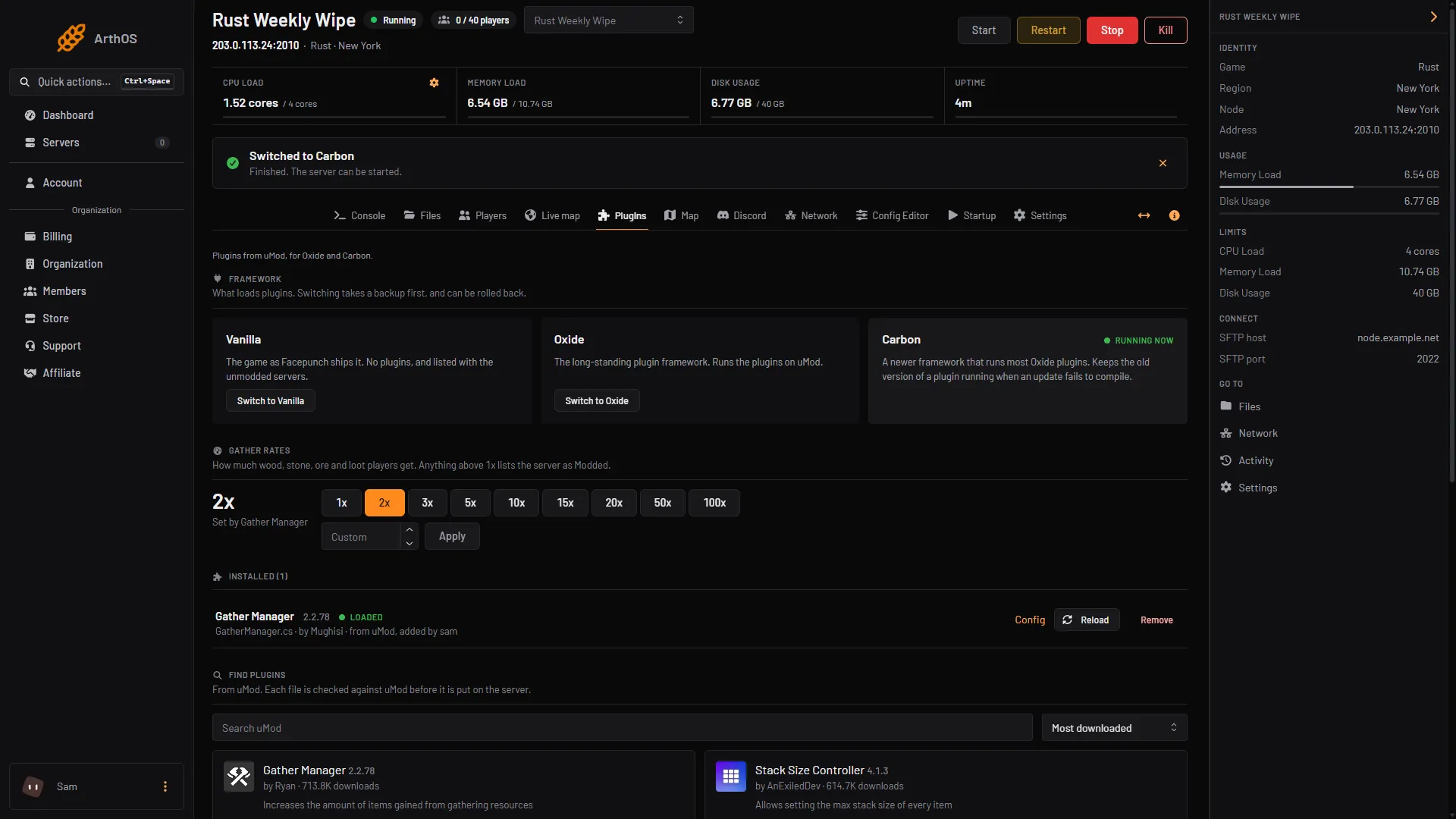
- Current rate
- Rate buttons
- Custom and Apply
- Gather Manager installed

To go back to normal, choose 1x. If the buttons are grey, the note beside them says why: the framework is still Vanilla, the server is stopped, or your role cannot change rates.
By hand
- Install Oxide or Carbon, then put
GatherManager.csfrom the uMod page in the plugins folder:oxide/pluginsfor Oxide,carbon/pluginsfor Carbon. - In the server console or over RCON, run:
gather.rate dispenser * 3
gather.rate pickup * 3
gather.rate quarry * 3
gather.rate excavator * 3
gather.rate survey * 3
The * means every resource. The game answers “You have set the gather rate for * to x3”. To set one resource, put its name instead of *, for example gather.rate dispenser wood 5. gather.resources lists the names. gather.rate dispenser wood remove resets one.
Two more commands help:
dispenser.scale tree 2changes how much is in each tree. It takestree,oreorcorpse.quarry.tickrate 30sets the seconds between quarry gathers.
The commands need an admin. In the console or over RCON this is automatic. In game you must be an owner. See make someone owner or moderator.
The plugin keeps your rates in GatherManager.json, in oxide/config or carbon/configs, under Options. Type /gather in game chat to see the current rates.
If it does not work
- The buttons are grey. Switch the framework to Oxide or Carbon, start the server, and check your role can change rates.
- It says Gather Manager is installed but not loaded. The plugin failed to compile. Open its entry under Installed on the Plugins tab; it shows what the compiler said.
- The command says you do not have permission. In game, you are not an owner. Run it from the console instead.
- Gather Manager fails after a game update. A restart downloads the framework’s newest build. If the plugin still fails, wait for the framework to release a build for the new game version, then restart again and check the rate.
More about the game: Rust servers.
Sources: umod.org: Gather manager, umod.org: GatherManager.cs, wiki.facepunch.com: Creating a server, rust.facepunch.com: News