






Rust only runs plugins when the server has a plugin framework: Oxide (also called uMod) or Carbon. Pick one and install it from the Plugins page in the ArthOS panel. The panel takes a backup first when it can, installs the framework and starts the server again.
Oxide or Carbon?
Both run .cs plugins from uMod. Install one, never both: they cannot live in the same server.
| Oxide | Carbon | |
|---|---|---|
| What it is | The long-standing plugin framework | A newer framework that runs most Oxide plugins |
| After a Rust update | Maintained for each Rust update | Maintained, and updates itself when the server boots |
| Commands | oxide. or o. | c. only |
| Plugin folders | oxide/plugins, oxide/config | carbon/plugins, carbon/configs |
| A plugin update fails to compile | Check the compiler message on the Plugins page | Keeps the old version of the plugin running |
| Permissions | Oxide’s own system | Its own system, stored in SQLite |
If you are unsure, Carbon is a reasonable pick for a new server. Pick Oxide if a plugin you must have says it needs Oxide.
A restart also updates the framework you chose: the panel’s own line says “each start downloads its latest build”.
A server with no framework is vanilla: no plugins, and it is listed with the unmodded servers.
In the ArthOS panel
- Open your server and choose Plugins. The Framework section shows Vanilla, Oxide and Carbon. The one in use is marked as running now.
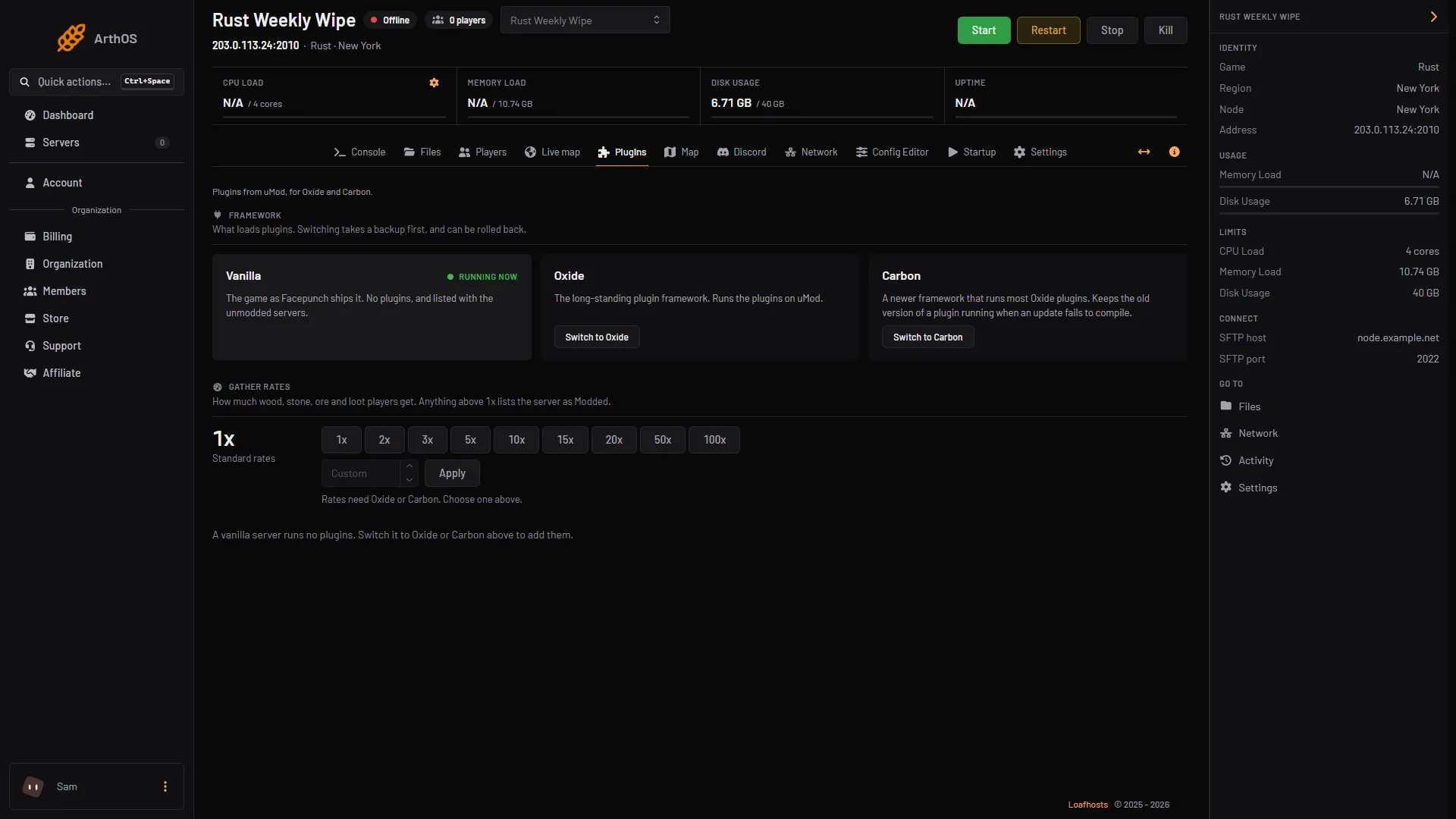
- Framework cards
- Switch to Oxide
- Switch to Carbon
- Look at the Framework cards (1). Press Switch to Oxide (2) or Switch to Carbon (3). A dialog, for example “Switch to Carbon?”, lists exactly what will happen to your server.
- Read the steps. They are: the server stops so the game can save, a backup is taken when it can be, your plugins are copied across if you are moving between Oxide and Carbon, then the server starts with the new framework and the panel checks that it answers.
- Press the switch button in the dialog to confirm. If the panel cannot take a backup, it says why, and you must choose Continue without a backup to go on. Only do that if you accept the risk.
- Wait for the server to come back. A progress line shows, for example “Starting with Carbon; each start downloads its latest build”, then “Switched to Carbon”. The card is marked as running now, and the plugin tools appear below it.
Switching later
- Oxide to Carbon, or back: your plugins, their settings, data files and translations are copied over. Nothing already there is overwritten. The old folder stays on disk.
- Leaving Oxide: Oxide changes the game’s own files, so the panel restores them with a SteamCMD check. It reads the whole install and takes a few minutes.
- Leaving Carbon: the Carbon loader is removed.
- Back to vanilla: your plugins stay in their folder, unused, in case you switch back.
- Something went wrong: the dialog says Roll back restores the backup taken before the switch.
You cannot set the framework from Startup. The Framework variable is locked there on purpose, because changing the value alone would leave the wrong files on disk.
By hand
For a server you run yourself. Stop the server first.
- For Carbon, download the latest Carbon release from its GitHub Releases page. Unpack it into the server’s root folder, the one that holds
RustDedicated, so thecarbonfolder sits next to the game files. Start the server as normal and keep the game updated at every boot. - For Oxide, install it from uMod’s installation page (see the sources). Oxide replaces some of the game’s files.
- Moving from Oxide to Carbon: restore the original game files first, for example with a SteamCMD
app_update 258550 validate. Carbon then copies your Oxide config, data and permission files across on its first start, and usescarbon/configsfor plugin settings. - Check which one is running in the server console:
| Framework | Command |
|---|---|
| Oxide | oxide.version |
| Carbon | c.version |
If it does not work
- There is no Switch button. You need the permission to change the server software. Ask the server owner.
- The switch says no backup can be taken. The dialog gives the reason. Fix that, or continue without a backup if you accept the risk.
- Plugins do not load after switching. Open the Plugins page and check the state of each plugin. A plugin that fails to compile shows what the compiler said.
o.commands do nothing on Carbon. Theo.shortcuts do not work there. Usec., for examplec.reload PluginName.- You installed both by hand and the server will not start. They cannot coexist. Restore the game files with a SteamCMD validate, then install one.
Want plugins running? Next: install uMod plugins. Rust on Loafhosts is on the Rust page.
Sources: carbonmod.gg: Oxide porting, carbonmod.gg: Installing carbon, carbonmod.gg: Configuring carbon, api.carbonmod.gg: Commands.json, umod.org: Installation