






A Rust server runs out of memory when the world it holds is bigger than its plan. Three things add to it: the map size, the number of entities (every base and deployable) and your plugins. Read Memory Load on the server page, then shrink the world or move to a bigger plan.
Facepunch, the maker of Rust, says a server needs 12 GB of free RAM and that a 6000 map uses more. It says the figures “are not fixed and highly depend on the use case and population of the server”. Your plan may be smaller than 12 GB, so a big map can be too much for it.
Read the numbers
-
Look at the top of the server page. Memory Load shows the memory in use. The Limits on the right show what your plan allows.
-
Open the Console and type
serverinfo. It prints the server’s state as JSON. ReadMemory,EntityCount,PlayersandUptime. Do not compareMemorywith the panel’s Memory Load; they measure different things.
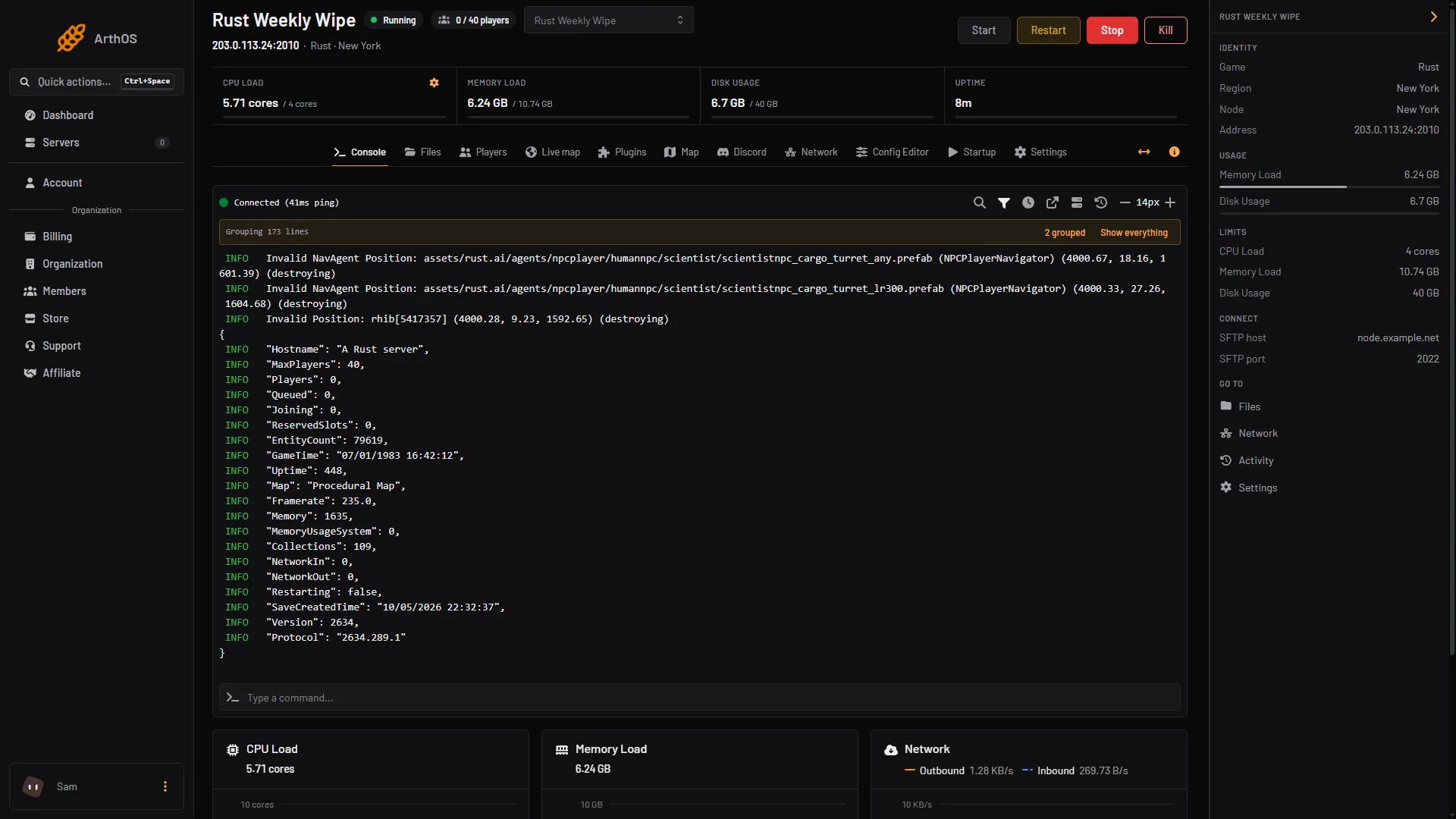
- Memory Load
- The serverinfo reply
Memory Load (1) shows the memory in use against the limit. The serverinfo reply (2) shows the rest.
- Write the numbers down right after a restart, and again a day or two later. If Memory Load keeps climbing between restarts, restarting more often will help. If it is already high right after a restart, the world itself is too big for the plan.
Fix it
Work down this list. Stop when Memory Load has room.
1. Restart on a schedule
If memory climbs with uptime, restart every day at a quiet hour.
- Open Settings, then Schedules, and create a schedule.
- Set the time with the cron fields: Second, Minute, Hour, Day, Month, Weekday. The page shows Next run is and the time. Check that it matches the hour you meant.
- Add a Send Power Signal step (“Start, restart, stop or kill the server.”) and set it to restart. The schedule uses the server’s clock, not yours; change it on Settings, Timezone.
A scheduled restart gives players no warning. For a warned restart, see restart with a warning. Every Rust restart also updates the game and the framework.
2. Cut the entities
Every base and deployable is an entity, and the save file holds all of them. Two things remove them:
- Decay. Decay removes abandoned bases over time. A Decay speed below 1 keeps abandoned bases longer, which adds to memory use late in a wipe. Turning decay off keeps everything until the wipe. See change decay and upkeep.
- A wipe. A map wipe deletes the save, which holds the map’s entities, buildings and deployables. See wipe your Rust server.
3. Test your plugins
Plugins on Oxide or Carbon run inside the server. To find a heavy one, stop the server and move half of the files in carbon/plugins (Carbon) or oxide/plugins (Oxide) out in Files. Start the server and compare Memory Load. Keep halving until one plugin is left. See fix lag on a Rust server.
4. Use a smaller map
On the Startup tab, Map size says “Bigger maps need more memory and take longer to generate”. The range is 1000 to 6000. A new size makes a new world.
5. Move to a bigger plan
If the world is right and the memory is not enough, change the size of the service.
- Open Billing, then your services, and choose Customize for the server.
- Choose a new size with more memory. The page shows what is due. For an increase, it says the server changes size as soon as it is paid.
- Afterwards, check Limits on the server page. Not checked whether a running server needs a restart to use the new limit as of 11 October 2026, so restart it with a warning to be sure.
By hand
When you host the server yourself, the same ideas apply: a smaller server.worldsize, a wipe, fewer plugins, and a host with more RAM. An RCON tool can send serverinfo. See connect an RCON tool.
If it does not work
- Memory is high straight after a start. The world is probably too big for the plan. Use steps 4 and 5.
- It was fine for days and then climbed. Use step 1, and check your newest plugin.
- The server stops while starting after you raised the map size. The Startup tab says bigger maps need more memory. Go back to the smaller Map size, or choose a bigger plan first.
More about Rust hosting on the Rust page.
Sources: wiki.facepunch.com: Creating a server, wiki.facepunch.com: Getting Started w Server, wiki.facepunch.com: The tool cupboard