






After the monthly Rust update, plugins fail to load when the plugin framework (Oxide or Carbon) is built for the old game, or when a plugin is written for the old game. Restart the server once the update is live, so that it downloads the new game and the newest framework. Then update each plugin and read the message under any that still fail.
In the ArthOS panel
- Restart once the update is live. Choose Restart in the server header, or Stop and Start. A Loafhosts Rust server checks for the new game build every time it starts, and it downloads your framework’s newest build in the same start. There is no separate update button, and nothing in the panel does this for you on update day. To warn players first, see restart with a warning.
- Open Plugins and wait until the server has finished starting. Each plugin in the Installed list shows a state: LOADED is fine; NOT LOADED needs attention.
- Update the plugins. A plugin with a newer version on uMod shows Update to and the version. Press it. The panel replaces the file and loads the new version.
- Find the reason. Sometimes a box headed What the compiler said shows the plugin’s own error under the row. Often nothing is shown. Open the Console. Choose the magnifier icon at the top of the console to search it. Search for the plugin’s file name, or for
compilation failed, and read the lines you find.
In October 2026, Stack Size Controller 4.1.3 installed on a Carbon server. Its row said NOT LOADED with no reason under it (1), next to Reload (2) and Remove (3). The Console held the reason: a line starting “Threading compilation failed for” and the plugin’s file path.
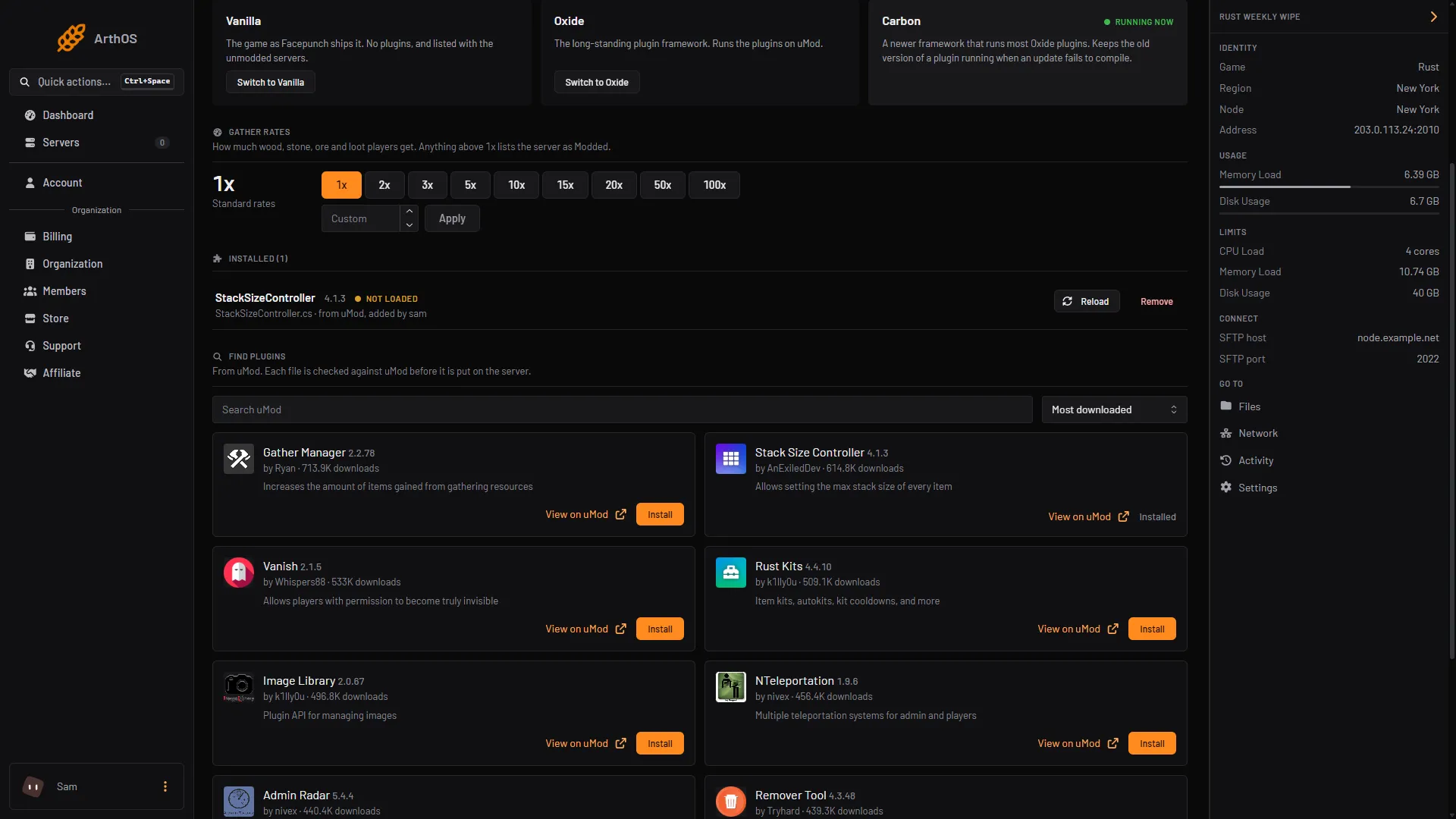
- The plugin's row
- Reload
- Remove
- If the plugin now loads, you are done. If it still fails, read the section below.
To take a failed plugin off, choose Remove. A box asks whether to also delete its settings; tick it only if you never want them back.
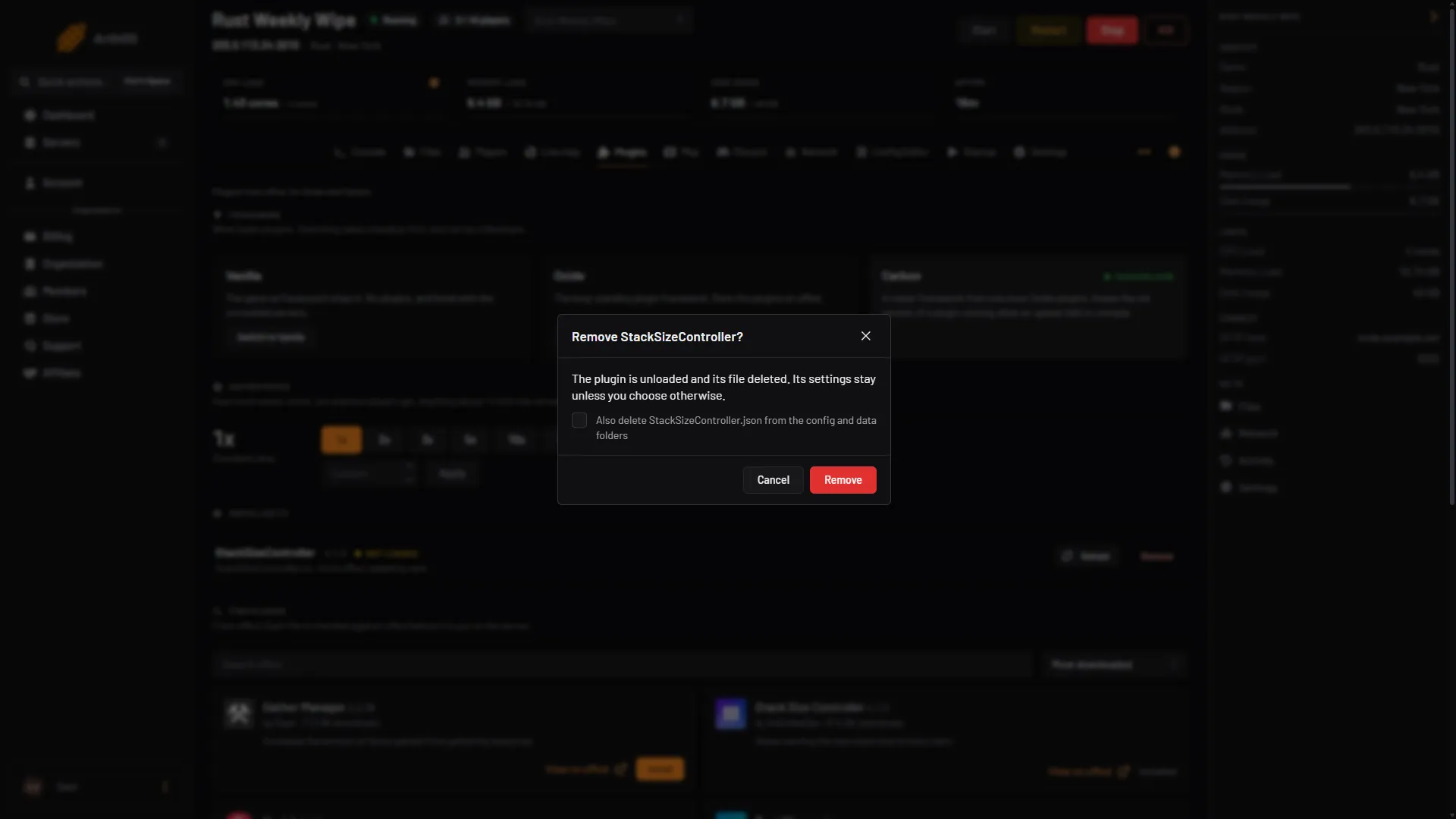
- Also delete its settings
- Remove
Why the framework matters
A framework changes parts of the game while it runs, so it has to match the game build. Carbon patches the game as it starts and updates itself, and its documentation says that on update day you update the server and boot it, and Carbon adapts to that Rust version. The Carbon production build is updated about twice a month, plus fixes. If the framework has no build for the new game yet, every plugin fails and the cure is to wait for the release and restart again. The release pages are github.com/CarbonCommunity/Carbon/releases and github.com/OxideMod/Oxide.Rust/releases. Carbon also fetches new hook fixes at start, so a restart can fix plugins without a new Carbon release.
Read the compiler message
A plugin is a source file that the framework compiles when it loads. A message gives the plugin’s file name, a line and a position, and what the compiler objected to.
| What you see | In the panel |
|---|---|
Oxide: Error while compiling Broken: ; expected | Line: 12, Pos: 4 | The text appears under What the compiler said. |
Carbon: a line that starts Threading compilation failed for and gives the plugin’s file path, followed by the message | Sometimes the same box. Carbon keeps the old version running. |
The What the compiler said box, and the text “The update did not compile; the previous version is still running”, appear only when the framework reports the failure. When it does not, the Console is the only place with the message.
Some examples of what a message can say, and what to try:
- It names a class, method or field of the game that cannot be found. The game may have changed since the plugin was written. Look for a newer version on uMod. If there is none, the plugin’s author has to fix it. Wait, or remove it.
- It names another plugin. A plugin it needs may be missing or out of date. Install or update that one first.
- It points at a line you edited. If you changed the plugin’s file by hand, put the original file back.
The message is also what you give a plugin’s author, with the plugin’s version and the Rust update’s name.
By hand
If you host elsewhere:
- Update the game:
steamcmd +force_install_dir <dir> +login anonymous +app_update 258550 validate +quit. - Download the newest framework release over the old one. Carbon’s production build is at
github.com/CarbonCommunity/Carbon/releases/tag/production_build. - Start the server. In the server console,
oxide.pluginslists the plugins and their errors. On Carbon,c.pluginsmay list no failure for a plugin that did not compile (seen in October 2026). Read the lines the server printed while it started. - Stop the server before you update its files. Plugins live in
oxide/plugins(Oxide) orcarbon/plugins(Carbon). Update a plugin by uploading its new.csover the old one. The framework loads it by itself. Reload one plugin withoxide.reload Nameorc.reload Name.
If it does not work
- Every plugin fails, even the ones you did not touch. The framework does not match the game build. Restart again for the newest framework build. If it still fails, wait for the framework’s next release.
- One plugin fails and the rest load. The problem is in that plugin. Update it, or remove it from the Plugins page. This is the October 2026 case above.
- A plugin says Update failed. The new version did not compile. On Carbon the old version keeps running. Wait for a fixed release.
- The row says NOT LOADED and shows nothing. Search the Console, as in step 4.
- Plugins show Waiting for the game. The server is still starting. Wait until it has fully started, then look again.
- The Reload button is missing. It only appears while the server is running and the framework answers.
Forced wipe day has more steps: see Rust forced wipe day. Hosting Rust? See the Rust page.
Sources: raw.githubusercontent.com: Entrypoint.sh, carbonmod.gg: Oxide porting, raw.githubusercontent.com: README.md, umod.org: Installation