









Open World rules and find the group Crafting. It holds the rules for how fast and how cheaply players make things, how items wear out and how helpers such as the dew collector behave. Change a value, choose Save, then restart the server. The game reads its rules when it starts.
Each is a World rule, stored in the SandboxCode line of the server’s settings file.
In the panel
- Open World rules.
- Find the group Crafting, or search for the row by label or key.
- Pick a value in the row.
- Choose Save. The panel says “Saved. The game reads its rules when it starts, so restart the server to use them.”
- Choose Restart now if the server is running. A restart drops every player, so tell them first.
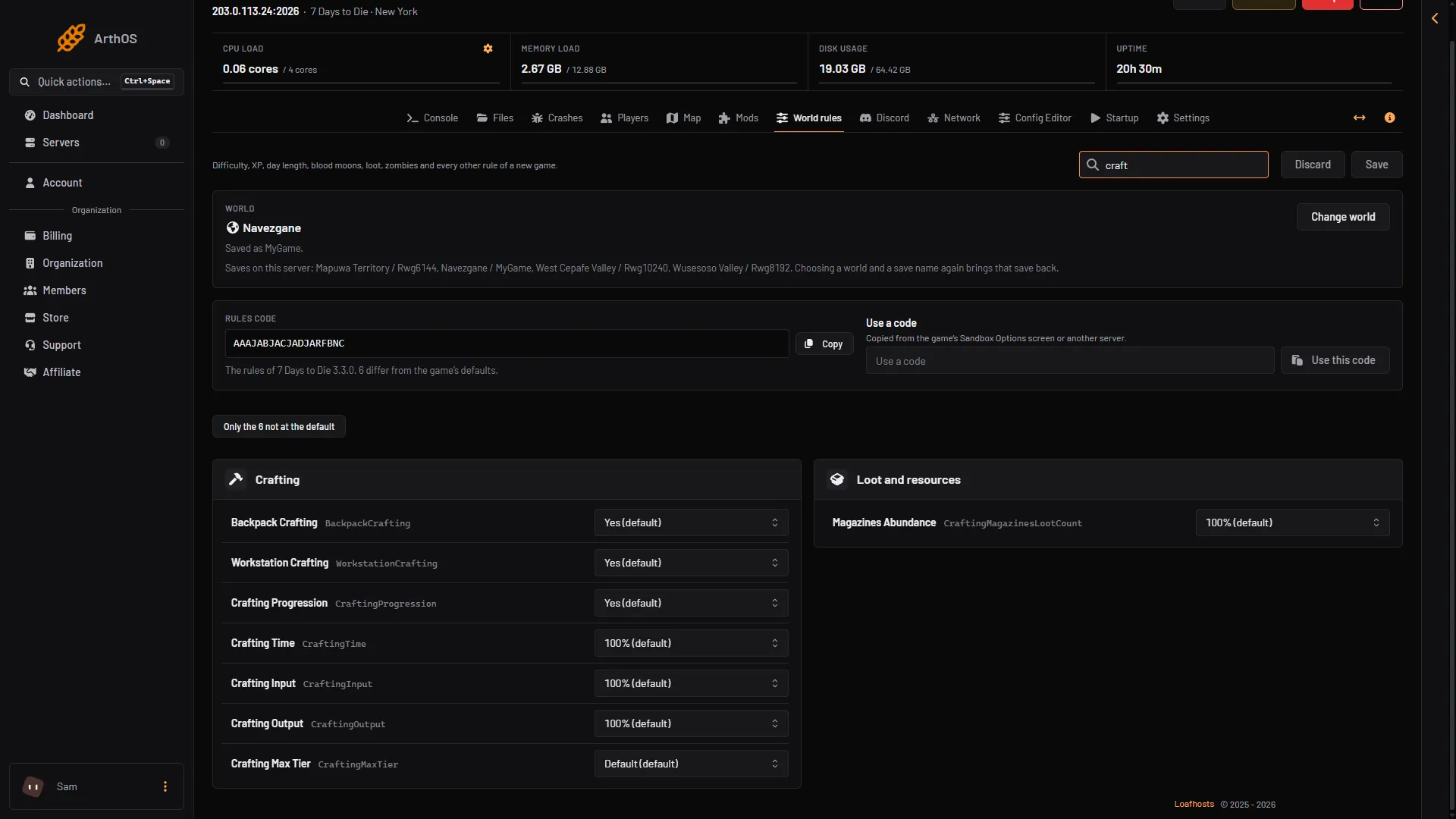
- Crafting Time
- Crafting Input
- Crafting Output
A row not at its default is marked Not the default. Only the N not at the default lists only the rules you changed.
Making things
| Row | Key | Choices | Default |
|---|---|---|---|
| Crafting Time | CraftingTime | None, 25%, 50%, 75%, 100%, 125%, 150%, 200%, 300% | 100% |
| Crafting Input | CraftingInput | None, 25%, 50%, 75%, 100%, 125%, 150%, 200%, 300% | 100% |
| Crafting Output | CraftingOutput | 25%, 50%, 75%, 100%, 125%, 150%, 200%, 300% | 100% |
| Crafting Max Tier | CraftingMaxTier | Default, 1, 2, 3, 4, 5, 6 | Default |
| Crafting Progression | CraftingProgression | No, Yes | Yes |
| Backpack Crafting | BackpackCrafting | No, Yes, Limited, Workbench Only | Yes |
| Workstation Crafting | WorkstationCrafting | No, Yes | Yes |
| Smelter Type | SmeltingType | Smelter, Recipes | Smelter |
Crafting Time is how long crafting takes. Crafting Input is how many materials a recipe asks for and Crafting Output is how many items it makes. Backpack Crafting is crafting from the backpack with no workstation. Workstation Crafting is the same switch for workstations. Default in Crafting Max Tier leaves the game’s own limit.
Taking things apart and keeping them whole
| Row | Key | Choices | Default |
|---|---|---|---|
| Scrapping Output | ScrappingOutput | None, 25%, 50%, 75%, 100%, 125%, 150%, 200%, 300% | 100% |
| Item Degradation | ItemDegradation | Disabled, Very Low, Low, Default, High, Very High | Default |
| Item Repair Types | RepairTypes | None, Repair Only, Combine Only, Both | Both |
| Max Degrade Amount | MaxDegradationAmount | None, 5%, 10%, 15%, 20%, 25% | None |
| Magazine Points | PointsPerMagazine | None, 1, 2, 3, 4, 5, 6, 7 | 1 |
Scrapping Output is how much a player gets back when scrapping an item. Item Degradation is how fast tools and weapons wear out, and Disabled stops it. Item Repair Types says how players may fix an item: repair it, combine two of the same item, or both.
Dew collector, chicken coop and apiary
Each helper has Time, Output and Input rows. The keys follow the pattern DewCollectorTime, DewCollectorOutput, DewCollectorInput, and the same with ChickenCoop and Apiary.
| Row | Choices | Default |
|---|---|---|
| Dew Collector Time | None, 25%, 50%, 75%, 100%, 125%, 150%, 200%, 300% | 100% |
| Dew Collector Output | 100%, 200%, 300%, 400%, 500% | 100% |
| Dew Collector Input | None, 100%, 200%, 300% | 100% |
| Chicken Coop Time and Apiary Time | None, 25%, 50%, 75%, 100%, 125%, 150%, 200%, 300% | 100% |
| Chicken Coop Output and Apiary Output | 100%, 200%, 300%, 400%, 500% | 100% |
| Chicken Coop Input and Apiary Input | None, 20%, 40%, 60%, 80%, 100%, 150%, 200%, 300% | 100% |
The Output rows cannot go below 100%. The group also holds Full Chicken Stress Event (FullChickenStressEvent): None, Random, Chicken Drop, Angry Chicken, Zombie Horde and Murder Chickens. The default is Random.
Not checked on V3.3.0 as of 19 October 2026: the effect in play of Backpack Crafting: Limited, Crafting Max Tier, Crafting Progression, Max Degrade Amount, Magazine Points and Full Chicken Stress Event. Change one rule at a time and test it.
To keep your choices, choose Copy on the Rules code card. See the world rules guide.
If it does not work
- Nothing changed. Restart the server.
- A value you wanted is not in the list. The panel offers only the choices the game lists.
- Players cannot craft where they used to. Check Backpack Crafting and Workstation Crafting.
- You cannot edit the rows. Your role may only read the rules.
More about the game: 7 Days to Die servers.
Sources: 7daystodie.wiki.gg: Game Settings