









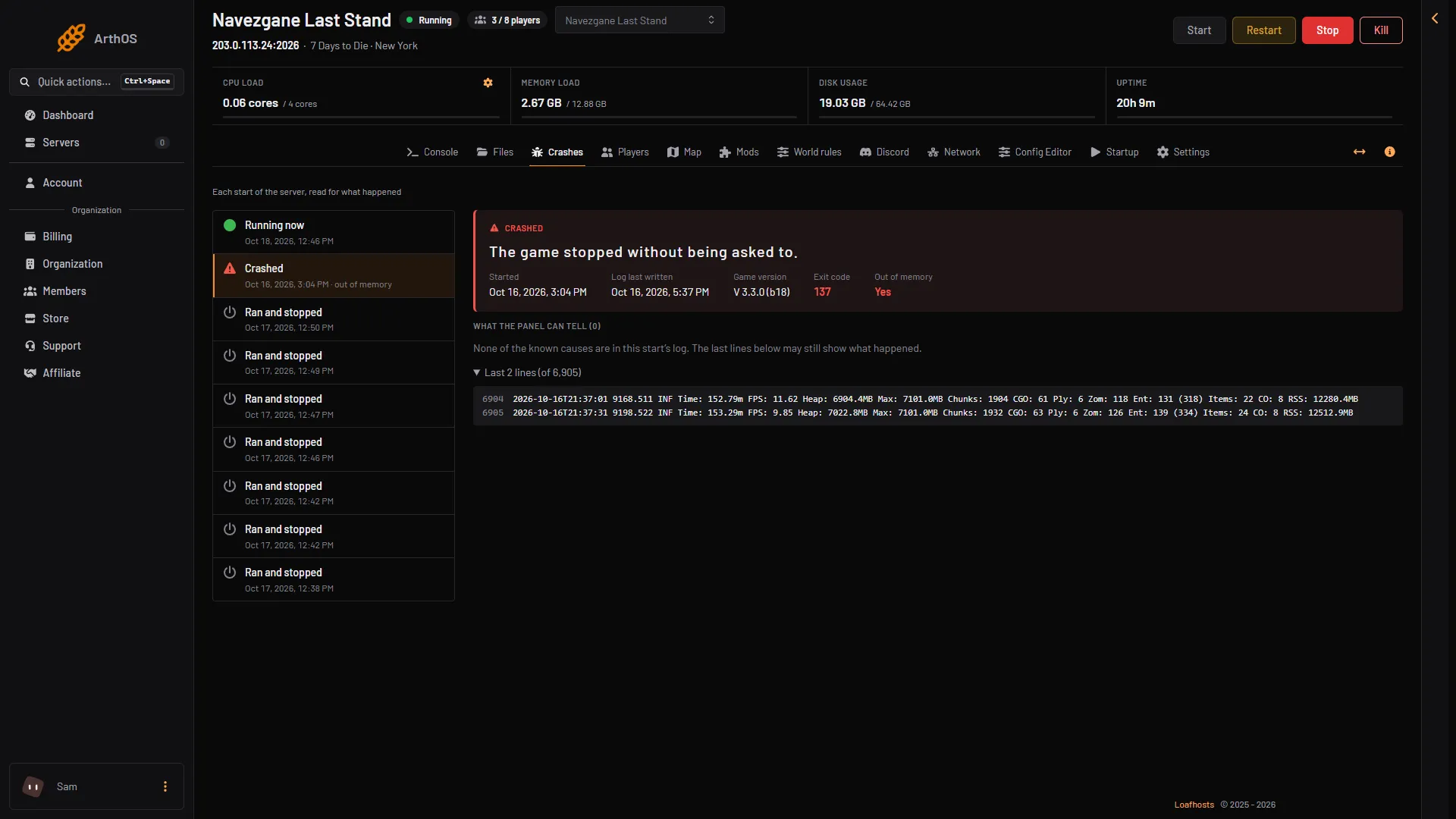
When a 7 Days to Die server is stopped for using all its memory, the Crashes page shows that start as Crashed, with exit code 137 and Out of memory Yes. Raise the server’s memory, lower the settings below, or remove heavy mods, then restart the server.
Exit code 137 means the process was killed. With Out of memory Yes, it was killed for using all its memory. With Out of memory No, someone chose Kill or something else stopped it: check Activity (a tab in Settings) before you change anything here.
What uses memory
Four things matter most on a 7 Days to Die server:
- The world. A bigger generated world needs more memory. The panel offers 6 km, 8 km and 10 km in the Config Editor. These are worlds of 6144, 8192 and 10240 blocks (6.1, 8.2 and 10.2 km in the Change world box on World rules).
- View distance. The farthest view distance a player may choose is a setting, from 6 to 12. The game says it has a high impact on memory and performance.
- Zombies and animals. The more that can be alive at once, the more the server must hold.
- Mods and players. Mods that add many items or zombies use more. More players spread out means more of the world loaded at once.
Check it on the Crashes page
- Open the Crashes page.
- Choose the start that failed in the list on the left (1). A start that was stopped for using all its memory shows Crashed.
- Look at Exit code (2) and Out of memory (3). A stop for lack of memory shows exit code 137 and Yes.
- Under What the panel can tell, look for The server ran out of memory. It appears only when the game’s own log says so.
- Pick the crashed start
- Exit code 137
- Out of memory: Yes
- Last lines
The last lines (4) are where the log stopped. A server stopped for memory may show no finding at all, so exit code 137 with Out of memory Yes is enough to act on.
You can also read the figure in the log. While a player is on, the game writes a line every 30 seconds that ends in RSS: ...MB. That is the memory the game is using at that moment, in MB. Compare RSS with the memory limit at the top of the server page. If it keeps climbing, the server will reach that limit.
Fix 1: raise the server’s memory
- Open Billing and the Services tab.
- On the server’s row, choose Customize.
- Pick a size with more GB of memory. The page shows each size as cores, GB memory and GB storage.
- Confirm. The button shows the amount to pay.
A bigger size is charged for the rest of the period now, with account credit used first. The server changes size as soon as it is paid. Restart the server afterwards (choose Restart at the top of the server page) so the game starts with the new memory.
Fix 2: use less memory
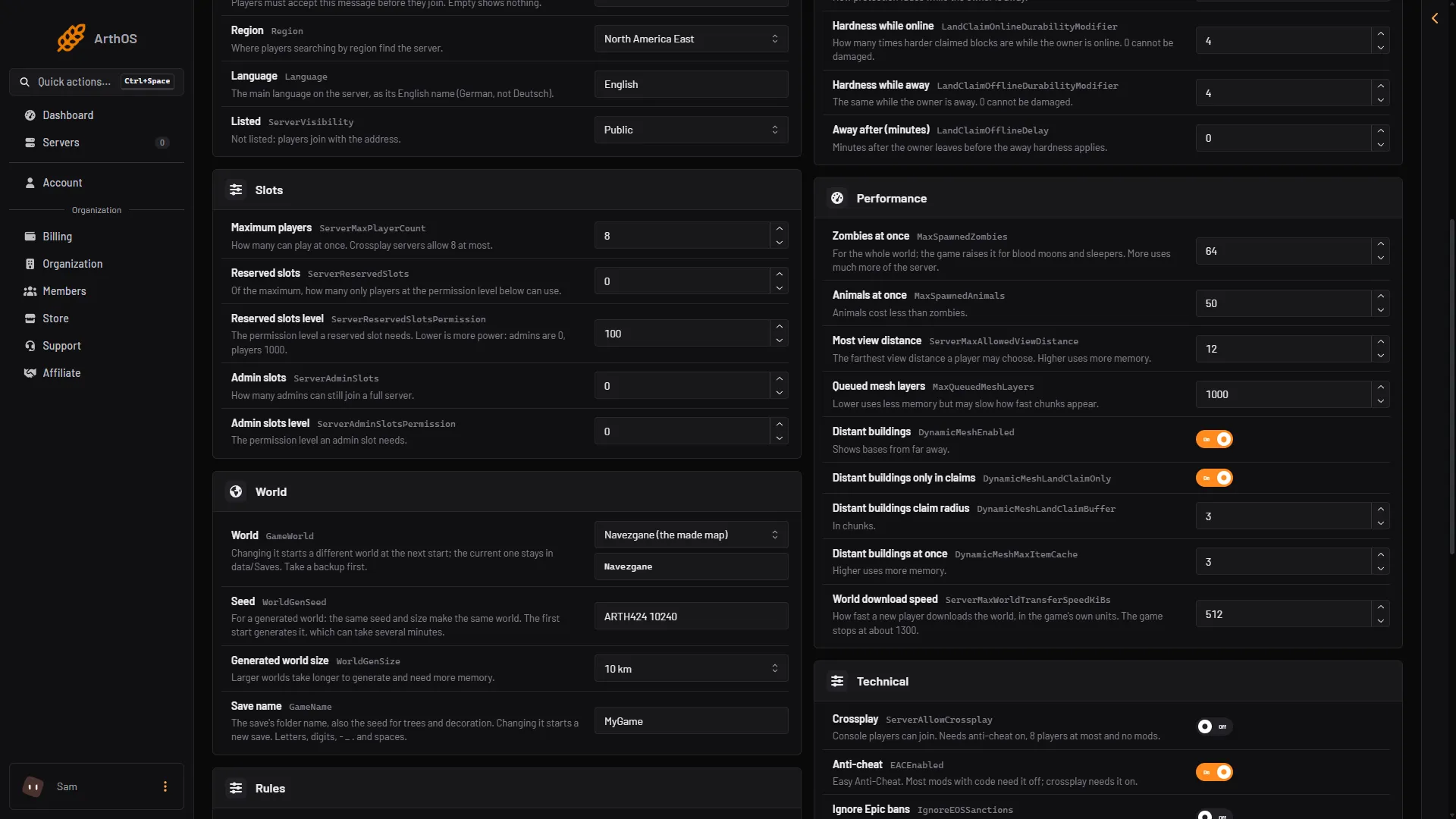
Open the Config Editor. Change these rows, save, and restart the server. Saved changes apply after a restart.
- In the Performance group, lower Most view distance (2). Players on 12 can no longer ask for the farthest view.
- Lower Zombies at once (1) and Animals at once.
- Lower Queued mesh layers. The row says this uses less memory but may slow how fast chunks appear.
- Turn off Distant buildings, or lower Distant buildings at once.
- In the Slots group, lower Maximum players if the server is full all day.
- Zombies at once
- Most view distance
Generated world size (in the World group) only counts when a new random world is made. It does not shrink a world you already play.
Remove heavy mods
- Open the Mods page.
- Use the switch on the right of the mod you added last to turn it off. Restart, and see if the memory problem is gone.
- To delete it for good, open its menu (three dots) and choose Remove.
See 7 Days to Die mod errors if a mod also fails to load.
By hand
Type these on the Console page:
memprints memory information.mem cleanis, in the game’s help, a cleanup of memory pools. It does not change the server’s memory limit, so it does not fix a server that is too small.
If it does not work
- It happens again right after a restart. The world, mods or settings need more memory than the server has. Do Fix 1 as well.
- No finding appears, but the server stops. Look at Out of memory in the start’s facts, and read the server crash guide.
- You cannot see Customize. Your account may not be allowed to order or pay for this server.
More about the game: 7 Days to Die servers.
Sources: 7daystodie.wiki.gg: Server