









Open the Crashes page. It lists the last ten starts of your 7 Days to Die server and says how each one ended. Open the start that went wrong, read the findings, and follow the fix written beside each.
What the page shows
The game writes one log for every start. Before each start the panel keeps the ten newest logs, so the logs folder shows up to eleven while the server runs. If the server stops and starts again and again, download the log of the first bad start before ten more starts push it out. The Crashes page lists them on the left, newest first. Each start has one of these outcomes:
- Running now: the server is up and players can join.
- Ran and stopped: the server started, ran and stopped normally.
- Failed to start: the server never got as far as letting players in.
- Crashed: the game stopped without being asked to.
Open a start to see Started, Log last written, Game version and Out of memory. A crashed start also shows Exit code. Below them, What the panel can tell lists the findings. At the bottom, the folded box “Last 80 lines” holds the end of the log.
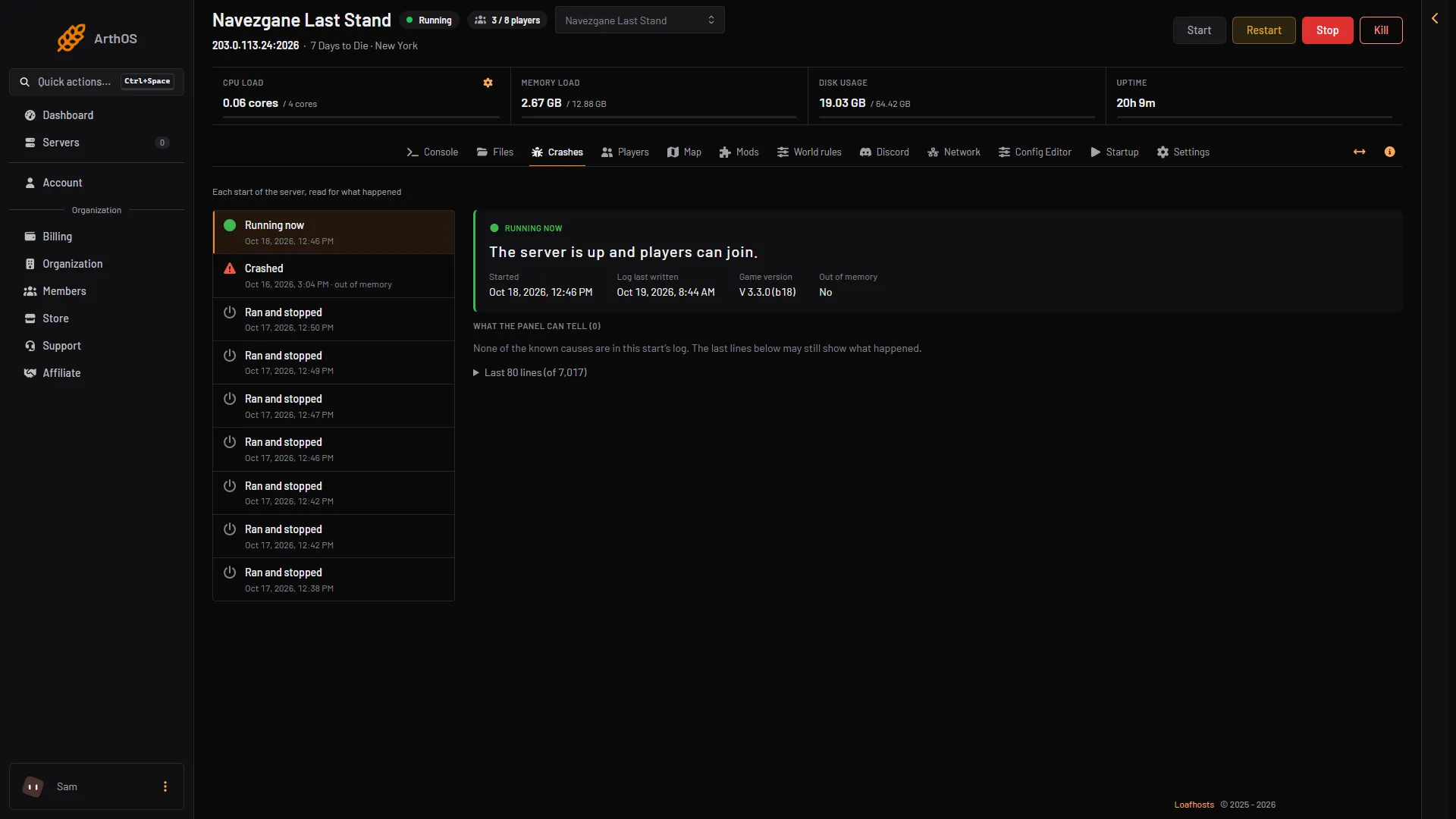
- Running now
- Ran and stopped
- Started
- Game version
- What the panel can tell
Times show in your own local time. The log file names and the lines inside them are in UTC, so they can differ from the page by your offset.
A start that ran out of memory
When the server is stopped for using all its memory, its start shows Crashed (1), Exit code 137 (2) and Out of memory Yes (3). The last lines (4) are where the log stopped. Exit code 137 means the process was killed. With Out of memory Yes it was killed for using all its memory. With Out of memory No, someone chose Kill or something else stopped it: check Activity in Settings. See 7 Days to Die out of memory.
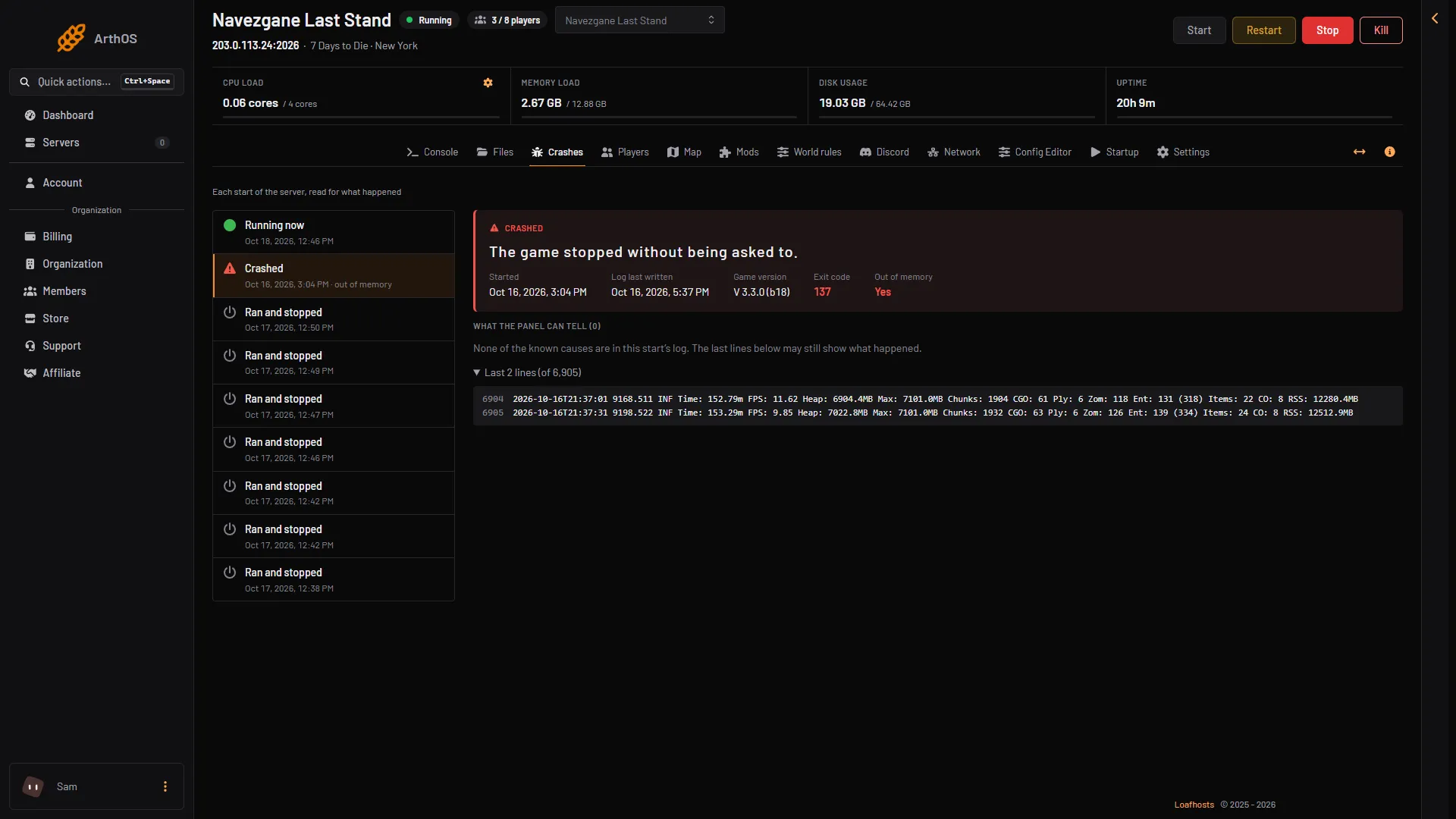
- Crashed
- Exit code 137
- Out of memory: Yes
- Last lines
The findings and their fixes
The panel looks for six known problems. Each shows a title and a fix:
- A mod could not be loaded. Its
ModInfo.xmlis missing a Name or a DisplayName, or is not valid XML. The Mods page names the folder. Fix the file or remove the mod. - A mod’s changes did not apply. The game started without them. The Mods page shows which mod and which file. A mod made for an older game version usually needs its update.
- The server ran out of memory. Remove mods that add many items or zombies, or raise the server’s memory.
- A port the game needs was already in use. Restart the server. If it happens again, ask support to check the server’s ports.
- The save could not be read. A save cut off by a crash or a full disk can no longer load. Restore the last backup from before it happened.
- The game crashed inside its engine. Restart it. If it happens at the same moment again, the last mod added is the first thing to remove.
Lines that are not faults
Two things appear in every log and mean nothing:
ERROR: Shader ... is not supported on this GPU. The server has no screen. It prints this at every start.- A memory report with
Peak Allocated memory, printed when the server stops.
The panel hides the shader line and the memory report in the last lines it shows. A normal stop writes INF Executing command 'shutdown', then INF Preparing quit, and ends with Shutdown handler: cleanup.
A broken settings file
If serverconfig.custom.xml stops reading as XML, the panel puts back the newest earlier copy that does read, before the next start, and keeps the broken one as serverconfig.custom.xml.broken. The page lists this under What the panel changed before this start. If no earlier copy reads, the panel leaves the file alone and says so. Fix it on the Files page.
What to send support
If the page names no cause, send the name of the start (such as server_20261017_151154.log in the logs folder), its Game version and Exit code, the mods installed and the last one you added, and the last lines the page shows.
If it does not work
- No starts are listed. The server has not started yet, so there is nothing to read.
- Players see no server and nothing crashed. A server nobody has played on for 3 days stops by itself (Standby in Settings). Start it, or use its Wake link.
- The server stopped and the outcome is Ran and stopped. Someone or something asked it to stop. Check the Activity tab in Settings.
- Nothing here points at a mod or a setting. The page says so. Read the last lines, then see 7 Days to Die server logs.
- The crash repeats after a mod was added. Turn it off on the Mods page and restart.
More: 7 Days to Die servers.
Sources: 7daystodie.wiki.gg: Server