









On a Loafhosts server you cannot use the game’s own web dashboard or telnet. The panel uses them for you. The Console, Players and Map pages do the same jobs.
What the panel does with them
7 Days to Die has a built-in Web API on its own port, and a telnet console. On a Loafhosts server:
- The Web API belongs to the panel. The panel turns it on, gives it its own port and its own secret key, and uses it for the player list, the map and sending commands. The key is written into
serveradmin.xmlbefore every start. Only that key works. The key is never shown, and you cannot change it. The game’s web dashboard page is not offered to owners. - Telnet stays inside the server. It listens on the server itself only, never on the internet. The Console page uses it to show the game’s output and to send your commands.
So there is nothing to open, and no port to forward. The Web API port is the fifth port on the Network page, on the Allocations tab. It is for the panel only. On the Startup page it is the read only Web API port. 7 Days to Die has no game filter at the network edge.
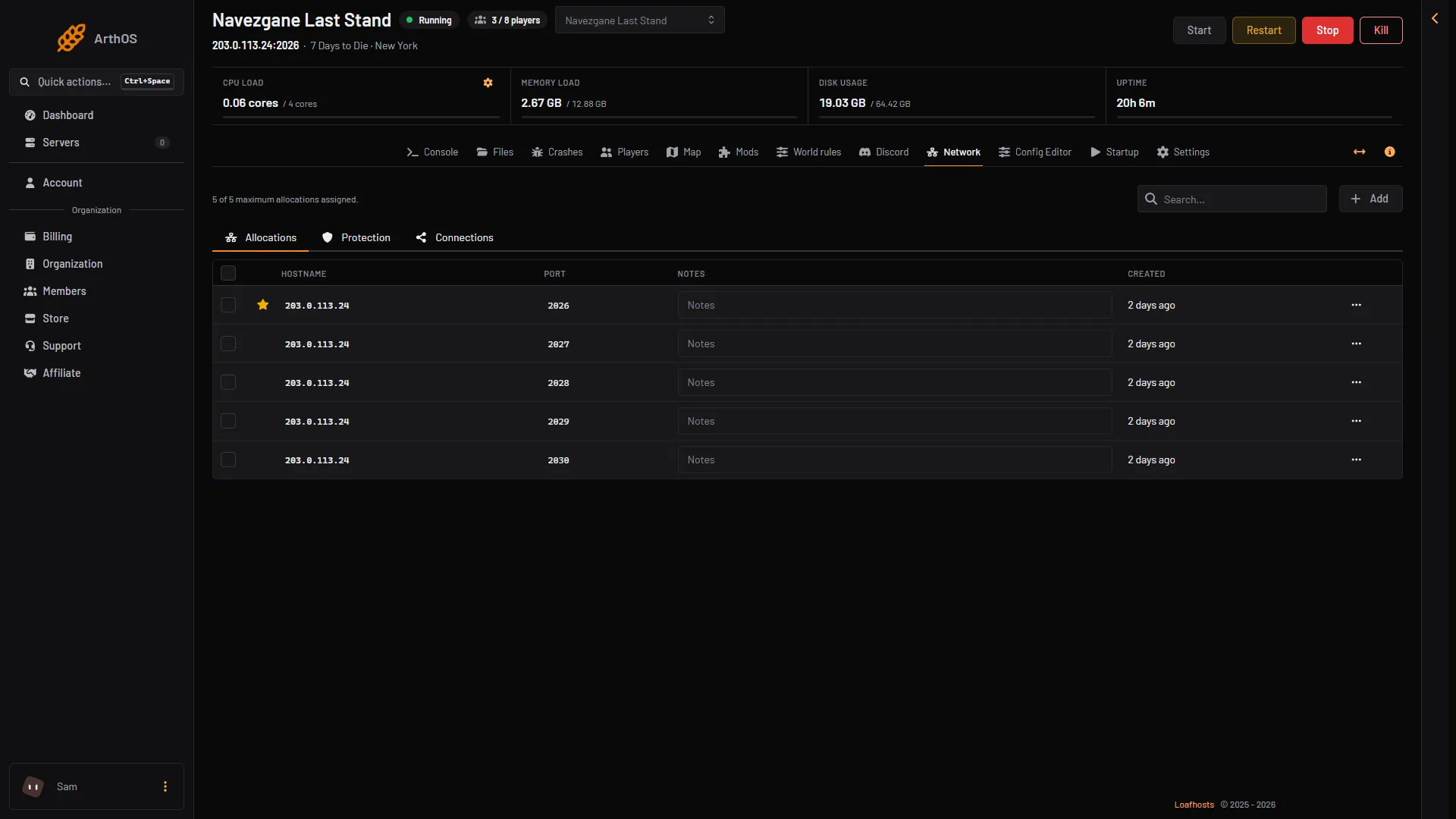
- Web API port, the fifth port
The fifth port in the list is the Web API port. The first, starred port is the game port players use.
The Config Editor shows those rows locked
On the Config Editor page the rows for these settings are locked, with the note “The panel sets this every time the server starts, so it cannot be changed here.”:
WebDashboardEnabled,WebDashboardPort,WebDashboardUrlEnableMapRenderingTelnetEnabled,TelnetPort,TelnetPassword
The panel sets them on the start line, and the start line wins over the file. Editing them in the file would change nothing.
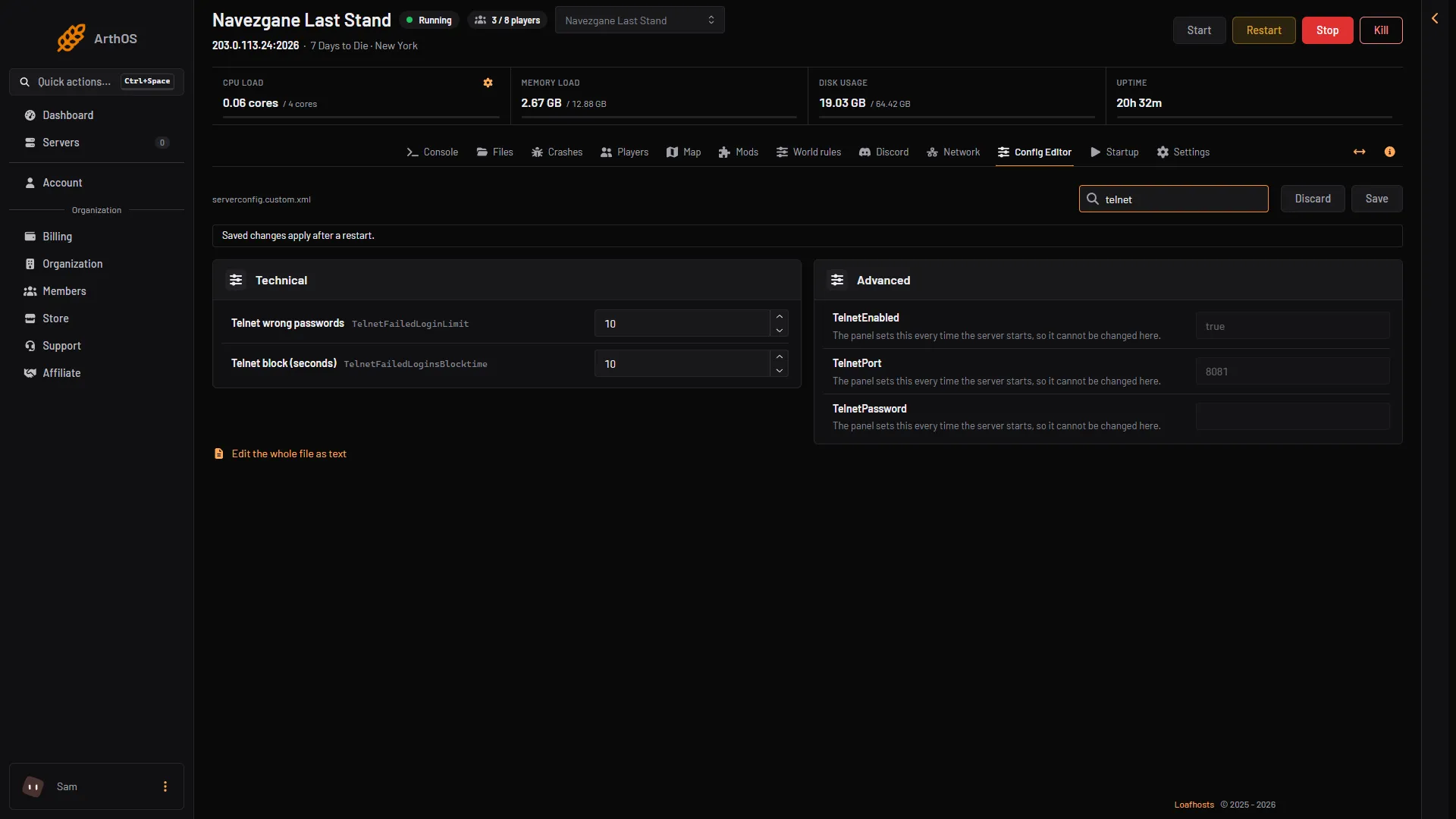
- Advanced
- TelnetEnabled
- TelnetPort
- TelnetPassword
The rows show by their key in Advanced. The web dashboard rows look the same.
What to use instead
- Console: type any console command and read the answer. See 7 Days to Die console commands.
- Players: who is online, kick, ban, give, teleport, and the Character window.
- Map: the world with players, zombies and land claims. See the server map.
For people hosting it themselves
If you run the server on your own machine, these are the game’s own settings in serverconfig.xml, with the game’s own comments, as shipped in V3.3.0:
<property name="WebDashboardEnabled" value="false"/> <!-- Enable/disable the web dashboard -->
<property name="WebDashboardPort" value="8080"/> <!-- Port of the web dashboard -->
<property name="WebDashboardUrl" value=""/> <!-- External URL to the web dashboard if not just using the public IP of the server, e.g. if the web dashboard is behind a reverse proxy. Needs to be the full URL, like "https://domainOfReverseProxy.tld:1234/". Can be left empty if directly using the public IP and dashboard port -->
<property name="EnableMapRendering" value="false"/> <!-- Enable/disable rendering of the map to tile images while exploring it. This is used e.g. by the web dashboard to display a view of the map. -->
<property name="TelnetEnabled" value="true"/> <!-- Enable/Disable the telnet -->
<property name="TelnetPort" value="8081"/> <!-- Port of the telnet server -->
<property name="TelnetPassword" value=""/> <!-- Password to gain entry to telnet interface. If no password is set the server will only listen on the local loopback interface -->- Set
WebDashboardEnabledtotrueto turn the dashboard on. It usesWebDashboardPort. - Telnet with no
TelnetPasswordlistens on the local machine only. A password lets other machines connect. - After
TelnetFailedLoginLimitwrong passwords (10 by default) from one client, the game blocks that client forTelnetFailedLoginsBlocktimeseconds (10 by default).
Three console commands manage who may use the web side:
createwebuser: creates a web dashboard user account.webtokens add <tokenname> <tokensecret> <level>,webtokens remove <tokenname>,webtokens list: tokens for the Web API. Level 0 is the highest permission.webpermission add <webfunction> <method> <level>,webpermission remove <webfunction>,webpermission list [includedefaults]: the permission level each web function needs.
To use telnet on a server of your own: connect a telnet client to the server address and TelnetPort, then enter TelnetPassword. On Loafhosts telnet is not reachable from outside.
Changes to serverconfig.xml apply when the server starts again.
If it does not work
- You cannot edit the web or telnet rows. They are locked on purpose.
- Players, the map or the console stay empty. The panel could not give the game its key. Restart the server once. If
serveradmin.xmlcannot be read as XML, fix it in Files.
More about the game: 7 Days to Die servers.