









On 7 Days to Die V3.3.0, zombie speed and behaviour are World rules, not lines in serverconfig.xml. Open the World rules page and look in the group Zombies and animals. The one zombie setting that is still a file setting is how many can exist at once, and that is in the Config Editor. Both apply at the next restart.
Each speed and behaviour below is a World rule with a key, for example ZombieMove. It is stored in the SandboxCode line of the server’s settings file.
The speed rules
Each speed rule has the same five choices: Walk, Jog, Run, Sprint and Nightmare.
| Rule | Key | Default |
|---|---|---|
| Zombie Day Speed | ZombieMove | Walk |
| Zombie Night Speed | ZombieMoveNight | Sprint |
| Zombie Feral Speed | ZombieFeralMove | Sprint |
| Zombie Blood Moon Speed | ZombieBMMove | Sprint |
Ferals are one kind of zombie in the game. Their speed has its own rule, so you can make ferals slow and normal zombies fast, or the other way round.
The behaviour rules
- Zombie Feral Sense (
ZombieFeralSense): choices Disabled, Day, Night, All. Default Disabled. It decides when ferals have their special senses. - Zombie AI Smell Mode (
AISmellMode): choices None, Walk, Jog, Run, Sprint, Nightmare. Default Run. A new Loafhosts server has it at Jog, which the page tags Not the default. - Allow Zombie Digging (
AllowZombieDigging): No or Yes. Default Yes. - Zombie Rage Chance (
ZombieRageChance): None, 15%, 30%, 35%, 40%, 50%, 60%, 75%, 90% or 100%. Default 15%. - Enemy Spawn (
EnemySpawnMode): No or Yes. Default Yes. No stops enemies spawning at all.
Density and respawn
Four rules set how many enemies appear and how fast they come back. Each has its own day and night version:
- Day Enemy Density (
BiomeDayEnemyDensity) and Night Enemy Density (BiomeNightEnemyDensity): None, Default, Very Low, Low, Medium, High, Very High. Default is Default. - Day Enemy Respawn (
BiomeDayZombieRespawn) and Night Enemy Respawn (BiomeNightZombieRespawn): Default, Very Slow, Slow, Normal, Fast, Very Fast. Default is Default.
Animals have matching rules (Day Animal Density BiomeDayAnimalDensity, Night Animal Density BiomeNightAnimalDensity, Day Animal Respawn BiomeDayAnimalRespawn, Night Animal Respawn BiomeNightAnimalRespawn) with the same choices.
In the panel
- Open your server and choose World rules.
- Open the group Zombies and animals.
- Change the rules you want.
- Choose Save at the top right. While the server runs, the panel says “Saved. The game reads its rules when it starts, so restart the server to use them.” with a Restart now button.
- Choose Restart now, or Restart at the top of the server page.
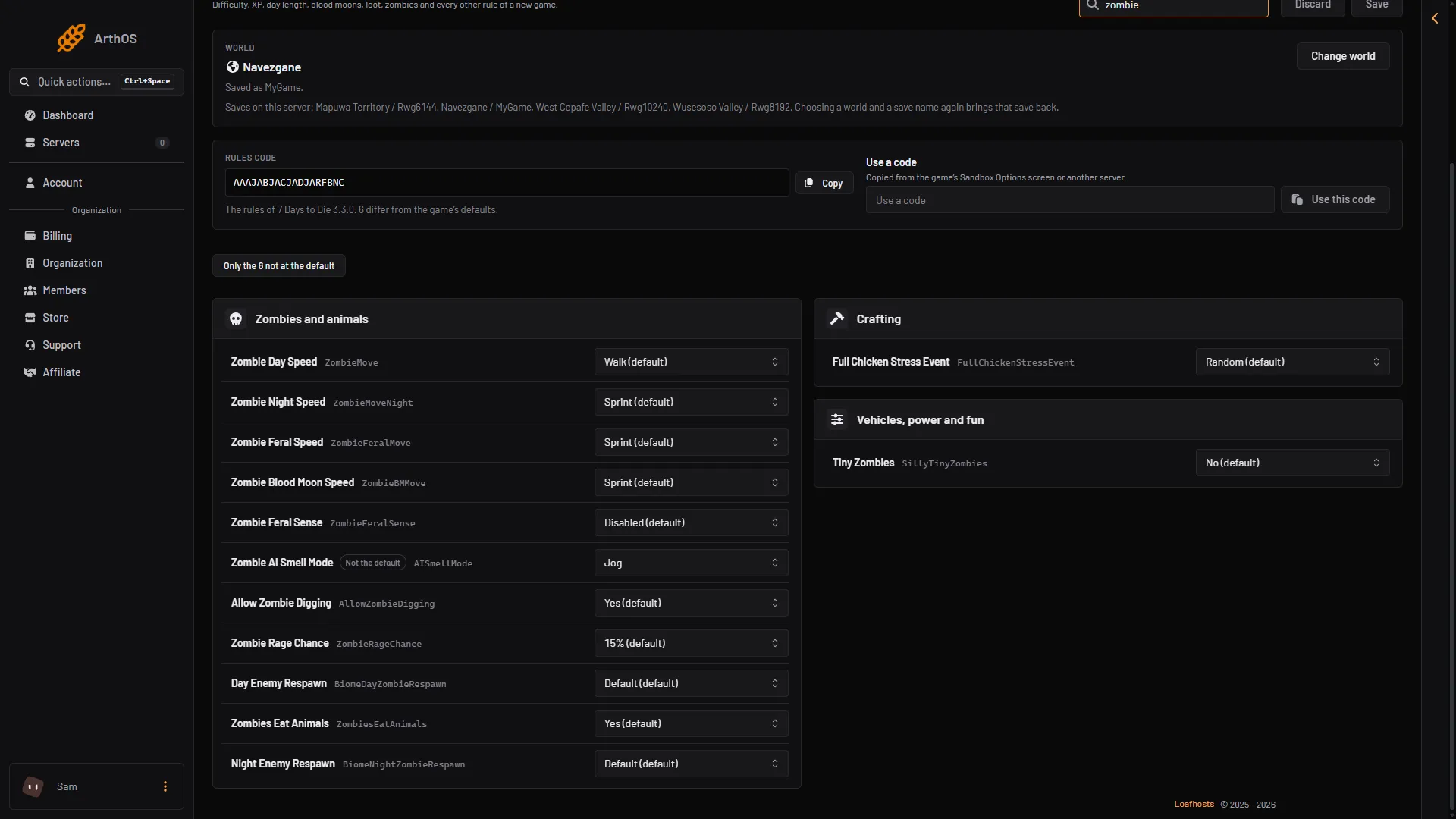
- Day speed
- Night speed
- Feral speed
- Blood moon speed
- Feral sense
Boxes 1 to 4 are the four speed rules. Box 5 is Zombie Feral Sense. A row you changed is tagged Not the default. The filter Only the N not at the default shows just the rules you changed. That is the quickest way to see what a server differs on. Search… matches labels and keys, so searching for zombie finds them all.
Zombies at once
The Config Editor has a row Zombies at once in its Performance group. It is the game’s MaxSpawnedZombies. The default is 64. The number covers the whole world, not one player. The game raises it during blood moons (about 1.9 times) and for sleepers (about 2.1 times).
A higher number costs processor time. The game’s own note says changing it “can have a huge impact on performance”. Raise it a little at a time and watch the server. See 7 Days to Die server lag.
- Open Config Editor.
- Change Zombies at once (1).
- Choose Save. The panel says “Saved. Restart the server to apply the changes.” Choose Restart now.
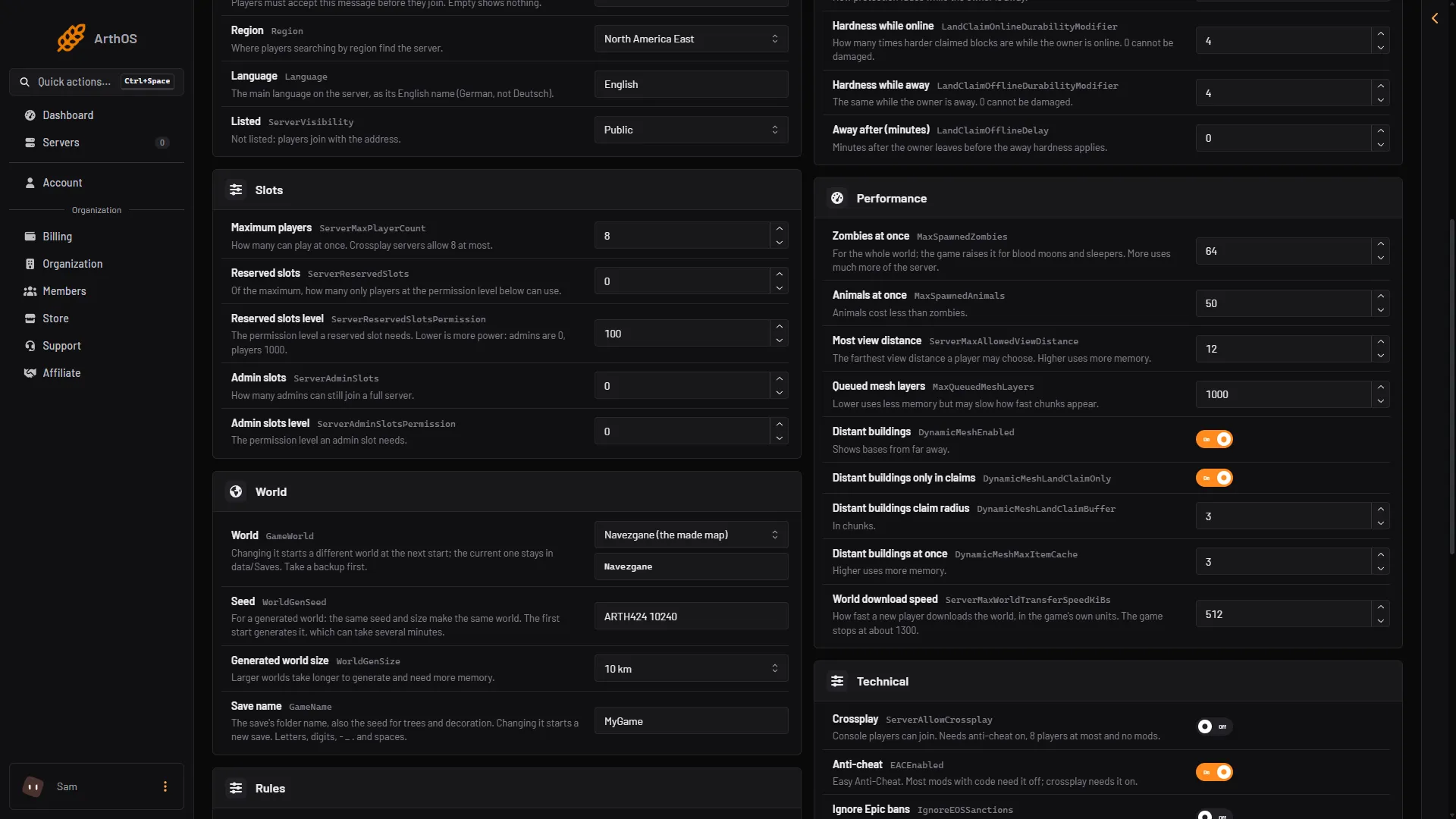
- Zombies at once
When it takes effect
All of these apply at the next start. A new set of rules applies to a world you already have. Nothing changes while the server runs.
Not checked on V3.3.0 as of 19 October 2026: what each rule does in play beyond the names the game gives its choices.
If it does not work
- The rule is not in the Config Editor. Speeds and density are on World rules. Only Zombies at once is in the Config Editor.
- Nothing changed in game. The server was not restarted. Restart it.
- The server lags after raising Zombies at once. Lower it again.
More about the game: 7 Days to Die servers.