
















You can ban a player who is not on your Arma 3 server. Type their 32-character GUID or their 17-digit Steam ID into the Bans card on the Players page. The GUID is BattlEye’s id for a player. BattlEye is the game’s anti-cheat, and it can ban someone who is not connected. A Steam ID is turned into the matching GUID for you.
For a player who is on right now, use ban a player.
What you need
One of these:
- A GUID. 32 letters and digits, such as
0123456789abcdef0123456789abcdef(a made-up example). See find a player’s GUID. - A Steam ID. 17 digits, such as
76561190000000101(a made-up example).
The GUID is worked out from the Steam ID, so both name the same player.
Ban by GUID or Steam ID
- Open the Players tab. The server must be running with BattlEye on.
- Find the Bans card. Under the list is the box Ban by GUID or Steam ID.
- Paste the GUID or the Steam ID.
- Write a reason if you want one in Reason (optional).
- In For, choose a length: For good, 1 hour, 1 day, 3 days, 7 days or 30 days. The list starts on For good, so leave it alone only if you want a permanent ban.
- Choose Ban.
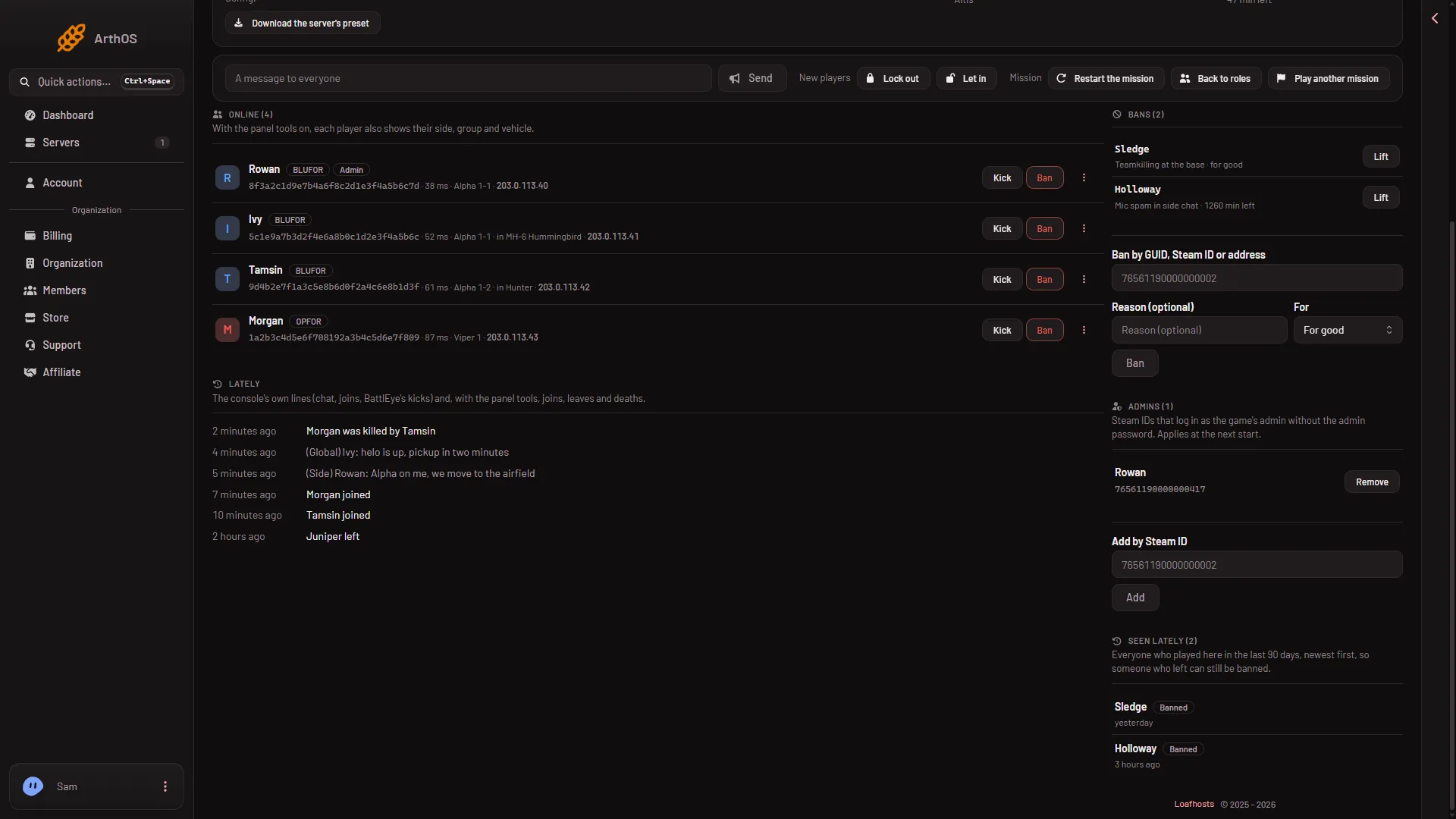
- The ban box
The ban box is (1). Under it sit Reason (optional), For and the Ban button. This picture was taken with a role that can see addresses, so the box reads Ban by GUID, Steam ID or address.
The panel answers “Banned (the ID you typed)”. If it says “Ban sent for (the ID), but it is not in the ban list yet”, the command went out and the list has not caught up. Look at the Bans card again after a few seconds.
The new ban shows in the Bans card with its time left, or “for good”.
Good to know
- A role that can see addresses gets one more option. The box then reads Ban by GUID, Steam ID or address. A role that does not allow it cannot ban an address.
- The player does not need to be online. That is the point of this box.
- Your role must allow moderating players.
By hand
If you run the server yourself, BattlEye takes the same ban through its remote console. addBan bans someone who is not on the server. The time is in minutes, and no time or 0 makes the ban permanent:
addBan 0123456789abcdef0123456789abcdef 1440 GriefingThat bans the made-up GUID for one day. See BattlEye on the Bohemia wiki. removeBan (number) lifts a ban by its number in the list.
If it does not work
- The box says “A 32-character GUID or a 17-digit Steam ID.” What you typed is the wrong length. Count the characters. Remove spaces at the start or end.
- The page says the server is not running, still starting, or BattlEye is off. Try again when the server is up.
- The page says BattlEye refused the panel’s RCon password. The password was changed while the server ran. Restart the server with Restart at the top of the page. A restart drops everyone who is on, so warn them first with A message to everyone on the Players page.
- You want to undo it. Choose Lift next to the ban in the Bans card. See unban a player.
Sources: Bohemia wiki: BattlEye