
















A new Arma 3 server writes your ordered name into its settings, makes three random passwords, and plays two Zeus sample missions. It is ready when the Console shows Host identity created. Here is what to expect, so nothing at the first start looks like a fault.
What the first start sets up
- The name. The server’s name in the game’s browser is the name you gave in your order. The panel writes it once, at the first start. Rename it later under Server name in the Config Editor, in
server.cfg. The Rename Server card on Settings changes only the panel’s own name for the server, not the one players see. - Passwords. The join password, the admin password and the RCon password are random. You see and change them under Passwords in the Config Editor.
- Players. The limit is your plan’s player count. Change it with Max Players on Startup, up to your plan’s limit.
- Missions. Two Zeus sample missions (Zeus is a game-master mode where one player runs the mission live) are in the rotation, the list of missions the server plays, in order:
MP_ZGM_m11.Altison Regular andMP_ZGM_m12.Stratison Recruit. You can swap them on the Missions page. - Anti-cheat. BattlEye (the game’s anti-cheat) is on, and mod signatures are checked (
verifySignaturesis 2). Players with different mod files are not allowed to join. - Limits. The
server.cfga new server starts with kicks players over 200 ms ping (maxping = 200) or 50% packet loss (maxpacketloss = 50), and kicks a second player who uses the same ID (kickDuplicate = 1). The game’s own default for the ping and loss limits is off (-1). - Persistence.
persistentis on, so the mission keeps running when everyone leaves. The server checks for a game update at every start (Automatic Updates). - Headless clients. None. Headless Clients is 0.
Watch it in the Console
Choose Start at the top of the server page and open the Console tab. Wait for Host identity created. That line means the server is ready.
Some lines look like errors and are not:
- A long list of
.pbofiles with build numbers. Strange convex component.SteamAPI initialization failed./sbin/ifconfig: not found.- Many lines reading
BattlEye Server: RCon admin #0 (...) logged in. The panel is checking who is online. The Players page leaves them out. - A line with
SteamInternal_SetMinidumpSteamIDa few minutes in. It is not a crash.
A message about content “deleted” from a3_characters_f is a known false message too.
Look at the passwords
- Open the Config Editor tab.
- Choose the Passwords file (1).
- You see Server Password (2), Admin Password (3) and RCon Password (4). Never share the last two.
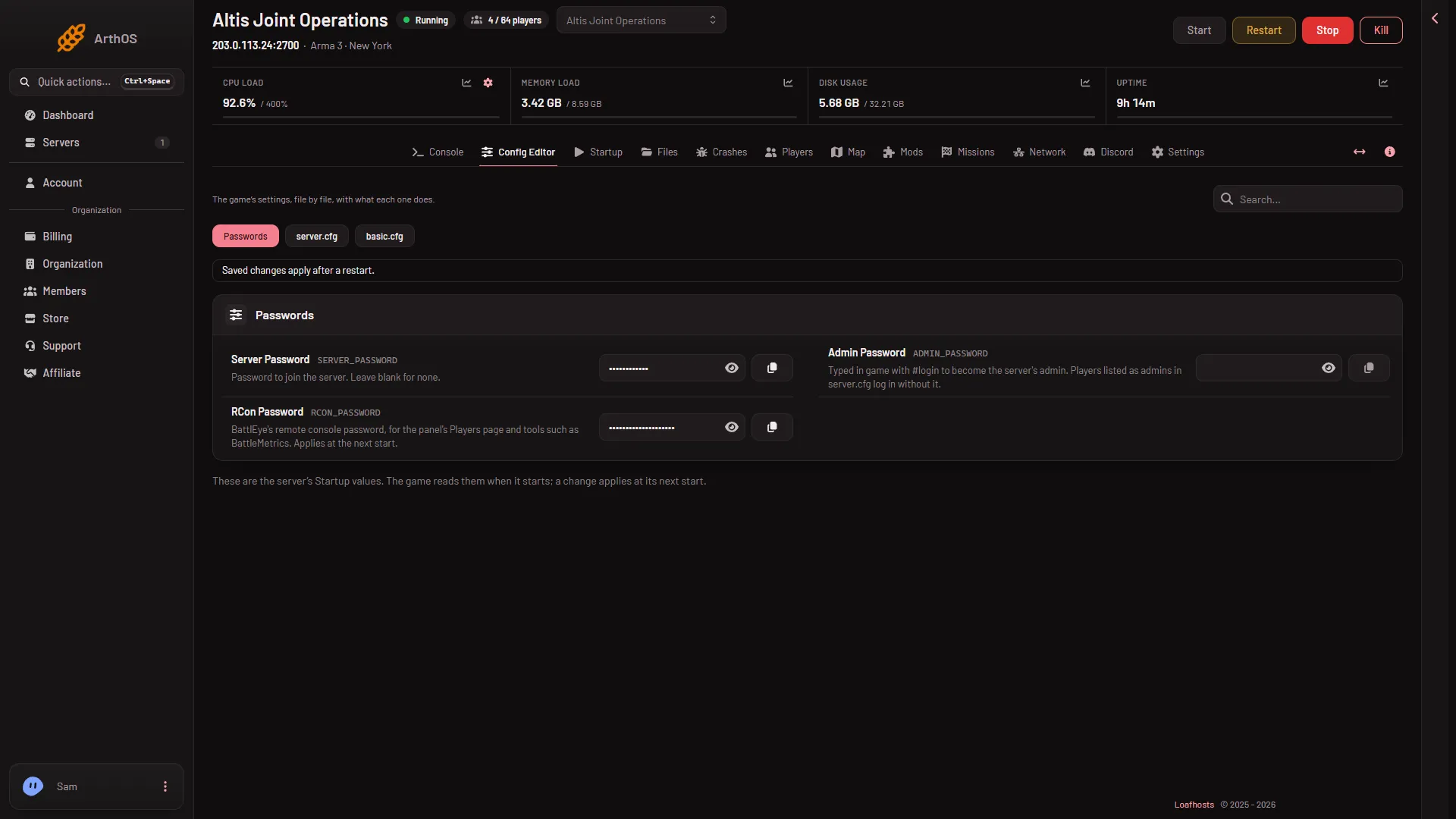
- Passwords file
- Server Password
- Admin Password
- RCon Password
Then
Open the Players page and copy the address from the Joining band. The whole first week is in set up an Arma 3 server. About the game: Arma 3 servers.
If it does not work
- No
Host identity created.line. The server is still starting, or it failed. Open the Crashes tab: a start that never reached that line is listed there, and What the panel can tell names the causes it recognises. - The name is not your ordered name. Only a server made by the store gets its name written, once. Change Server name in the Config Editor.
- A mission is missing from the list. Check the Missions page. It lists what is in
mpmissionsand what is in the rotation.
Sources: Bohemia wiki: Dedicated Server, Bohemia wiki: Server Config File