


Open the Crashes tab in the ArthOS panel. Every start of your Reforger server is listed there with how it ended: crashed, failed to start, froze while stopping, or ran normally. Pick the bad one and the panel tells you what it found and what to do. If it names no mod, the Troubleshoot tab on the Mods page can search for it.
In the ArthOS panel
- Open the Crashes tab. Starts are listed newest first. The list shows the last 8 starts, and the game keeps only the newest ten logs. If the server keeps crashing, press Stop first, so the start you want to read is not pushed out by new ones.
- Pick the start that went wrong (1). The label tells you what happened:
- Failed to start: the server never got as far as letting players in.
- Crashed: the game crashed while players could be on it.
- Froze while stopping: the server ran normally, then froze while shutting down.
- Ended early: the log ends before the server finished starting.
- Read What the panel can tell (2). Each finding comes with a fix, for example a mod that is missing something it needs.
- Open Errors, grouped (3) if there is nothing in step 3. Errors are sorted into From mods, From the engine, From the game itself and What happened as a result. Look at From mods first. The game writes some errors on most starts, so those rarely explain a crash.
- For a crash, the page also shows The game’s crash report and the crash ID the game sent to Bohemia.
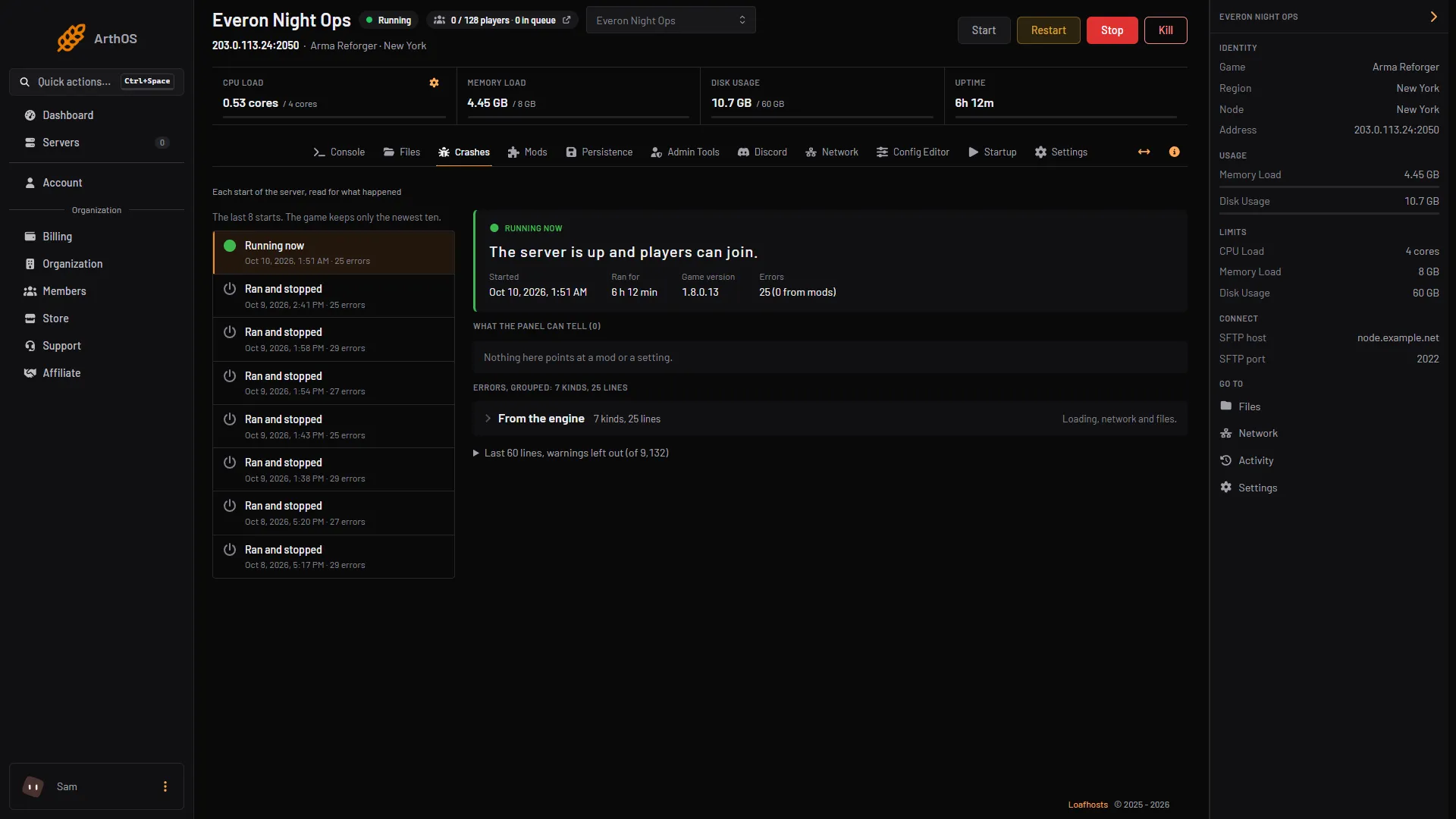
- Pick the start
- What the panel can tell
- Errors, grouped
When the log names no mod
- Open Mods, then the Troubleshoot tab.
- It first says whether the last start worked and what the log shows. A finding can offer Remove, Add what it needs or Switch to another scenario. Each takes effect at the next start.
- If nothing is named, choose Start the search. The panel starts the server with parts of your mod list until it knows which mod, or which pair of mods, stops it. A list of 30 mods needs about 12 starts, and players cannot join until it finishes. Your saves are never touched, and your list and scenario are put back afterwards, even if you cancel.
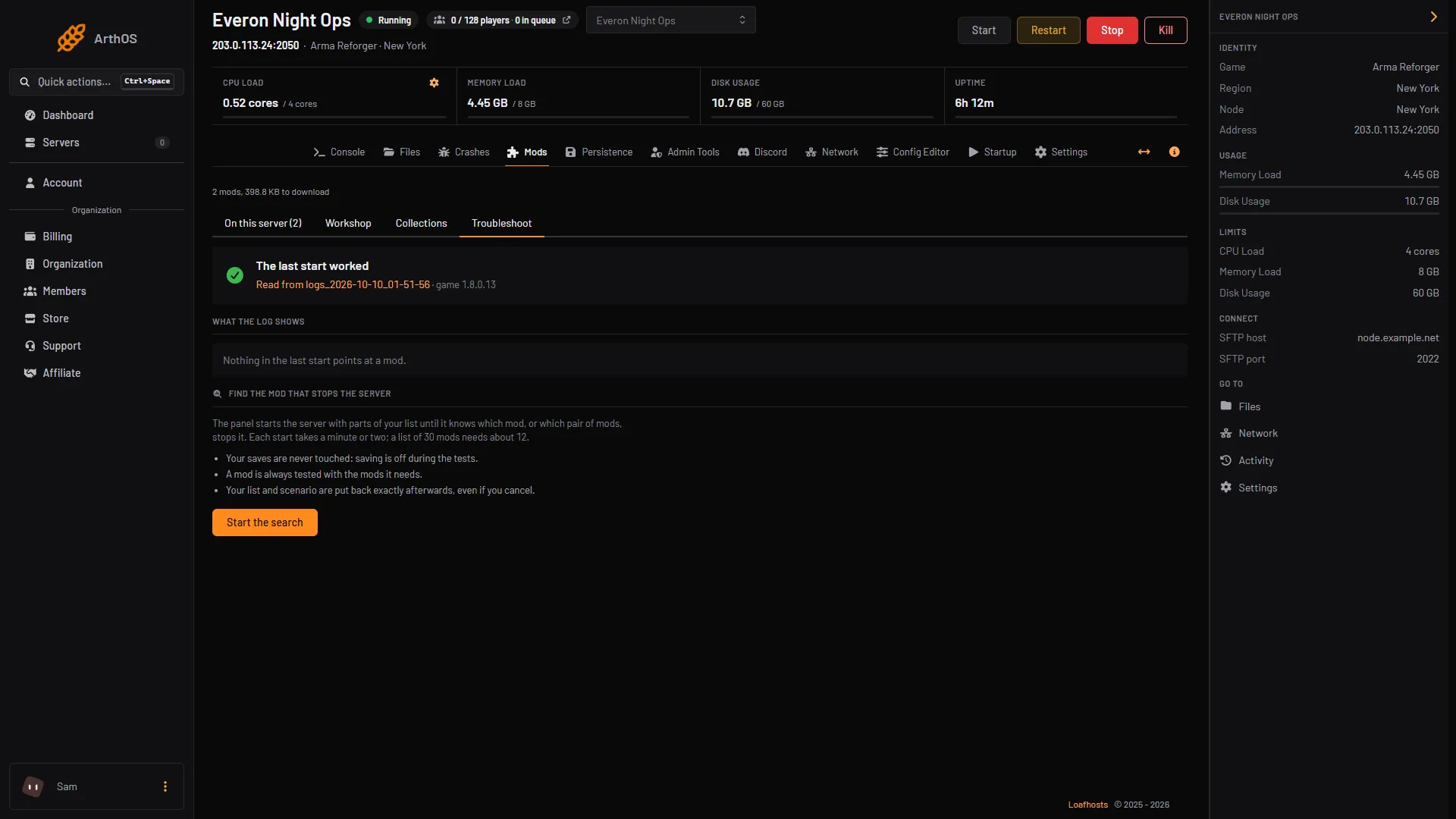
- Troubleshoot tab
- What the log shows
- Start the search
The guide to finding the mod that stops your server goes through the search in full.
By hand
- Open the newest
logs_folder inprofile/logsand read the end ofconsole.log. Our guide to Arma Reforger server logs shows where each file is. - Look for
Unable to initialize the game,Application crashed!orApplication hangs (force crash). - If the game crashed, it makes a crash report and a memory dump. Bohemia’s Crash Reporter records each report in
CrashReports.logwith the date, game version and a GUID. A dedicated server keeps adding reports to that file. - Quote the GUID if you contact Bohemia, and post to their feedback tracker with the steps that lead to the crash.
Causes Bohemia documents
- A frozen server.
-freezeChecksets how many seconds a freeze may last before the game forces a crash. A freeze at shutdown ends this way. On a Loafhosts server, turn on the Hang recovery card on the Settings tab: it restarts a server that hangs, for example after a match ends without the server closing, or when its log goes silent for 5 minutes. - Old game versions. The 1.8.0.13 update fixed a crash when vanilla scripted commands were used on a modded server through RCON, and a crash when an equipment item used an empty model. Keep the server on the current stable version.
If it does not work
- The Crashes tab says “No crash reports or logs yet.”: the server has not started yet.
- The panel finds nothing: the log may not name the cause. Run the Troubleshoot search, then check the Workshop page of any mod it blames for a newer version.
- The server crashes again straight after a fix: compare the new start with the old one in Crashes. A different error means the first problem is fixed.
- You need the memory dump: if the game wrote one, it is in the
dumpsfolder in Files. The panel cannot read a dump, so it is only useful to send to Bohemia.
More about the game on our Arma Reforger page.
Sources: Bohemia wiki: Crash Report, Bohemia wiki: Startup Parameters, reforger.armaplatform.com: Update september 3 2026