






Most Minecraft servers start with the same few plugins: a permissions plugin, something to protect builds, something to undo damage, and EssentialsX for everyday commands. Pick by job below. All of them need Paper or Purpur, and this guide shows how to install them.
Plugins are not mods. Plugins run on Paper-family servers, and mods run on Fabric, Forge and NeoForge. A mod file in plugins will not load.
Where to start
If you install only three, take LuckPerms, EssentialsX and CoreProtect. They cover ranks, everyday commands and undoing griefing.
In October 2026, EssentialsX and CoreProtect had no build made for Minecraft 26.3, only for older versions, and WorldEdit had only betas for 26.3. A build made for an older version may still work, but it can cause bugs or lag. See install and set up EssentialsX and CoreProtect before you plan around them.
Permissions
- LuckPerms: a permissions plugin. You make groups such as
defaultandmoderatorand decide what each can do. Nearly every other plugin on this page asks for permissions, so install this first. See LuckPerms ranks and permissions.
Everyday commands and economy
- EssentialsX: homes, warps, kits, teleport requests, sign shops and a built-in economy. Setup is in install and set up EssentialsX. Its optional EssentialsXChat module adds prefixes in chat, and it needs Vault and LuckPerms.
- Vault: a small plugin other plugins use to talk to a permissions or economy plugin. EssentialsX asks for it for chat prefixes. VaultUnlocked is a drop-in replacement that is kept up to date.
- PlaceholderAPI: lets plugins show each other’s information, such as a player’s rank in a scoreboard.
Protection
- WorldGuard: guards areas of land against griefers and lets you switch off gameplay features inside them. It needs the Bukkit version of WorldEdit installed too.
- GriefPrevention: a self-service anti-griefing plugin, so players protect their own land without an admin drawing every region by hand. It suits survival servers.
Pick one of the two to start. They do the same job in different ways.
Logging and rollback
- CoreProtect: a data logging and anti-griefing tool. It lets you roll back and restore damage. Install it before you need it, because it can only undo what it has recorded.
World editing and worlds
- WorldEdit: an in-game map editor with selections, copy and paste, schematics and brushes. Use it in creative, or carefully in survival.
- Chunky: pre-generates chunks so players do not wait for the world to generate as they explore. Run it before opening a new world.
- Multiverse-Core: manages several worlds on one server, such as a survival world and a creative world.
Chat and community
- EssentialsXChat: chat formats and prefixes (see above).
- DiscordSRV: links your Minecraft chat to a Discord server, both ways.
Crossplay and versions
- Geyser and Floodgate: let Bedrock players on phones, tablets, consoles and Windows join your Java server. Geyser translates the game, Floodgate lets them join without owning Java. In the ArthOS panel you turn this on from Settings, so you do not install them from Add-ons. See let Bedrock players join your Java server.
- ViaVersion: lets players on newer Java clients join an older server.
Maps
- BlueMap: builds a 3D model of your worlds and shows it in a web viewer. A public map is also a good way to show people your server.
Profiling
You do not need to install a profiler. Paper includes the /spark command for performance information, and Paper recommends it over its older /tps and /mspt.
Check before you install
Run through this list every time:
- Does it support your Minecraft version? A new Minecraft release means plugin authors need time to update. The Add-ons page only lists builds made for your server’s version, and says “No build of this is made for this server’s version and loader” when there is none. Geyser, for example, supports one Java version at a time. A build made for an older version often still works, but it can cause bugs or lag, or fail to load: if you use one, upload it by hand after a backup and watch the server afterwards. See when a plugin has no build for your version.
- Is the page the original? Install from the plugin’s own page on Modrinth, Hangar or SpigotMC. Copies re-uploaded elsewhere have carried malware.
- Does it need another plugin? Paper’s server log tells you with “Unknown/missing dependency plugins”.
- Do you need it? Every plugin you add is something to update and something that can break. Start small.
In the ArthOS panel
Open Add-ons and choose Plugins (1). Pick a source (2): CurseForge, Modrinth, Hangar or SpigotMC. Type the plugin’s name in the search box (3), then press Install (4) on the result. The panel checks each file against the source’s checksum, and reads it for hidden code, before it is used. Restart the server afterwards. You do not need to unpack anything.
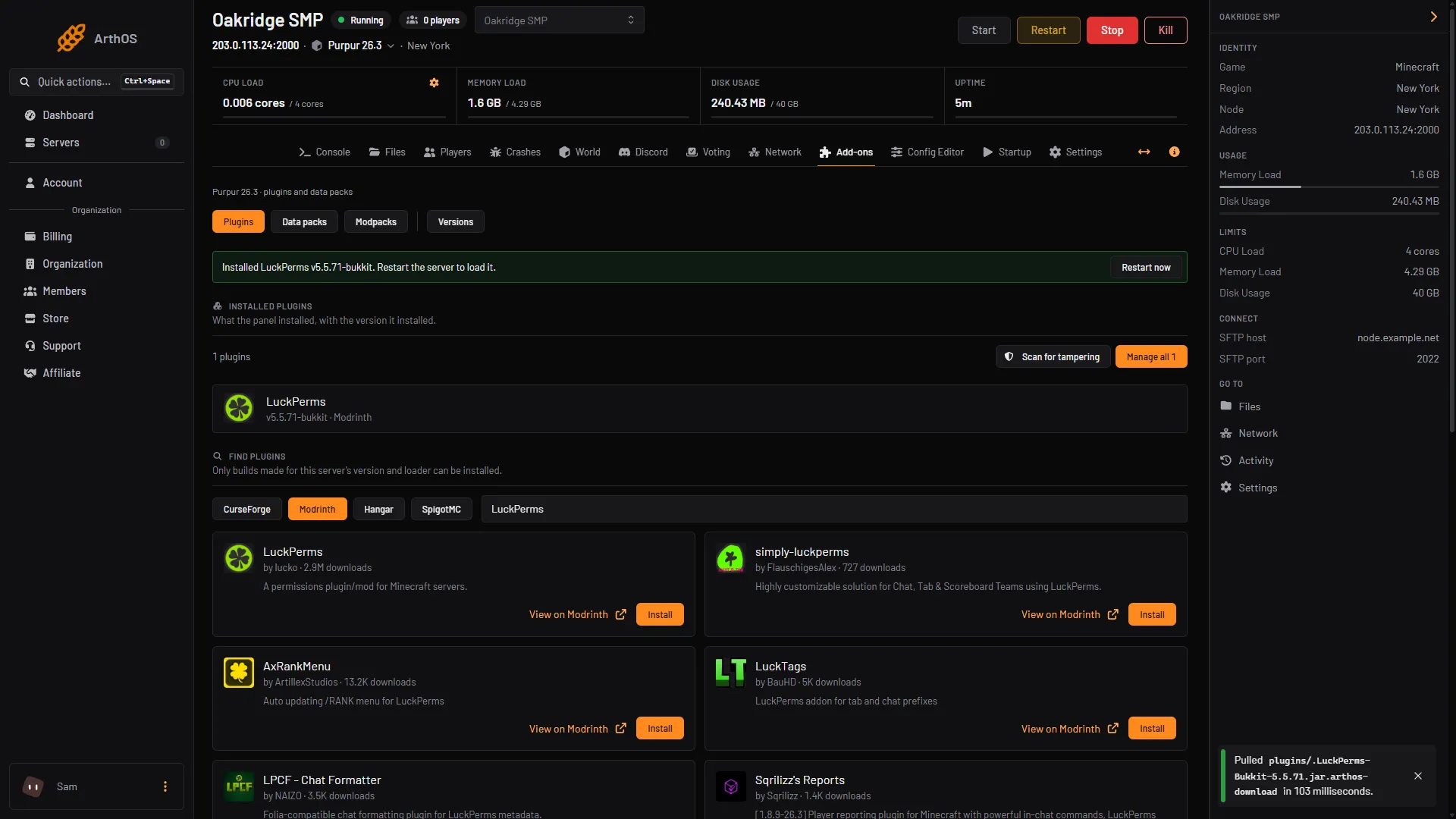
- Plugins button
- Choose a source
- Type the name
- Install
If a plugin will not load
Open logs/latest.log in Files and read the first lines of the error. The usual causes are a missing dependency, a plugin built for a different Minecraft version, or a Fabric or Forge mod put in plugins. More in install plugins on your Minecraft server.
Pick your server size on the Minecraft page.
Sources: docs.papermc.io: Adding plugins, docs.papermc.io: Commands, essentialsx.net: Modules, worldguard.enginehub.org: Install, geysermc.org: Supported versions, modrinth.com: Luckperms, modrinth.com: Worldedit, modrinth.com: Worldguard, modrinth.com: Coreprotect, modrinth.com: Griefprevention, modrinth.com: Bluemap, modrinth.com: Chunky, modrinth.com: Multiverse core, modrinth.com: Discordsrv, modrinth.com: Viaversion, modrinth.com: Placeholderapi